Unit 1: Fundamental Security Concepts, Threat Types, and Cryptographic Solutions
1. Security Concepts
The foundation of cybersecurity relies on understanding what we are trying to protect and how we identify users.
The CIA Triad
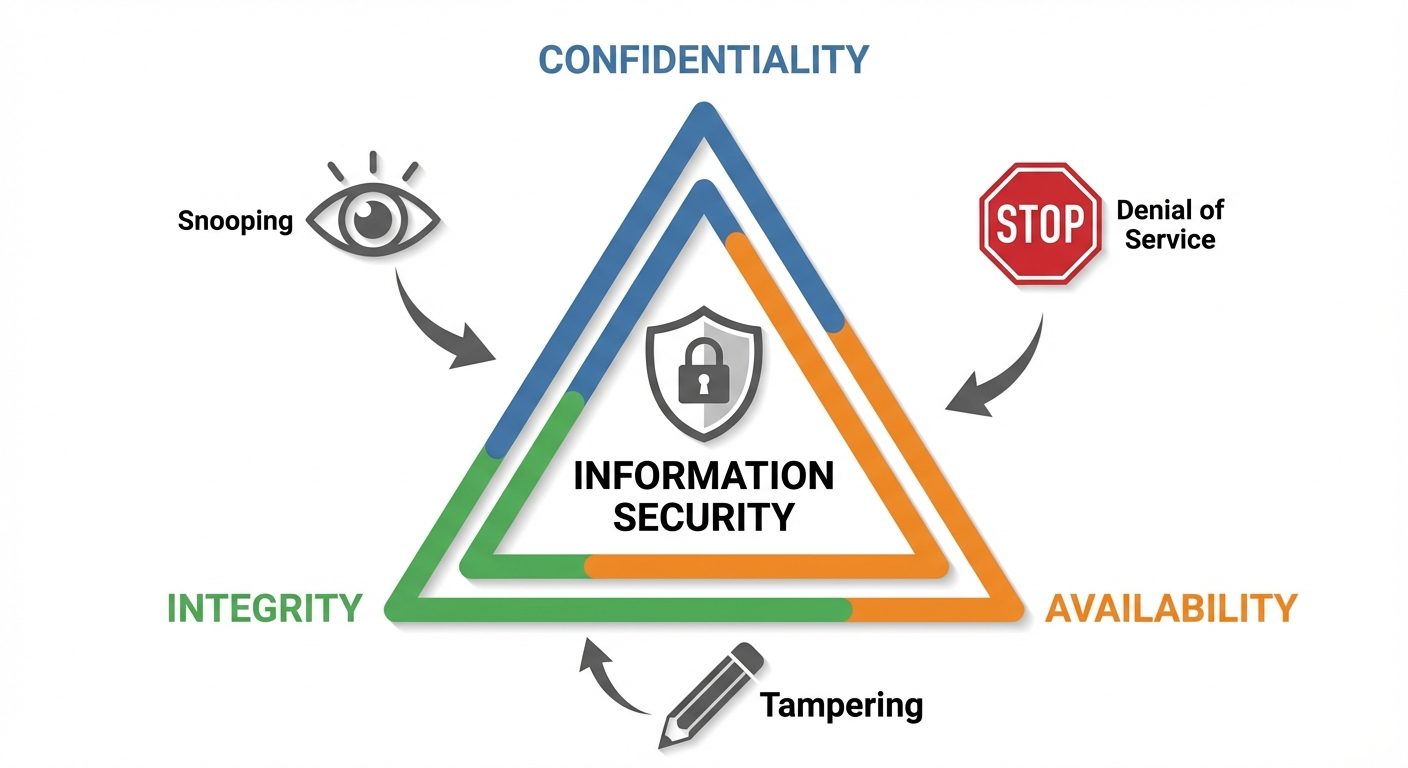
The Confidentiality, Integrity, and Availability (CIA) triad is a model designed to guide policies for information security within an organization.
- Confidentiality: Ensures that sensitive information is accessed only by an authorized person and kept away from those not authorized to possess it.
- Methods: Encryption, Access Control Lists (ACLs), Two-Factor Authentication (2FA).
- Breach Example: A laptop theft resulting in exposed passwords.
- Integrity: Assures that data is consistent, accurate, and trustworthy over its entire lifecycle. It must not be changed in transit or altered by unauthorized people.
- Methods: Hashing, Checksums, Digital Signatures, Version Control.
- Breach Example: An attacker injecting false data into a database or modifying a log file.
- Availability: Ensures that information and resources are available to authorized users when needed.
- Methods: Redundancy (RAID), Backups, Load Balancing, Disaster Recovery Plans.
- Breach Example: A Distributed Denial of Service (DDoS) attack taking down a web server.
The AAA Framework
AAA is a framework for intelligently controlling access to computer resources, enforcing policies, and auditing usage.
- Authentication (Who are you?): Verifying the identity of a user or system (e.g., passwords, biometrics, tokens).
- Authorization (What can you do?): Determining what actions the authenticated user is allowed to perform (e.g., read-only access vs. admin rights).
- Accounting (What did you do?): Tracking user activities and resource usage (e.g., log files, session times).
2. Security Controls
Security controls are safeguards or countermeasures to avoid, detect, counteract, or minimize security risks.
Categorization by Function
- Preventive: Stops an incident before it occurs (e.g., Firewalls, Encryption, Security Guards).
- Detective: Identifies an incident's occurrence (e.g., IDS, CCTV, Log Audits).
- Corrective: Fixes systems after an incident (e.g., Backups, Patching).
- Deterrent: Discourages potential attackers (e.g., "Warning" signs, Hardware locks).
- Compensating: Alternative controls when primary controls are not feasible (e.g., dual-authorized keys).
Categorization by Implementation
- Technical (Logical): Hardware or software mechanisms (Firewalls, Anti-virus).
- Administrative (Managerial): Policies, procedures, and training (Acceptable Use Policy, Background Checks).
- Physical: Tangible protection measures (Fences, Locks, Biometric Scanners).
3. Threat Actors
Understanding who attacks systems helps in designing defense strategies.
| Threat Actor | Motivation | Skill Level | Characteristics |
|---|---|---|---|
| Script Kiddie | Notoriety/Fun | Low | Uses pre-made tools/scripts; little understanding of underlying mechanics. |
| Hacktivist | Political/Social | Medium-High | Attacks targets to promote a cause (e.g., Anonymous). |
| Organized Crime | Financial Gain | High | Structured groups; utilize ransomware, phishing, and credit card theft. |
| Nation-State (APT) | Espionage/Warfare | Very High | Advanced Persistent Threats (APT); government-sponsored; unlimited resources. |
| Insider Threat | Revenge/Greed | Varies | Current/former employees; dangerous because they have legitimate access. |
| Competitors | Industrial Espionage | High | Stealing trade secrets or intellectual property. |
4. Attack Surfaces
The attack surface is the total sum of vulnerabilities that an attacker can exploit to carry out a security attack.
- Network Attack Surface: Open ports, unpatched protocols, wireless entry points.
- Software Attack Surface: Application code, APIs, user input fields (SQL Injection points).
- Physical Attack Surface: USB ports, server rooms, discarded hardware.
- Human Attack Surface: Employees vulnerable to social engineering.
Hardening is the process of reducing the attack surface (e.g., closing unused ports, disabling default accounts).
5. Social Engineering
Social engineering exploits human psychology rather than technical hacking techniques to gain access to buildings, systems, or data.
Common Techniques
- Phishing: Sending fraudulent emails appearing to be from reputable sources to induce individuals to reveal personal information.
- Spear Phishing: Highly targeted phishing aimed at specific individuals or companies.
- Whaling: Phishing attacks targeting high-profile executives (CEOs, CFOs).
- Vishing (Voice Phishing): Using the telephone to scam the user.
- Smishing (SMS Phishing): Using text messages to deliver malicious links.
- Tailgating/Piggybacking: Following an authorized person into a secure area.
- Dumpster Diving: Looking through trash to find sensitive information (requires shredding policies).
- Watering Hole Attack: Infecting a website known to be visited by the target group.
6. Cryptographic Algorithms
Cryptography is the science of securing communication.
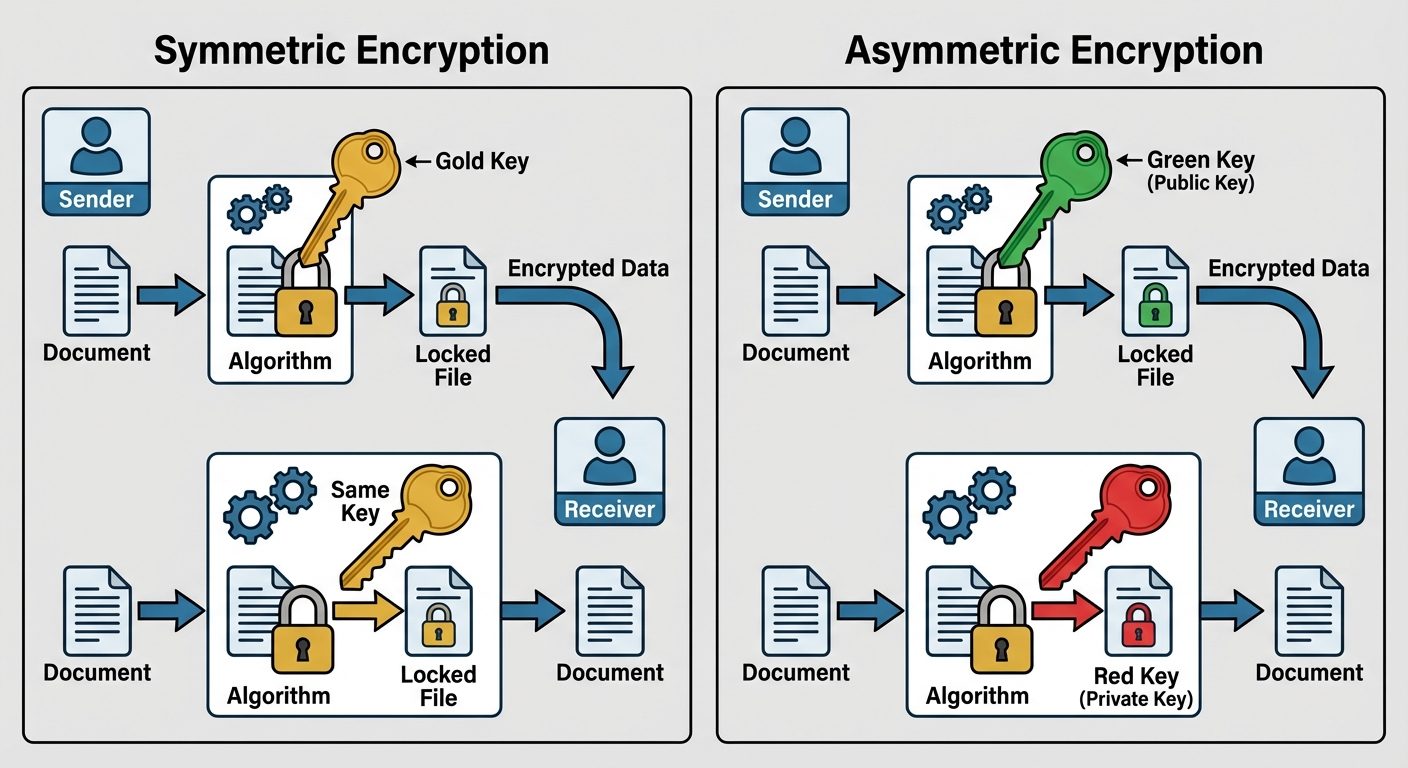
1. Symmetric Encryption
Uses the same key for both encryption and decryption.
- Pros: Fast, efficient for large data.
- Cons: Key exchange is difficult (securely sharing the key).
- Algorithms:
- AES (Advanced Encryption Standard): Current standard (128, 192, 256-bit keys).
- DES/3DES: Legacy, considered insecure.
- Blowfish/Twofish: Alternatives to AES.
2. Asymmetric Encryption (Public Key Cryptography)
Uses a key pair: A Public Key (shared with everyone) and a Private Key (kept secret).
- Encryption Mode: Encrypt with Public Key Decrypt with Private Key (Confidentiality).
- Signing Mode: Encrypt with Private Key Verify with Public Key (Authenticity/Non-repudiation).
- Pros: Solves key exchange problem.
- Cons: Slower than symmetric.
- Algorithms:
- RSA: Based on factoring large prime numbers.
- ECC (Elliptic Curve Cryptography): Efficient, strong security with smaller key sizes (used in mobile).
- Diffie-Hellman: Used primarily for secure key exchange, not encryption itself.
3. Hashing
A one-way mathematical function that converts data of any length into a fixed-length string (digest/hash).
- Characteristics: One-way (cannot reverse), Deterministic (same input = same output), Collision-resistant.
- Use Cases: Verifying file integrity, storing passwords.
- Algorithms:
- MD5: 128-bit (Legacy, vulnerable to collisions).
- SHA-1: 160-bit (Legacy, deprecated).
- SHA-2 (SHA-256): Current standard.
- SHA-3: Newest standard.
7. Public Key Infrastructure (PKI)
PKI is the set of roles, policies, hardware, software, and procedures needed to create, manage, distribute, use, store, and revoke digital certificates and manage public-key encryption.
Core Components
- Digital Certificate (X.509): An electronic document attempting to prove the ownership of a public key. It includes the Public Key, Identity of the owner, and Signature of the CA.
- Certificate Authority (CA): A trusted entity that issues digital certificates (e.g., Verisign, Let's Encrypt).
- Registration Authority (RA): Verifies the identity of a certificate requestor before the CA issues the cert.
- CRL (Certificate Revocation List): A list of certificates that have been revoked before their expiration date (e.g., due to key compromise).
- OCSP (Online Certificate Status Protocol): A real-time alternative to CRL for checking certificate status.
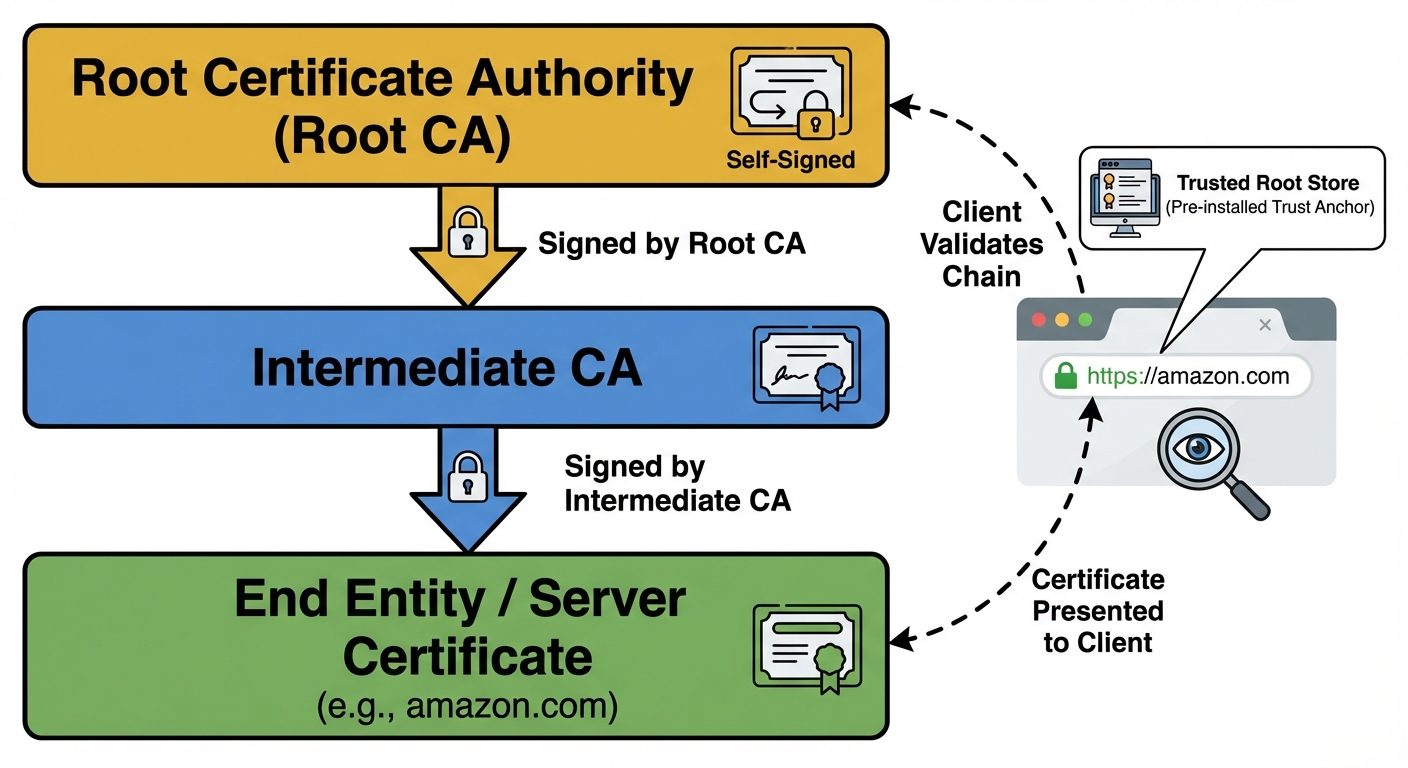
Chain of Trust
Browsers trust a "Root CA." The Root CA signs "Intermediate CAs." Intermediate CAs sign "End-Entity Certificates" (Websites). If the chain is broken, the browser displays a security warning.
8. Cryptographic Solutions
How cryptography is applied in real-world scenarios.
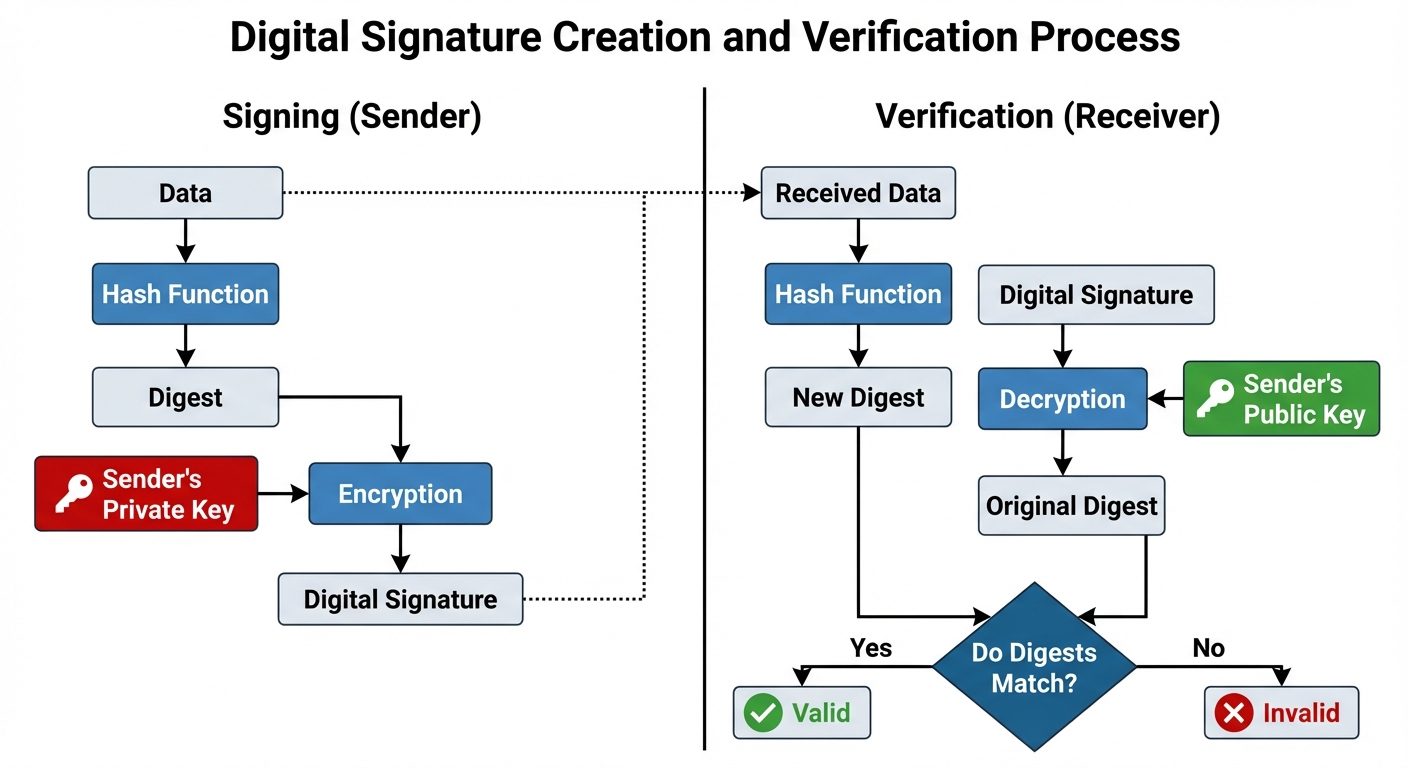
Digital Signatures
Ensures Integrity, Authentication, and Non-repudiation.
- Sender hashes the data.
- Sender encrypts the hash with their Private Key.
- Receiver decrypts the hash with Sender's Public Key.
- Receiver computes their own hash of the data.
- If the hashes match, the signature is valid.
Data States and Protection
- Data at Rest: Data stored on hard drives, USBs, backup tapes.
- Solution: Full Disk Encryption (FDE) like BitLocker, File-level encryption (AES).
- Data in Transit (Motion): Data moving over a network (Internet, LAN).
- Solution: TLS/SSL (HTTPS), IPsec VPNs, SSH.
- Data in Use: Data currently in memory (RAM) or being processed by the CPU.
- Solution: Secure Enclaves (Intel SGX), Homomorphic Encryption (theoretical/emerging).
Steganography
The practice of concealing a file, message, image, or video within another file, message, image, or video. Unlike encryption, which hides the content, steganography hides the existence of the message (e.g., hiding text inside the Least Significant Bits of an image file).
Did this save you a night before the exam?
LPU Notes is free, and it stays free. Ads cover part of the server bill. The rest comes out of a student's own pocket: the domain, the storage, and keeping the site up through the weeks everyone needs it at once.
The payment button didn't load. An ad blocker or a filtered network is the usual reason. to try again.
Nothing here is ever locked, and nothing unlocks. Chip in only if it was worth it. What it pays for →