Unit 4: Process Management & Signals
1. Process Creation using fork()
Concept of Process Creation
In Unix/Linux systems, the fork() system call is the primary mechanism for creating new processes. When a process calls fork(), it creates a duplicate of itself. The original process is called the Parent, and the new process is called the Child.
Key Characteristics of fork()
- Cloning: The child process gets a copy of the parent’s data segment, heap, and stack. However, they have separate address spaces (modern OSs use Copy-on-Write optimization).
- PID: The child is assigned a unique Process ID (PID).
- Inheritance: The child inherits the parent's open file descriptors, environment variables, and current working directory.
- Execution: Both processes continue execution from the instruction immediately following the
fork()call.
Return Values
The fork() function returns an integer value used to distinguish between the parent and the child:
- Return value < 0: Creation failed (usually due to resource limits).
- Return value == 0: Returned to the newly created Child process.
- Return value > 0: Returned to the Parent process (the value is the PID of the child).
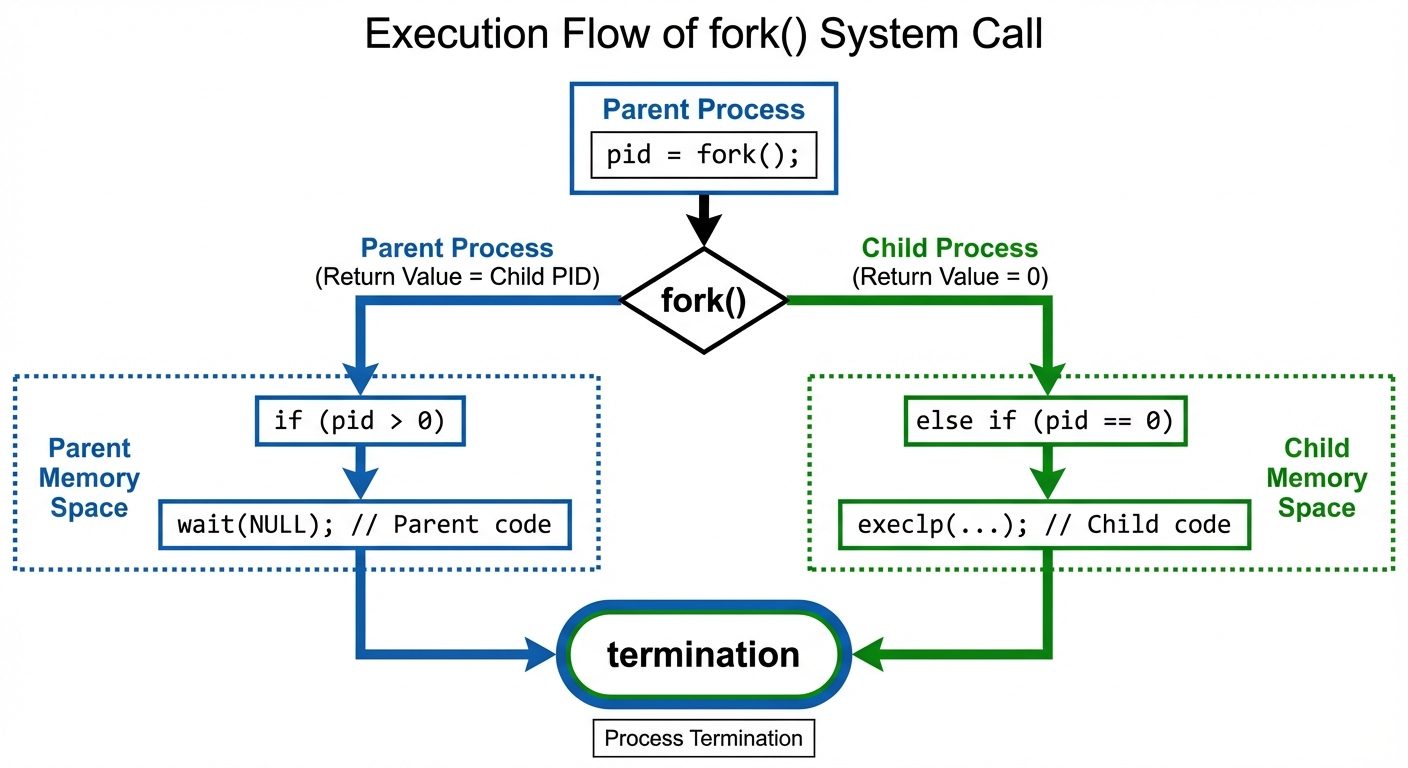
Code Example: fork()
#include <stdio.h>
#include <unistd.h>
#include <sys/types.h>

int main() {
    pid_t pid;

    printf("Before fork()\n");

    pid = fork();

    if (pid < 0) {
        fprintf(stderr, "Fork failed");
        return 1;
    } else if (pid == 0) {
        // Child process
        printf("I am the Child process. My PID is %d, Parent PID is %d\n", getpid(), getppid());
    } else {
        // Parent process
        printf("I am the Parent process. My PID is %d, Child's PID is %d\n", getpid(), pid);
    }

    return 0;
}
2. Program Execution using exec()
Concept
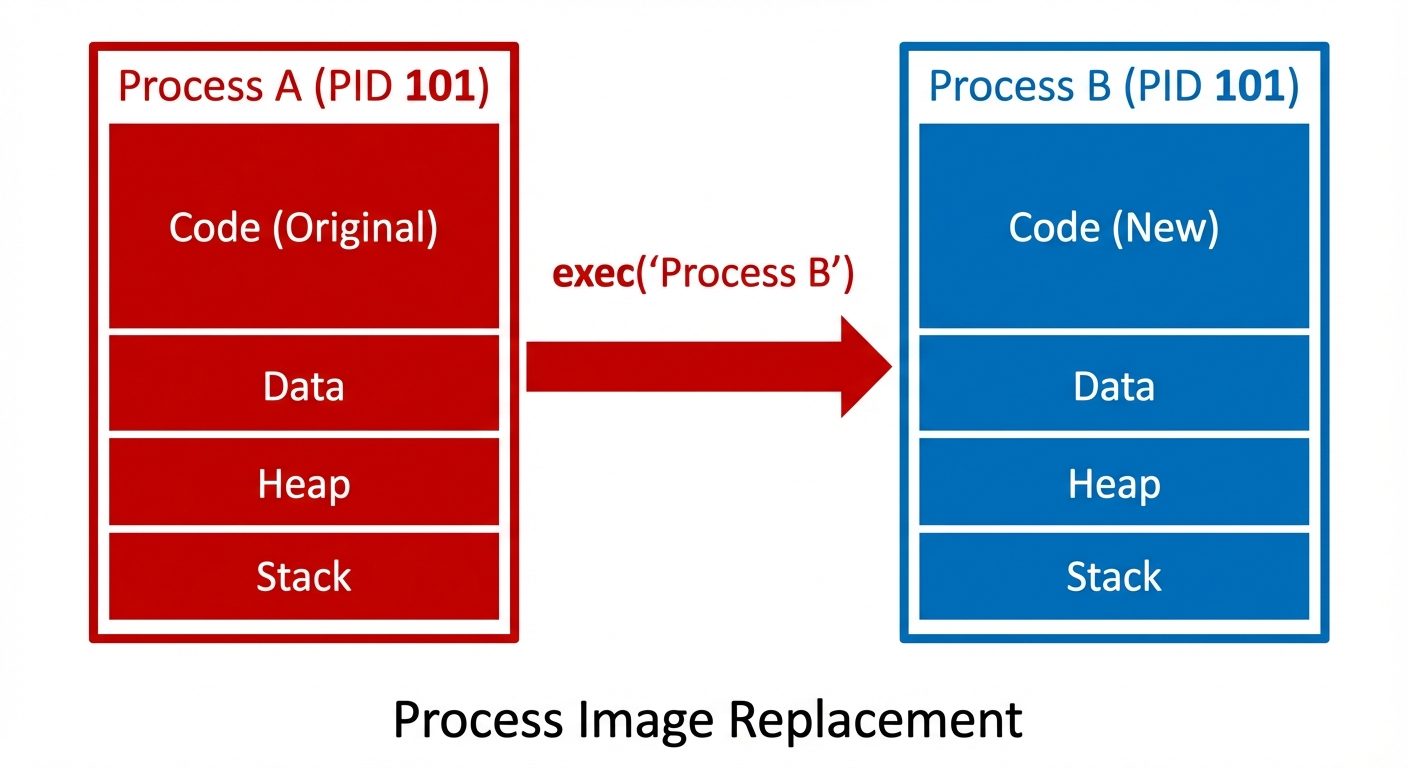
While fork() creates a copy of the process, the exec() family of system calls replaces the current process image with a new process image. It loads a new program into the current process's memory space.
Mechanism
- The PID remains the same.
- The text (code), data, stack, and heap of the calling process are overwritten by the new program.
- If
exec()is successful, the control never returns to the original program (lines afterexec()are not executed).
The exec Family
There are several variations, differentiated by how arguments are passed and whether the PATH environment variable is searched:
execl(list): Arguments passed as a list, terminated by NULL.execv(vector): Arguments passed as an array of strings.execp(path): Uses the PATH environment variable to find the executable file (e.g.,execlp,execvp).exece(environment): Allows passing a specific environment array (e.g.,execle,execve).
Code Example: execlp()
#include <stdio.h>
#include <unistd.h>

int main() {
    printf("This will be printed.\n");

    // Replace current process with 'ls -l'
    // execlp(file, arg0, arg1, ..., NULL)
    execlp("ls", "ls", "-l", NULL);

    // This line will ONLY execute if execlp fails
    printf("This will NOT be printed unless exec fails.\n");

    return 0;
}
3. Orphan and Zombie Processes
These are special states of processes arising from the parent-child relationship.
Zombie Process (Defunct)
- Definition: A child process that has finished execution (terminated via
exit()) but its entry still exists in the process table. - Cause: The parent process has not yet called
wait()to read the child's exit status. - Characteristics: It consumes no resources (memory, CPU) except a slot in the process table.
- Resolution: The parent must call
wait()to "reap" the zombie.
Orphan Process
- Definition: A child process whose parent has terminated while the child is still running.
- Cause: Parent finishes execution or crashes before the child.
- Resolution: The orphan is "adopted" by the
initprocess (PID 1) orsystemdin modern Linux. Theinitprocess automatically waits for its children, cleaning them up.
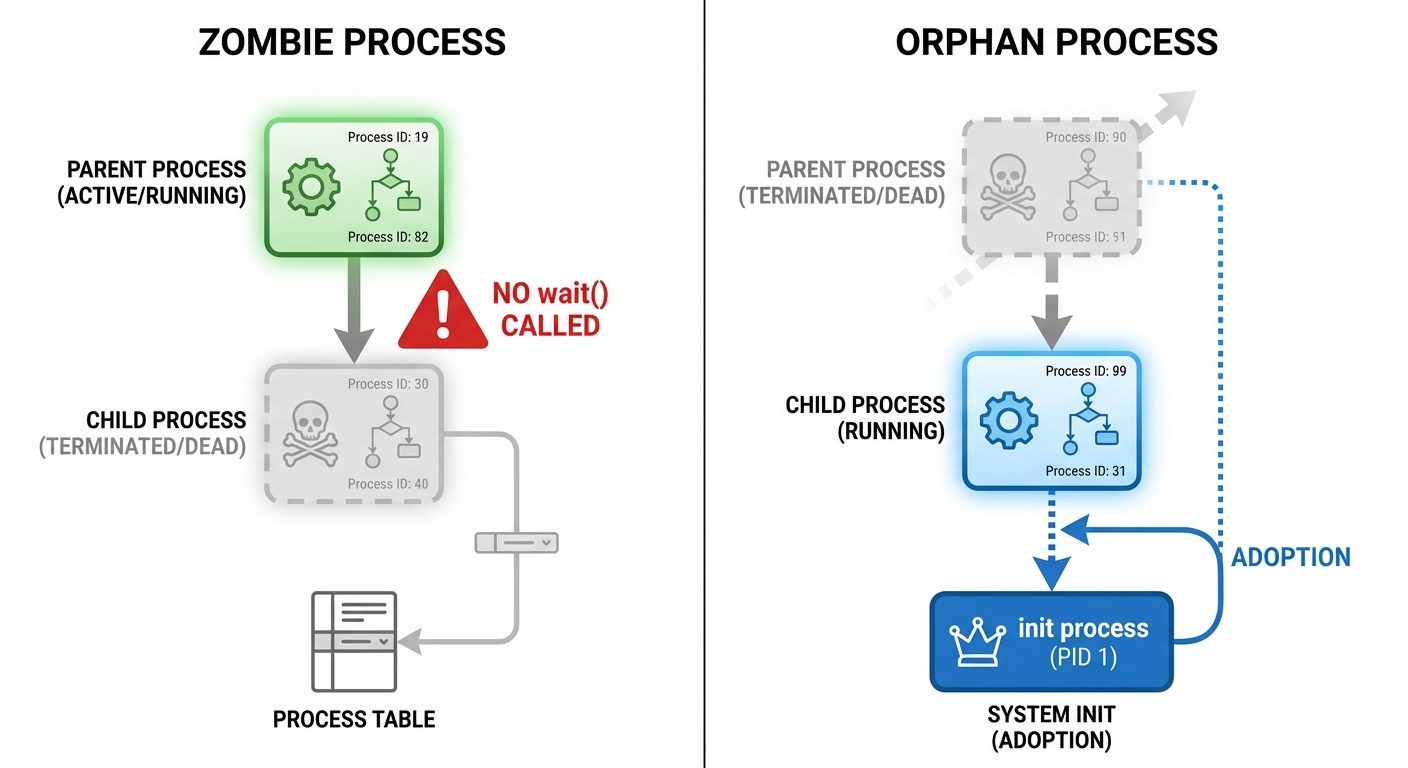
Code Example: Creating a Zombie
#include <stdio.h>
#include <stdlib.h>
#include <unistd.h>

int main() {
    pid_t pid = fork();

    if (pid > 0) {
        // Parent sleeps, allowing child to finish and become a zombie
        printf("Parent (PID %d) sleeping. Child (PID %d) should be a zombie now.\n", getpid(), pid);
        printf("Check 'ps -l' in another terminal.\n");
        sleep(10);
    } else if (pid == 0) {
        // Child exits immediately
        printf("Child (PID %d) exiting...\n", getpid());
        exit(0);
    }
    return 0;
}
4. Process Synchronization using wait()
To prevent zombie processes and ensure deterministic execution order, parents must synchronize with children.
The wait() System Call
- Function: Suspends the execution of the calling process until one of its children terminates.
- Header:
<sys/wait.h> - Syntax:
pid_t wait(int *status); - Status: If
statusis not NULL, the exit information of the child is stored in the integer pointed to bystatus.
Status Inspection Macros
WIFEXITED(status): True if child terminated normally.WEXITSTATUS(status): Returns the exit code of the child.WIFSIGNALED(status): True if child was terminated by a signal.
The waitpid() System Call
- Allows waiting for a specific child PID.
- Can be non-blocking using
WNOHANGoption. - Syntax:
pid_t waitpid(pid_t pid, int *status, int options);
Code Example: wait()
#include <stdio.h>
#include <stdlib.h>
#include <unistd.h>
#include <sys/wait.h>

int main() {
    pid_t pid = fork();

    if (pid == 0) {
        printf("Child: Working for 2 seconds...\n");
        sleep(2);
        printf("Child: Done.\n");
        exit(42); // Exit with code 42
    } else {
        int status;
        printf("Parent: Waiting for child...\n");

        // Block until child finishes
        pid_t child_pid = wait(&status);

        if (WIFEXITED(status)) {
            printf("Parent: Child %d finished with status %d\n", child_pid, WEXITSTATUS(status));
        }
    }
    return 0;
}
5. Signals
Definition
Signals are software interrupts sent to a program to indicate that an important event has occurred. They can be generated by the OS (kernel), the user (keyboard), or another process.
Common Signals
| Signal Name | Number | Description | Default Action |
|---|---|---|---|
| SIGINT | 2 | Interrupt from keyboard (Ctrl+C) | Terminate |
| SIGQUIT | 3 | Quit from keyboard (Ctrl+) | Terminate + Core Dump |
| SIGKILL | 9 | Kill signal (cannot be caught/ignored) | Terminate immediately |
| SIGSEGV | 11 | Invalid memory reference (Segmentation fault) | Core Dump |
| SIGTERM | 15 | Termination signal (can be caught) | Terminate |
| SIGSTOP | 19 | Stop process (cannot be caught) | Pause/Suspend |
Signal Handling
A process can handle a signal in three ways:
- Default: Let the kernel perform the default action (usually termination).
- Ignore: Tell the kernel to discard the signal (
SIG_IGN). - Catch (Handler): Execute a custom function when the signal is received.
System Calls
kill(pid_t pid, int sig): Used by one process to send a signal to another.signal(int signum, handler_t handler): Older method to register a handler.sigaction(): Newer, more robust method for signal handling.
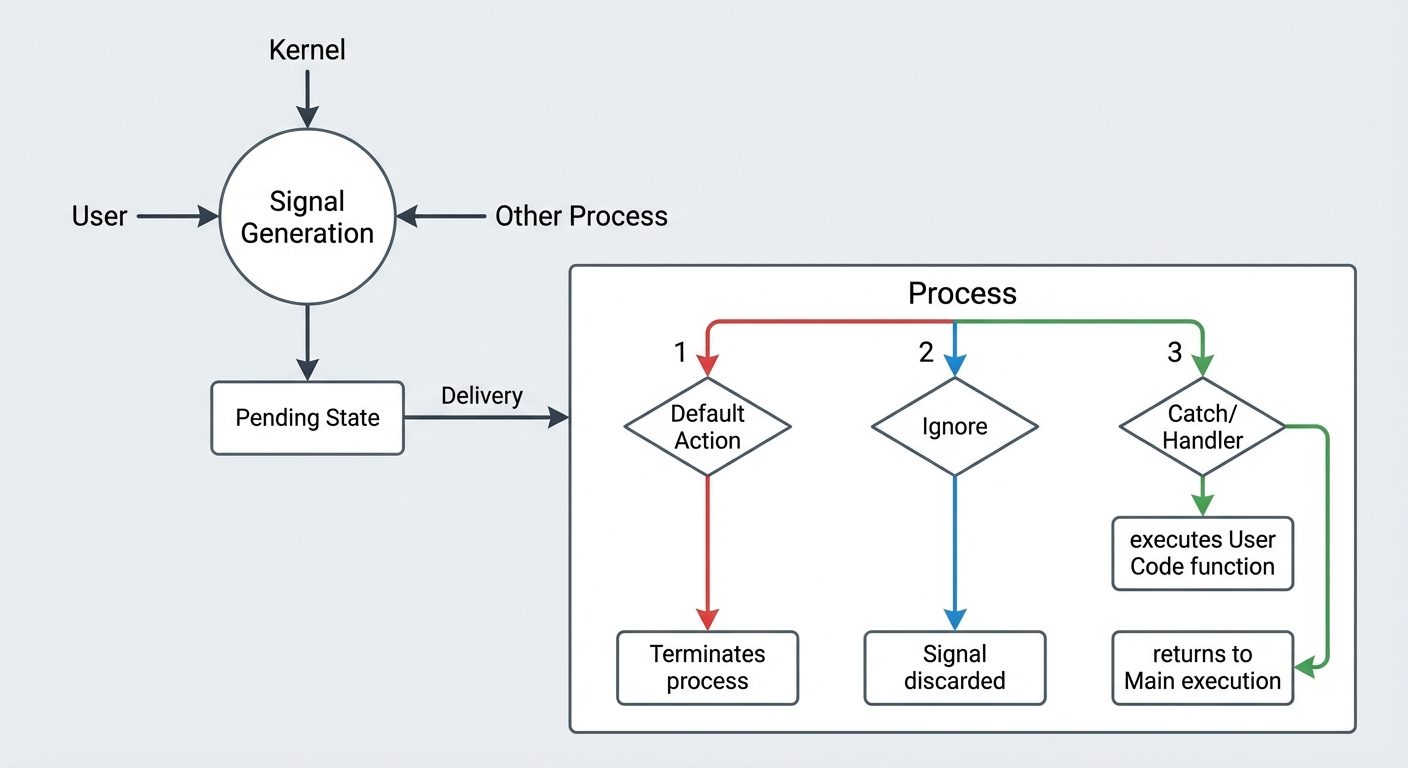
Code Example: Catching SIGINT
#include <stdio.h>
#include <stdlib.h>
#include <unistd.h>
#include <signal.h>

// Signal Handler Function
void handle_sigint(int sig) {
    printf("\nCaught signal %d (SIGINT). I refuse to die!\n", sig);
}

int main() {
    // Register the handler
    signal(SIGINT, handle_sigint);

    printf("Press Ctrl+C to test the signal handler...\n");
    printf("Run 'kill -9 %d' from another terminal to actually kill me.\n", getpid());

    while(1) {
        printf("Running...\n");
        sleep(1);
    }
    return 0;
}
Did this save you a night before the exam?
LPU Notes is free, and it stays free. Ads cover part of the server bill. The rest comes out of a student's own pocket: the domain, the storage, and keeping the site up through the weeks everyone needs it at once.
The payment button didn't load. An ad blocker or a filtered network is the usual reason. to try again.
Nothing here is ever locked, and nothing unlocks. Chip in only if it was worth it. What it pays for →