Unit 3: File system management
1. Introduction to File System Calls
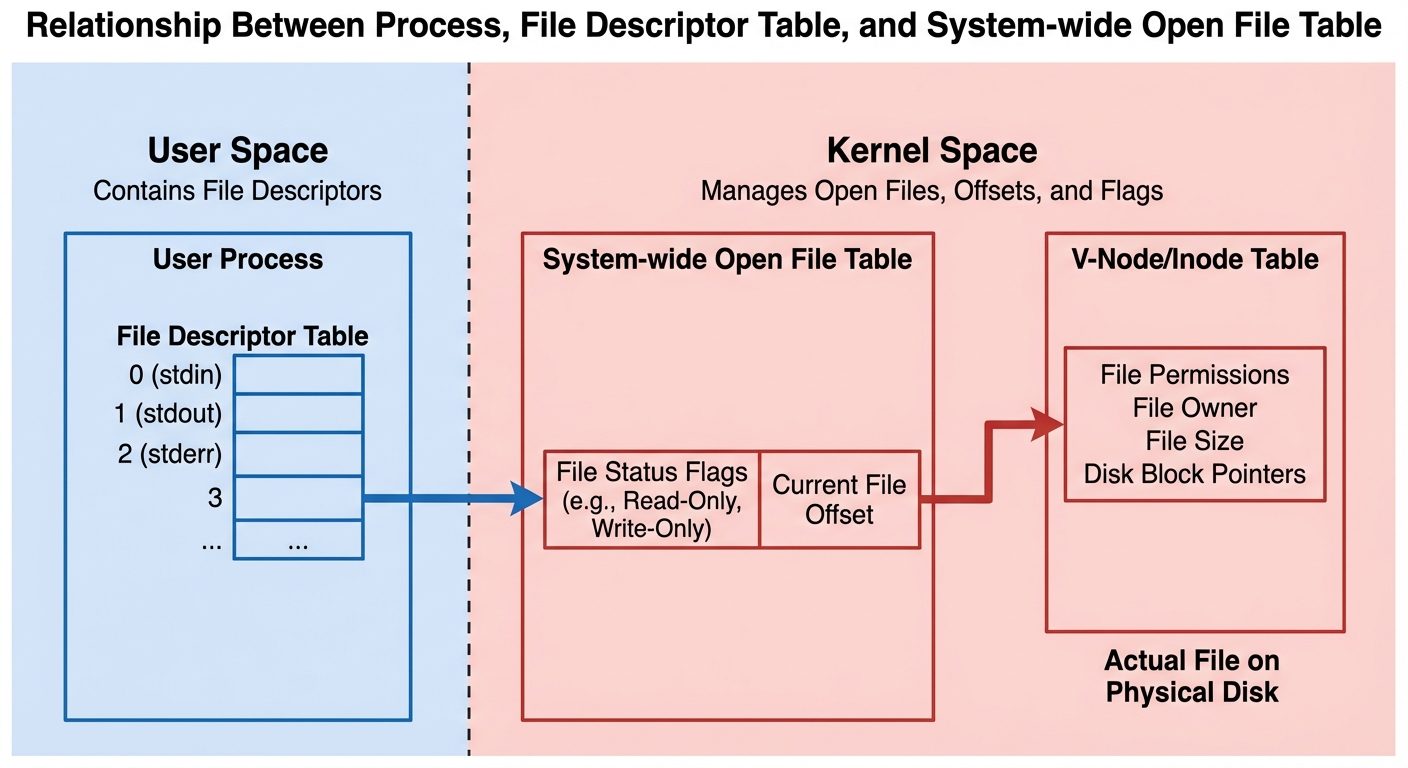
In UNIX and Linux operating systems, file handling is performed through a set of system calls. Unlike standard library functions (like fopen or fprintf in C), system calls interact directly with the operating system kernel. These calls work with File Descriptors rather than file pointers.
Key Concepts
- File Descriptor (fd): A non-negative integer that uniquely identifies an open file in a process.
0: Standard Input (stdin)1: Standard Output (stdout)2: Standard Error (stderr)
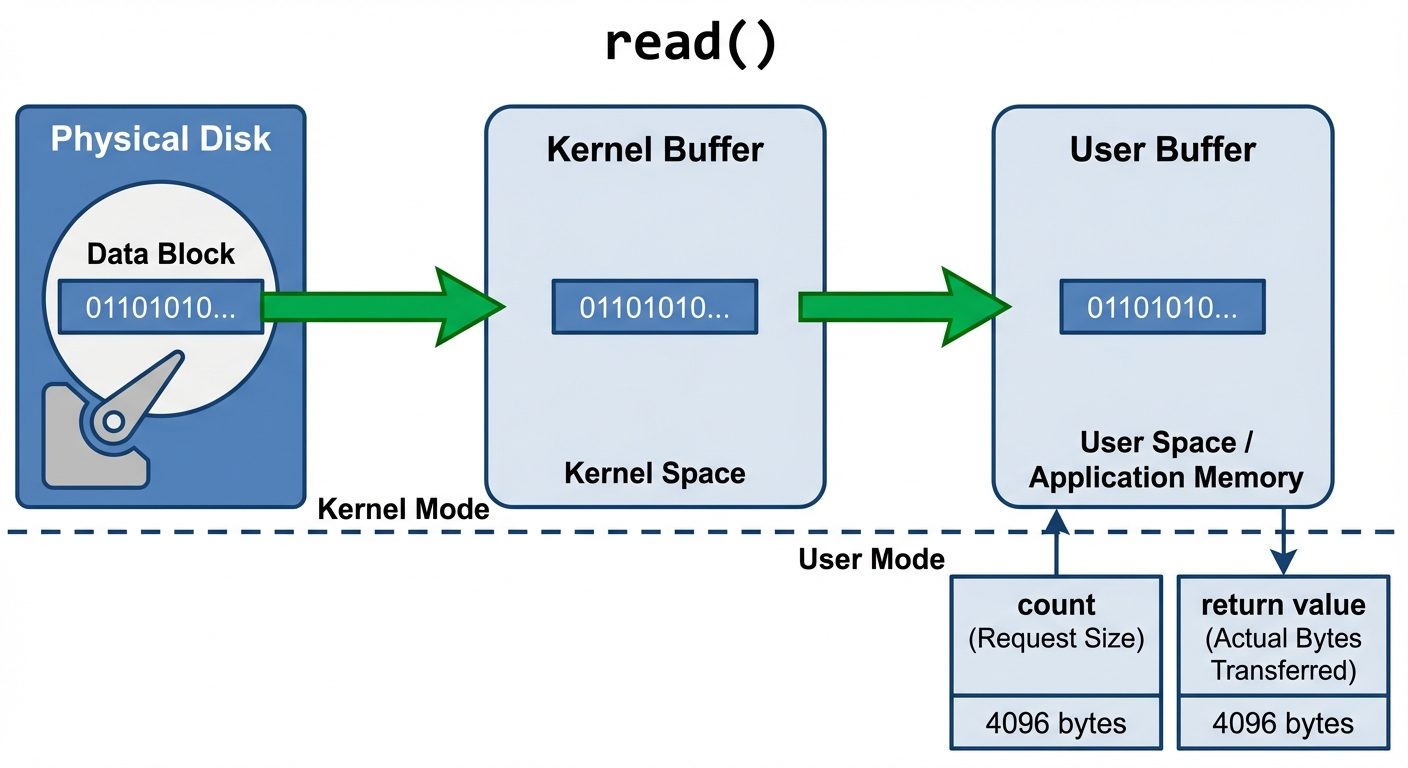
- Kernel Mode vs. User Mode: System calls trigger a context switch from user mode to kernel mode to perform the hardware operation (disk I/O).
2. The open() System Call
The open() system call is used to establish a connection between a file and a file descriptor. It can open an existing file or create a new one.
Syntax
#include <fcntl.h>

int open(const char *pathname, int flags, mode_t mode);
Arguments
- pathname: The absolute or relative path to the file.
- flags: Determines how the file is opened. Common flags include:
O_RDONLY: Open for reading only.O_WRONLY: Open for writing only.O_RDWR: Open for reading and writing.O_CREAT: Create the file if it does not exist.O_APPEND: Append data to the end of the file.O_TRUNC: If the file exists and is opened for writing, clear the content.
- mode: (Optional) Specifies permissions when creating a new file (e.g.,
0644for owner read/write, others read).
Return Value
- Success: Returns the new file descriptor (lowest available integer, usually > 2).
- Error: Returns
-1(setserrno).
Example
int fd = open("example.txt", O_WRONLY | O_CREAT, 0644);
if (fd < 0) {
    perror("Error opening file");
}
3. The read() System Call
The read() system call reads data from a file descriptor into a memory buffer.
Syntax
#include <unistd.h>

ssize_t read(int fd, void *buf, size_t count);
Arguments
- fd: The file descriptor returned by
open(). - buf: A pointer to the buffer where the read data will be stored.
- count: The maximum number of bytes to read.
Return Value
- > 0: Number of bytes actually read.
- 0: End of File (EOF) reached.
- -1: Error.
 AI-generated image — may contain inaccuraciesread() operation. Left side shows "Physical Disk" with a data..." />
4. The write() System Call
The write() system call writes data from a buffer to the file referred to by the file descriptor.
Syntax
#include <unistd.h>

ssize_t write(int fd, const void *buf, size_t count);
Arguments
- fd: The file descriptor.
- buf: Pointer to the buffer containing data to be written.
- count: The number of bytes to write.
Return Value
- > 0: Number of bytes successfully written.
- -1: Error.
Example
char *data = "Hello OS";
int bytes_written = write(fd, data, 8);
5. The lseek() System Call
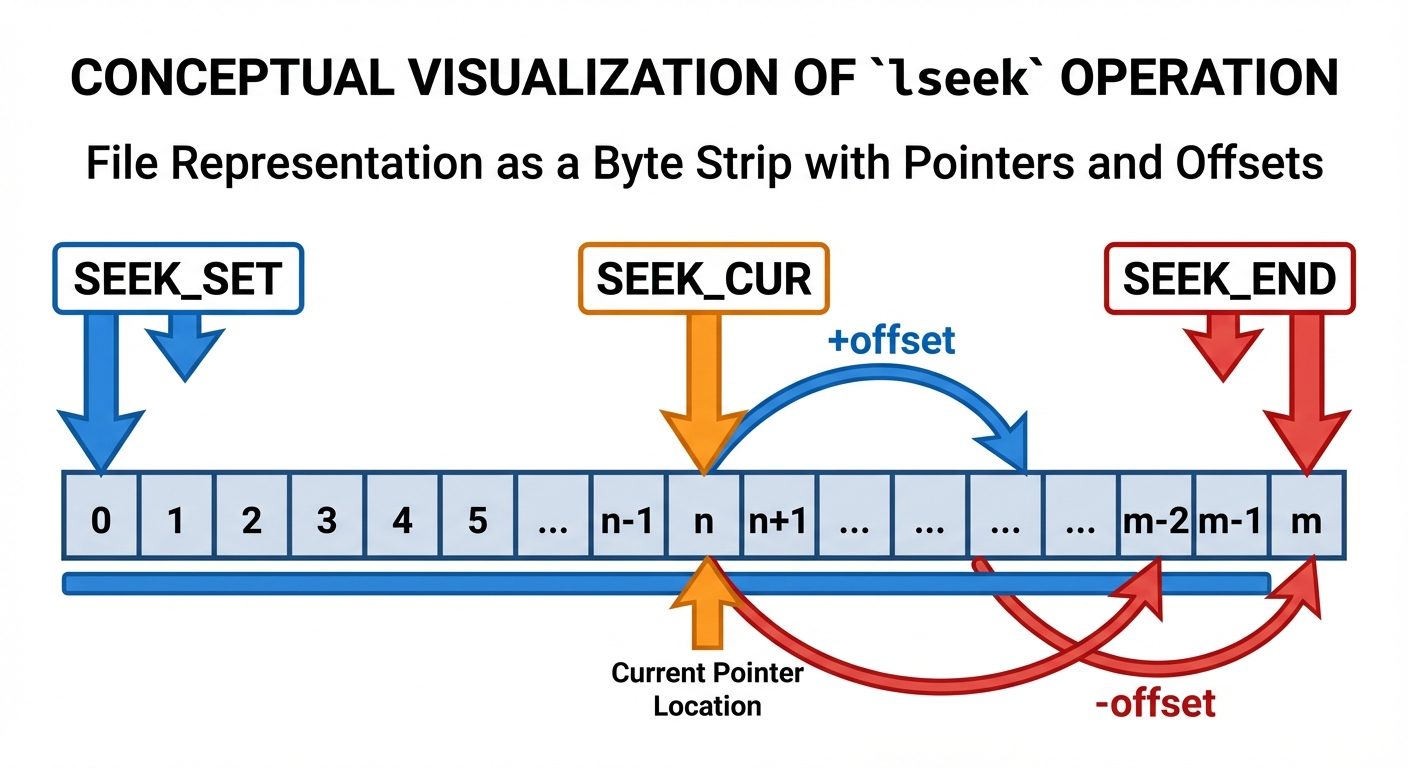
lseek() is used to reposition the file offset (the read/write pointer) of an open file. It allows random access to a file.
Syntax
#include <unistd.h>
#include <sys/types.h>

off_t lseek(int fd, off_t offset, int whence);
Arguments
- fd: File descriptor.
- offset: Number of bytes to move the pointer (can be positive or negative).
- whence: The reference point for the move.
SEEK_SET: The beginning of the file.SEEK_CUR: The current position of the file pointer.SEEK_END: The end of the file.
Return Value
- Success: Returns the new offset location (in bytes from the beginning).
- Error: Returns
-1.
 AI-generated image — may contain inaccuracieslseek operation. The file is represented as a long, horizontal t..." />
Examples of lseek usage
lseek(fd, 0, SEEK_SET);— Reset pointer to the beginning.lseek(fd, 0, SEEK_END);— Move pointer to the end (useful for appending).lseek(fd, -10, SEEK_CUR);— Move back 10 bytes from current position.
6. The close() System Call
The close() system call dissociates a file descriptor from a file. It is critical to release resources (file table entries) after operations are complete.
Syntax
#include <unistd.h>

int close(int fd);
Return Value
- 0: Success.
- -1: Error.
7. Comprehensive Lab Example: File Copy Program
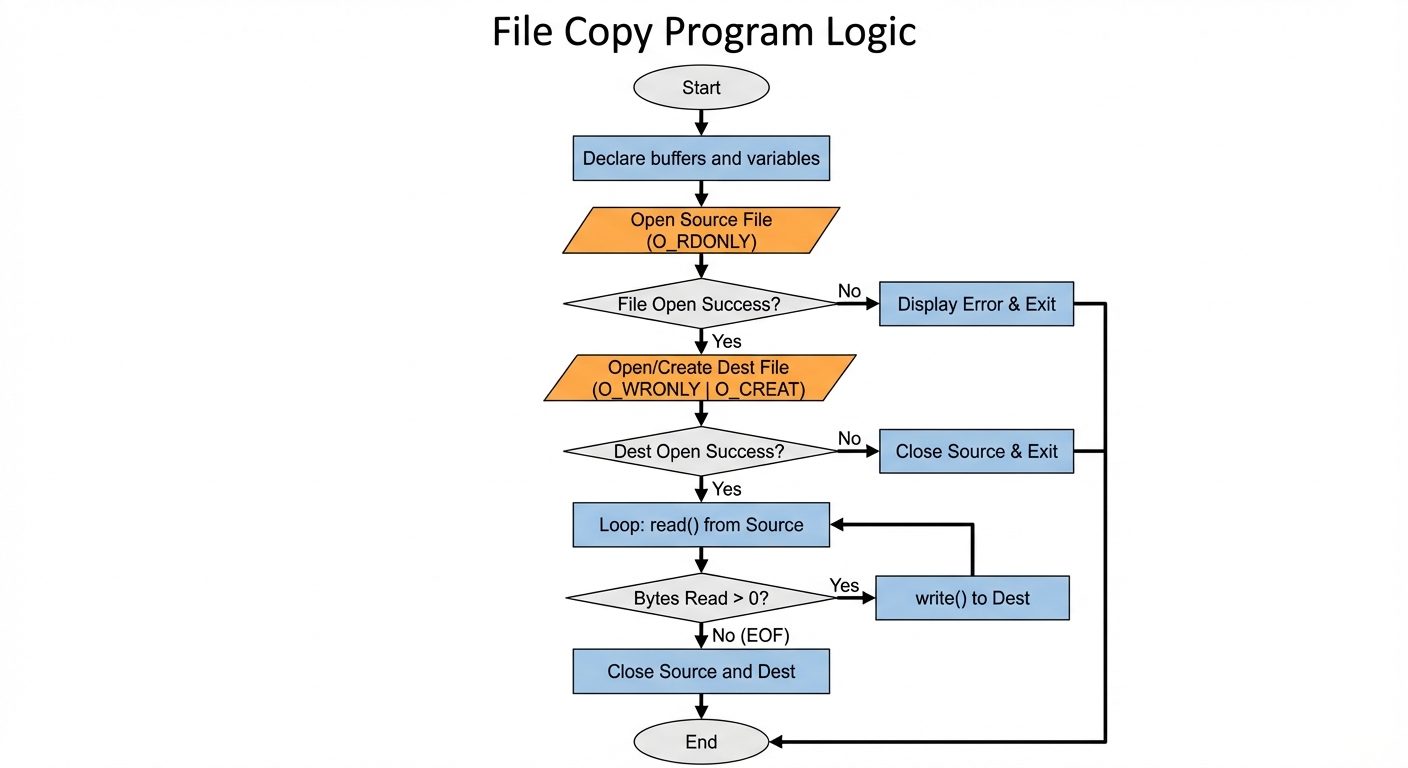
The following C program demonstrates the usage of open, read, write, and close to copy the contents of one file to another.
Source Code
#include <stdio.h>
#include <stdlib.h>
#include <fcntl.h>
#include <unistd.h>

#define BUFFER_SIZE 1024

int main() {
    int source_fd, dest_fd;
    ssize_t bytes_read, bytes_written;
    char buffer[BUFFER_SIZE];

    // 1. OPEN Source File
    source_fd = open("input.txt", O_RDONLY);
    if (source_fd == -1) {
        perror("Error opening source file");
        return 1;
    }

    // 2. OPEN Destination File
    // Create if not exists, Truncate if exists, Permission 0644
    dest_fd = open("output.txt", O_WRONLY | O_CREAT | O_TRUNC, 0644);
    if (dest_fd == -1) {
        perror("Error opening destination file");
        close(source_fd); // Clean up source before exiting
        return 1;
    }

    // 3. READ and WRITE loop
    while ((bytes_read = read(source_fd, buffer, BUFFER_SIZE)) > 0) {
        bytes_written = write(dest_fd, buffer, bytes_read);

        if (bytes_written != bytes_read) {
            perror("Write error");
            close(source_fd);
            close(dest_fd);
            return 1;
        }
    }

    if (bytes_read == -1) {
        perror("Read error");
    }

    // 4. CLOSE files
    if (close(source_fd) == -1) perror("Error closing source");
    if (close(dest_fd) == -1) perror("Error closing dest");

    printf("File copied successfully.\n");
    return 0;
}
Explanation of the Code
- Buffer: A 1024-byte array acts as temporary storage.
- Loop: The
readfunction is called in a loop. It reads up to 1024 bytes at a time. - Termination: The loop continues as long as
readreturns a positive number. When it returns 0, the end of the file is reached, and the loop breaks. - Write Consistency: We write exactly
bytes_readamounts to the destination, notBUFFER_SIZE, to avoid writing garbage data at the end of the file.
Did this save you a night before the exam?
LPU Notes is free, and it stays free. Ads cover part of the server bill. The rest comes out of a student's own pocket: the domain, the storage, and keeping the site up through the weeks everyone needs it at once.
The payment button didn't load. An ad blocker or a filtered network is the usual reason. to try again.
Nothing here is ever locked, and nothing unlocks. Chip in only if it was worth it. What it pays for →