Unit 2: Shell Scripting
This unit covers the fundamental concepts of shell scripting in a Linux environment using the Bash (Bourne Again SHell) interpreter.
1. Script Creation, Execution, and Permissions
A shell script is a text file containing a sequence of commands for a UNIX-based operating system. It allows for the automation of repetitive tasks.
The Shebang Line
Every shell script should begin with a "shebang" line. This tells the system which interpreter to use to execute the file.
#!/bin/bashCreating and Executing a Script
- Create the file: Use a text editor (vi, nano, gedit).
BASHnano myscript.sh - Execution Methods:
- Direct execution (requires execute permission):
./myscript.sh - Using the interpreter explicitly:
bash myscript.shorsh myscript.sh
- Direct execution (requires execute permission):
File Permissions
Linux uses a permission system (Read-r, Write-w, Execute-x) for three categories of users: Owner (u), Group (g), and Others (o). By default, created files are usually not executable.
To change permissions, use chmod (Change Mode).
Symbolic Mode:
chmod +x script.sh      # Add execute permission for everyone
chmod u+x script.sh     # Add execute permission for the user (owner) only
chmod 755 script.sh     # rwx for owner, rx for group and others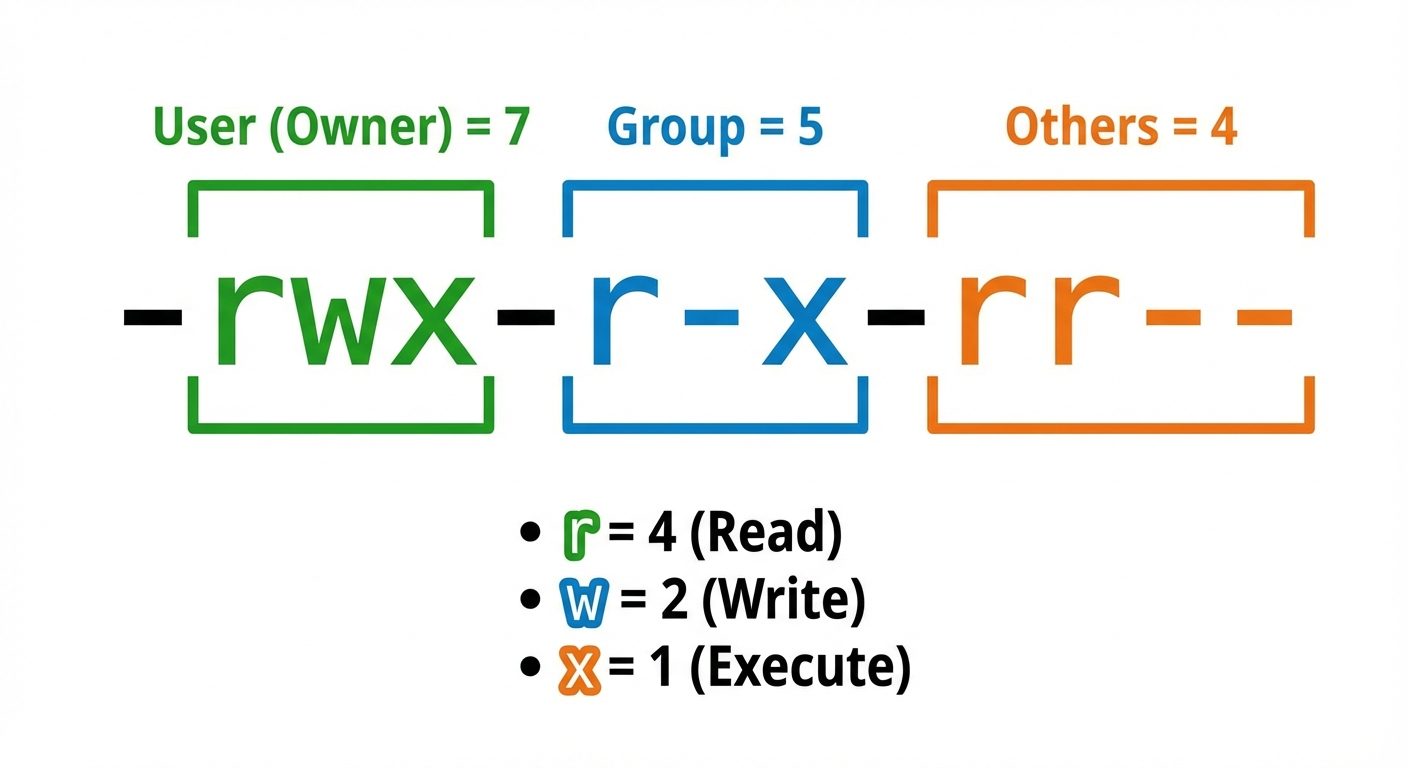
2. Environment and User-Defined Variables
Variables in shell scripting are loosely typed (essentially treated as strings).
User-Defined Variables
- Syntax:
VARIABLE_NAME=value(No spaces around the=). - Access: Use the
$symbol (e.g.,$VARIABLE_NAME). - Best Practice: Use uppercase for constants/environment variables, lowercase for local variables.
name="John Doe"
age=25
echo "My name is $name and I am $age years old."
Reading User Input
The read command captures input from standard input (keyboard).
echo "Enter your username:"
read username
echo "Hello, $username"
Environment Variables
These are system-wide variables available to all child processes.
$HOME: Path to user's home directory.$PATH: Directories the shell searches for executable commands.$USER: Current logged-in user.$SHELL: Path to the current shell.
To make a user variable an environment variable, use export:
export MY_VAR="Global Data"3. Arithmetic Operations using expr and bc
Bash treats variables as strings by default. Specific tools are needed for math.
The expr Command
Used for integer arithmetic. Spaces are mandatory between operators and operands.
- Syntax:
expr op1 operator op2 - Multiplication: The
*must be escaped with a backslash\*.
a=10
b=20
sum=`expr $a + $b`    # Backticks for command substitution
mul=$(expr $a \* $b)  # $() syntax (preferred)
echo "Sum: $sum, Product: $mul"
The bc Command (Basic Calculator)
Used for floating-point arithmetic (decimals), which expr cannot handle. It is often used with pipes.
- scale: Defines the number of decimal places.
a=10.5
b=2
result=$(echo "scale=2; $a / $b" | bc)
echo "Result: $result"
Double Parentheses ((...))
Bash built-in for C-style integer arithmetic (no spaces required).
((sum = a + b))
((cnt++))
4. Input/Output Redirection and Pipes
Linux treats everything as a file. There are three standard streams:
- STDIN (0): Standard Input (Keyboard).
- STDOUT (1): Standard Output (Screen/Terminal).
- STDERR (2): Standard Error (Screen/Terminal).
Redirection Operators
>: Output Redirection. Overwrites the file.
BASHls > filelist.txt>>: Append Redirection. Adds to the end of the file.
BASHdate >> logfile.txt<: Input Redirection. Feeds file content to a command.
BASHwc -l < filelist.txt2>: Error Redirection. Redirects error messages.
Pipes (|)
Pipes connect the STDOUT of the first command to the STDIN of the second command.
# List files, then count lines
ls -l | wc -l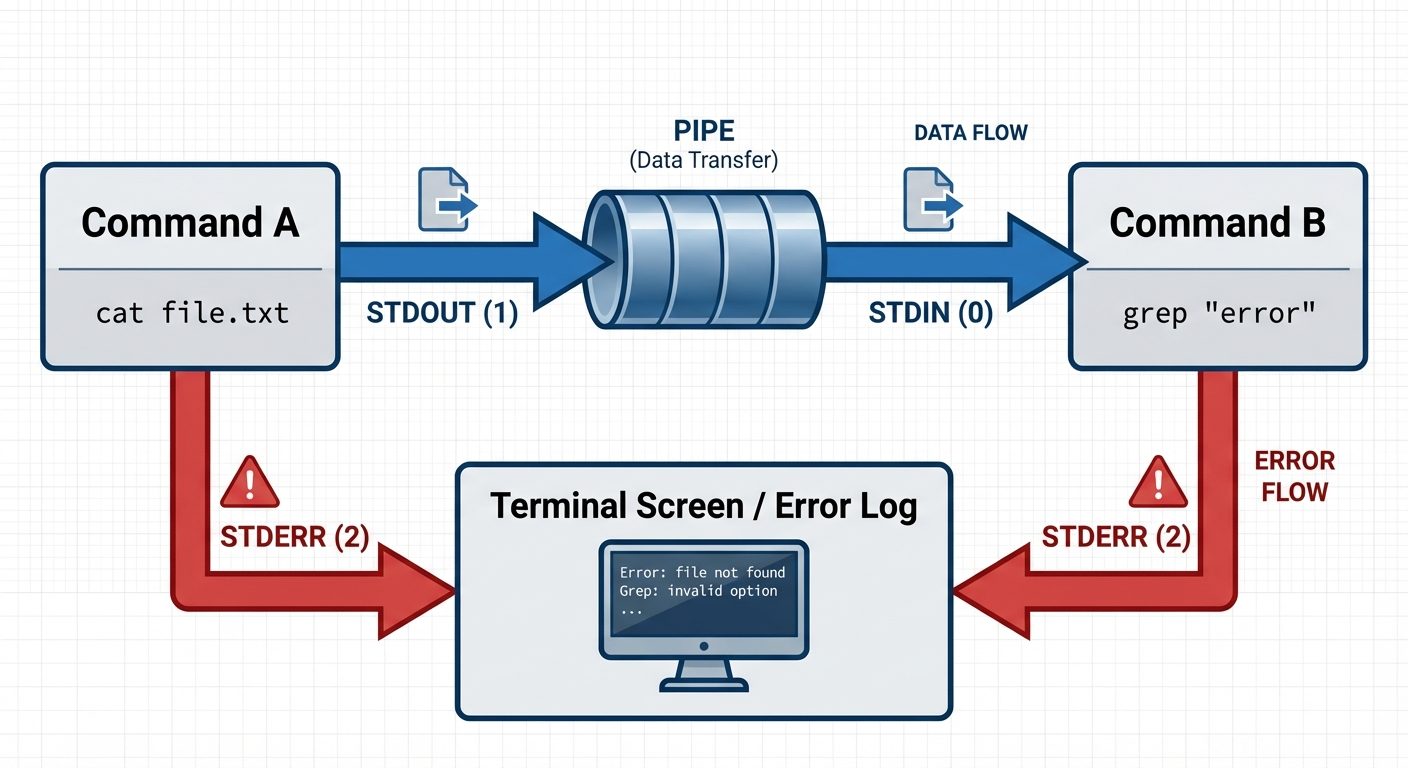
5. Conditional Statements and Menu-Driven Programs
if-else Statements
Used to make decisions based on the exit status of commands or test conditions.
Syntax:
if [ condition ]; then
    # statements
elif [ condition ]; then
    # statements
else
    # statements
fi
Common Test Operators:
- Integers:
-eq(equal),-ne(not equal),-gt(greater than),-lt(less than). - Strings:
=(equal),!=(not equal),-z(empty string). - Files:
-f(file exists),-d(directory exists),-r(readable).
case Statement (Switch)
Ideal for menu-driven programs.
echo "1. Show Date"
echo "2. List Files"
read choice

case $choice in
    1) date ;;
    2) ls -l ;;
    *) echo "Invalid option" ;;
esac
6. Looping Constructs
for Loop
Iterates over a list of items or a range.
List Syntax:
for i in 1 2 3 4 5
do
   echo "Number: $i"
done
C-Style Syntax:
for (( i=0; i<5; i++ ))
do
   echo "Counter: $i"
done
while Loop
Executes as long as the condition is true.
count=1
while [ $count -le 5 ]
do
    echo "Count: $count"
    ((count++))
done
until Loop
Executes as long as the condition is false (until it becomes true).
count=1
until [ $count -gt 5 ]
do
    echo "Count: $count"
    ((count++))
done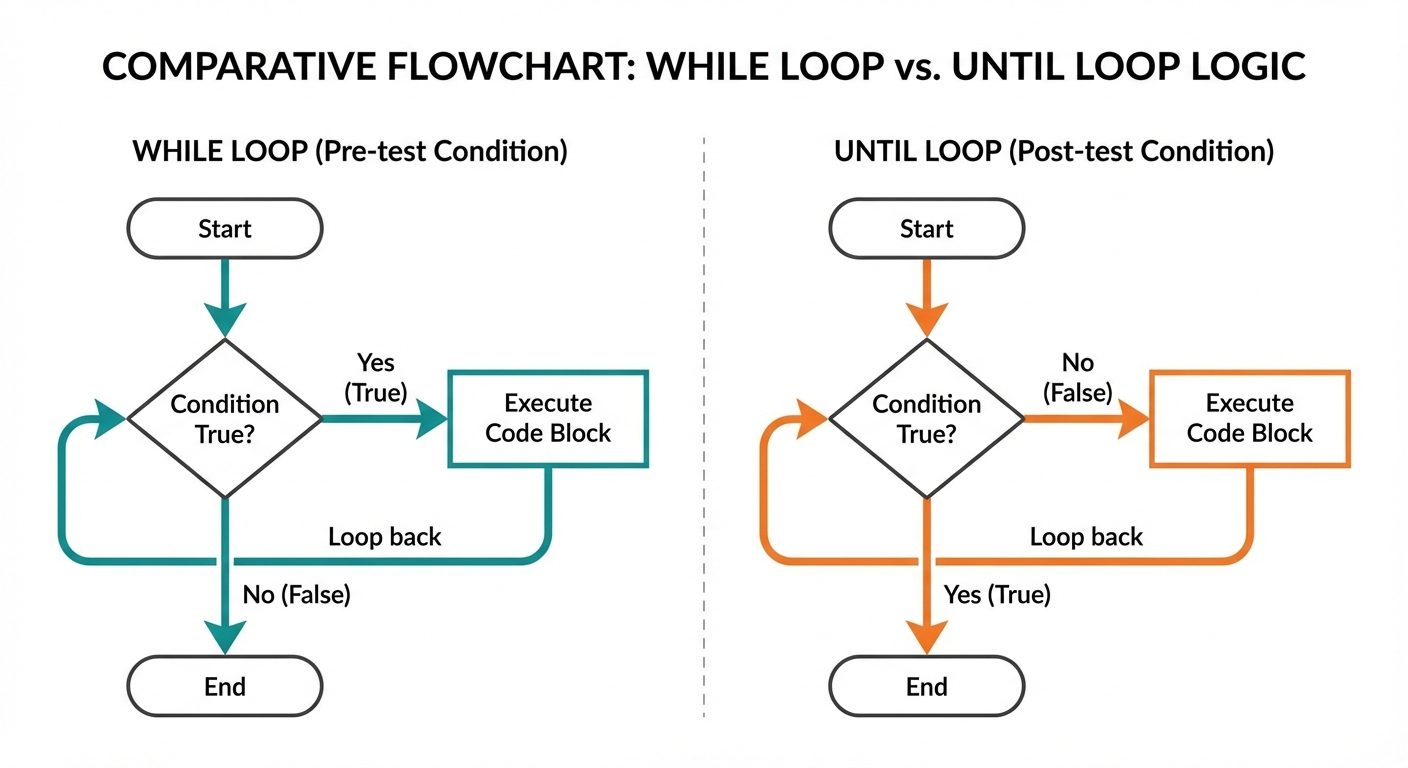
7. Indexed and Associative Arrays
Bash supports one-dimensional arrays.
Indexed Arrays (Numeric Keys)
- Declaration:
arr=(value1 value2 value3) - Access Single Element:
${arr[index]}(Index starts at 0) - Access All Elements:
${arr[@]} - Array Length:
${#arr[@]}
fruits=("Apple" "Banana" "Cherry")
echo ${fruits[1]}       # Output: Banana
echo ${fruits[@]}       # Output: Apple Banana Cherry
Associative Arrays (String Keys)
Requires explicit declaration using declare -A (Available in Bash 4.0+).
declare -A user_info
user_info[name]="Alice"
user_info[role]="Admin"

echo "User ${user_info[name]} is an ${user_info[role]}"
8. User-Defined Functions and Parameter Passing
Functions allow you to group commands into a logical block for reuse.
Defining and Calling Functions
# Definition
function greet() {
    echo "Hello, World!"
}

# Calling the function
greet
Parameter Passing
Arguments passed to a function are accessed using positional parameters ($1, $2, etc.), similar to script arguments.
$0: Script name (not function name).$1-$9: First to ninth arguments.$#: Total number of arguments.$@: All arguments as a list.
add_numbers() {
    sum=$(($1 + $2))
    echo "Sum is: $sum"
}

# Calling with parameters
add_numbers 10 20
Return Values
- Exit Status:
return n(0-255). Checked via$?. - Output:
echo "result"inside the function, captured via command substitution.
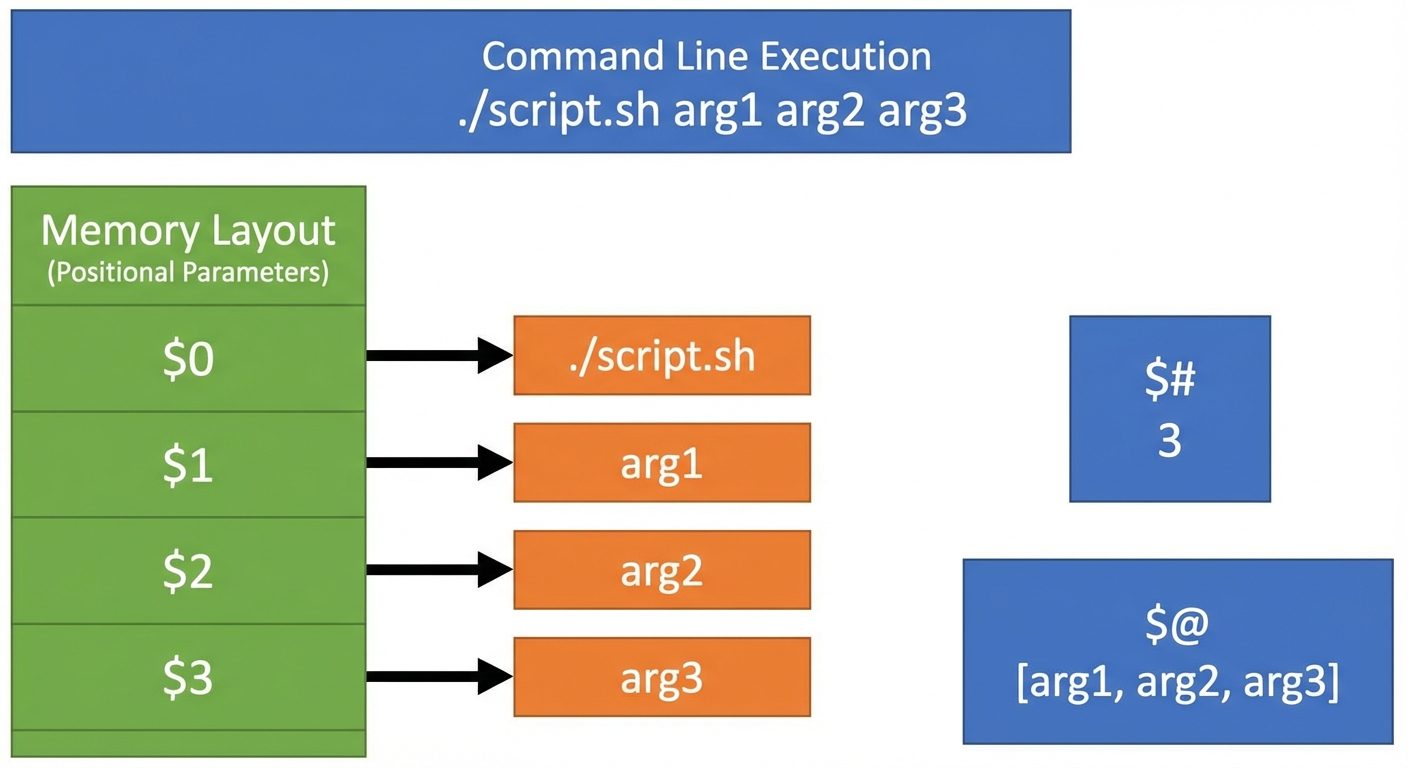 AI-generated image — may contain inaccuracies. Use a clean computer science memory structure diagram style with arrows connecting the variable names to their values.]
Did this save you a night before the exam?
LPU Notes is free, and it stays free. Ads cover part of the server bill. The rest comes out of a student's own pocket: the domain, the storage, and keeping the site up through the weeks everyone needs it at once.
The payment button didn't load. An ad blocker or a filtered network is the usual reason. to try again.
Nothing here is ever locked, and nothing unlocks. Chip in only if it was worth it. What it pays for →