Unit 5: Memory Unit
1. Memory Hierarchy
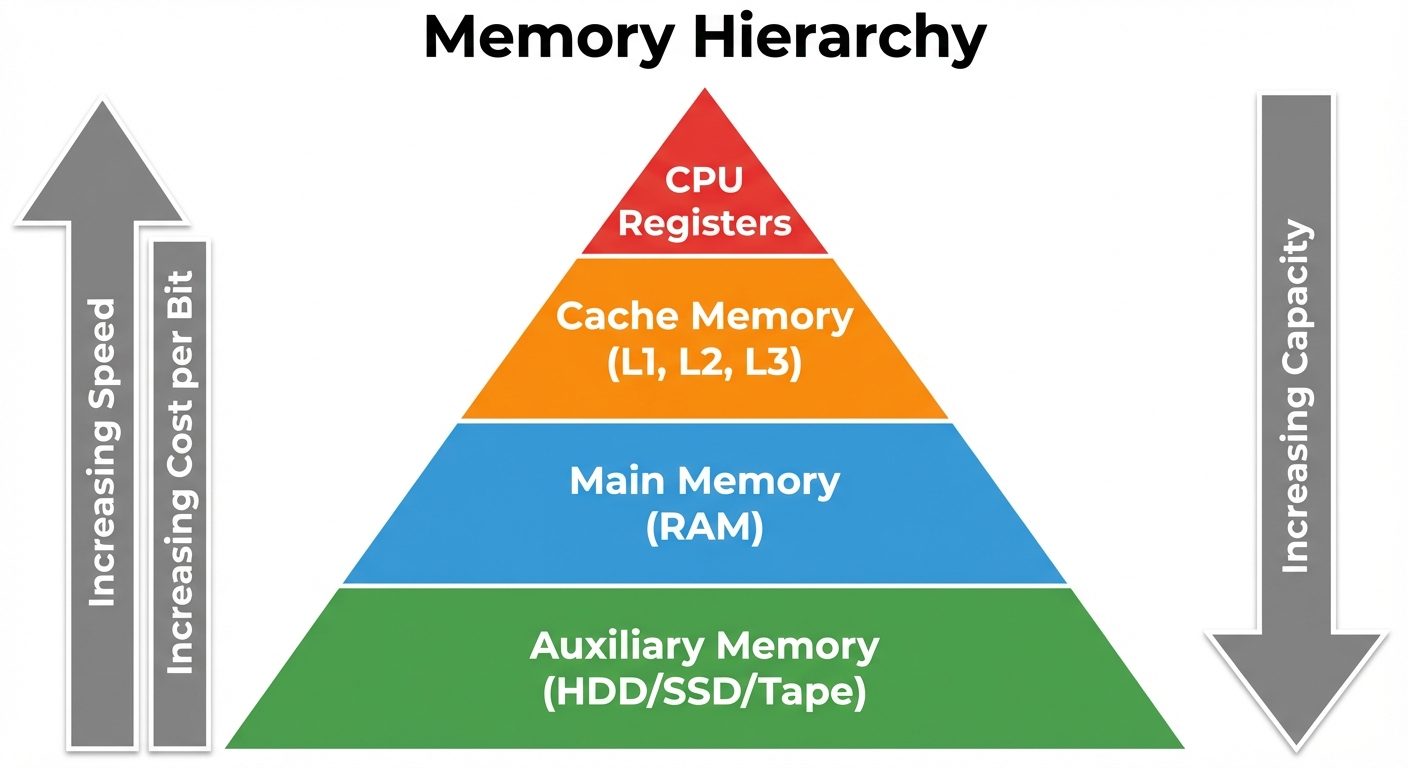
The memory hierarchy is a structural arrangement of storage in a computer system to optimize cost, performance, and capacity. The goal is to obtain the highest possible access speed while minimizing the total cost of the memory system.
Levels of Hierarchy
The hierarchy is typically organized in a pyramidal structure:
- Registers: Located inside the CPU. Fastest access (sub-nanosecond), smallest capacity, highest cost per bit.
- Cache Memory: SRAM based. Very fast, stores frequently used data/instructions.
- Main Memory: DRAM based. Moderate speed and capacity. Directly addressable by the CPU.
- Auxiliary Memory (Secondary Storage): Magnetic disks (HDD), Solid State Drives (SSD), Magnetic Tapes. Large capacity, slow access, non-volatile, lowest cost per bit.
Key Principles:
- Locality of Reference: Programs tend to access a localized area of memory for a period of time.
- Temporal Locality: If an item is referenced, it will tend to be referenced again soon (loops).
- Spatial Locality: If an item is referenced, items whose addresses are close by will tend to be referenced soon (arrays).
2. Main Memory and Auxiliary Memory
Main Memory (RAM & ROM)
The central storage unit communicating directly with the CPU.
- RAM (Random Access Memory): Volatile. Used for loading Operating System, programs, and data.
- Static RAM (SRAM): Uses flip-flops. Faster, consumes less power, used for Cache.
- Dynamic RAM (DRAM): Uses capacitors. Slower, requires refreshing, higher density, used for standard system RAM.
- ROM (Read-Only Memory): Non-volatile. Stores bootstrap loader and BIOS. Types include PROM, EPROM, EEPROM.
Auxiliary Memory
Devices that provide backup storage. The CPU cannot access these directly; data must be transferred to main memory via I/O processors.
- Magnetic Disks: Circular plates with magnetic material. Accessed via tracks and sectors.
- Magnetic Tapes: Sequential access devices (slowest). Used for archival.
3. Cache Memory
Cache is a high-speed memory designed to speed up the CPU by storing frequently accessed data from the main memory. It acts as a buffer.
- Hit Ratio: The performance of cache is measured by the hit ratio.
Mapping Techniques
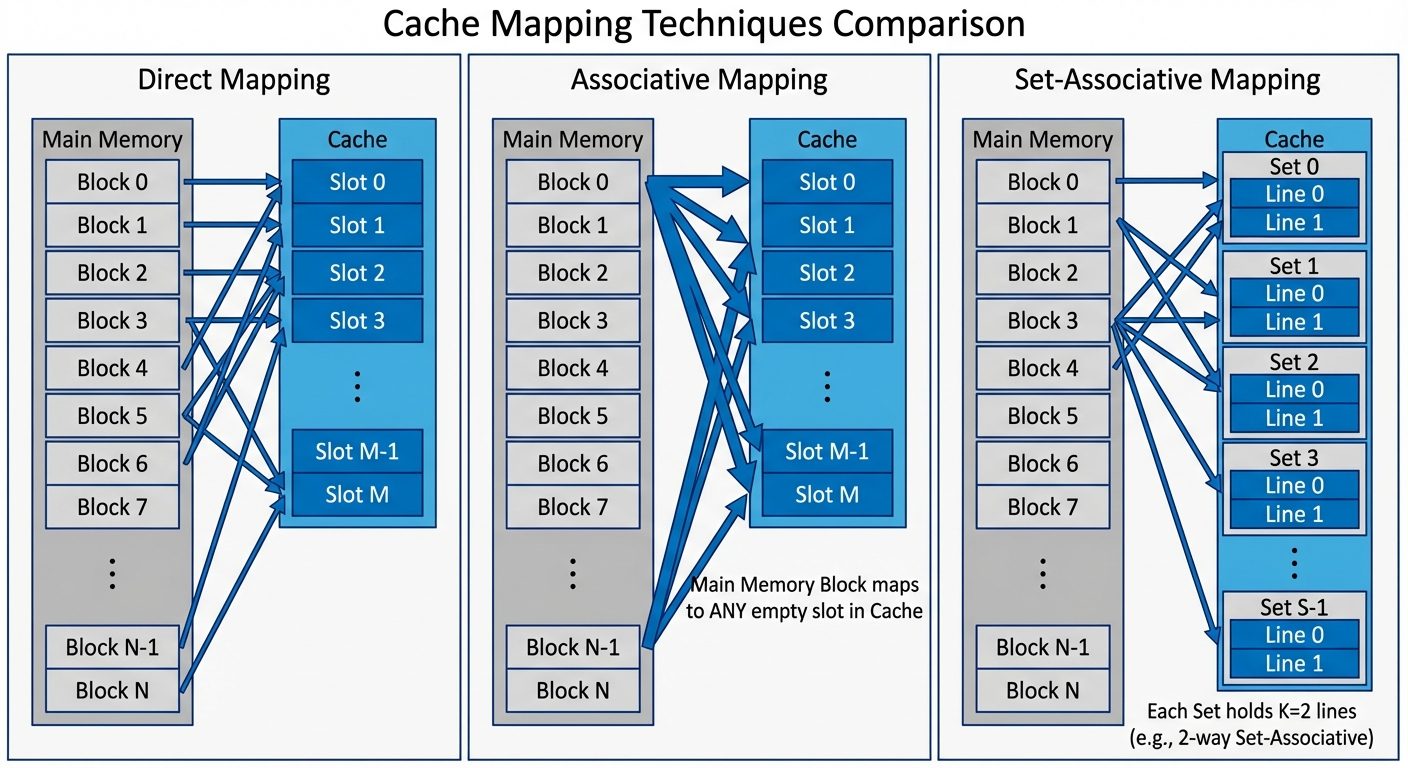
Mapping transforms data from the main memory address space to the cache memory address space.
A. Direct Mapping
- Each block of main memory maps to only one specific line in the cache.
- Formula: (where is the main memory block number, is the number of cache lines).
- Pros: Simple, inexpensive hardware.
- Cons: High conflict miss rate if two active blocks map to the same line.
B. Associative Mapping
- A main memory block can be loaded into any line of the cache.
- The address is interpreted as a Tag and Word offset.
- Hardware compares the tag of the address against all tags in the cache simultaneously (Content Addressable Memory).
- Pros: Most flexible, lowest conflict miss rate.
- Cons: Expensive and complex hardware due to parallel comparators.
C. Set-Associative Mapping
- A compromise between direct and associative mapping.
- Cache is divided into sets. Each set contains lines (k-way set associative).
- A block maps to a specific set (Direct mapping), but can be placed in any line within that set (Associative mapping).
Writing into Cache (Write Policies)
When the CPU updates data, the cache and main memory must remain consistent.
- Write-Through:
- Data is written to both the cache and the main memory simultaneously.
- Advantage: Main memory always contains valid data; simplifies recovery.
- Disadvantage: Slow due to main memory access speed; generates high bus traffic.
- Write-Back (Copy-Back):
- Data is written only to the cache. The specific location is marked with a "Dirty Bit".
- Data is copied to main memory only when the cache line is about to be replaced.
- Advantage: Faster write operations.
- Disadvantage: Complexity in maintaining consistency (e.g., in multiprocessor systems).
4. Virtual Memory
Virtual memory is a concept that permits the user to construct programs as though a large contiguous memory space were available, equal to the capacity of the auxiliary memory.
- Logical Address (Virtual Address): Generated by the CPU.
- Physical Address: The actual address in Main Memory.
- MMU (Memory Management Unit): Hardware that translates logical addresses to physical addresses.
Implementation Mechanisms
- Paging:
- Address space is divided into fixed-size blocks called Pages.
- Physical memory is divided into fixed-size blocks called Frames.
- A Page Table maps pages to frames.
- Segmentation:
- Memory is divided into variable-sized segments based on logical units (e.g., code, stack, data, subroutines).
- Provides protection and sharing mechanisms.
5. Parallel Processing and Pipelining
Parallel Processing
Processing multiple tasks simultaneously to increase computational speed.
Flynn’s Taxonomy:
- SISD (Single Instruction, Single Data): Standard von Neumann architecture.
- SIMD (Single Instruction, Multiple Data): Vector processors, GPUs (same operation on array of data).
- MISD (Multiple Instruction, Single Data): Uncommon; used in fault tolerance.
- MIMD (Multiple Instruction, Multiple Data): Modern multicore processors, distributed systems.
Pipelining
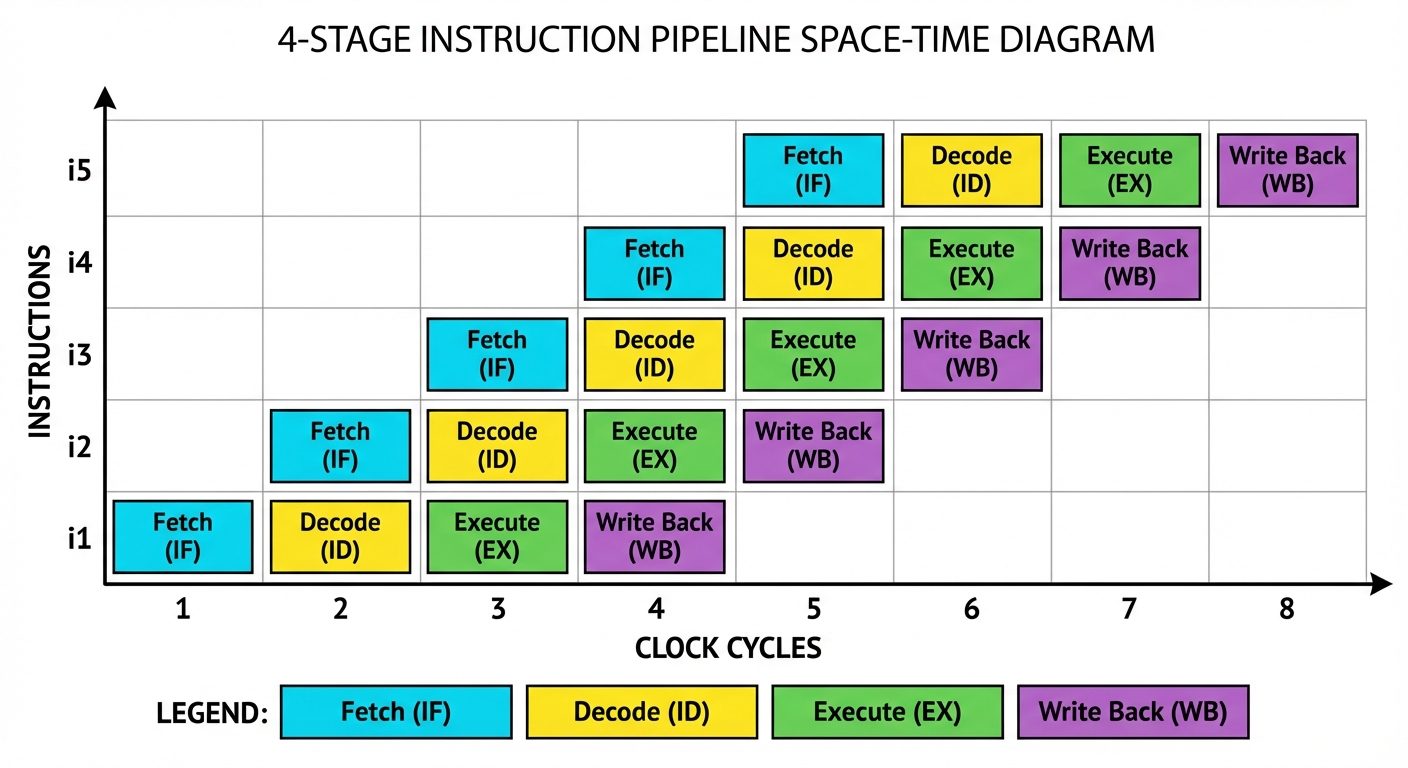
A technique of decomposing a sequential process into sub-operations, with each subprocess being executed in a special dedicated segment that operates concurrently with all other segments.
Instruction Pipeline Stages (Typical 4-segment pipeline):
- FI: Fetch Instruction.
- DA: Decode Address / Instruction.
- FO: Fetch Operand.
- EX: Execute Instruction.
Pipeline Hazards:
- Structural Hazards: Hardware resource conflicts (e.g., attempting to fetch instruction and data from memory simultaneously).
- Data Hazards: Operand availability (e.g., instruction B needs result of instruction A which hasn't finished).
- Control Hazards: Branch instructions (the pipeline may fetch the wrong instructions before knowing the branch outcome).
6. Characteristics of Multiprocessors
A multiprocessor system is an interconnection of two or more CPUs with memory and I/O equipment.
Coupling
- Tightly Coupled:
- Processors share a global main memory.
- High-speed communication via shared memory.
- Synchronization is critical.
- Loosely Coupled:
- Each processor has its own local memory.
- Communicate via message passing packets over a network (LAN/WAN).
- Often referred to as distributed systems.
Interconnection Structures
The physical infrastructure connecting processors and memory.
- Time-Shared Common Bus:
- All processors, memory, and I/O share a single bus.
- Pros: Simple, low cost.
- Cons: Bus contention; only one transfer at a time; bandwidth bottleneck.
- Multiport Memory:
- Memory modules have multiple access ports.
- Resolves conflicts internally within the memory module.
- Crossbar Switch:
- A grid of switching elements.
- Allows simultaneous connection between any processor and any memory module (provided they are distinct).
- Highest bandwidth but highest hardware cost ( switches).
- Multistage Switching Network:
- Uses stages of switches (e.g., Omega network) to route data.
- A balance between common bus and crossbar in terms of cost and performance.
- Hypercube System:
- Processors are nodes in an -dimensional cube.
- Loosely coupled structure suitable for massive parallelism.
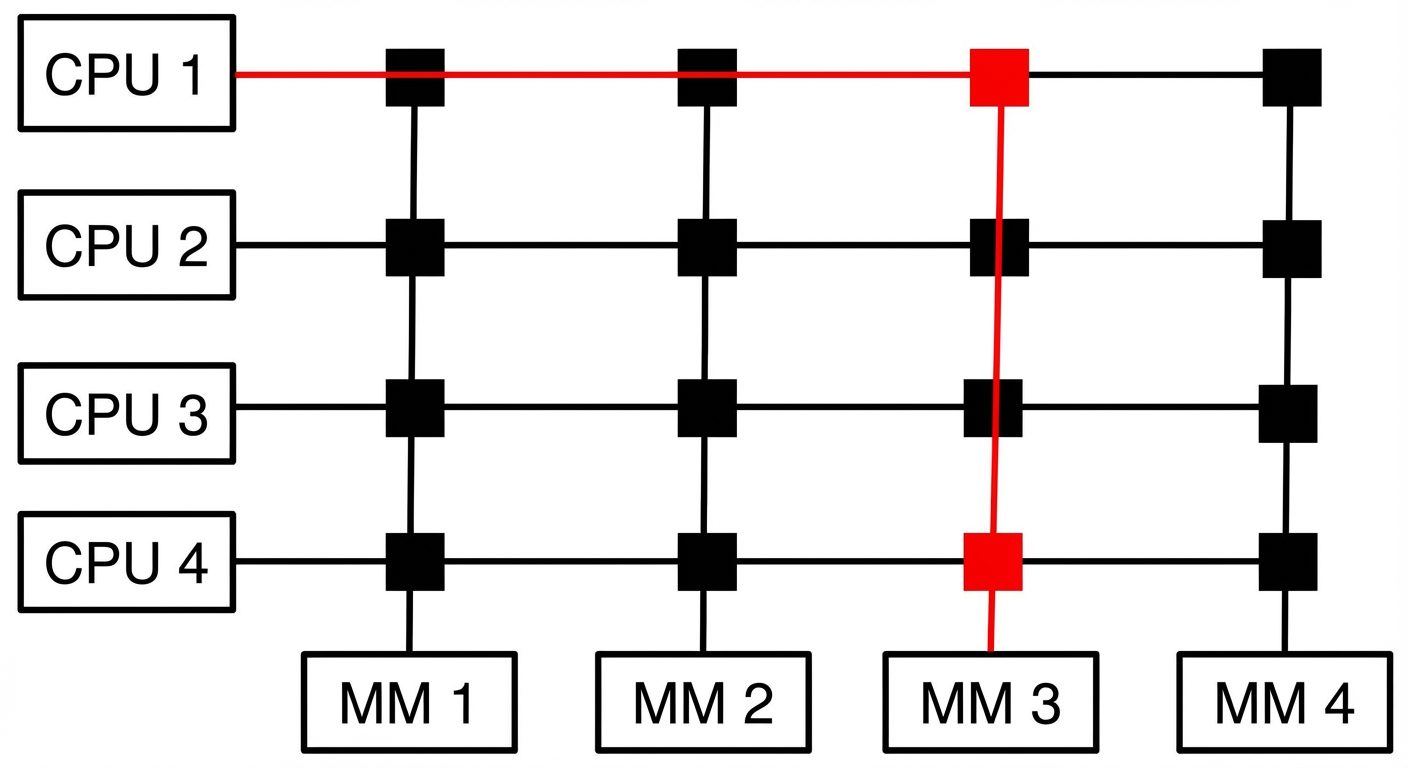 AI-generated image — may contain inaccuracies Crossbar Switch Interconnection Network. The diagram should show..." />
Did this save you a night before the exam?
LPU Notes is free, and it stays free. Ads cover part of the server bill. The rest comes out of a student's own pocket: the domain, the storage, and keeping the site up through the weeks everyone needs it at once.
The payment button didn't load. An ad blocker or a filtered network is the usual reason. to try again.
Nothing here is ever locked, and nothing unlocks. Chip in only if it was worth it. What it pays for →