Unit 5: Software Project Management & DevOps Practices
1. Project Management Basics
Software Project Management (SPM) involves the planning, scheduling, monitoring, controlling, and staffing of software projects to ensure they are delivered on time, within budget, and with the required quality.
The 4 P’s of Management Spectrum
Effective software project management focuses on four key elements:
- People: The most important asset. Includes stakeholders, team leaders, and the software team.
- Product: The software to be built. Management must define the scope and requirements objectives.
- Process: The framework activities and software engineering tasks (e.g., Agile, Waterfall) used to get the job done.
- Project: The planned undertaking, which includes tracking resources, risks, and schedules.
2. Project Planning & Monitoring
Project Planning
Planning occurs before the project begins. It involves:
- Scope Definition: defining the boundaries of the software (what is in and what is out).
- Resource Estimation: Determining required human resources, hardware, and software tools.
- Decomposition: Breaking the problem down (Work Breakdown Structure - WBS).
Project Monitoring & Control
Monitoring happens during development to ensure the plan is followed.
- Tracking: Comparing actual progress against the schedule.
- Risk Management: Identifying, analyzing, and mitigating risks (e.g., staff turnover, scope creep).
- Reporting: Status reports to stakeholders.
3. Cost Estimation Methods
Software cost estimation predicts the effort (person-months) and time required to build a system.
A. Function Points (FP)
A metric used to estimate the size of functionality provided to the user, independent of the programming language.
Five Information Domain Values:
- External Inputs (EI): Data entering the system.
- External Outputs (EO): Reports or messages leaving the system.
- External Inquiries (EQ): Interactive inputs requiring immediate response.
- Internal Logical Files (ILF): Master data stored within the system.
- External Interface Files (EIF): Data shared with other systems.
Calculation Formula:
- Where is the sum of 14 complexity adjustment factors (Value Adjustment Factor).
B. Use Case Points (UCP)
An estimation method typically used for Object-Oriented projects.
- Unadjusted Use Case Weight (UUCW): Complexity of use cases (Simple, Average, Complex).
- Unadjusted Actor Weight (UAW): Complexity of actors (API, Protocol, GUI).
- Technical Complexity Factor (TCF): Technical requirements (performance, portability).
- Environmental Complexity Factor (ECF): Team capability (motivation, experience).
Formula:
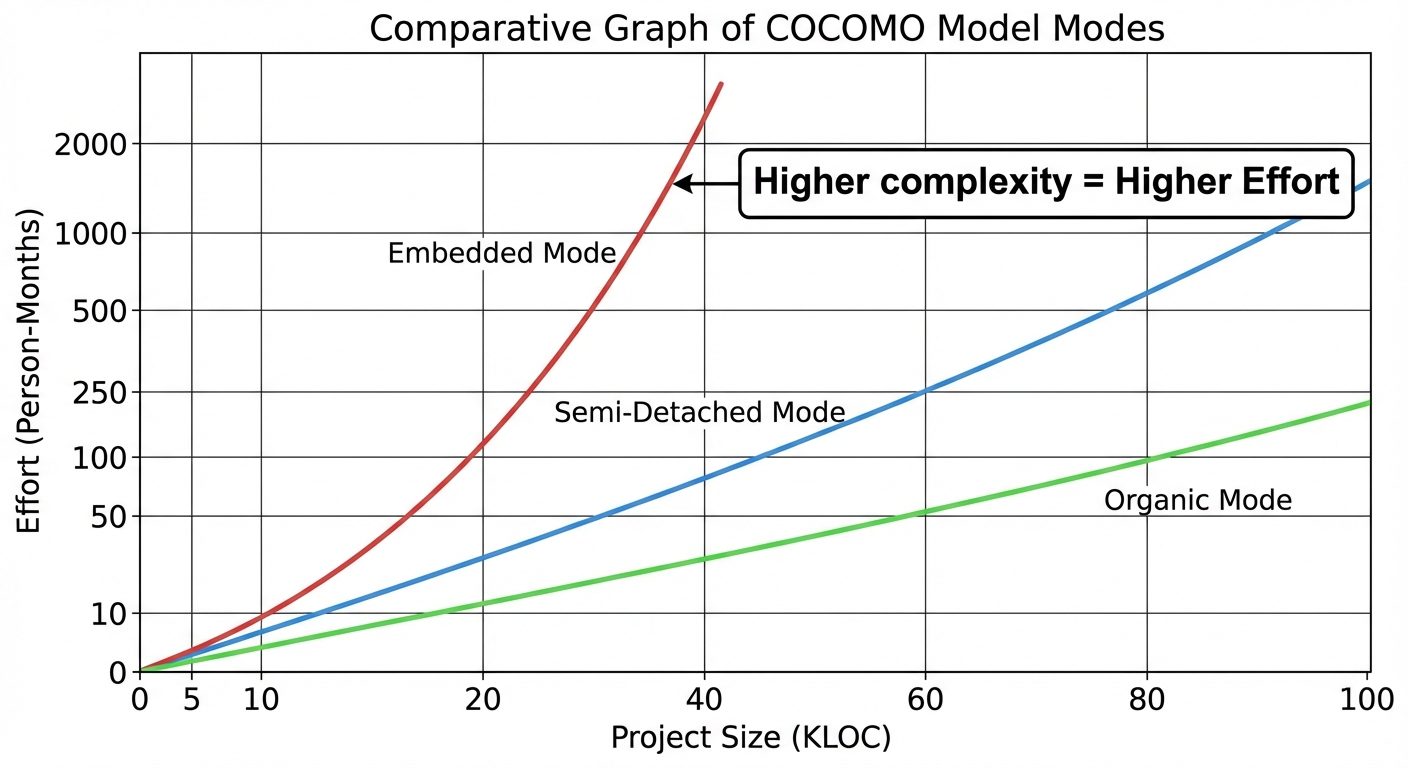
C. COCOMO (Constructive Cost Model)
Proposed by Barry Boehm, this is an empirical model derived from historical project data.
The Three Modes:
- Organic: Small, simple projects; experienced teams; loose requirements.
- Semi-detached: Intermediate size; mixed team experience; mixed constraints.
- Embedded: Tight hardware/software constraints; complex; high reliability required.
Basic COCOMO Formula:
(Where KLOC is Kilo Lines of Code, and are constants based on the mode).
4. Scheduling Techniques
Scheduling involves distributing the estimated effort across the planned timeline.
A. Gantt Charts
A bar chart that represents the project schedule.
- X-axis: Time timeline.
- Y-axis: List of tasks.
- Bars: Represent the duration of tasks.
- Pros: Easy to visualize, good for tracking progress.
- Cons: Does not clearly show inter-task dependencies.
B. PERT (Program Evaluation and Review Technique)
A probabilistic model suitable for projects with high uncertainty (e.g., R&D). It uses three time estimates for every task:
- Optimistic time (): Best case.
- Most likely time (): Normal case.
- Pessimistic time (): Worst case.
Expected Time () Formula:
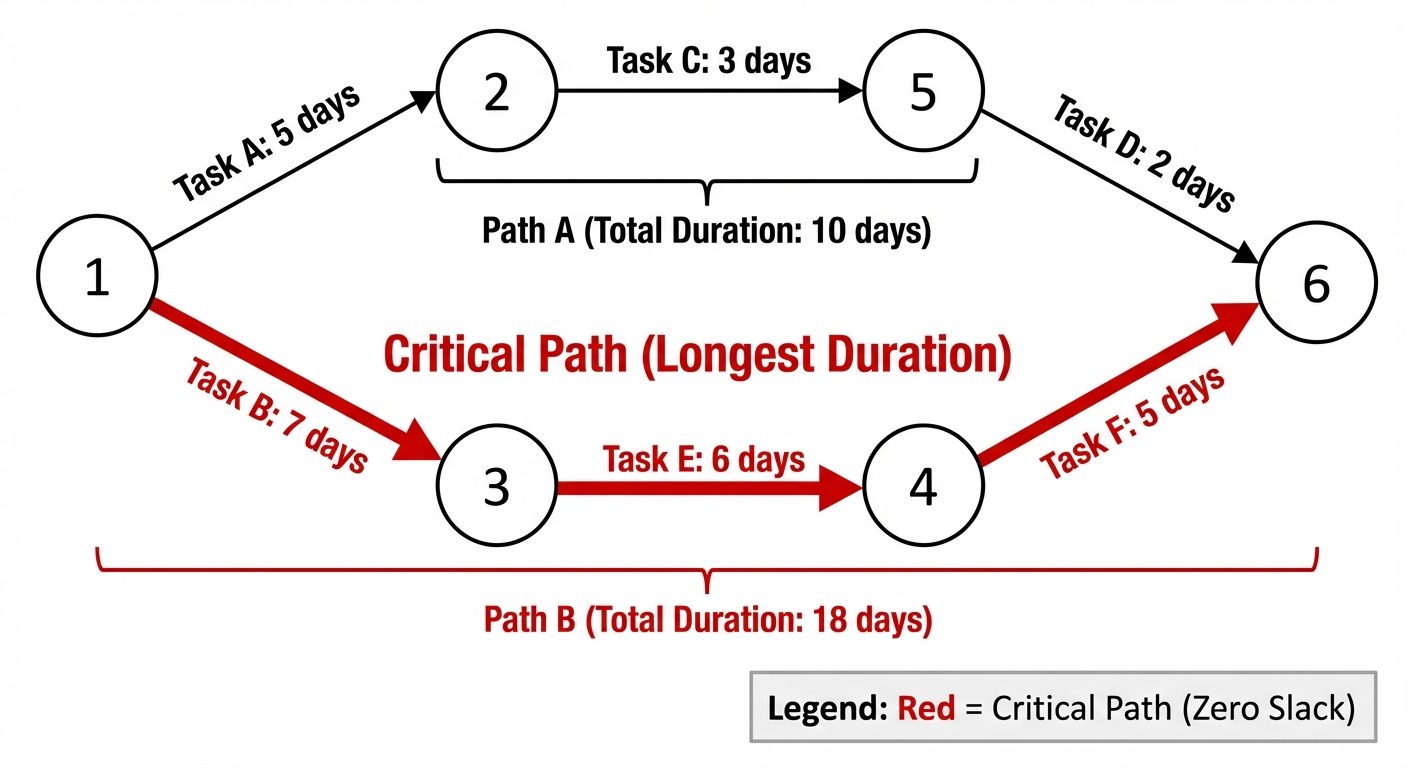
C. CPM (Critical Path Method)
A deterministic model used for projects where task times are known. It identifies the Critical Path: the longest sequence of dependent tasks that determines the shortest possible project duration.
- Slack/Float: The amount of time a task can be delayed without delaying the project. Critical path tasks have Zero Slack.
5. Software Configuration Management (SCM)
SCM is the discipline of controlling the evolution of complex software systems.
Key Concepts
- SCI (Software Configuration Item): Any work product that is placed under control (source code, design doc, test plan).
- Baseline: A snapshot of the software at a specific point in time that has been formally reviewed and agreed upon. Changes to a baseline require a formal change control process.
SCM Activities
- Identification: Identifying items to be controlled (naming conventions, directory structures).
- Version Control: Managing different versions of SCIs (e.g., using Git).
- Branching: Creating parallel lines of development.
- Merging: Combining branches back together.
- Change Control: The process of approving or rejecting changes (Change Request -> Evaluate -> Approve/Reject -> Implement).
- Configuration Auditing: Verifying that the software matches the requirements and the configuration records are accurate.
- Status Reporting: Informing stakeholders about version status and changes.
6. Introduction to DevOps & CI/CD Tools
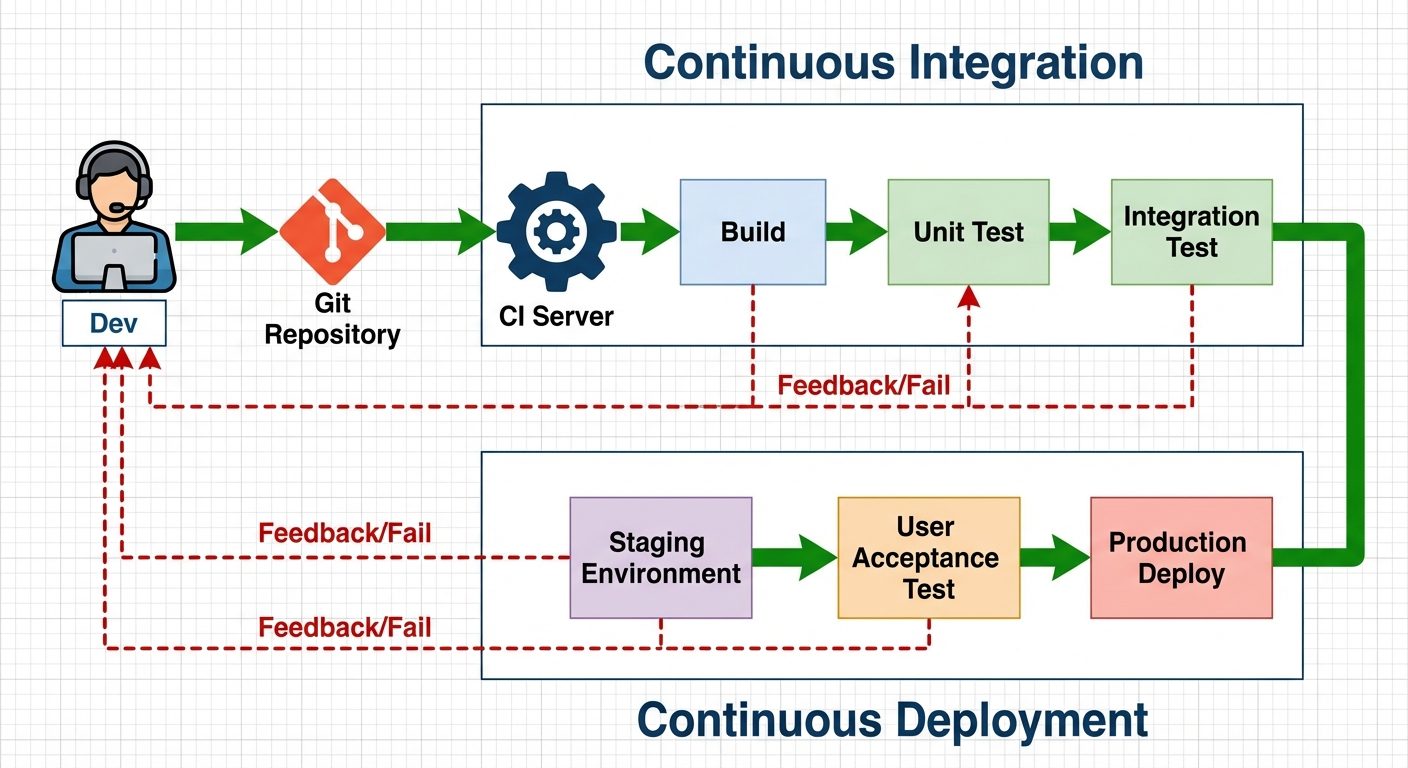
DevOps is a set of practices that combines software development (Dev) and IT operations (Ops) to shorten the systems development life cycle.
CI/CD Concepts
- Continuous Integration (CI): Developers frequently merge code changes into a central repository. Automated builds and tests run immediately to detect errors early.
- Continuous Delivery (CD): Code changes are automatically built, tested, and prepared for a release to production.
- Continuous Deployment (CD): Every change that passes all stages of the production pipeline is released to customers automatically (no human intervention).
GitHub Actions
GitHub Actions is a CI/CD platform that allows you to automate your build, test, and deployment pipeline directly within GitHub.
Key Components of GitHub Actions:
- Workflow: A configurable automated process defined by a YAML file (stored in
.github/workflows). - Events: Triggers that start a workflow (e.g.,
push,pull_request). - Jobs: A set of steps that execute on the same runner. Jobs run in parallel by default.
- Steps: Individual tasks inside a job (can be a shell script or an "action").
- Runners: The server (Ubuntu, Windows, macOS) that runs the workflow.
Example Workflow Structure (YAML):
name: CI Pipeline
on: [push] # Event
jobs:
  build-and-test:
    runs-on: ubuntu-latest # Runner
    steps:
      - uses: actions/checkout@v2
      - name: Run Tests
        run: npm test # Step
Did this save you a night before the exam?
LPU Notes is free, and it stays free. Ads cover part of the server bill. The rest comes out of a student's own pocket: the domain, the storage, and keeping the site up through the weeks everyone needs it at once.
The payment button didn't load. An ad blocker or a filtered network is the usual reason. to try again.
Nothing here is ever locked, and nothing unlocks. Chip in only if it was worth it. What it pays for →