Unit 6: Quality Management, Maintenance & Emerging Technologies
1. Quality Management & Standards
Software Quality Management (SQM) ensures that the required level of quality is achieved in a software product. It involves defining appropriate quality standards and procedures and ensuring that these are followed.
ISO 9001 (International Organization for Standardization)
ISO 9001 is a generic standard that applies to any organization, but it is widely used in the software industry to ensure quality assurance in design, development, production, installation, and servicing.
- Core Principles:
- Customer Focus: Understanding current and future customer needs.
- Process Approach: Managing activities and resources as a process.
- Continual Improvement: A permanent objective of the organization.
- Evidence-based Decision Making: Analysis of data and information.
- Relevance to Software: While ISO 9001 is generic, ISO 9000-3 provided specific guidelines for applying ISO 9001 to software development, later replaced by ISO/IEC 90003.
SEI CMMI (Capability Maturity Model Integration)
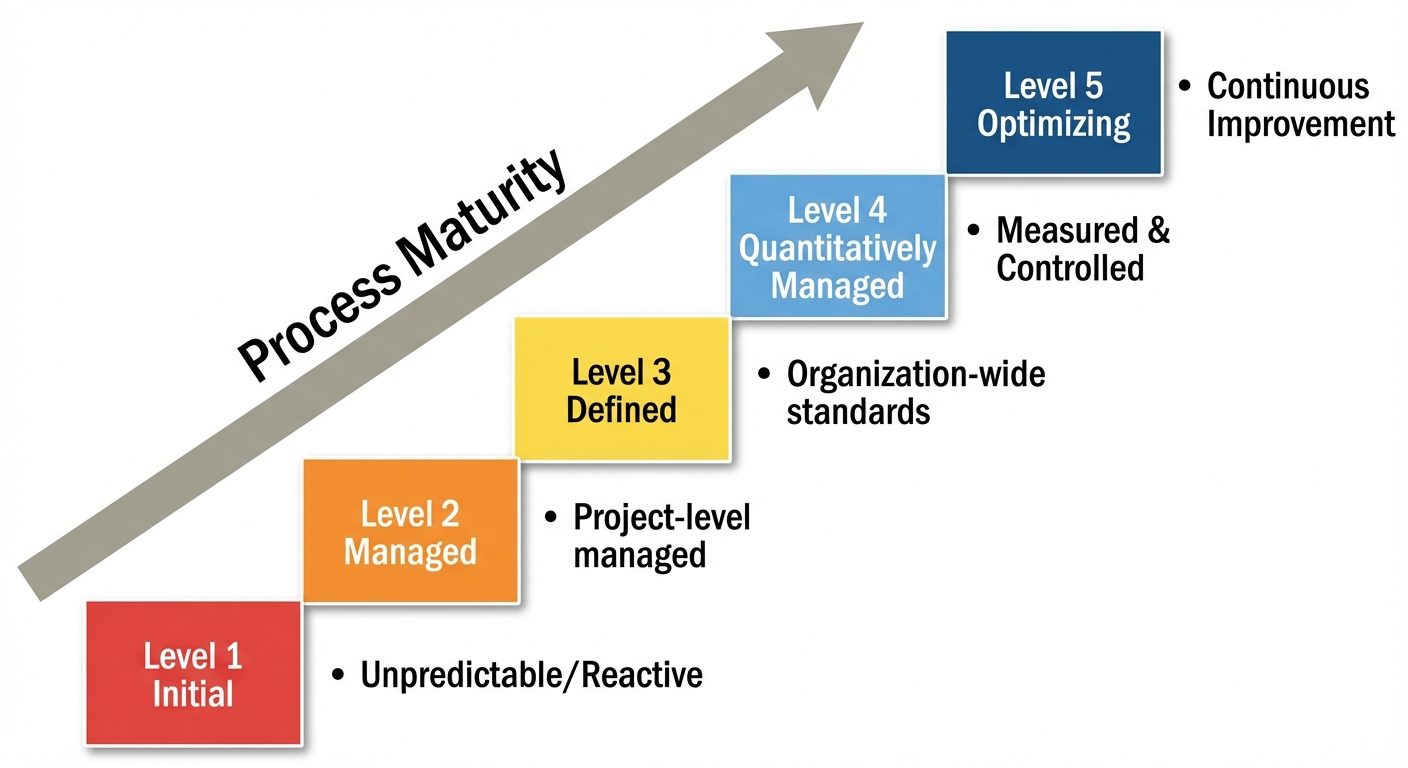
Developed by the Software Engineering Institute (SEI), CMMI is a process improvement training and appraisal program. It defines five maturity levels for processes:
- Level 1: Initial (Chaotic)
- Processes are unpredictable, poorly controlled, and reactive.
- Success depends on individual heroics rather than established processes.
- Level 2: Managed
- Processes are characterized for projects and is often reactive.
- Basic project management is in place to track cost and schedule.
- Level 3: Defined
- Processes are characterized for the organization and are proactive.
- Standard processes are established and improved over time.
- Level 4: Quantitatively Managed
- Processes are measured and controlled.
- Quantitative data is used to predict process performance.
- Level 5: Optimizing
- Focus on continuous process improvement.
- Innovations and feedback are used to optimize processes.
Six Sigma
Six Sigma is a data-driven approach for eliminating defects in any process.
- Goal: To achieve 3.4 defects per million opportunities (DPMO).
- Methodologies:
- DMAIC: For improving existing processes (Define, Measure, Analyze, Improve, Control).
- DMADV: For designing new processes/products (Define, Measure, Analyze, Design, Verify).
PSP (Personal Software Process)
PSP is a structured software development process that is intended to help software engineers understand and improve their own performance.
- Focus: Individual level (unlike CMMI which is organizational).
- Key Activities:
- Time Recording: Tracking time spent on different phases.
- Defect Recording: Logging every defect found and when it was injected/removed.
- Planning: Estimating size and time based on historical data.
2. Computer-Aided Software Engineering (CASE) Tools
CASE tools are software applications used to automate SDLC activities. They reduce the effort required to produce a work product and improve the quality of the product.
Classification of CASE Tools
- Upper CASE Tools:
- Support the early stages of the SDLC (Planning, Analysis, Design).
- Examples: Diagramming tools (Lucidchart), Requirement analysis tools.
- Lower CASE Tools:
- Support the later stages (Implementation, Testing, Maintenance).
- Examples: Compilers, Debuggers, Code generators, Static Analysis tools.
- Integrated CASE (I-CASE):
- Offer a seamless flow of information between Upper and Lower CASE tools.
- Example: Modern IDEs (Visual Studio, IntelliJ) with plugin ecosystems that cover design through deployment.
Benefits:
- Standardization of notations.
- improved documentation quality.
- Faster prototyping and development.
3. Software Maintenance
Software maintenance is the process of modifying a software system or component after delivery to correct faults, improve performance, or adapt to a changed environment.
Types of Maintenance
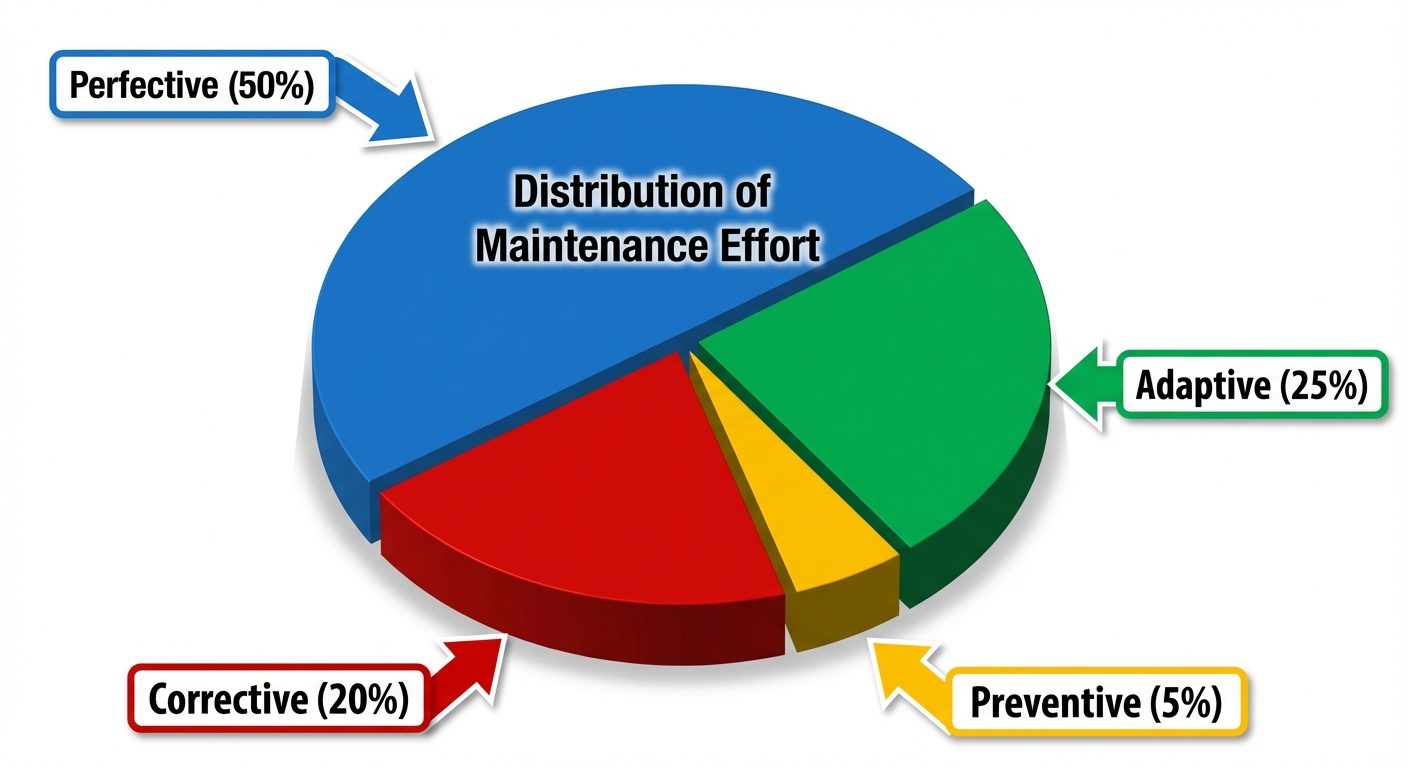
- Corrective Maintenance (approx. 20%):
- Fixing errors and bugs reported by users after deployment.
- "Emergency repairs."
- Adaptive Maintenance (approx. 25%):
- Modifying software to work in a new or changed environment (e.g., OS upgrade, new hardware, new compiler).
- Perfective Maintenance (approx. 50% - The Largest Portion):
- Implementing new functional or non-functional requirements.
- Improving performance or user interface based on user requests.
- Preventive Maintenance (approx. 5%):
- Software Re-engineering.
- Making changes to prevent future problems (e.g., refactoring code to improve maintainability).
Challenges in Software Maintenance
- Legacy Code: Old code often lacks documentation and structure ("Spaghetti code").
- Personnel Turnover: The original developers are often unavailable, requiring new staff to learn the system from scratch.
- Cost: Maintenance is the most expensive phase of the SDLC (often 60-80% of total lifecycle cost).
- Regression: Fixing one bug may introduce new bugs in other parts of the system.
4. Software Reuse & Component-Based Software Development (CBSD)
Software Reuse
The use of existing software artifacts (code, designs, test cases, documentation) to build new software.
- Levels of Reuse:
- Code Reuse: Libraries, classes, functions.
- Design Reuse: Design patterns, architectural patterns.
- Application Reuse: COTS (Commercial Off-The-Shelf) software.
Component-Based Software Development (CBSD)
CBSD focuses on building large software systems by integrating pre-existing software components.
- Component Definition: A self-contained unit of composition with contractually specified interfaces and explicit context dependencies only.
- Key Characteristics:
- Independent: Components can be deployed independently.
- Standardized: Must adhere to component models (e.g., JavaBeans, .NET, COM).
- Black-box: Internal implementation is hidden; interaction occurs only via interfaces.
- CBSD Lifecycle:
- Requirements gathering.
- Component search and selection (Buy vs. Build).
- Component adaptation (wrapping/bridging).
- System integration.
5. Advanced and Future Techniques
Cloud-Native Software Development
An approach to building and running applications that exploits the advantages of the cloud computing delivery model.
- Microservices: Breaking monolithic apps into loosely coupled services.
- Containers: Packaging code and dependencies together (e.g., Docker) for consistency across environments.
- DevOps & CI/CD: Continuous Integration and Continuous Deployment pipelines automate delivery.
- Scalability: Applications can auto-scale horizontally based on demand.
AI in Software Development (AI-Assisted SE)
The integration of Artificial Intelligence and Machine Learning into the software engineering workflow.
- Generative AI Coding Assistants:
- GitHub Copilot / Amazon CodeWhisperer: These tools use Large Language Models (LLMs) trained on billions of lines of public code.
- Functionality: They suggest whole lines or functions of code, write unit tests, and translate code between languages.
- Benefits:
- Increased developer velocity.
- Reduction in boilerplate coding tasks.
- Assistance with syntax and API discovery.
- Challenges:
- Security: AI might suggest insecure code patterns.
- IP/Copyright: Legal concerns regarding the training data used for the models.
- Over-reliance: Developers may approve code they do not fully understand.
Low-Code / No-Code Platforms
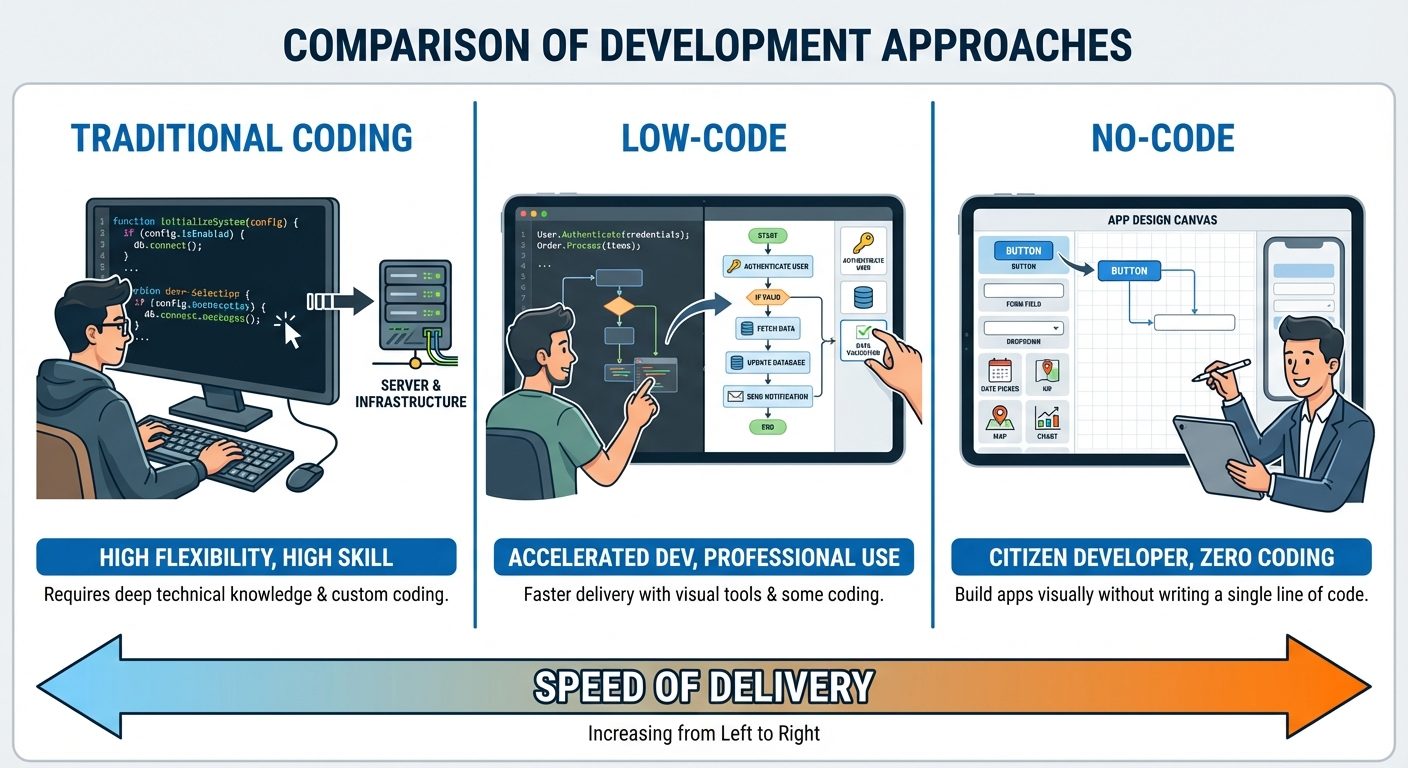
Development platforms that allow the creation of application software through graphical user interfaces and configuration instead of traditional computer programming.
- No-Code: Targeted at "Citizen Developers" (business users). purely visual, drag-and-drop. Good for simple apps.
- Low-Code: Targeted at professional developers. Requires some coding for complex logic but automates standard CRUD operations and UI design.
- Examples: Mendix, OutSystems, Microsoft PowerApps, Bubble.
Did this save you a night before the exam?
LPU Notes is free, and it stays free. Ads cover part of the server bill. The rest comes out of a student's own pocket: the domain, the storage, and keeping the site up through the weeks everyone needs it at once.
The payment button didn't load. An ad blocker or a filtered network is the usual reason. to try again.
Nothing here is ever locked, and nothing unlocks. Chip in only if it was worth it. What it pays for →