Unit 4: Software Testing Concepts, Techniques, and Automation
1. Fundamentals of Software Testing
Software testing is the process of evaluating and verifying that a software product or application does what it is supposed to do. The benefits of testing include preventing bugs, reducing development costs, and improving performance.
Key Concepts
- Verification: The process of evaluating work-products (documents, design, code) of a development phase to determine whether they meet the specified requirements. Question: "Are we building the product right?"
- Validation: The process of evaluating software during or at the end of the development process to determine whether it meets specified requirements. Question: "Are we building the right product?"
- Defect/Bug: A variance between expected and actual results.
- Failure: The inability of a system or component to perform its required functions within specified performance requirements.
Functional vs. Non-Functional Testing
| Feature | Functional Testing | Non-Functional Testing |
|---|---|---|
| Focus | Verifies what the system does. | Verifies how the system performs. |
| Goal | Validate software actions against business requirements. | Validate performance, reliability, and usability. |
| Examples | Unit testing, Integration testing, API testing. | Load testing, Stress testing, Security testing. |
| Timing | Performed before non-functional testing. | Performed after functional testing. |
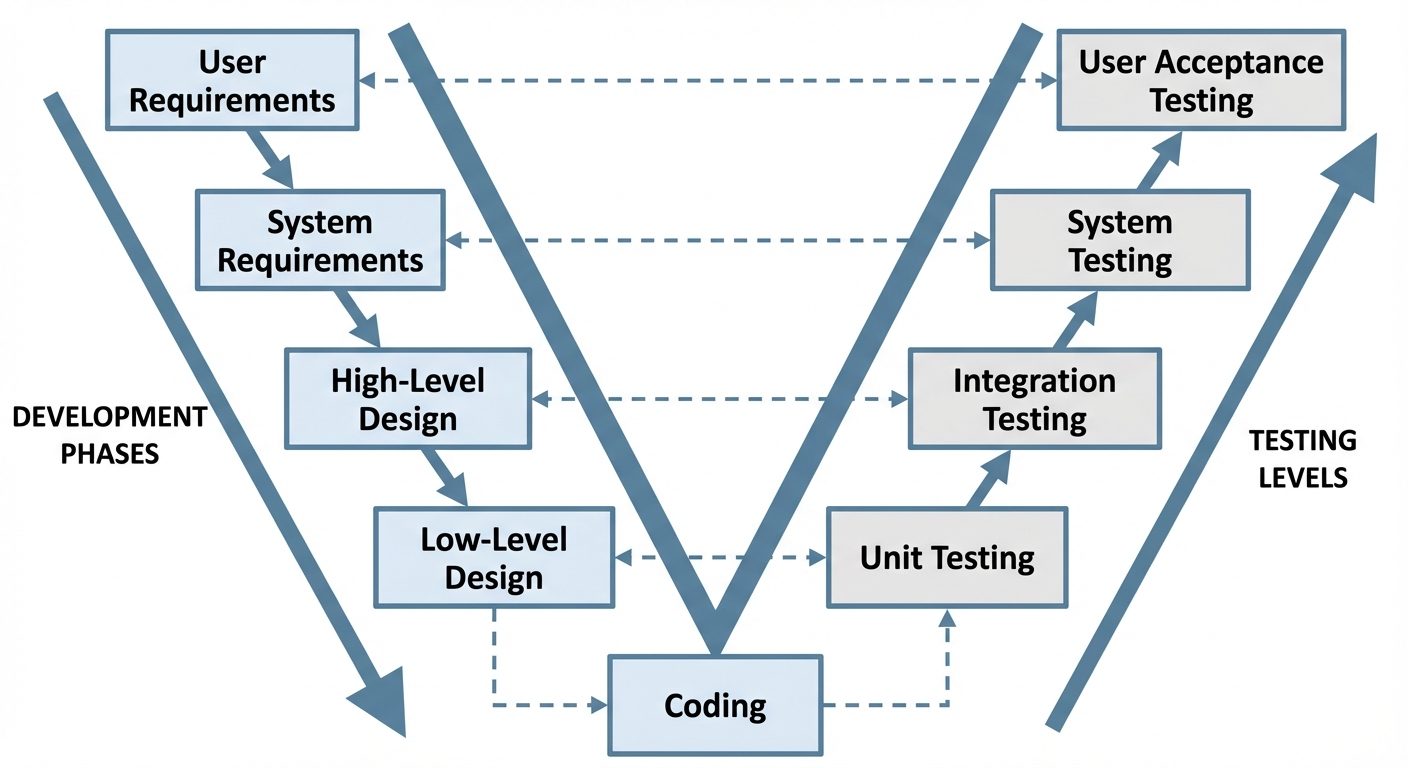
2. Testing Techniques
Testing techniques are strategies used to design test cases to ensure sufficient coverage.
Black Box Testing
- Definition: Testing the software without knowing the internal structure, design, or code. The tester interacts with the system interface (GUI).
- Focus: Inputs and Outputs.
- Methods: Equivalence Partitioning, Boundary Value Analysis, State Transition Testing.
White Box Testing (Glass Box Testing)
- Definition: Testing where the internal structure, design, and implementation of the item being tested are known to the tester.
- Focus: Code structure, branches, paths, and conditions.
- Methods: Statement Coverage, Branch Coverage, Path Testing, Cyclomatic Complexity.
Key Black Box Techniques
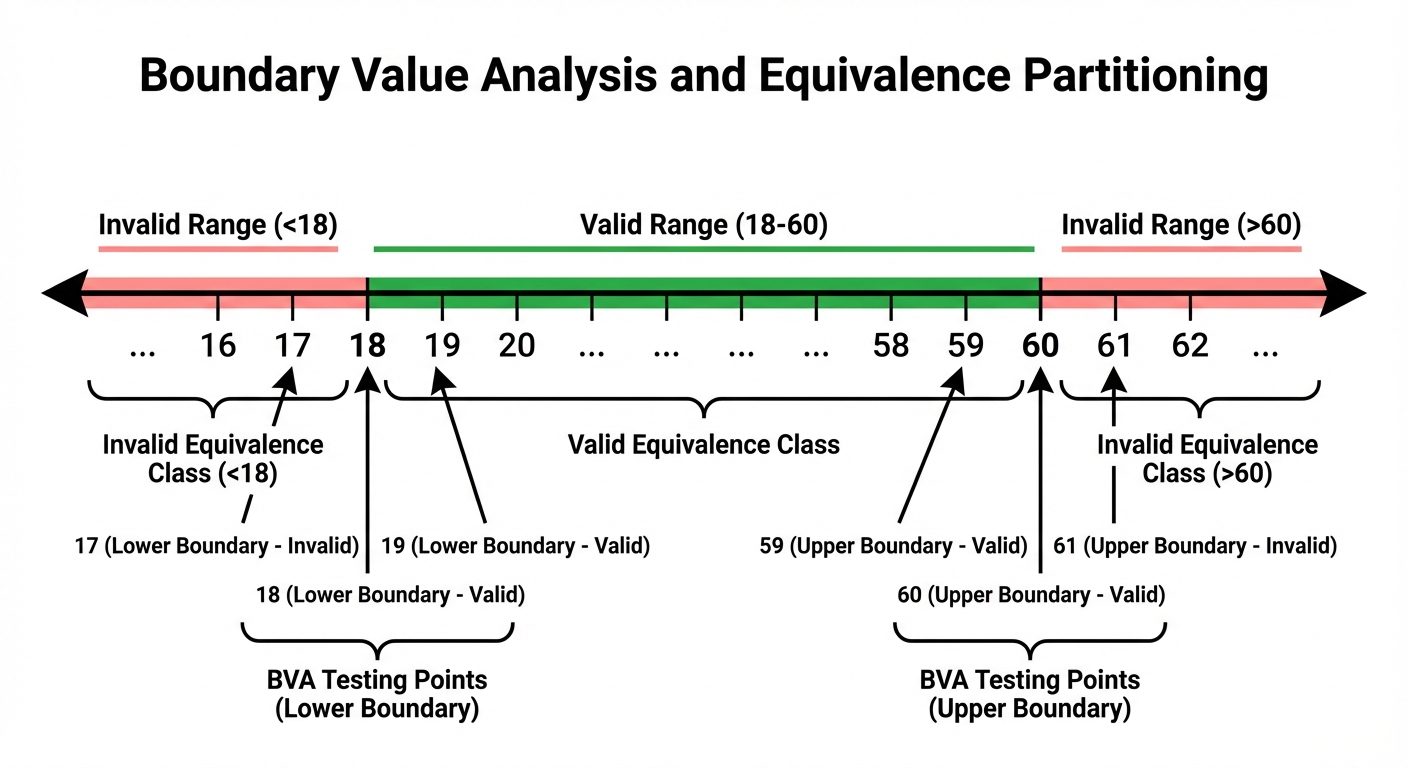
1. Equivalence Partitioning (EP)
EP divides input data into different classes (partitions). The theory is that if one value in a class works, all values in that class should work.
- Valid Partition: Values that should be accepted.
- Invalid Partition: Values that should be rejected.
2. Boundary Value Analysis (BVA)
BVA focuses on the values at the boundaries of the equivalence classes. Errors are most likely to occur at the edges of input ranges.
- Test Points: Minimum, Minimum - 1, Maximum, Maximum + 1.
3. Levels of Testing
Testing is performed at different stages of the software development lifecycle.
1. Unit Testing
- Scope: The smallest testable parts of an application (e.g., functions, methods, classes).
- Performer: Developers.
- Tooling: JUnit, NUnit, PyTest.
- Goal: Ensure individual components work in isolation.
2. Integration Testing
- Scope: Interfaces between integrated components or systems.
- Performer: Developers or Testers.
- Approaches:
- Top-down: Using stubs for lower-level modules not yet built.
- Bottom-up: Using drivers for higher-level modules.
- Big Bang: Integrating everything at once (risky).
3. System Testing
- Scope: The complete, integrated system.
- Performer: Testing Team.
- Goal: Verify the system meets functional and non-functional requirements in an environment simulating production.
4. User Acceptance Testing (UAT)
- Scope: Business scenarios and real-world usage.
- Performer: End-users or Client.
- Types:
- Alpha Testing: Performed by users at the developer's site.
- Beta Testing: Performed by users at their own environment.
4. Types of Software Testing (Specific Domains)
API Testing
Testing the Application Programming Interfaces (APIs) directly and as part of integration testing to determine if they meet expectations for functionality, reliability, performance, and security.
- Characteristics: No GUI; data is exchanged via JSON or XML.
- Checks: HTTP Status codes (200 OK, 404 Not Found), Response time, Error handling.
- Tools: Postman, SoapUI, REST Assured.
Web Testing
Testing a web application for potential bugs before making it live.
- Functionality: Forms, database connections, cookies.
- Compatibility: Cross-browser (Chrome, Firefox, Safari) and Operating Systems.
- Usability: Navigation, content, accessibility.
Mobile Testing
Testing applications built for mobile devices.
- Types: Native (iOS/Android), Web Apps (Mobile Browser), Hybrid.
- Challenges: Device fragmentation (screen sizes), network types (4G, 5G, Wi-Fi), battery consumption, interruptions (calls/SMS).
5. Automation Testing
Automation testing uses specialized tools to execute tests and compare actual results against expected results. It is best for repetitive, regression, and data-driven tasks.
Selenium IDE (Integrated Development Environment)
A browser extension (Chrome/Firefox) that records users' interactions with the browser and exports them as reusable scripts.
- Record & Playback:
- Install: Add extension from Chrome Web Store.
- Record: Click "Record", perform actions (clicks, typing) on the website.
- Validate: Add assertions (e.g.,
assertTextto check if specific text appears). - Playback: Run the script to watch the browser repeat the actions automatically.
- Limitation: Not suitable for complex logic, loops, or dynamic data handling.
Introduction to Selenium WebDriver (Conceptual)
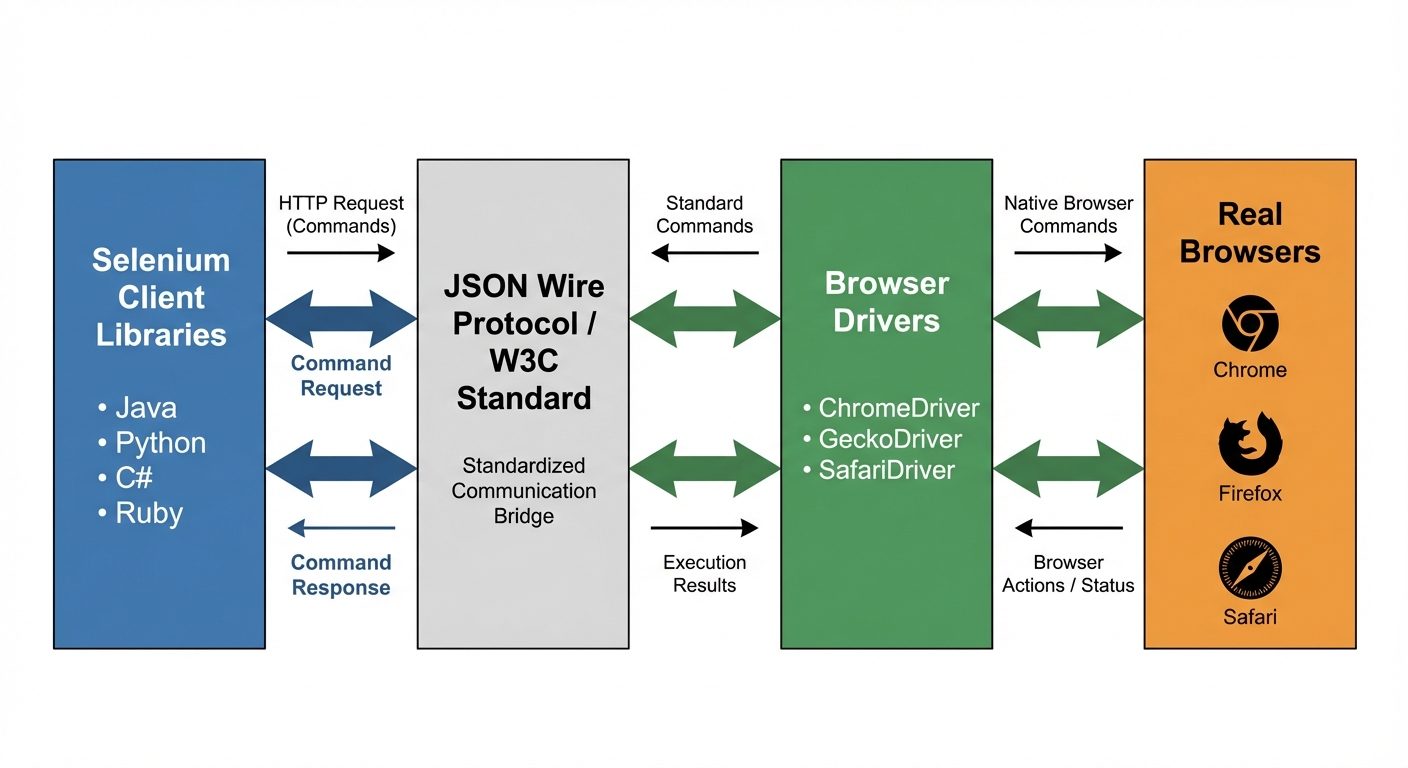
WebDriver is a collection of open-source APIs which are used to automate the testing of a web application. Unlike the IDE, this requires programming (Java, Python, C#, etc.).
- Architecture:
- Selenium Client Library: The code written by the tester (e.g., Python script).
- JSON Wire Protocol (or W3C Protocol): Transports data between client and driver.
- Browser Driver: A distinct binary (e.g., ChromeDriver, GeckoDriver) that speaks the browser's native language.
- Browser: The real browser executing commands.
6. Performance and Security Testing Basics
Performance Testing
Determines how a system performs in terms of responsiveness and stability under a particular workload.
- Load Testing: Testing with expected normal and peak usage volume.
- Stress Testing: Testing beyond normal operational capacity (breaking point).
- Scalability Testing: Ability to handle increasing loads by adding resources.
- Tools: Apache JMeter, LoadRunner.
Security Testing
Ensures that data and resources in the system are protected from intruders.
- Confidentiality: Data is accessible only to authorized users.
- Integrity: Data is reliable and not altered by unauthorized users.
- Common Vulnerabilities: SQL Injection, Cross-Site Scripting (XSS), Broken Authentication.
- Penetration Testing: Simulating a cyber-attack to find vulnerabilities.
7. Introduction to AI-Assisted Testing Tools
Artificial Intelligence is transforming software testing by reducing maintenance and increasing coverage.
- Self-Healing Scripts: AI tools can detect if a UI element (ID or XPath) changes and automatically update the test script to prevent failure (e.g., Testim, Mabl).
- Visual Validation: AI compares screenshots pixel-by-pixel but ignores false positives like rendering differences due to screen resolution, focusing on layout shifts or missing elements (e.g., Applitools).
- Test Data Generation: Generating production-like synthetic data using Machine Learning models.
- Predictive Analytics: Analyzing historical data to predict which modules are most likely to fail, helping prioritize testing efforts.
Did this save you a night before the exam?
LPU Notes is free, and it stays free. Ads cover part of the server bill. The rest comes out of a student's own pocket: the domain, the storage, and keeping the site up through the weeks everyone needs it at once.
The payment button didn't load. An ad blocker or a filtered network is the usual reason. to try again.
Nothing here is ever locked, and nothing unlocks. Chip in only if it was worth it. What it pays for →