Unit 5: Cloud Computing
1. Introduction to Cloud Computing
Definition:
Cloud computing is the on-demand delivery of IT resources—including servers, storage, databases, networking, software, analytics, and intelligence—over the Internet ("the cloud") to offer faster innovation, flexible resources, and economies of scale. Instead of owning their own computing infrastructure or data centers, companies can rent access to anything from applications to storage from a cloud service provider.
Key Characteristics (NIST Standard):
- On-Demand Self-Service: Users can provision computing capabilities (like server time and network storage) automatically without requiring human interaction with the service provider.
- Broad Network Access: Capabilities are available over the network and accessed through standard mechanisms (mobile phones, tablets, laptops, workstations).
- Resource Pooling: The provider’s computing resources are pooled to serve multiple consumers using a multi-tenant model (e.g., different customers sharing the same physical hardware but logically separated).
- Rapid Elasticity: Capabilities can be elastically provisioned and released to scale rapidly outward and inward commensurate with demand.
- Measured Service: Cloud systems automatically control and optimize resource use by leveraging a metering capability (pay-as-you-go).
2. Types of Cloud Services (Service Models)
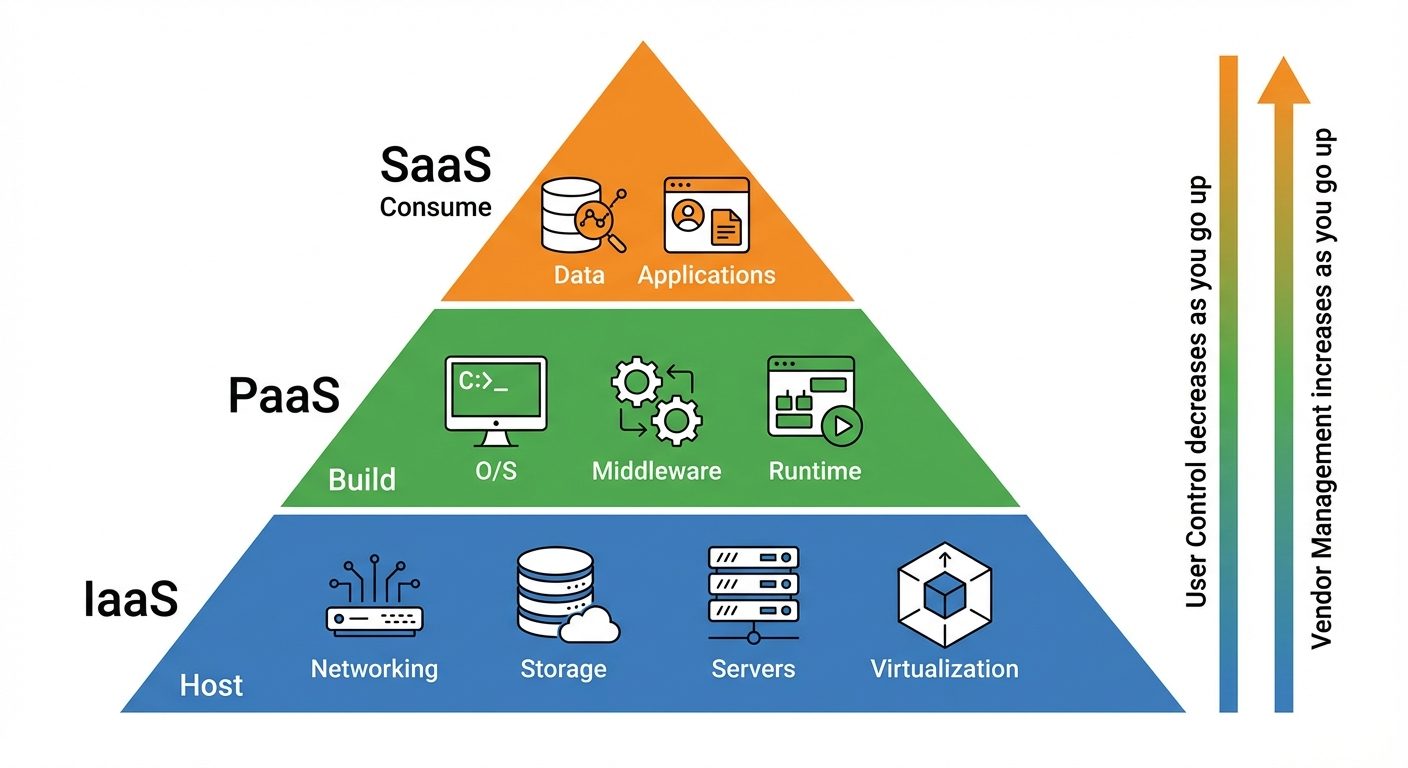
Cloud computing services fall into three main categories (the "Stack"), based on how much control the user has versus the provider.
A. Infrastructure as a Service (IaaS)
- Description: The most basic category. You rent IT infrastructure—servers and virtual machines (VMs), storage, networks, operating systems—from a cloud provider on a pay-as-you-go basis.
- User Responsibility: OS patching, middleware, data, and applications.
- Provider Responsibility: Virtualization, servers, storage, and networking.
- Examples: Amazon EC2, Microsoft Azure Virtual Machines, Google Compute Engine.
B. Platform as a Service (PaaS)
- Description: Refers to cloud computing services that supply an on-demand environment for developing, testing, delivering, and managing software applications. It is designed to make it easier for developers to create web or mobile apps without worrying about setting up or managing the underlying infrastructure of servers, storage, network, and databases.
- User Responsibility: Applications and data.
- Provider Responsibility: Runtime, middleware, OS, virtualization, servers, storage, networking.
- Examples: AWS Elastic Beanstalk, Google App Engine, Heroku, Windows Azure.
C. Software as a Service (SaaS)
- Description: A method for delivering software applications over the Internet, on demand and typically on a subscription basis. Cloud providers host and manage the software application and underlying infrastructure and handle any maintenance, like software upgrades and security patching.
- User Responsibility: None (just configuration and usage).
- Provider Responsibility: Everything (Full stack).
- Examples: Gmail, Salesforce, Dropbox, Zoom, Microsoft Office 365.
3. Types of Cloud Model Implementations (Deployment Models)
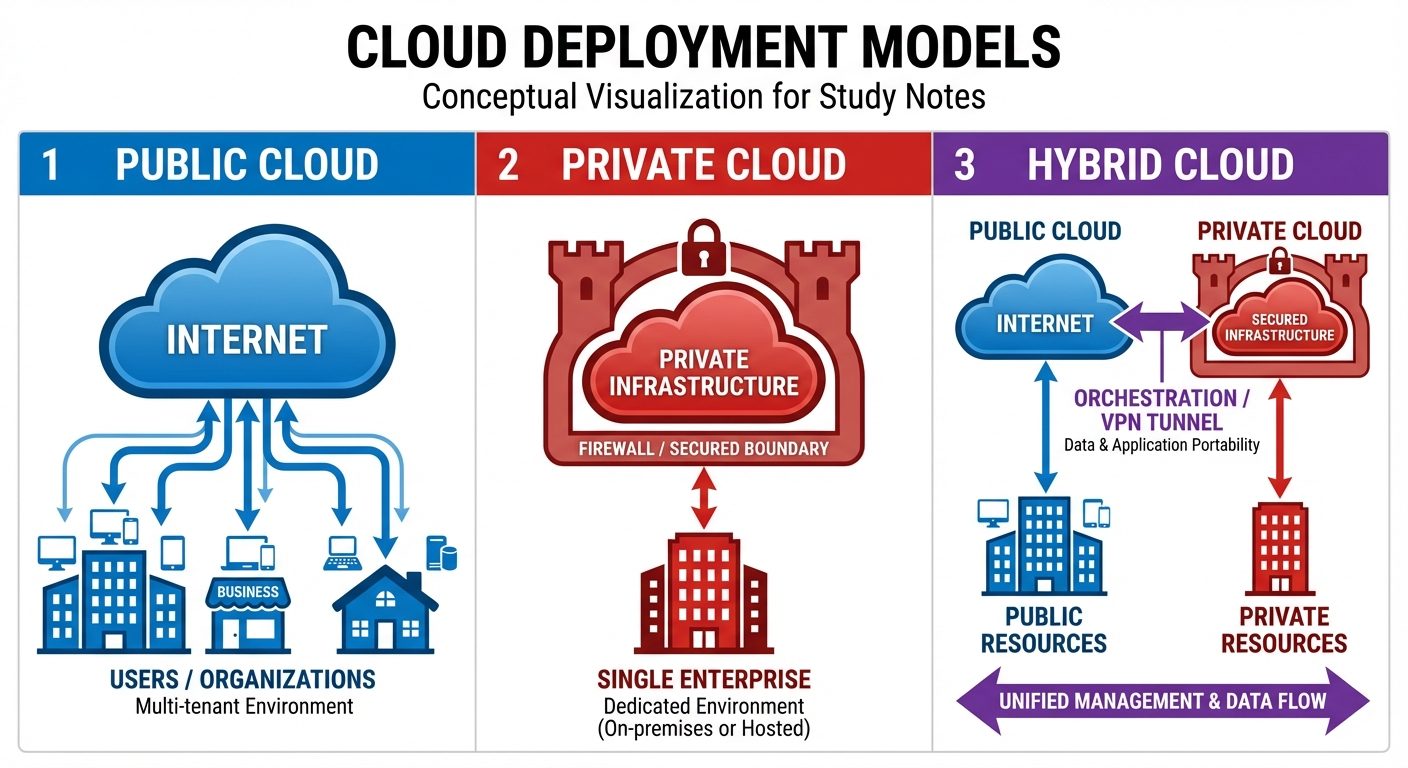
Deployment models define the type of access to the cloud, i.e., how the cloud is located and who has access to it.
A. Public Cloud
- Concept: The cloud infrastructure is provisioned for open use by the general public. It may be owned, managed, and operated by a business, academic, or government organization.
- Pros: Cost-effective (no hardware costs), high scalability, no maintenance.
- Cons: Less secure (multi-tenancy), less customizable.
- Examples: AWS, Azure, GCP.
B. Private Cloud
- Concept: The cloud infrastructure is provisioned for exclusive use by a single organization comprising multiple consumers (e.g., business units). It may be owned, managed, and operated by the organization, a third party, or some combination of them.
- Pros: High security and privacy, more control.
- Cons: High initial cost, requires IT expertise to manage maintenance.
- Examples: VMware vSphere, OpenStack (deployed on-premise).
C. Hybrid Cloud
- Concept: A composition of two or more distinct cloud infrastructures (private, community, or public) that remain unique entities but are bound together by standardized or proprietary technology that enables data and application portability.
- Use Case: Keep sensitive financial data on a Private Cloud while using the Public Cloud for running front-end applications.
- Pros: Flexibility, security for sensitive data, scalability.
D. Community Cloud
- Concept: Shared by several organizations and supports a specific community that has shared concerns (e.g., mission, security requirements, policy, and compliance considerations).
4. Virtualization
Virtualization is the fundamental technology that powers cloud computing. It allows a single physical server to be partitioned into multiple logical servers (Virtual Machines).
Key Concepts:
- Virtual Machine (VM): A software-based simulation of a physical computer. It has its own CPU, memory, storage, and network interface cards.
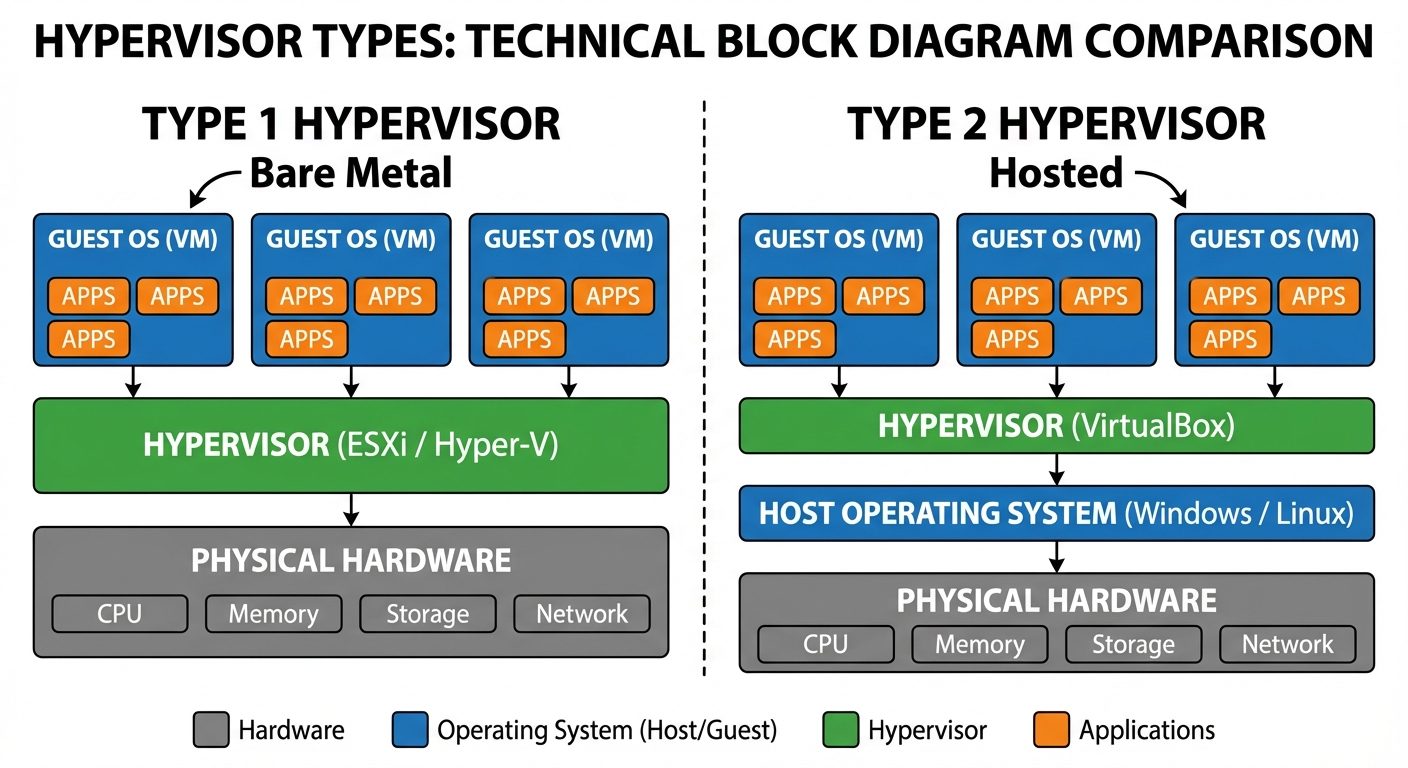
- Hypervisor: The software layer that coordinates VMs. It sits between the hardware and the virtual machine.
Types of Hypervisors:
- Type 1 (Bare Metal): Installs directly on the physical hardware. (e.g., VMware ESXi, Microsoft Hyper-V). Used in enterprise cloud data centers.
- Type 2 (Hosted): Installs as an application on top of an existing Operating System. (e.g., Oracle VirtualBox, VMware Workstation). Used for personal testing.
Benefits in Cloud:
- Isolation: If one VM crashes, it does not affect others.
- Utilization: maximizes the usage of physical hardware.
- Portability: VMs can be easily moved between servers.
5. Uses of Cloud Computing in Applications & Services
Cloud computing has revolutionized how applications are built and delivered:
- File Storage and Backup: Storing files remotely to access them from anywhere and protecting data from local hardware failure (e.g., Google Drive, Dropbox).
- Big Data Analytics: processing massive datasets that would be impossible on a single machine.
- Disaster Recovery (DR): Replicating production sites to the cloud to ensure business continuity in case of physical disasters.
- Testing and Development: Spinning up temporary environments for coding and testing without buying hardware.
- Web Hosting: Hosting websites that can scale automatically during traffic spikes (e.g., Netflix streaming).
6. Data Analytics in Cloud
Cloud computing provides the storage and processing power required for modern Data Analytics.
- Scalability: Analytics often requires processing petabytes of data; cloud storage (Data Lakes) scales automatically.
- Cost Efficiency: You only pay for the compute power used during the analysis, rather than buying a supercomputer.
- Tools:
- Data Warehousing: Amazon Redshift, Google BigQuery, Snowflake.
- Data Lakes: Storing raw unstructured data (AWS S3, Azure Data Lake).
- Machine Learning: Training AI models using cloud GPUs (AWS SageMaker).
7. Tools and Techniques for Implementing Cloud Computing
Implementing cloud solutions involves specific modern technologies:
A. Containerization (Docker)
Unlike VMs, containers share the host machine's OS kernel but isolate the application processes. They are lighter and faster than VMs.
- Tool: Docker.
B. Orchestration (Kubernetes)
When running hundreds of containers, you need a system to manage them (start, stop, scale, heal).
- Tool: Kubernetes (K8s).
C. Infrastructure as Code (IaC)
Managing and provisioning computer data centers through machine-readable definition files, rather than physical hardware configuration or interactive configuration tools.
- Tools: Terraform, Ansible, AWS CloudFormation.
D. DevOps (CI/CD)
Techniques for continuous integration and continuous delivery of code to the cloud.
- Tools: Jenkins, GitLab CI, Azure DevOps.
8. Job Roles and Skillset for Cloud Computing
As cloud adoption grows, specific roles have emerged in the IT industry.
Job Roles:
- Cloud Architect: Designs the overall cloud strategy and infrastructure structure.
- Cloud Engineer: Responsible for the implementation, maintenance, and support of cloud services.
- DevOps Engineer: Bridges the gap between development and operations, focusing on automation and CI/CD.
- Cloud Security Specialist: Ensures the security of data and compliance with regulations in the cloud.
Required Skillsets:
- Cloud Platforms: Deep knowledge of at least one major provider (AWS, Azure, or GCP).
- Operating Systems: Strong proficiency in Linux (command line).
- Networking: Understanding of DNS, TCP/IP, VPNs, Firewalls, and Load Balancers.
- Programming: Python, Go, or Node.js for scripting and automation.
- Database Skills: SQL and NoSQL database management.
- Security: IAM (Identity and Access Management), encryption standards.
Did this save you a night before the exam?
LPU Notes is free, and it stays free. Ads cover part of the server bill. The rest comes out of a student's own pocket: the domain, the storage, and keeping the site up through the weeks everyone needs it at once.
The payment button didn't load. An ad blocker or a filtered network is the usual reason. to try again.
Nothing here is ever locked, and nothing unlocks. Chip in only if it was worth it. What it pays for →