Unit 6: Full Stack Web Development & UI/UX
1. Introduction to Web Development
Web development refers to the work involved in developing a website for the Internet (World Wide Web) or an intranet (a private network). It ranges from developing a simple single static page of plain text to complex web applications, electronic businesses, and social network services.
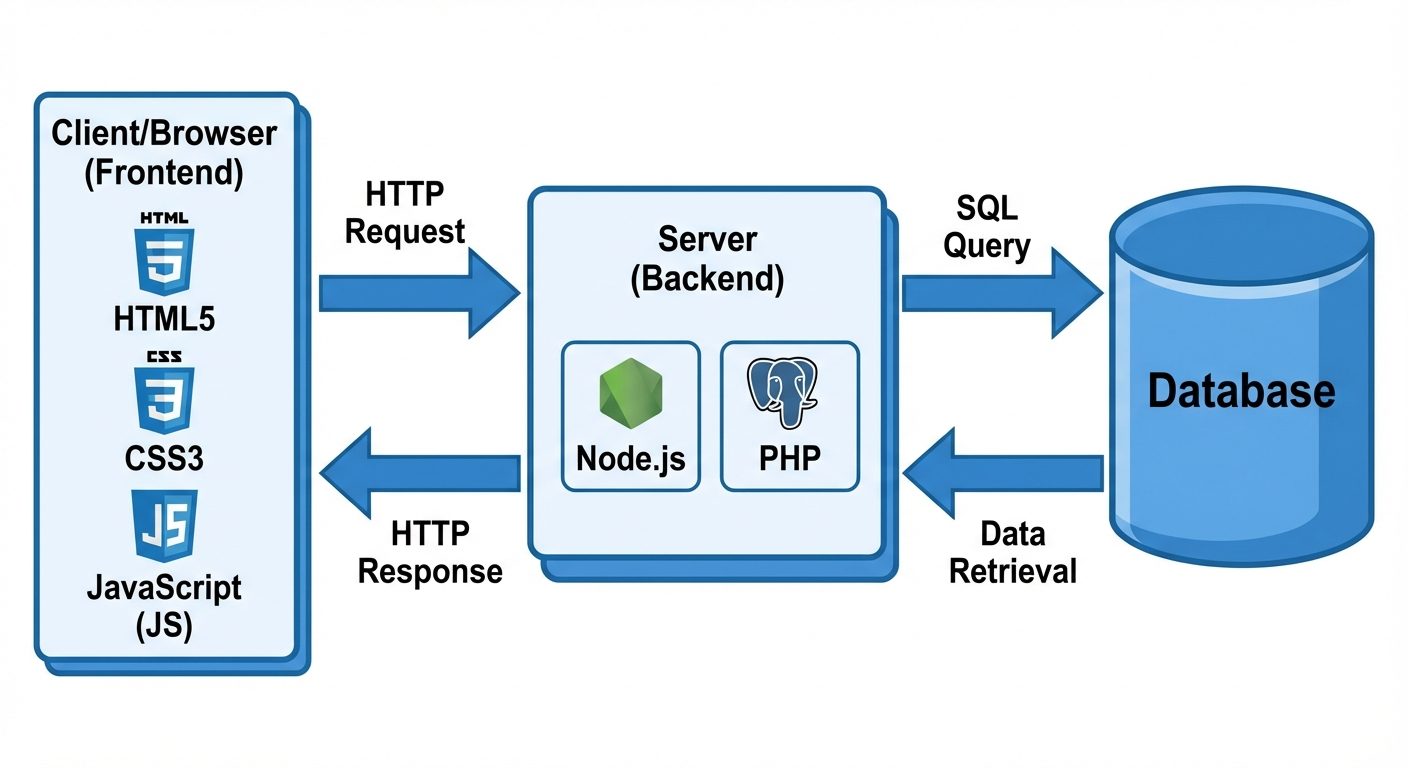
The Three Pillars of Web Architecture
To understand Full Stack development, one must understand the three layers of web architecture:
- Frontend (Client-Side):
- The part of the website that users interact with directly.
- It is rendered in the user's browser.
- Core technologies: HTML, CSS, JavaScript.
- Backend (Server-Side):
- The "under the hood" logic that powers the site.
- Handles data processing, authentication, and server configuration.
- Core technologies: PHP, Python, Node.js, Java.
- Database:
- The storage system where data (user profiles, products, posts) is saved and retrieved.
- Core technologies: MySQL, MongoDB, PostgreSQL.
Full Stack Development refers to the practice of working on both the client-side (frontend) and server-side (backend) of the application, including database management.
2. User Interface (UI) vs. User Experience (UX)
While often used interchangeably, UI and UX are distinct disciplines essential for modern web development.
User Interface (UI) Design
- Definition: The visual layout of the elements that a user interacts with in a website or software.
- Focus: Aesthetics, typography, color theory, buttons, icons, and spacing.
- Goal: To create a visually appealing and intuitive interface.
- Tools: Adobe XD, Figma, Sketch.
User Experience (UX) Design
- Definition: The overall experience a user has while interacting with a product.
- Focus: Usability, accessibility, user flow, wireframing, and problem-solving.
- Goal: To ensure the product is easy to use and efficiently solves the user's problem.
- Process: User Research Personas Wireframes Prototyping Testing.
3. Key Web Design Concepts
Responsive Web Design (RWD)
Responsive design is an approach where web pages render well on a variety of devices and window or screen sizes.
- Fluid Grids: Elements are sized in relative units (percentages) rather than absolute units (pixels).
- Flexible Images: Images resize within their containing elements.
- Media Queries: CSS techniques that apply styles based on the device characteristics (e.g.,
@media screen and (max-width: 600px)).
Mobile-First Development
A design philosophy that aims to design for the smallest screen (mobile) first and then work up to larger screens (tablets, desktops).
- Why? Mobile traffic now exceeds desktop traffic.
- Strategy: Prioritize essential content, optimize performance, and use touch-friendly navigation.
Single Page Applications (SPA)
An SPA is a web application or website that interacts with the web browser by dynamically rewriting the current web page with new data from the web server, instead of the default method of the browser loading entire new pages.
- Examples: Gmail, Facebook, Trello.
- Advantages: Faster transitions, native-app feel.
- Disadvantages: Harder to optimize for SEO initially.
4. Languages and Tools
Core Languages
1. HTML (HyperText Markup Language)
- Function: Defines the structure and content of the web page.
- Example:
HTML<div class="container"> <h1>Welcome</h1> <p>This is a paragraph.</p> </div>
2. CSS (Cascading Style Sheets)
- Function: Controls the presentation (color, layout, fonts).
- Example:
CSS.container { background-color: #f0f0f0; padding: 20px; text-align: center; }
3. JavaScript (JS)
- Function: Adds interactivity and logic (animations, form validation, API calls).
- Example:
JAVASCRIPTdocument.querySelector('button').addEventListener('click', function() { alert('Button clicked!'); });
4. PHP (Hypertext Preprocessor)
- Function: A server-side scripting language used to generate dynamic page content and interact with databases.
- Example:
PHP<?php $name = "Student"; echo "Hello, " . $name; ?>
Frameworks & Libraries
Frameworks provide pre-written code to speed up development.
- Frontend: React, Angular, Vue.js, Bootstrap (CSS framework).
- Backend: Laravel (PHP), Express.js (Node), Django (Python).
Development Tool: VS Code (Visual Studio Code)
A powerful, open-source code editor by Microsoft.
- Key Features:
- IntelliSense: Smart code completion based on variable types and function definitions.
- Extensions: Marketplace for plugins (e.g., Live Server, Prettier).
- Integrated Terminal: Run commands directly inside the editor.
- Git Integration: Built-in source control management.
5. CRUD Applications
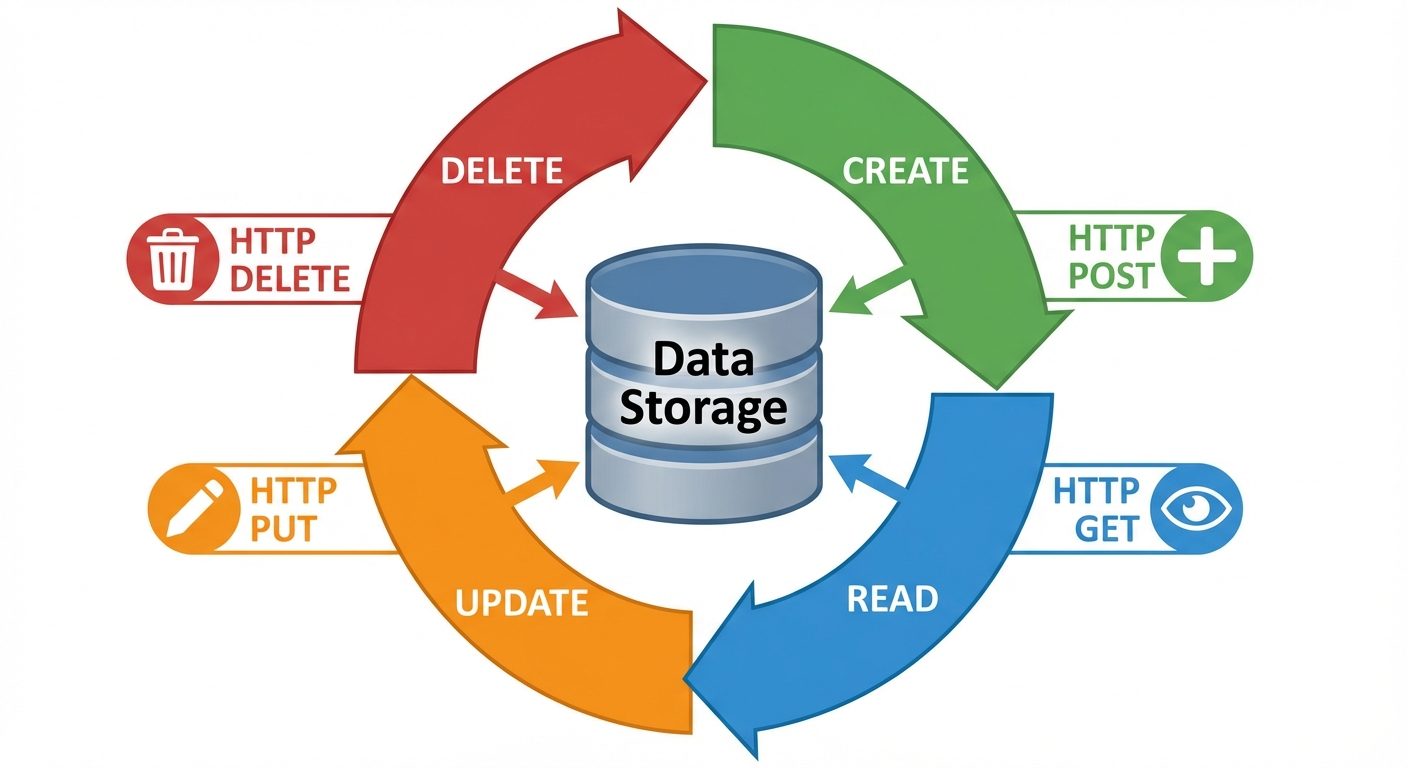
CRUD stands for the four basic operations of persistent storage. Every dynamic web application involves these steps.
| Acronym | Operation | HTTP Method | SQL Command | Description |
|---|---|---|---|---|
| C | Create | POST |
INSERT |
Adding new data (e.g., User Sign up). |
| R | Read | GET |
SELECT |
Retrieving data (e.g., Viewing a profile). |
| U | Update | PUT / PATCH |
UPDATE |
Modifying data (e.g., Changing password). |
| D | Delete | DELETE |
DELETE |
Removing data (e.g., Deleting a post). |
6. AR/VR: Overview and Significance
Definitions
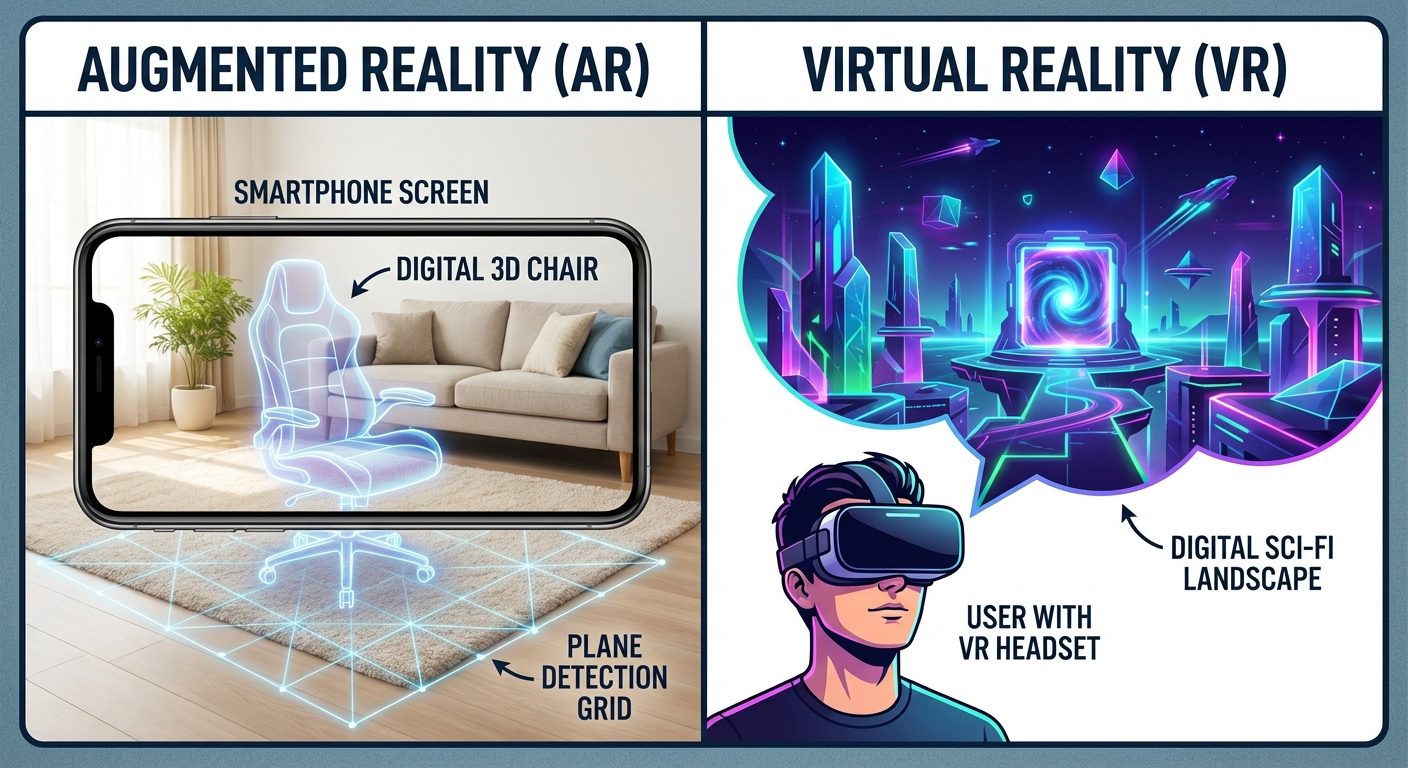
- Virtual Reality (VR): A completely immersive computer-generated experience that replaces the user's real-world environment with a simulated one.
- Augmented Reality (AR): An interactive experience where digital elements (images, sound, text) are overlaid onto the real-world environment.
Significance
- Enhanced Training: Simulation of dangerous scenarios (pilots, surgeons) without risk.
- Remote Collaboration: Virtual meeting spaces.
- Immersive Marketing: "Try before you buy" (AR furniture placement).
How Does AR/VR Work?
- Input: Sensors (gyroscopes, accelerometers, cameras) track the user's head and hand movements.
- Processing: The CPU/GPU calculates the change in perspective and physics interactions.
- Rendering: The system generates a new image corresponding to the new perspective.
- Display: The image is projected onto the headset screens (VR) or overlaid on the camera feed (AR) with low latency to prevent motion sickness.
Hardware and Devices
- VR Headsets: Meta Quest, HTC Vive, PlayStation VR.
- AR Devices: Microsoft HoloLens, Google Glass, Magic Leap, High-end Smartphones (iPhone Pro with LiDAR).
- Sensors: LiDAR (Depth sensing), Haptic Feedback gloves, Motion controllers.
Software
- Unity: The most popular game engine for cross-platform AR/VR development.
- Unreal Engine: Known for high-fidelity photorealistic graphics.
- ARKit (Apple) / ARCore (Google): SDKs for mobile AR development.
Applications
- Healthcare: VR for exposure therapy (PTSD), AR for overlaying veins/anatomy during surgery.
- Education: Virtual field trips, 3D anatomy models.
- Real Estate: Virtual property tours.
- Gaming/Entertainment: Pokémon GO (AR), Beat Saber (VR).
- Retail: Virtual fitting rooms.
7. Job Roles and Skillsets
1. Full Stack Developer
- Role: Builds the entire web application (frontend + backend).
- Skillset:
- Proficiency in HTML/CSS/JS.
- Backend language (PHP, Node.js, or Java).
- Database management (SQL/NoSQL).
- Version Control (Git).
- API design (REST/GraphQL).
2. UI/UX Designer
- Role: Designs the look and feel of the product.
- Skillset:
- Wireframing and Prototyping (Figma/Adobe XD).
- User Research and Testing.
- Visual Communication.
- Basic understanding of HTML/CSS (to understand feasibility).
3. AR/VR Developer
- Role: Creates immersive 3D experiences.
- Skillset:
- C# (for Unity) or C++ (for Unreal).
- 3D Math and Physics.
- 3D Modeling basics (Blender/Maya).
- Computer Vision concepts.
Did this save you a night before the exam?
LPU Notes is free, and it stays free. Ads cover part of the server bill. The rest comes out of a student's own pocket: the domain, the storage, and keeping the site up through the weeks everyone needs it at once.
The payment button didn't load. An ad blocker or a filtered network is the usual reason. to try again.
Nothing here is ever locked, and nothing unlocks. Chip in only if it was worth it. What it pays for →