Unit 4: DevOps & Software Testing
1. Introduction to DevOps
DevOps is a set of practices, tools, and a cultural philosophy that automates and integrates the processes between software development (Dev) and IT teams (Ops). It emphasizes team empowerment, cross-team communication and collaboration, and technology automation.
The primary goal of DevOps is to shorten the systems development life cycle while delivering features, fixes, and updates frequently in close alignment with business objectives.
DevOps vs. Traditional Software Development Models (Waterfall/Agile)
Traditional models often created silos where developers wrote code and threw it "over the wall" to operations staff to deploy and support, leading to the "blame game" when things broke.
| Feature | Traditional Model (Waterfall) | DevOps Model |
|---|---|---|
| Release Cycle | Long, infrequent (Months/Years) | Short, frequent (Weeks/Days/Hours) |
| Collaboration | Siloed teams (Dev vs. Ops) | Cross-functional, collaborative teams |
| Testing | Post-development activity | Continuous testing throughout the lifecycle |
| Automation | Minimal; mostly manual | High; infrastructure as code, CI/CD |
| Objective | Stability and definition | Speed, agility, and reliability |
| Feedback | Delayed (End of cycle) | Immediate (Continuous feedback loops) |
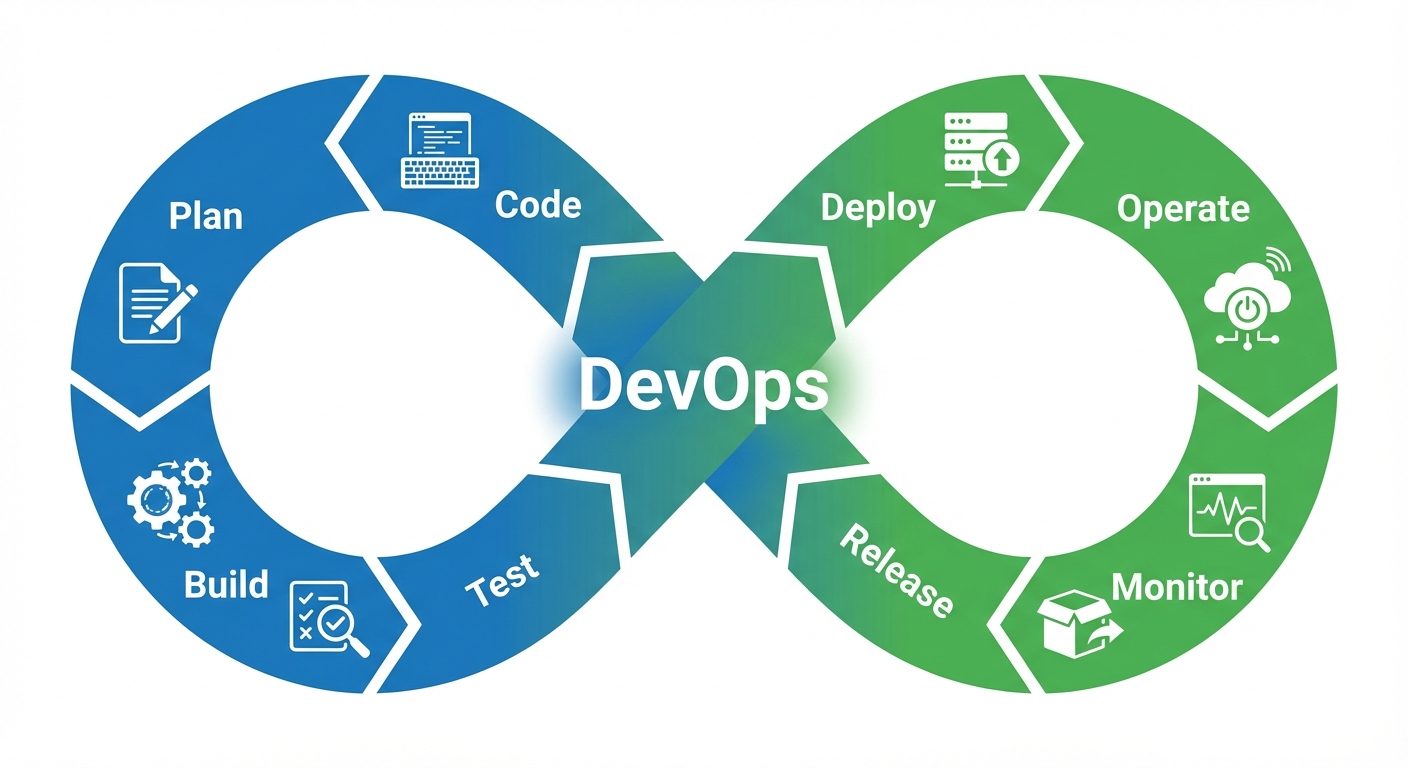
2. The DevOps Life Cycle & Automation
The DevOps life cycle is continuous, represented by an infinity loop. Automation is the core enabler of this cycle, removing manual errors and speeding up processes.
Phases of the DevOps Life Cycle:
- Plan: Defining business value and requirements.
- Code: Software design and code development using Git.
- Build: Managing software versions and compiling code (Maven/Gradle).
- Test: Automated testing to ensure quality (Selenium/JUnit).
- Release: managing, scheduling, and controlling the build updates.
- Deploy: Automatic deployment to production environments (Docker/Kubernetes).
- Operate: Configuration and management of the software.
- Monitor: Identifying performance issues and bugs in real-time (Nagios).
Role of Automation
- Consistency: Eliminates "it works on my machine" issues.
- Speed: Builds and deployments happen in minutes, not hours.
- Reliability: Automated tests run the exact same way every time.
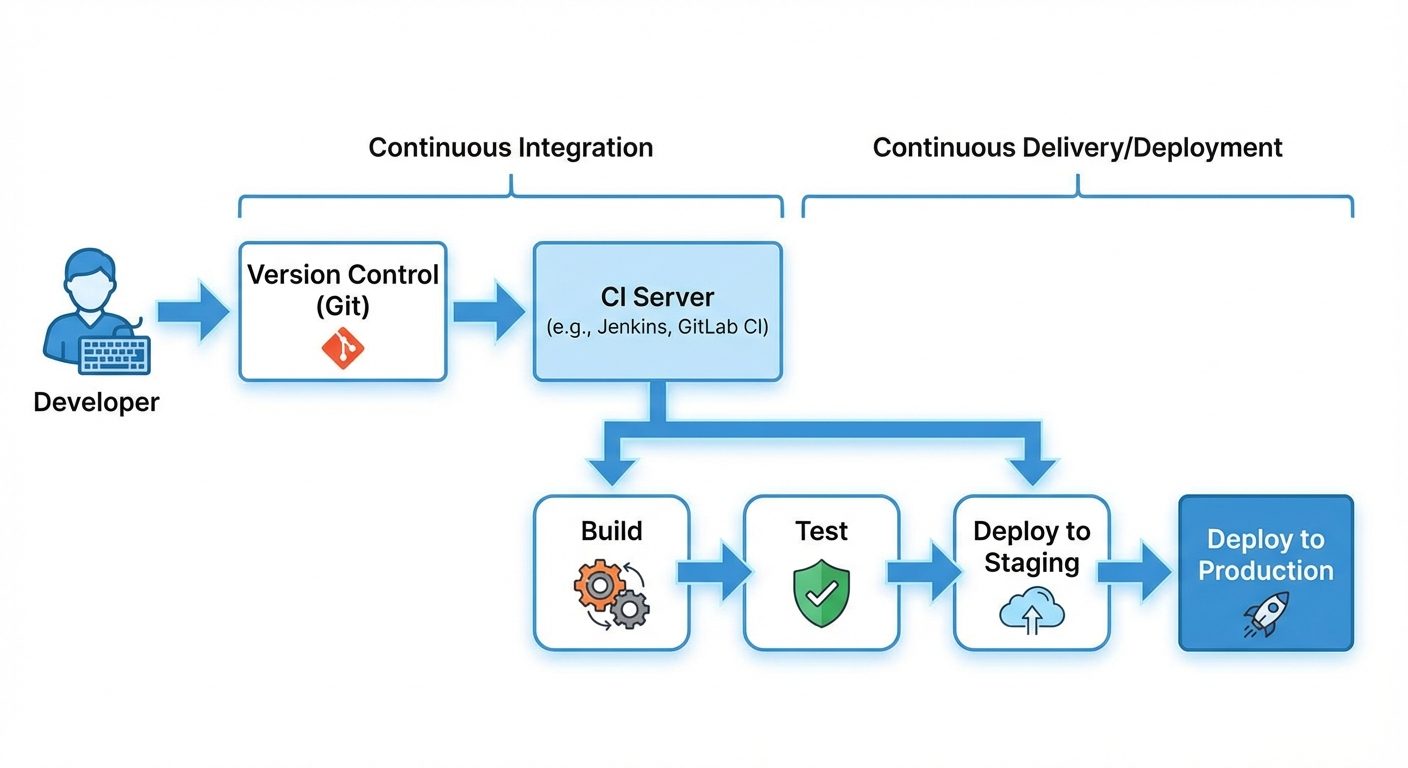
3. CI/CD: Continuous Integration and Continuous Deployment
CI/CD is the backbone of modern DevOps operations.
- Continuous Integration (CI): Developers frequently merge their code changes into a central repository (like GitHub). Automated builds and tests run immediately to validate the code.
- Continuous Delivery (CD): Code changes are automatically built, tested, and prepared for a release to production.
- Continuous Deployment: Every change that passes all stages of the production pipeline is released to customers automatically, with no human intervention.
4. DevOps Tools
A "DevOps Toolchain" is a set of tools used to perform DevOps tasks.
- Git: A distributed version control system for tracking changes in source code. It allows multiple developers to work together.
- Maven: A build automation tool used primarily for Java projects. It manages dependencies (libraries) and the build process.
- Selenium: An open-source tool for automating web browsers. It is primarily used for functional and regression testing of web applications.
- Docker: A platform for "containerization." It packages an application and its dependencies into a "container" that can run on any Linux server, ensuring consistency across environments.
- Kubernetes (K8s): An open-source system for automating deployment, scaling, and management of containerized applications (orchestration). It manages Docker containers.
- Puppet: A configuration management tool. It treats "Infrastructure as Code," allowing admins to define the state of their IT infrastructure automatically.
- Ansible: Similar to Puppet but agentless (easier to set up). It automates software provisioning, configuration management, and application deployment.
- Nagios: A monitoring system that alerts DevOps teams to system outages, server crashes, or performance bottlenecks.
5. Fundamentals of Software Testing
Software Testing is the process of evaluating and verifying that a software product or application does what it is supposed to do. The benefits include preventing bugs, reducing development costs, and improving performance.
Objectives of Testing
- Verification: Are we building the product right? (Adhering to specs).
- Validation: Are we building the right product? (Meeting user needs).
- Defect Detection: Finding bugs before the customer does.
- Quality Assurance: Ensuring reliability, security, and performance.
Levels of Testing
Testing is performed at different granularities:
- Unit Testing: Testing individual components or modules of source code (usually done by developers).
- Integration Testing: Testing the interaction between integrated units/modules to detect interface defects.
- System Testing: Testing the complete, integrated software to verify it meets requirements.
- Acceptance Testing (UAT): Testing performed by the client/user to verify the system satisfies business requirements before delivery.
Types of Testing
- Functional Testing: Checks what the system does (e.g., Unit, Integration, System, Sanity, Smoke).
- Non-Functional Testing: Checks how the system performs (e.g., Performance, Load, Stress, Security, Usability).
6. Manual vs. Automation Testing & Test Design
Manual vs. Automation
| Aspect | Manual Testing | Automation Testing |
|---|---|---|
| Definition | Human tester executes test cases without tools. | Tools execute pre-scripted tests. |
| Speed | Slower, prone to human fatigue. | Faster, can run 24/7. |
| Accuracy | Prone to human error. | High accuracy (does exactly what script says). |
| Cost | Low initial cost, high long-term cost (labor). | High initial cost (tools/scripting), low ROI long-term. |
| Suitability | Best for Usability, Ad-hoc, and Exploratory testing. | Best for Regression, Load, and repeated execution. |
Introduction to Test Case Design
A test case is a set of conditions under which a tester will determine whether an application represents the requirements.
Example Test Case: Login Functionality
| ID | Test Step | Test Data | Expected Result | Actual Result | Status |
|---|---|---|---|---|---|
| TC01 | Enter valid username and password | User: admin<br>Pass: 12345 | Login successful, redirect to dashboard | Dashboard loaded | Pass |
| TC02 | Enter invalid password | User: admin<br>Pass: wrong | Error message "Invalid Credentials" | Error displayed | Pass |
Applications of Software Testing in IT Companies
- BFSI (Banking): Critical for security and transaction accuracy.
- E-Commerce: Essential for load testing (Handling high traffic like Black Friday) and payment gateway verification.
- Healthcare: Compliance with regulations (HIPAA) and data integrity.
7. Defect Life Cycle (Bug Life Cycle)
The Defect Life Cycle is the journey of a defect from its identification to its closure.
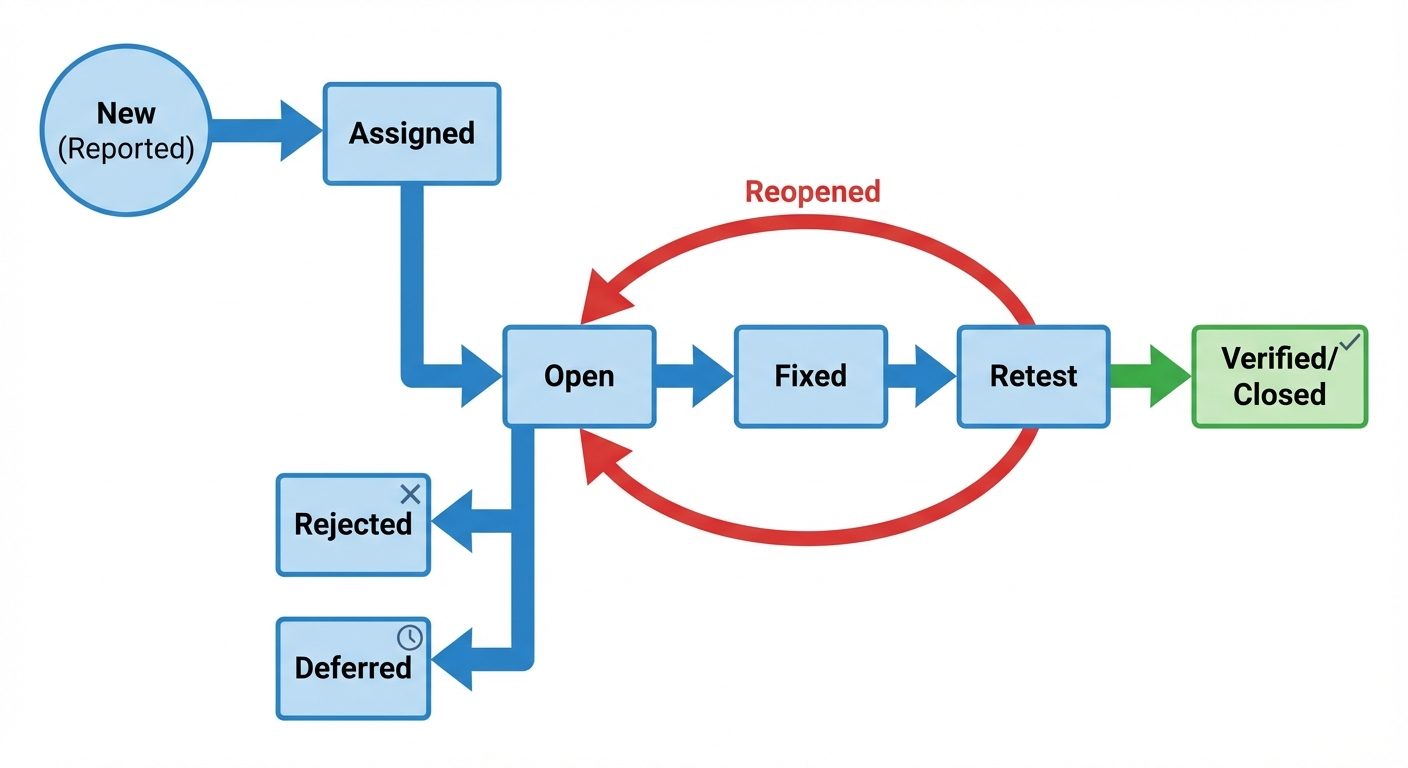
Stages:
- New: Defect is logged/posted for the first time.
- Assigned: Lead assigns the defect to a developer.
- Open: Developer starts analyzing and working on the fix.
- Fixed: Developer makes necessary code changes and marks it fixed.
- Pending Retest: Code is deployed for testing.
- Retest: Tester verifies the fix.
- Verified/Closed: If the bug is gone, it is closed.
- Reopened: If the bug persists, it is sent back to the developer.
8. Career Opportunities in DevOps & Testing
The industry demand for "Shift Left" (testing early) and rapid deployment has created high demand for these roles.
Roles
- DevOps Engineer: Focuses on infrastructure, CI/CD pipelines, and cloud management.
- QA Automation Engineer: Writes scripts (Python/Java) to automate testing using tools like Selenium.
- Site Reliability Engineer (SRE): Ensures systems are reliable and scalable (Google's approach to DevOps).
- Release Manager: Coordinates the deployment of code to production.
- Manual Tester: Focuses on UX/UI and exploratory testing.
Required Skillset
- Hard Skills: Linux/Unix command line, Scripting (Python, Bash, or Shell), Git, Jenkins/Maven, Docker/Kubernetes, Cloud platforms (AWS/Azure).
- Soft Skills: Communication (bridging the gap between teams), problem-solving, and adaptability.
Did this save you a night before the exam?
LPU Notes is free, and it stays free. Ads cover part of the server bill. The rest comes out of a student's own pocket: the domain, the storage, and keeping the site up through the weeks everyone needs it at once.
The payment button didn't load. An ad blocker or a filtered network is the usual reason. to try again.
Nothing here is ever locked, and nothing unlocks. Chip in only if it was worth it. What it pays for →