Unit 3: Cybersecurity
1. Introduction to Cybersecurity
Definition
Cybersecurity represents the body of technologies, processes, and practices designed to protect networks, devices, programs, and data from attack, damage, or unauthorized access. It is often referred to as information technology security or electronic information security.
Importance in the Digital Era
- Data Protection: Protecting sensitive personal information (PII), protected health information (PHI), and intellectual property.
- Economic Stability: Preventing financial loss due to theft or service disruption.
- National Security: Protecting critical infrastructure (power grids, water supplies) from cyberwarfare.
- Trust: Maintaining user confidence in digital banking, e-commerce, and communication platforms.
The CIA Triad
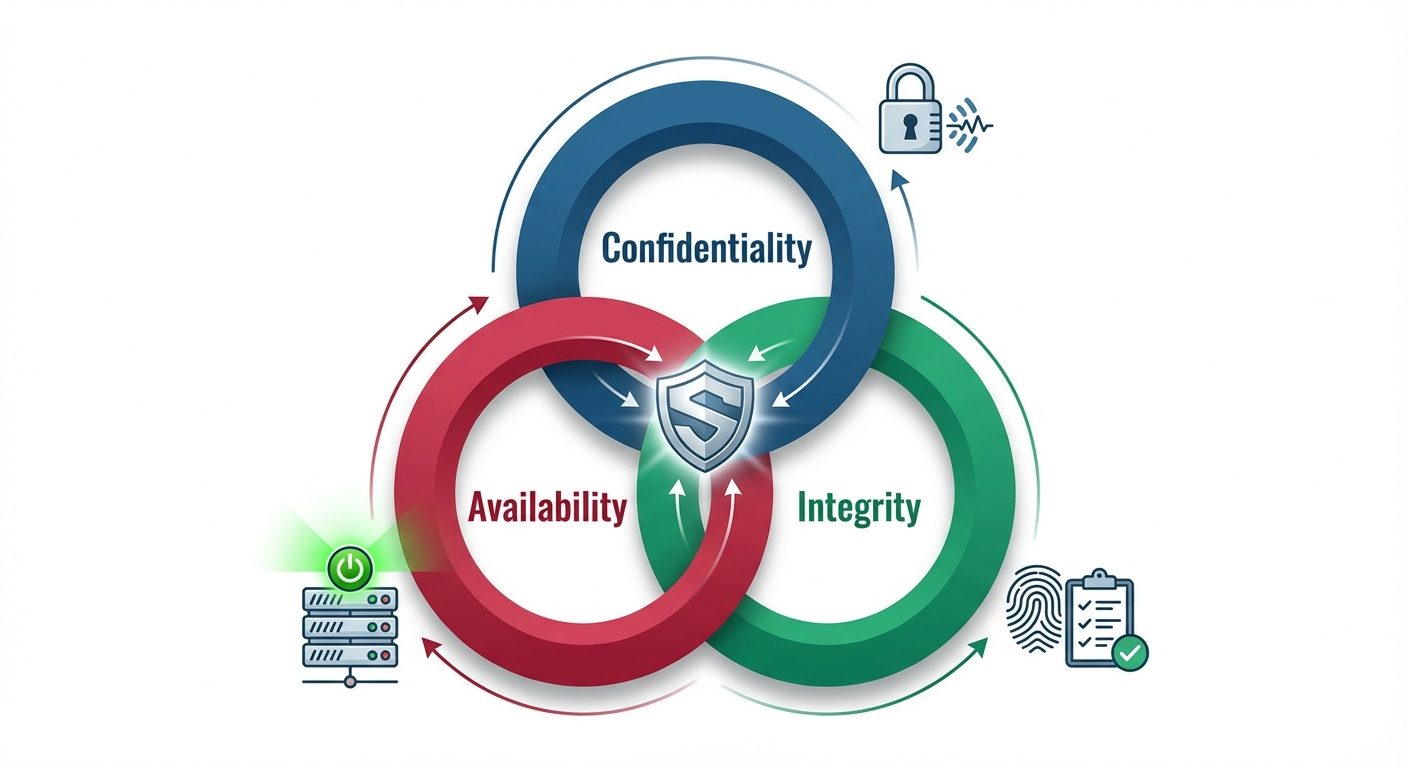
The CIA Triad is the foundational model for information security policies within an organization.
- Confidentiality: Ensuring that sensitive information is disclosed only to authorized parties.
- Methods: Encryption, Access Control Lists (ACLs), Two-Factor Authentication (2FA).
- Integrity: Ensuring that data remains accurate, consistent, and trustworthy over its entire lifecycle. It prevents unauthorized modification.
- Methods: Hashing (checksums), Digital Signatures, Version Control.
- Availability: Ensuring that information and resources are accessible to authorized users when needed.
- Methods: Redundancy (backups), Failover systems, DDoS protection.
2. Cyber Threat Landscape
The threat landscape refers to the entire scope of potential cyber risks.
Insider vs. External Threats
- External Threats: originate from outside the organization.
- Actors: Nation-states, criminal syndicates, hacktivists, and script kiddies.
- Goal: Financial gain, espionage, or chaos.
- Insider Threats: originate from within the organization.
- Malicious Insiders: Disgruntled employees stealing data or sabotaging systems.
- Negligent Insiders: Employees who accidentally click phishing links or mishandle data (human error).
3. Common Cyber-Attacks
Phishing and Social Engineering
Social engineering relies on psychological manipulation rather than technical hacking to trick users into making security mistakes.
- Phishing: Sending fraudulent emails resembling reputable sources to steal sensitive data.
- Spear Phishing: Targeted attacks against a specific individual or organization.
- Vishing: Phishing via voice calls.
- Pretexting: Creating a fabricated scenario (pretext) to obtain information.
Password and Brute-Force Attacks
- Brute-Force:Systematically checking all possible passwords until the correct one is found.
- Dictionary Attack: Using a list of common words and passwords.
- Credential Stuffing: Using stolen username/password pairs from one breach to access other accounts.
Malware-Based Attacks
Malware (Malicious Software) is an umbrella term for intrusive software.
- Ransomware: Encrypts a victim's files; the attacker demands a ransom for the decryption key (e.g., WannaCry).
- Spyware: Secretly records user activity (keystrokes, browsing history).
- Trojans: Disguises itself as legitimate software to create backdoors.
- Rootkits: Gives attackers administrator-level access while hiding their presence.
Denial of Service (DoS) & Distributed DoS (DDoS)
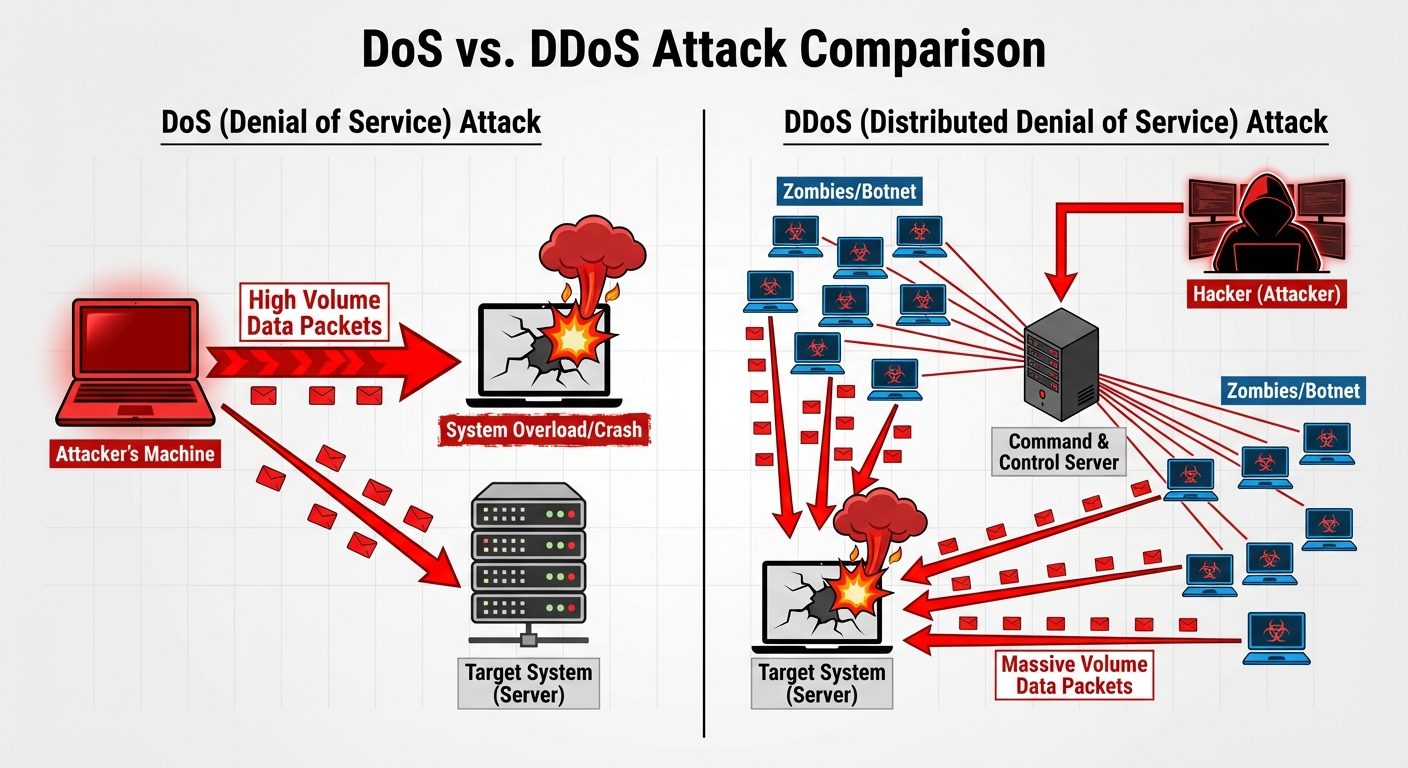
- DoS: A single attacker floods a target server with traffic to exhaust resources, making it unavailable to legitimate users.
- DDoS (Distributed): Uses a network of compromised devices (Botnet) to launch a coordinated attack, making it harder to block.
Zero-Day Attack
An attack that exploits a software vulnerability that is unknown to the software vendor or antivirus vendors.
- Zero-Day Vulnerability: The flaw exists but is undiscovered.
- Zero-Day Exploit: The code used to take advantage of the flaw before a patch is released.
4. Case Studies of Recent Cyber Incidents
- SolarWinds (2020):
- Type: Supply Chain Attack.
- Impact: Hackers inserted malicious code into the Orion software updates. 18,000 companies and US government agencies downloaded the compromised update, allowing espionage.
- Colonial Pipeline (2021):
- Type: Ransomware (DarkSide group).
- Impact: Forced the shutdown of the largest fuel pipeline in the U.S., causing gas shortages and panic buying. Highlighted the vulnerability of Critical Infrastructure.
- Log4j (2021):
- Type: Zero-Day Vulnerability (Remote Code Execution).
- Impact: A flaw in a common Java logging library allowed attackers to take control of servers worldwide. It affected millions of devices.
5. Personal Data Protection and Digital Hygiene
Secure Web Browsing
- HTTPS: Ensure the padlock icon is present (Hypertext Transfer Protocol Secure).
- VPN (Virtual Private Network): Encrypts internet traffic, masking location and data from ISPs and hackers on public Wi-Fi.
- Ad Blockers: Prevent "Malvertising" (malicious code embedded in ads).
Social Media and Email Security
- Privacy Settings: Restrict who can view posts and personal info.
- MFA (Multi-Factor Authentication): Always enable 2FA/MFA.
- Email Hygiene: Verify sender addresses, hover over links before clicking, and never open unexpected attachments.
Digital Footprints
- Passive Footprint: Data collected without user knowledge (IP address, browser history).
- Active Footprint: Data intentionally shared (Facebook posts, blog comments).
- Mitigation: Regular cookie clearing, using privacy-focused browsers (Brave, Tor), and "Right to be Forgotten" requests.
6. Cybersecurity Tools
Nmap (Network Mapper)
- Function: Open-source tool for network discovery and security auditing.
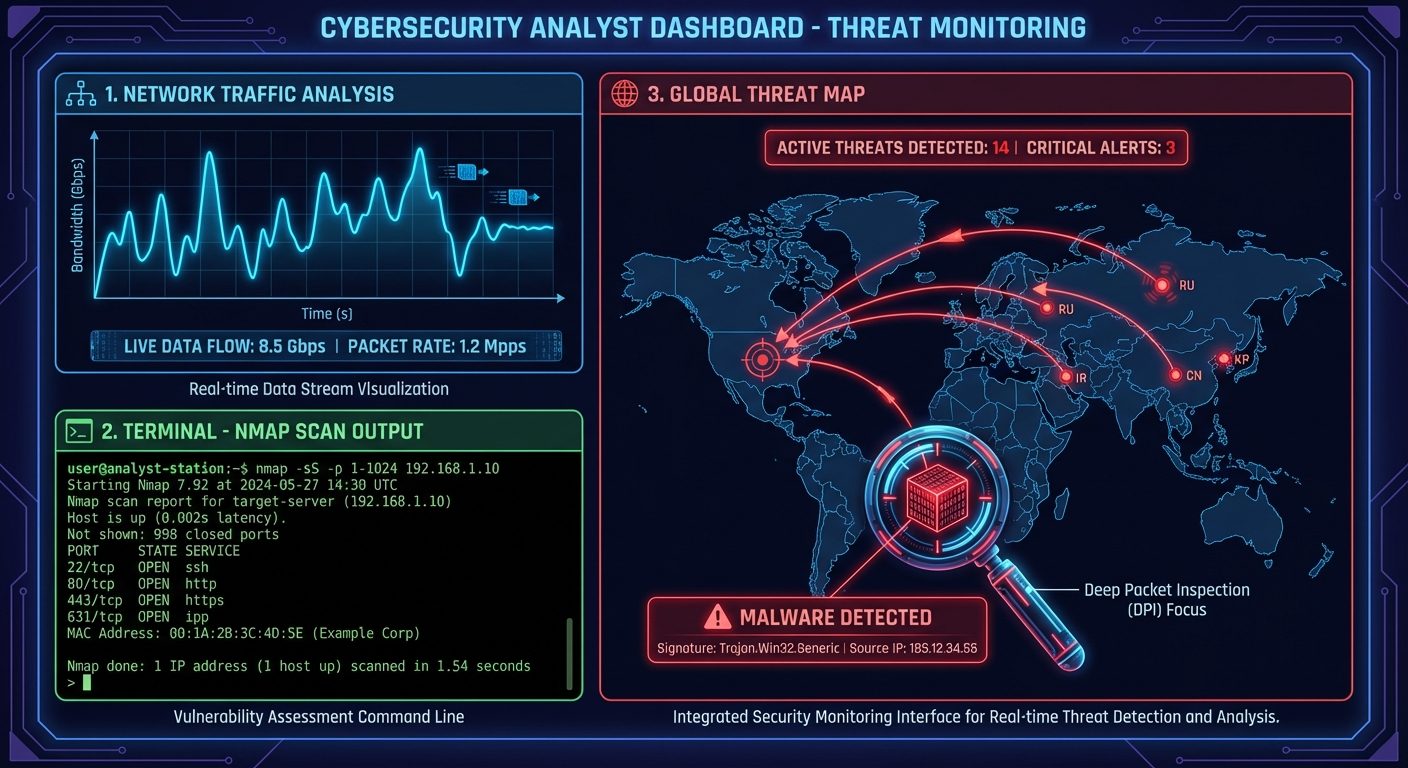
- Usage: Scans IP addresses to identify active hosts, open ports, and operating systems. Used by admins for inventory and hackers for reconnaissance.
Wireshark
- Function: Network protocol analyzer.
- Usage: Captures data packets moving through a network interface in real-time. It allows detailed inspection of traffic to troubleshoot network performance or detect malicious data exfiltration.
AI-Based Threat Detection
- Behavioral Analysis: AI learns "normal" network behavior and alerts on anomalies (e.g., a user downloading 50GB of data at 3 AM).
- Automated Response: Can isolate infected devices instantly without human intervention.
7. Cybersecurity Compliance
Organizations must adhere to legal standards to avoid fines and reputational damage.
- GDPR (General Data Protection Regulation): EU law on data protection and privacy.
- HIPAA (Health Insurance Portability and Accountability Act): US law protecting medical information.
- ISO/IEC 27001: International standard for Information Security Management Systems (ISMS).
- PCI DSS: Standards for securing credit card transactions.
8. Job Roles and Skill Sets
Job Roles
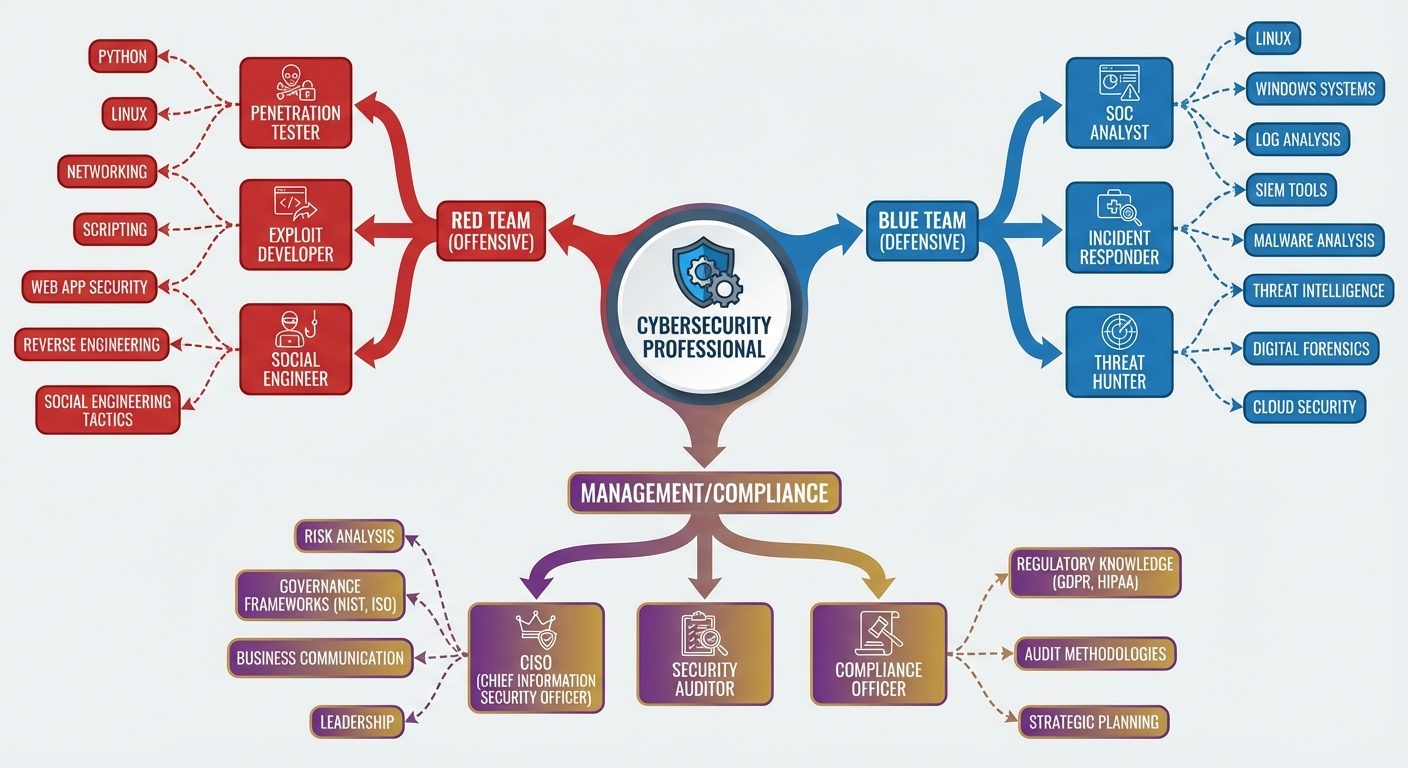
- CISO (Chief Information Security Officer): Executive responsible for an organization's information and data security.
- Penetration Tester (Ethical Hacker): Proactively attempts to break into systems to find vulnerabilities.
- SOC (Security Operations Center) Analyst: Monitors networks for alerts and responds to incidents.
- Security Architect: Designs secure network infrastructures.
Essential Skill Sets
- Technical Skills:
- Networking (TCP/IP, DNS, Routing).
- Operating Systems (Linux/Unix, Windows Server).
- Scripting/Coding (Python, Bash, PowerShell).
- Cloud Security (AWS, Azure).
- Soft Skills:
- Problem-solving and critical thinking.
- Attention to detail.
- Ethical integrity.
Did this save you a night before the exam?
LPU Notes is free, and it stays free. Ads cover part of the server bill. The rest comes out of a student's own pocket: the domain, the storage, and keeping the site up through the weeks everyone needs it at once.
The payment button didn't load. An ad blocker or a filtered network is the usual reason. to try again.
Nothing here is ever locked, and nothing unlocks. Chip in only if it was worth it. What it pays for →