Unit 5: Managing Files, Directories, Linux Boot Process & Kernel Modules
1. Managing Files and Directories
Effective system administration requires fluency in command-line file manipulation. This section covers creation, editing, searching, and advanced text processing.
1.1 Creating and Editing Text Files
Command Line Editors
- nano: A beginner-friendly, modeless editor.
- Usage:
nano filename.txt - Key Commands:
Ctrl+O(Save),Ctrl+X(Exit),Ctrl+W(Search).
- Usage:
- vi / vim: The standard, modal editor found on almost all Unix systems. It operates in distinct modes:
- Command Mode: Default mode for navigation. Use
h,j,k,lto move. Pressxto delete characters,ddto delete lines. - Insert Mode: Press
ito enter text. PressEscto return to Command Mode. - Last Line Mode: Press
:in Command Mode. Common commands::w(save),:q(quit),:wq(save and quit),:q!(force quit without saving).
- Command Mode: Default mode for navigation. Use
creation Commands
touch filename: Creates an empty file or updates the timestamp of an existing file.cat > filename: Creates a file and allows typing content (end withCtrl+D).
1.2 Performing Operations on Files and Directories
- Listing:
ls -l(long format),ls -a(show hidden files). - Copying:
cp source destination(files),cp -r source_dir dest_dir(recursive/directories). - Moving/Renaming:
mv oldname newnameormv file /path/to/destination. - Removing:
rm file(delete file),rm -r directory(delete directory recursively),rm -rf directory(force delete, use with caution). - Directories:
mkdir dirname(create),rmdir dirname(remove empty directory).
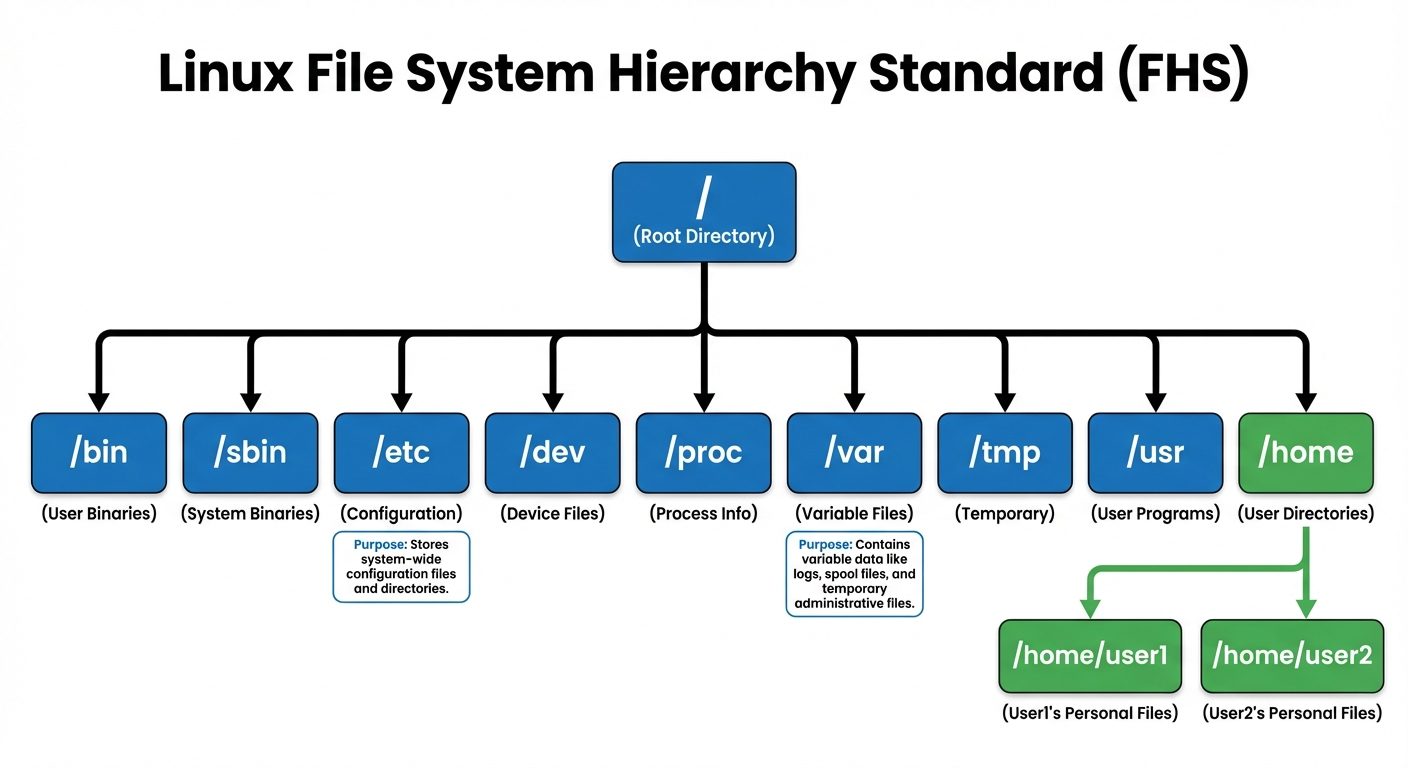
1.3 Searching for Files
- find: Searches the directory tree recursively in real-time.
- Syntax:
find [path] [expression] - Example:
find /etc -name "*.conf"(Find all .conf files in /etc). - Example:
find /home -user bob(Find files owned by user 'bob'). - Example:
find /var/log -mtime -7(Find files modified in the last 7 days).
- Syntax:
- locate: Searches a pre-built database (faster but may be outdated).
- Usage:
locate filename. - Update: Run
updatedbto refresh the database.
- Usage:
- which: Shows the full path of a shell command (e.g.,
which python).
1.4 Processing Text Files and Manipulating Output
text Processing Tools
- cat: Concatenate and display file content.
- less / more: Paging tools to view large files one screen at a time.
- head / tail: View the beginning or end of a file.
- Useful:
tail -f /var/log/syslog(Follows the log file in real-time as it updates).
- Useful:
- grep: Global Regular Expression Print. Searches for text patterns within files.
- Example:
grep "error" /var/log/syslog(Show lines containing "error"). - Example:
grep -r "config" /etc/(Recursive search).
- Example:
- cut: Extracts sections from each line of a file.
- sort: Sorts lines of text files.
- uniq: Reports or omits repeated lines.
Output Manipulation (I/O Redirection)
Linux follows the concept of Standard Input (stdin, 0), Standard Output (stdout, 1), and Standard Error (stderr, 2).
- Redirect Output (
>and>>):command > file: Saves output to file (overwrites).command >> file: Appends output to the end of the file.command 2> file: Redirects error messages only.
- Piping (
|): Takes the stdout of the first command and uses it as the stdin of the second.- Example:
cat file.txt | grep "search_term" | sort
- Example:
- tee: Reads from standard input and writes to both standard output and files simultaneously.
2. The Linux Kernel and Kernel Modules
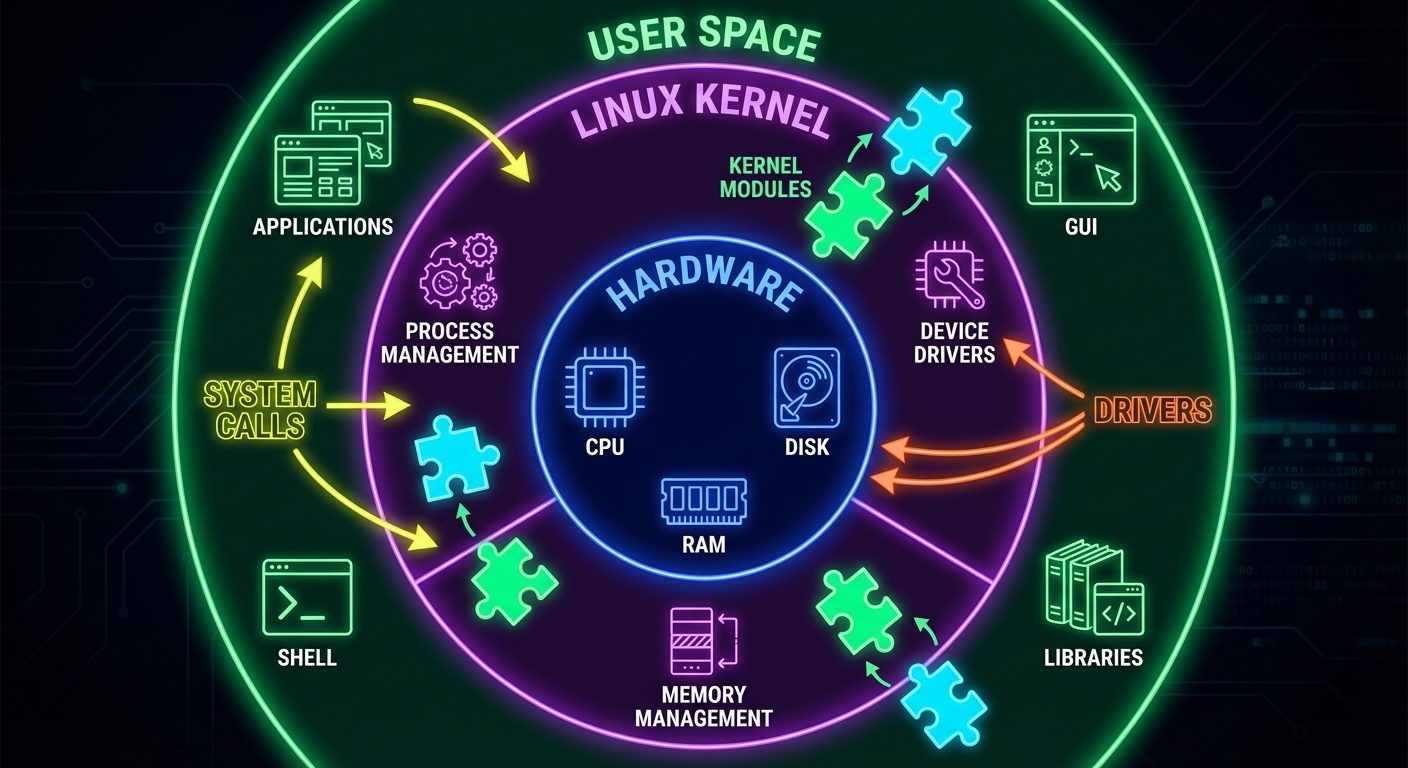
The kernel is the core of the operating system, managing hardware resources and system calls. Linux uses a monolithic kernel architecture that allows dynamic loading of components (modules).
2.1 Exploring the Linux Kernel
- Kernel Location: Typically found in
/boot, namedvmlinuz-<version>. - uname command:
uname -r: Prints the kernel release version.uname -a: Prints all system information including kernel version and architecture.
- /proc directory: A pseudo-filesystem providing an interface to kernel data structures.
/proc/cpuinfo: CPU information./proc/meminfo: Memory usage./proc/modules: List of loaded modules.
2.2 Kernel Modules
Kernel modules are pieces of code (drivers) that can be loaded and unloaded into the kernel upon demand, without recompiling the kernel or rebooting.
Monitoring Modules
- lsmod: Lists all currently loaded kernel modules.
- Output: Module name, size, and used_by (dependencies).
- modinfo <module_name>: Displays detailed information about a module (filename, license, description, parameters).
Installing and Configuring Modules
- insmod: Inserts a module into the kernel. (Does not resolve dependencies).
- Usage:
insmod /path/to/module.ko
- Usage:
- rmmod: Removes a module.
- Usage:
rmmod module_name
- Usage:
- modprobe: The intelligent tool for managing modules. It looks at the module directory
/lib/modules/$(uname -r)and automatically handles dependencies.- Load:
modprobe module_name - Remove:
modprobe -r module_name
- Load:
Persistent Configuration
To ensure modules load at boot or have specific parameters:
- Config Directory:
/etc/modprobe.d/ - Blacklisting: To prevent a module from loading, create a file (e.g.,
/etc/modprobe.d/blacklist.conf) containing:blacklist module_name.
3. The Linux Boot Process
Understanding the boot process is critical for troubleshooting startup failures.
3.1 The Boot Sequence Stages
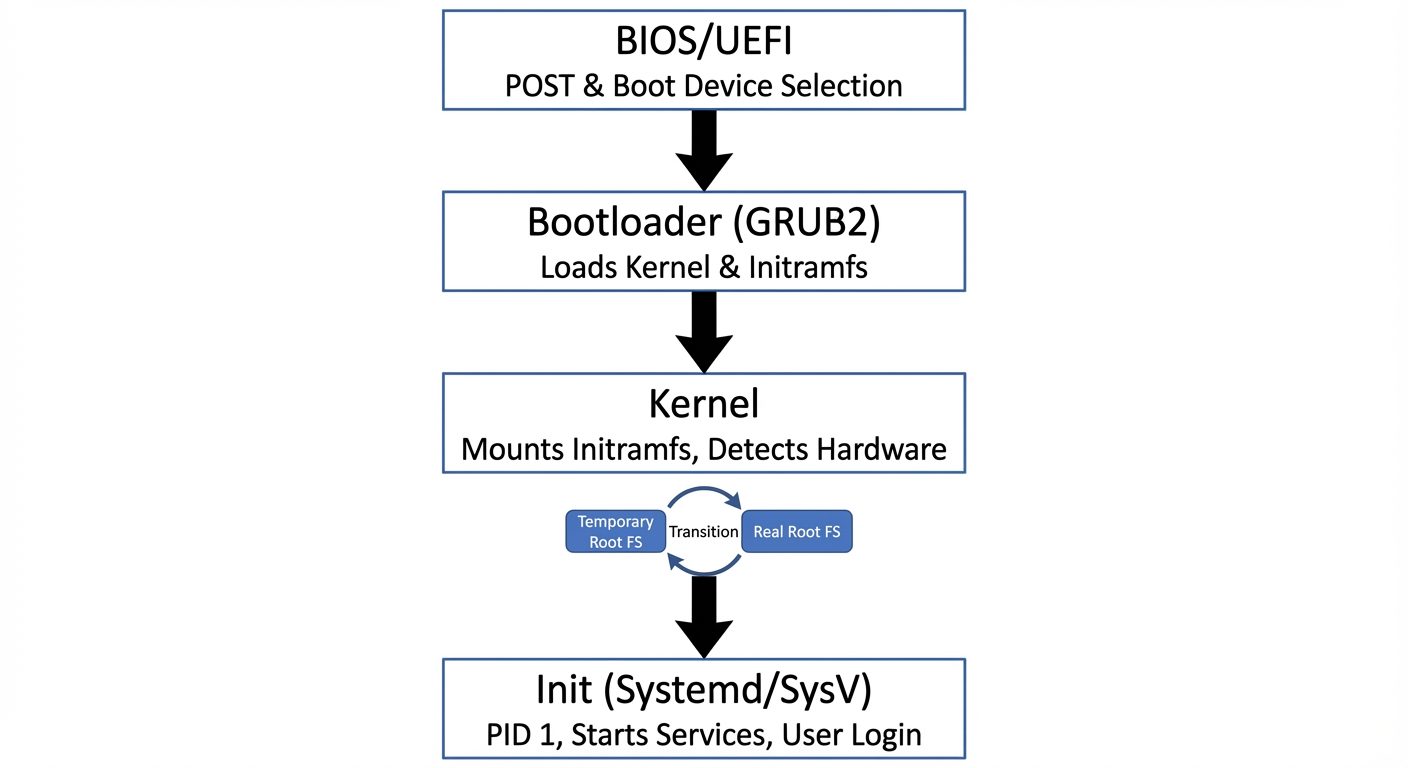
- BIOS/UEFI (Hardware Initialization):
- Performs POST (Power-On Self-Test).
- Identifies the boot device (Hard Disk, USB, Network).
- Loads the Bootloader.
- Bootloader (GRUB2):
- Loads into memory.
- Displays the boot menu (kernel selection).
- Loads the Kernel and the Initial RAM Filesystem (initramfs).
- Kernel Initialization:
- The kernel decompresses itself and sets up system functions (hardware detection, memory management).
- Mounts the
initramfs(a temporary root filesystem) to load necessary drivers (like filesystem drivers) required to mount the real root filesystem.
- Init Process:
- The kernel executes the first process (PID 1).
- Traditionally
sysvinit, but modern Linux uses systemd. - Systemd mounts the real root filesystem and starts services/targets (GUI, Network, etc.).
4. Configuring GRUB2
GRUB2 (Grand Unified Bootloader version 2) is the standard bootloader for most modern Linux distributions.
4.1 GRUB2 Architecture
- /boot/grub2/grub.cfg: The main configuration file used during boot.
- WARNING: Do not edit this file directly. It is automatically generated.
- /etc/default/grub: The primary user-configurable settings file.
- /etc/grub.d/: Directory containing scripts that build the
grub.cfg.
4.2 Configuring Boot Components
Common tasks in /etc/default/grub:
GRUB_TIMEOUT=5: Sets the boot menu countdown in seconds.GRUB_DEFAULT=0: Sets the default kernel to boot (0 is the first entry).GRUB_CMDLINE_LINUX="...": Pass arguments to the kernel (e.g.,rhgb quietfor silent boot, oripv6.disable=1).
4.3 Applying Changes
After editing /etc/default/grub, you must regenerate the main config file for changes to take effect.
Command:
# On BIOS systems:
grub2-mkconfig -o /boot/grub2/grub.cfg

# On UEFI systems (path varies by distro, e.g., CentOS/RHEL):
grub2-mkconfig -o /boot/efi/EFI/centos/grub.cfg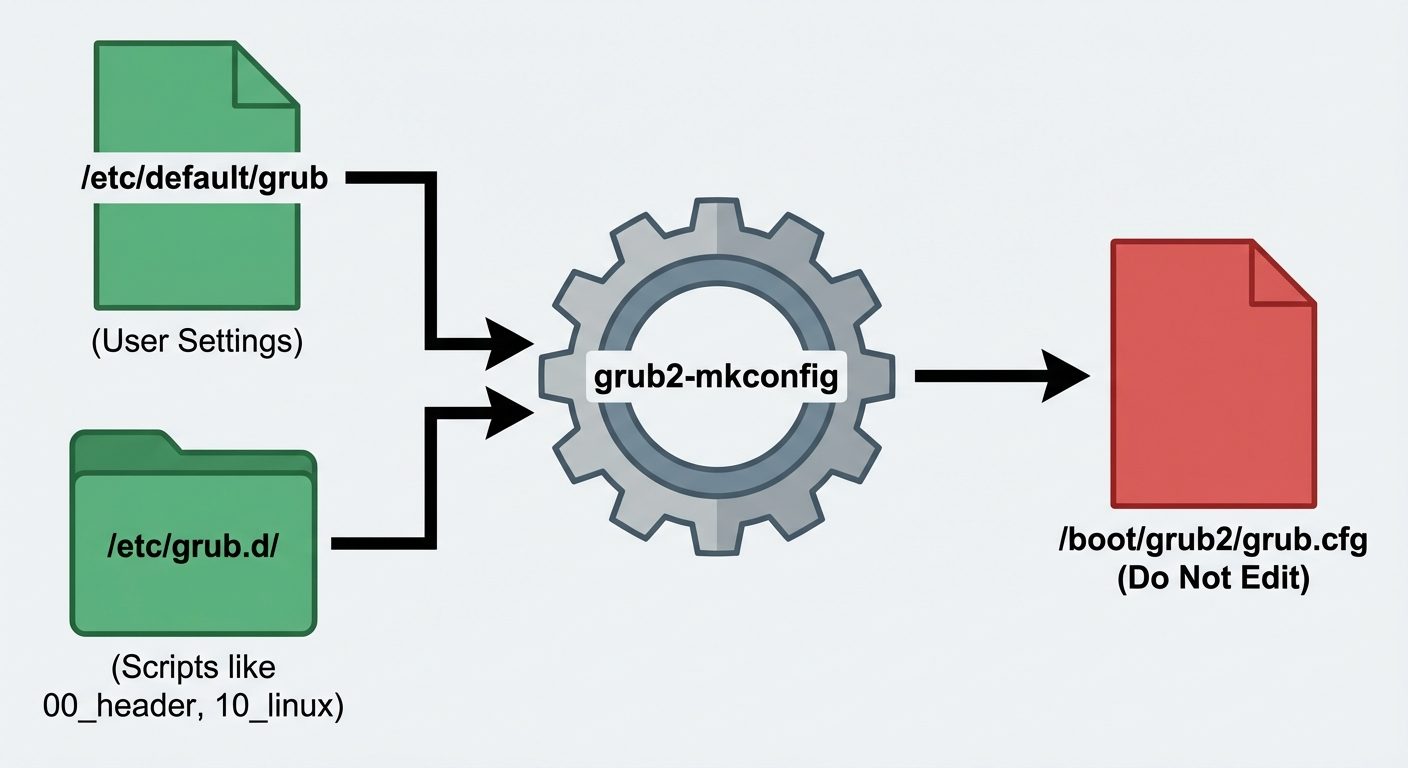
Did this save you a night before the exam?
LPU Notes is free, and it stays free. Ads cover part of the server bill. The rest comes out of a student's own pocket: the domain, the storage, and keeping the site up through the weeks everyone needs it at once.
The payment button didn't load. An ad blocker or a filtered network is the usual reason. to try again.
Nothing here is ever locked, and nothing unlocks. Chip in only if it was worth it. What it pays for →