Unit 4: Performing Basic Linux Tasks, Managing Users, Groups, Permissions & Storage
1. Linux Fundamentals and Design Philosophy
Identify Linux Design Philosophy
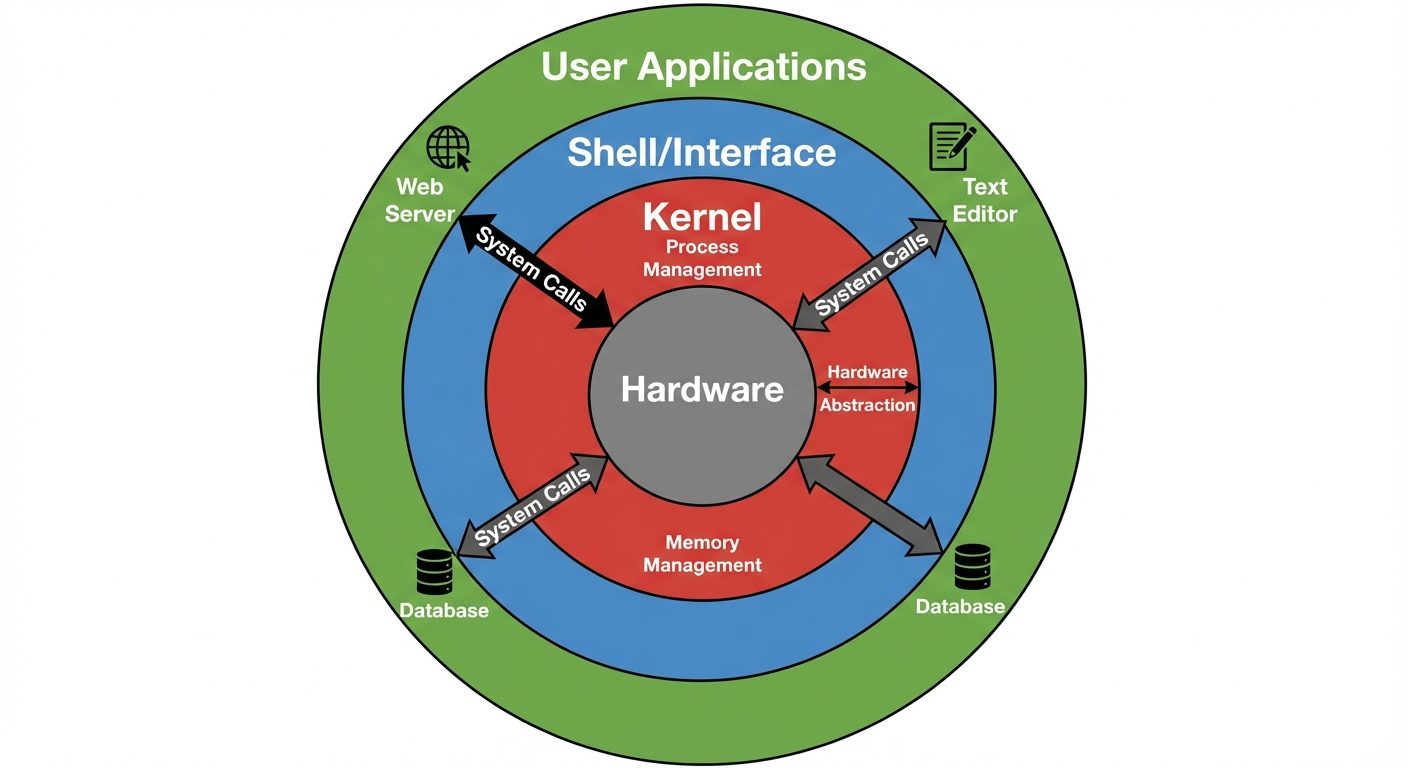
Linux follows the Unix philosophy, which emphasizes modularity and reusability. Key tenets include:
- "Everything is a file": Hardware devices, processes, and directories are represented as files in the filesystem.
- Small, single-purpose programs: Write programs that do one thing and do it well.
- Chaining: Programs are designed to work together via text streams (Standard Input/Output) using pipes (
|). - Configuration in text: System configurations are stored in human-readable text files, not binary registries.
- Case Sensitivity: Linux is natively case-sensitive (
File.txtandfile.txtare different).
Enter Shell Commands
The shell is the command-line interpreter (CLI). The most common shell is Bash (Bourne Again SHell).
- Syntax:
command [options] [arguments]ls -l /home(Command:ls, Option:-l, Argument:/home)
- Key shortcuts:
Tab: Autocompletes commands or filenames.Ctrl+C: Terminates the running command.Ctrl+R: Search command history.Up/Down Arrow: Navigate history.
Get Help with Linux
Administrators rely on built-in documentation systems:
- Man Pages (Manual): The primary reference.
man <command>(e.g.,man ls).- Navigation:
Space(next page),q(quit),/(search).
- Info Pages: detailed, hyperlinked documentation.
info <command>
- --help Option: Quick syntax summary.
<command> --help
Assume Superuser Privileges
Linux uses a permission model where the root user has unrestricted access.
- su (Switch User): Switches the current shell to another user (usually root).
su -(Switches to root and loads root's environment variables).
- sudo (SuperUser DO): Executes a single command with root privileges based on rules in
/etc/sudoers.sudo apt update- Benefits: granular control, logging of administrative actions.
2. Managing Users and Groups
User and group management is critical for system security and resource allocation.
Core Configuration Files
/etc/passwd: Stores user account information (publicly readable)./etc/shadow: Stores encrypted password hashes and aging info (readable only by root)./etc/group: Stores group information.
Create, Modify, and Delete Users
- Create:
useradduseradd -m -s /bin/bash -c "John Doe" jdoe-m: Create home directory.-s: Set default shell.-c: Comment (full name).
- Modify:
usermodusermod -aG sudo jdoe(Append user to the 'sudo' group).usermod -L jdoe(Lock the account).
- Delete:
userdeluserdel -r jdoe(Remove user AND their home directory).
Create, Modify, and Delete Groups
Groups allow permissions to be assigned to multiple users simultaneously.
- Create:
groupadd developers - Modify:
groupmod -n dev_team developers(Rename group). - Delete:
groupdel dev_team
Query Users and Groups
id <username>: Displays UID (User ID), GID (Group ID), and group memberships.whoami: Displays current effective user.worwho: Shows who is currently logged in.last: Shows history of user logins.
Configure Account Profiles
When a user is created, their environment is initialized using skeleton files.
- /etc/skel/: Any file placed here is automatically copied to a new user's home directory upon creation (e.g.,
.bashrc). - ~/.bashrc: Script executed for non-login shells (opening a new terminal window). Used for aliases and prompt settings.
- ~/.bash_profile or ~/.profile: Executed for login shells (SSH or GUI login). Used for path variables.
3. Permissions and Ownership
Linux uses a Discretionary Access Control (DAC) model based on Read, Write, and Execute.
Modify File and Directory Permissions
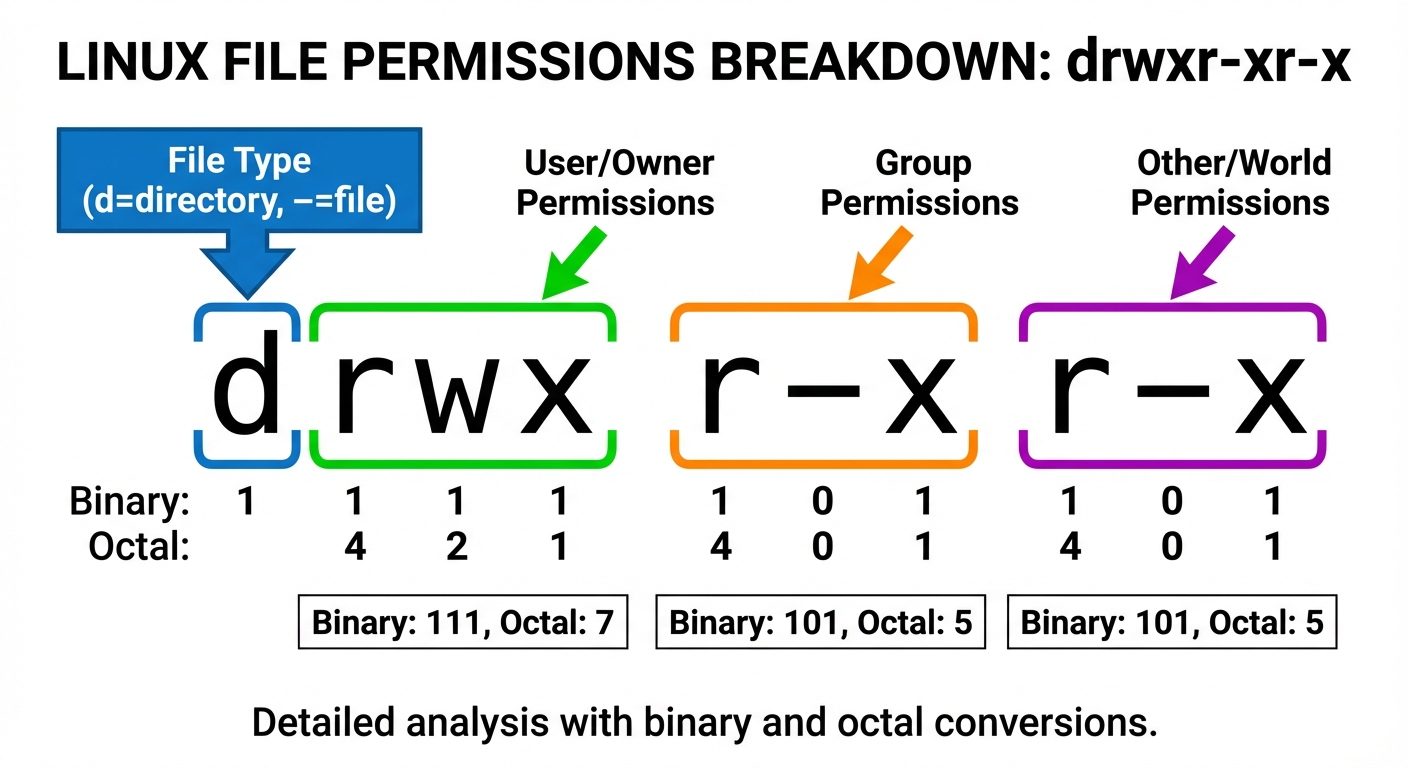
Permissions apply to three entities: User (u), Group (g), and Others (o).
Permission Modes:
- Read (r): Value 4. (File: view contents; Directory: list contents).
- Write (w): Value 2. (File: modify contents; Directory: create/delete files).
- Execute (x): Value 1. (File: run as program; Directory: enter/cd into).
The chmod Command:
- Symbolic Mode:
chmod g+w file.txt(Add write permission to group). - Octal Mode:
chmod 755 script.sh- Owner: 7 (4+2+1 = rwx)
- Group: 5 (4+0+1 = r-x)
- Others: 5 (4+0+1 = r-x)
Modify File and Directory Ownership
- chown (Change Owner):
chown user:group filenamechown bob:developers project.cchown -R bob /var/www/html(Recursive change).
- chgrp (Change Group):
chgrp developers project.c
Configure Special Permissions and Attributes
- SUID (Set User ID): (chmod u+s or 4xxx). Executables run with the permissions of the file owner, not the user running it (e.g.,
passwdcommand). - SGID (Set Group ID): (chmod g+s or 2xxx).
- On files: Run with group privileges.
- On directories: New files created inside inherit the group of the directory, not the user's primary group. Used for shared folders.
- Sticky Bit: (chmod +t or 1xxx).
- On directories: Only the file owner or root can delete a file. (e.g.,
/tmp).
- On directories: Only the file owner or root can delete a file. (e.g.,
Troubleshoot Permissions Issues
- Symptom: "Permission Denied".
- Steps:
- Check
ls -lto view current mode. - Check
idto verify user group membership. Note: If a user was just added to a group, they must logout/login for it to take effect. - Check directory permissions tree (user needs +x on all parent directories to reach a file).
- Check SELinux/AppArmor context (advanced security layers) if standard permissions look correct.
- Check
4. Storage Management
Navigate the Linux Directory Structure (FHS)
The Filesystem Hierarchy Standard defines the directory structure:
/: Root directory./boot: Kernel and bootloader files./etc: System configuration files./home: User home directories./var: Variable data (logs, spools, web files)./bin&/sbin: System binaries (programs)./dev: Device files (hardware interfaces).
Create Partitions
- fdisk: Legacy tool for MBR partitions.
- gdisk: Tool for GPT partitions.
- parted: Versatile tool for both.
- Process:
fdisk /dev/sdbn(new partition) -> Select primary/extended -> Select size.w(write changes).
Manage Logical Volumes (LVM)
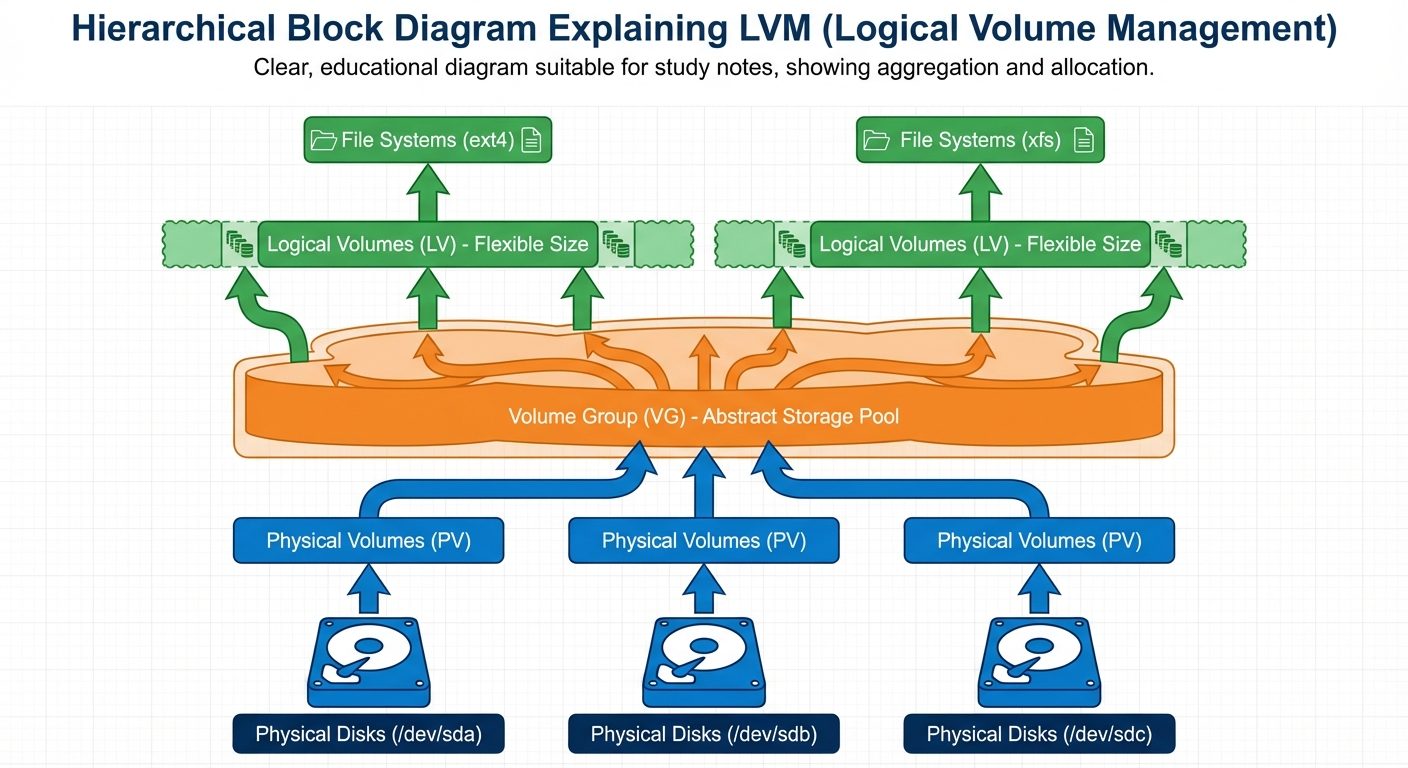
LVM allows flexible resizing of storage across multiple physical disks.
- Physical Volume (PV): Initialize the disk.
pvcreate /dev/sdb1
- Volume Group (VG): Pool storage together.
vgcreate my_data_vg /dev/sdb1
- Logical Volume (LV): Carve out a virtual partition.
lvcreate -L 10G -n my_lv my_data_vg
Manage File Systems
After partitioning (or creating an LV), a filesystem must be applied.
- Formatting:
mkfs.ext4 /dev/my_data_vg/my_lv(Standard Linux FS).mkfs.xfs /dev/sdb1(High performance, common in RHEL/CentOS).
Mount File Systems
To access data, the filesystem must be mounted to a directory point.
- Temporary Mount:
mount /dev/sdb1 /mnt/data
- Unmount:
umount /mnt/data
- Persistent Mount (
/etc/fstab):- Configures mounts to occur automatically at boot.
- Format:
<Device> <Mount Point> <Type> <Options> <Dump> <Pass> - Example:
/dev/sdb1 /var/www ext4 defaults 0 2
Did this save you a night before the exam?
LPU Notes is free, and it stays free. Ads cover part of the server bill. The rest comes out of a student's own pocket: the domain, the storage, and keeping the site up through the weeks everyone needs it at once.
The payment button didn't load. An ad blocker or a filtered network is the usual reason. to try again.
Nothing here is ever locked, and nothing unlocks. Chip in only if it was worth it. What it pays for →