Unit 6: Managing Devices & Networking
1. Managing Devices in Linux
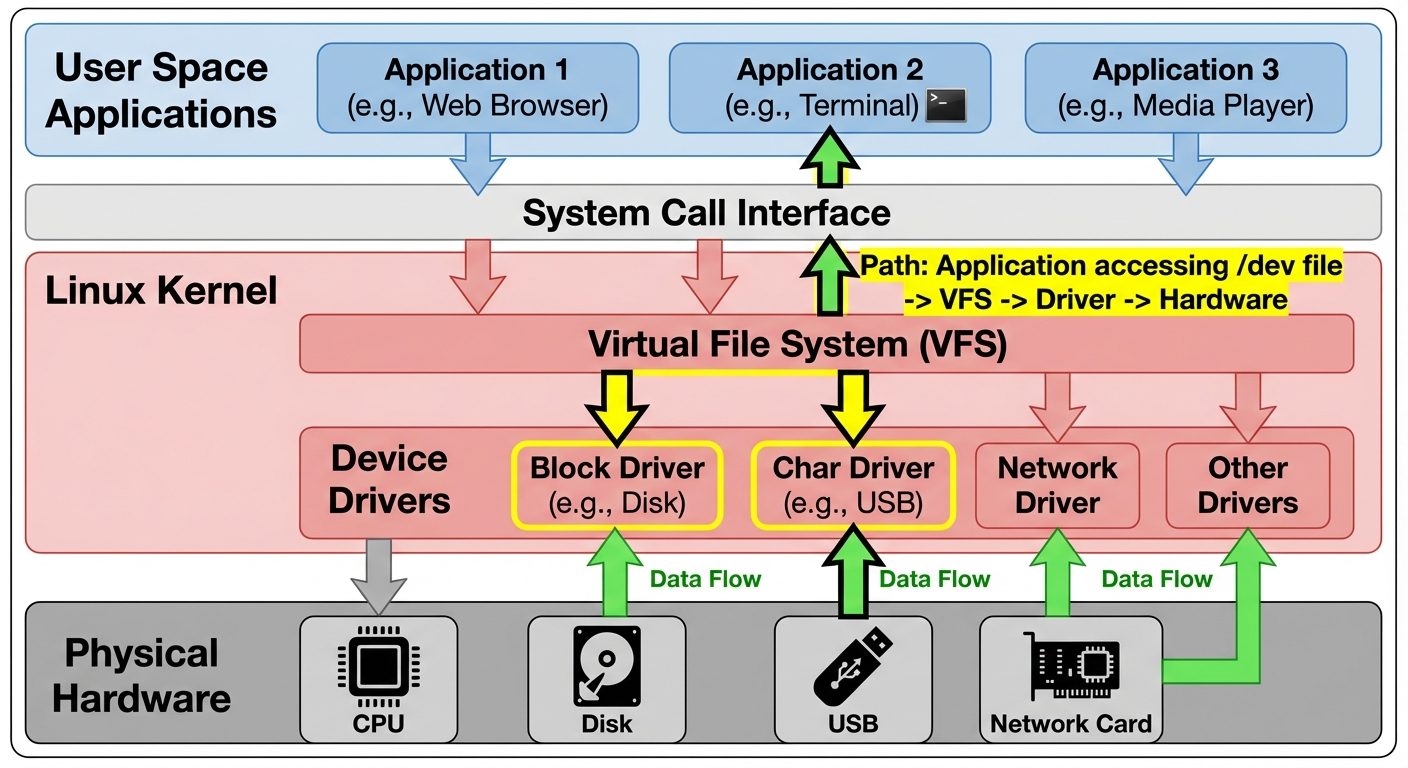
In Linux, the fundamental philosophy is "Everything is a file." This applies to hardware devices as well, which are represented as special files located within the file system.
1.1 Types of Linux Devices
Linux kernel interfaces with hardware through device drivers and presents them to user space via device files. These are categorized into three main types:
-
Block Devices (
b):- Devices that store data in fixed-size blocks (usually 512 bytes to 4KB).
- Data can be accessed randomly (buffered).
- Examples: Hard drives (
/dev/sda), SSDs, USB flash drives, CD-ROMs. - Identification:
ls -lshows a 'b' in the first column of permissions.
-
Character Devices (
c):- Devices that transmit data as a stream of characters (bytes).
- Data is accessed sequentially (unbuffered).
- Examples: Keyboards, mice, serial ports (
/dev/ttyS0), terminals, audio cards. - Identification:
ls -lshows a 'c' in the first column.
-
Network Devices:
- Packet-based devices handled by the network subsystem, not the filesystem.
- They do not usually have entries in
/dev. - Examples: Ethernet cards (
eth0,enp3s0), Wi-Fi adapters (wlan0).
1.2 The /dev Directory
The /dev directory contains the special device files.
- Naming Conventions:
sda: First SCSI/SATA/USB drive.sda1: First partition on the first drive.nvme0n1: NVMe storage device.tty: TeleTypewriter (terminal) devices.null: A black hole (/dev/null) that discards all data written to it.
1.3 Configuring Devices (udev and sysfs)
Modern Linux uses udev (userspace /dev) to dynamically manage node files.
- sysfs (
/sys): A virtual filesystem that exports information about devices and drivers from the kernel to user space. It shows the hierarchy of connected devices. - udev: A daemon that listens to kernel
uevents(hardware add/remove events). Based on rules located in/etc/udev/rules.d/, it creates or removes device nodes in/dev.
Example udev rule:
# /etc/udev/rules.d/10-local.rules
# Assign a persistent name to a USB network adapter based on MAC address
SUBSYSTEM=="net", ACTION=="add", ATTR{address}=="00:11:22:33:44:55", NAME="my_usb_net"
2. Monitoring and Troubleshooting Hardware
System administrators must identify hardware specifications and diagnose failures using command-line tools.
2.1 Hardware Identification Tools
| Command | Description | Use Case |
|---|---|---|
lshw |
List Hardware | Detailed report on all hardware (memory, CPU, disk, network). |
lsusb |
List USB | Shows USB buses and connected devices (IDs usually required for drivers). |
lspci |
List PCI | Shows devices connected to the PCI bus (graphics, network cards, RAID controllers). |
lscpu |
List CPU | Architecture, number of cores, threads, and speed. |
lsblk |
List Block Devices | Tree view of storage devices and partitions. |
dmidecode |
DMI Table Decoder | Dumps hardware info from the BIOS/UEFI (serial numbers, RAM slots). |
2.2 Troubleshooting Hardware Issues
The primary log for hardware troubleshooting is the Kernel Ring Buffer.
dmesg: Displays messages from the kernel ring buffer. This is critical for seeing what happens during boot or when a new device is plugged in.- Usage:
dmesg | grep -i errorordmesg | tail(to see recent events).
- Usage:
/var/log/messagesor/var/log/syslog: Persistent logs containing system activity, including hardware errors.
Troubleshooting Workflow:
- Check Physical Connection: Is the light on? Is the cable secure?
- Check Kernel Recognition: Run
dmesg | tailimmediately after plugging in the device. - Check Driver Loading: Run
lsmodto see loaded kernel modules. If missing, usemodprobe <module_name>. - Check Resources: Use
toporhtopfor CPU/RAM issues, andiostatfor disk I/O bottlenecks.
3. Networking Fundamentals: TCP/IP
Linux networking is built on the TCP/IP protocol suite.
3.1 The TCP/IP Model
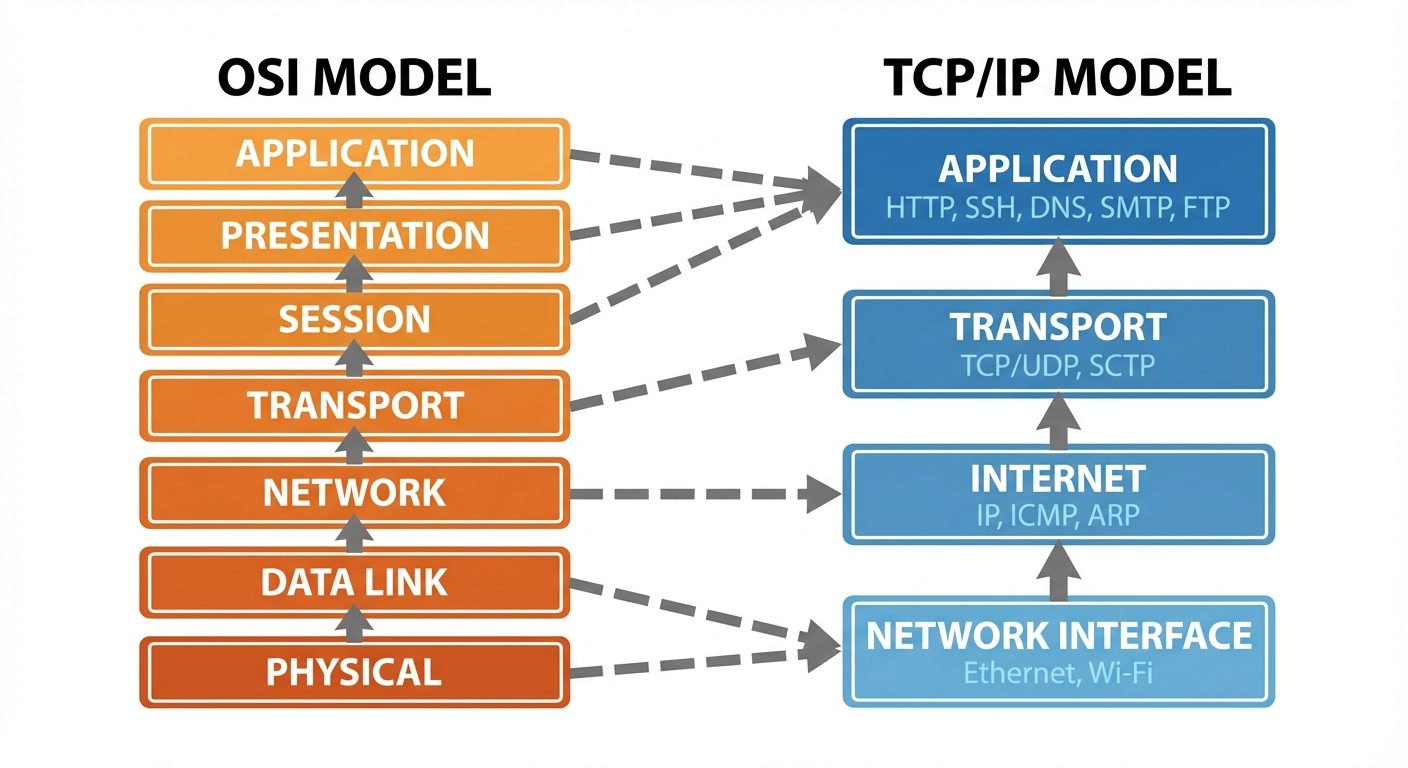
Unlike the 7-layer OSI model, TCP/IP is condensed into 4 layers:
- Application Layer: HTTP, FTP, SSH, DNS (Process-to-process communication).
- Transport Layer: TCP (Reliable), UDP (Fast, unreliable). Handles flow control and ports.
- Internet Layer: IP, ICMP, ARP. Handles logical addressing and routing.
- Network Interface (Link) Layer: Ethernet, Wi-Fi. Handles physical addressing (MAC).
3.2 IP Addressing and Subnetting
- IPv4: 32-bit address (e.g.,
192.168.1.10). - IPv6: 128-bit address (e.g.,
fe80::1). - Subnet Mask / CIDR: Defines the network portion and host portion of an IP.
- Example:
192.168.1.0/24means the subnet mask is255.255.255.0.
- Example:
- Gateway: The router address used to communicate outside the local network.
3.3 Ports
- 0-1023: Well-known ports (Requires root to bind).
- SSH: 22, HTTP: 80, HTTPS: 443.
- 1024-49151: Registered ports.
- 49152-65535: Dynamic/Ephemeral ports.
4. Linux Network Configuration
4.1 Connecting to a Network
There are legacy tools and modern replacements. Modern Linux distributions primarily use the iproute2 suite.
Comparison of Commands:
| Action | Legacy (net-tools) |
Modern (iproute2) |
|---|---|---|
| Show Interfaces | ifconfig |
ip addr show or ip a |
| Bring Interface Up | ifconfig eth0 up |
ip link set eth0 up |
| Add IP Address | ifconfig eth0 10.0.0.1 |
ip addr add 10.0.0.1/24 dev eth0 |
| Show Routing Table | route -n |
ip route |
4.2 Network Managers
Linux servers often use configuration files or daemons to manage connections persistently.
- NetworkManager (
nmcli): Common in Fedora, RHEL, CentOS, Ubuntu Desktop.nmcli dev status: Check status.nmcli con add ...: Create a new connection profile.
- Netplan: Default in Ubuntu Server. Uses YAML configuration files in
/etc/netplan/. - systemd-networkd: Lightweight manager for servers.
4.3 DHCP and DNS Client Configuration
DHCP (Dynamic Host Configuration Protocol):
- Allows the server to request an IP automatically.
- Client Daemon:
dhclient. - Command:
sudo dhclient -v eth0(Requests a new IP lease).
DNS (Domain Name System):
- Resolves hostnames (google.com) to IP addresses.
- Configuration File:
/etc/resolv.conf.- Contains lines like
nameserver 8.8.8.8. - Note: On modern systems using systemd-resolved, this file is often a symlink and should not be edited manually. Use
resolvectlor Netplan to configure DNS.
- Contains lines like
5. Linux Server Roles
A Linux system can be configured to perform specific roles on a network:
- Web Server: Apache (httpd), Nginx. Serves HTML/PHP content.
- File Server: Samba (SMB/CIFS for Windows compatibility), NFS (Unix-to-Unix).
- Database Server: MySQL, MariaDB, PostgreSQL.
- DNS Server: BIND (named). Resolves names for the network.
- DHCP Server:
isc-dhcp-server. Assigns IPs to clients. - Mail Server: Postfix, Sendmail, Dovecot.
- Proxy/Load Balancer: HAProxy, Squid.
6. Cloud and Virtualization Technologies
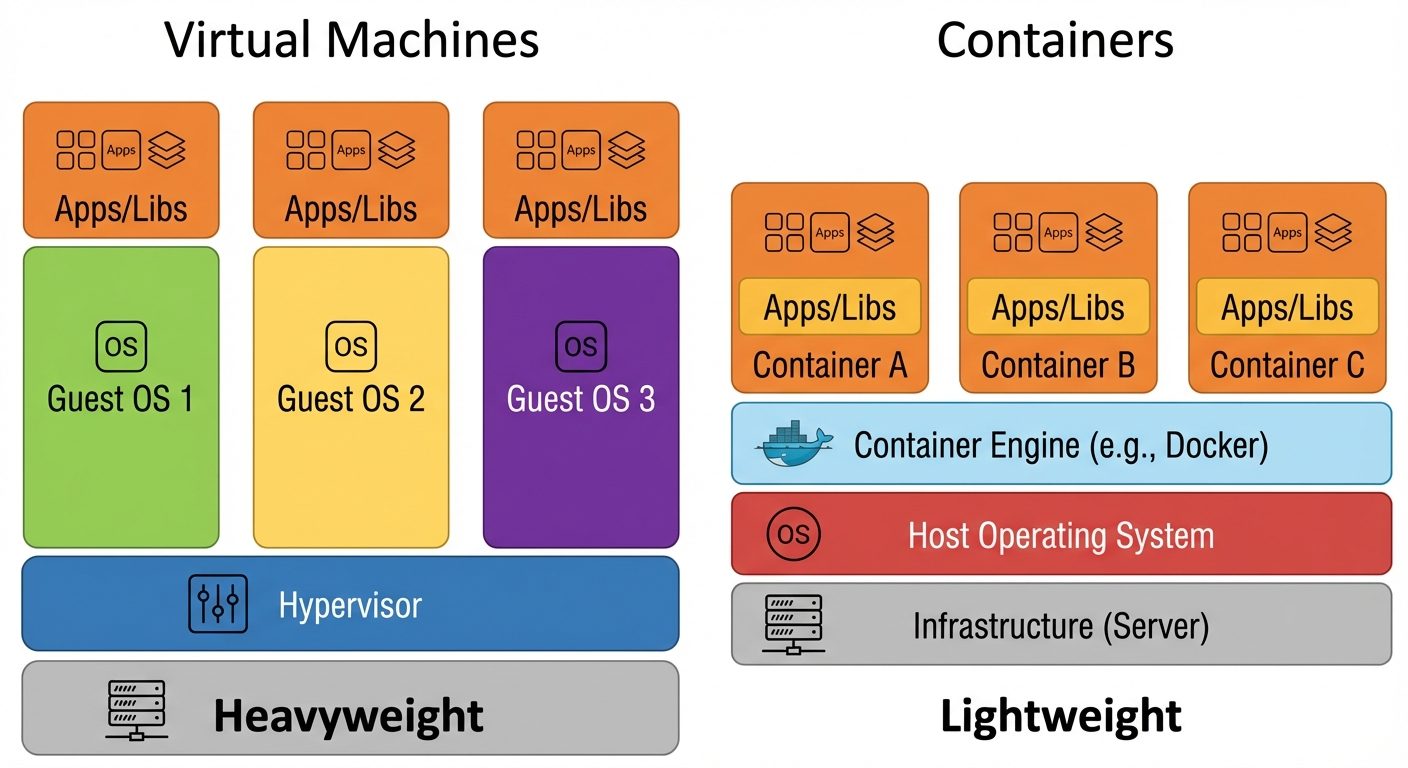
Virtualization abstracts hardware, allowing multiple operating systems (VMs) to run on a single physical machine.
6.1 Hypervisors
The software that creates and runs virtual machines (VMs).
- Type 1 (Bare Metal): Installs directly on hardware.
- Examples: VMware ESXi, Microsoft Hyper-V, KVM (Kernel-based Virtual Machine - acts like Type 1).
- Use Case: Enterprise data centers.
- Type 2 (Hosted): Runs as an application inside an OS.
- Examples: Oracle VirtualBox, VMware Workstation.
- Use Case: Desktop testing/development.
6.2 Containerization
Unlike VMs, containers share the host OS kernel but package the application and dependencies in isolation.
- Docker: The most popular container platform.
- Kubernetes: Orchestration tool for managing clusters of containers.
- Benefit: Lightweight, fast startup (seconds vs minutes for VMs).
6.3 Cloud Computing Models
- IaaS (Infrastructure as a Service): Renting raw VMs/Storage (e.g., AWS EC2). Admin manages OS and Apps.
- PaaS (Platform as a Service): Renting a framework (e.g., Google App Engine). Admin manages Apps only.
- SaaS (Software as a Service): Renting software (e.g., Gmail, Dropbox). Admin manages only access.
7. Troubleshooting Networking Issues
When a server cannot connect to the network, use a systematic approach (OSI Bottom-Up).
7.1 Connectivity Tools
ping <ip>: Uses ICMP Echo to test reachability.- Checks Layer 3 connectivity.
traceroute <ip>(ortracepath): Shows the path and hops packets take to reach a destination. Used to identify where packets are dropping.mtr: Combines ping and traceroute for real-time diagnostics.
7.2 Port and Service Tools
netstat(Legacy) /ss(Socket Statistics - Modern):- Used to see listening ports.
- Command:
ss -tuln(TCP, UDP, Listening, Numeric). - Scenario: Is the Web Server actually listening on port 80?
nmap: Network Mapper. Scans remote hosts to see open ports.telnet <ip> <port>ornc -zv <ip> <port>: Tests if a specific port is open on a remote machine.
7.3 DNS Tools
nslookup: Query Internet name servers interactively.dig(Domain Information Groper):- More detailed than nslookup.
- Command:
dig google.com +short.
host: Simple DNS lookup.
7.4 Packet Capture
tcpdump: CLI packet analyzer. Captures traffic flowing through an interface.- Command:
tcpdump -i eth0 port 80(Capture only HTTP traffic on eth0). - Essential for deep-dive troubleshooting when connection establishes but data is bad.
- Command:
Troubleshooting Scenario Example:
Problem: Cannot access a web server.
ping 8.8.8.8: Do I have internet? (Layer 3)ping google.com: Is DNS working? (Layer 7 / DNS)ip a: Do I have an IP address? (Layer 2/3)ip route: Is my default gateway correct?systemctl status networking: Is the network service running?
Did this save you a night before the exam?
LPU Notes is free, and it stays free. Ads cover part of the server bill. The rest comes out of a student's own pocket: the domain, the storage, and keeping the site up through the weeks everyone needs it at once.
The payment button didn't load. An ad blocker or a filtered network is the usual reason. to try again.
Nothing here is ever locked, and nothing unlocks. Chip in only if it was worth it. What it pays for →