Unit 3: Securing The Server
This unit focuses on the critical aspects of hardening a server environment against unauthorized access, data breaches, and service disruptions. It covers the implementation of technical controls (firewalls, IDS), administrative controls (access models), and physical security measures.
1. Configure Firewalls
A firewall is a network security device or software that monitors and controls incoming and outgoing network traffic based on predetermined security rules.
Types of Firewalls
- Packet Filtering (Stateless): Inspects individual packets against a rule set (source IP, destination IP, port). Does not retain context of previous packets.
- Stateful Inspection: Tracks the state of active connections (e.g., TCP handshakes). If a packet is part of an established connection, it is allowed automatically.
- Proxy Firewalls: Acts as an intermediary between the client and the server, performing deep packet inspection (Layer 7).
Linux Firewall Tools
- iptables/nftables: The kernel-level packet filtering framework.
- UFW (Uncomplicated Firewall): A user-friendly frontend for iptables (common in Ubuntu).
- firewalld: A dynamic firewall manager with support for network/firewall zones (common in RHEL/CentOS).
Configuration Best Practices
- Default Deny Policy: Block all incoming traffic by default; explicitly allow only necessary services.
- Least Privilege: Open only the specific ports required (e.g., 80/443 for Web, 22 for SSH).
- Egress Filtering: Restrict outbound traffic to prevent malware from phoning home.
Example: Basic UFW Configuration
# Set default policies
sudo ufw default deny incoming
sudo ufw default allow outgoing

# Allow specific services
sudo ufw allow ssh      # Port 22
sudo ufw allow http     # Port 80
sudo ufw allow 443/tcp  # HTTPS

# Enable the firewall
sudo ufw enable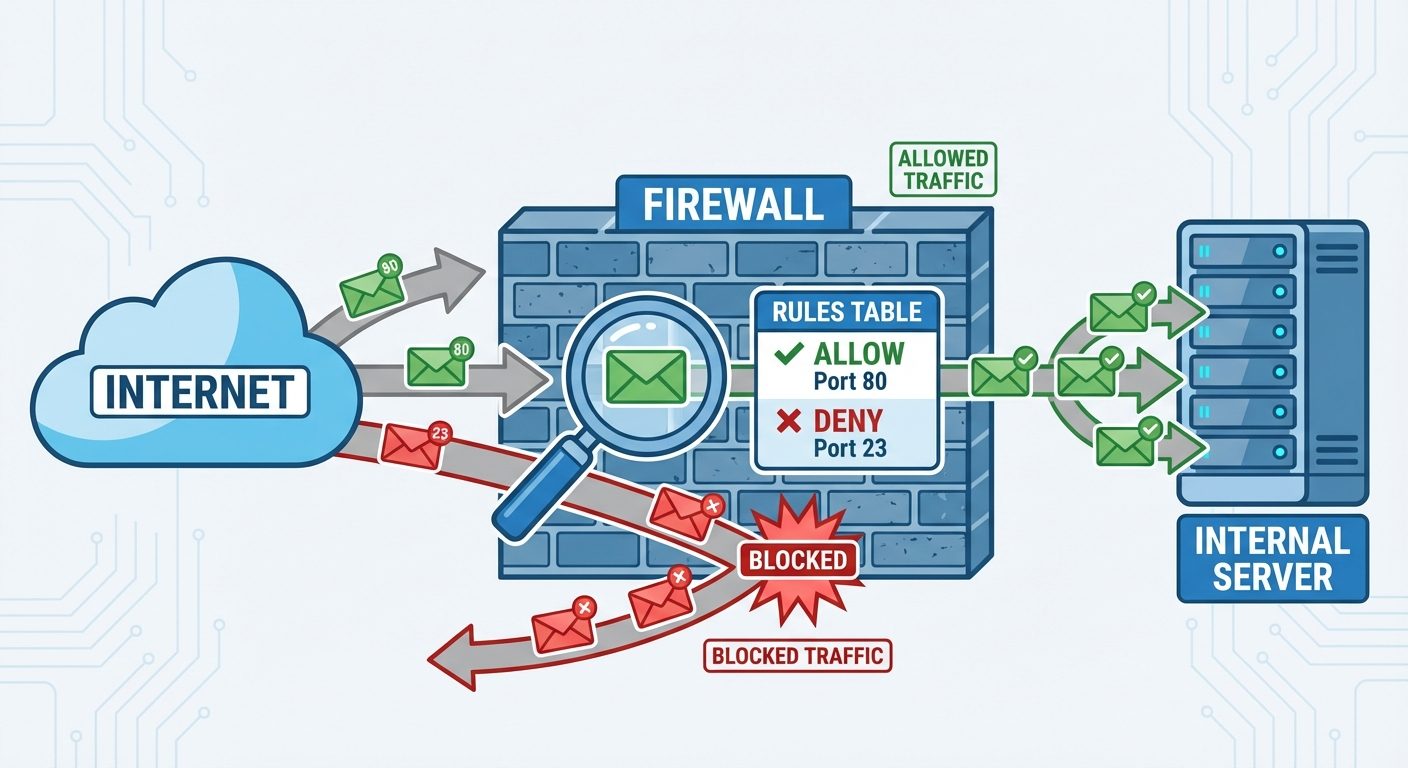
2. Configure Security Protocols
Secure protocols ensure that data transmitted between the administrator and the server, or the server and clients, remains confidential and tamper-proof.
Secure Shell (SSH)
SSH is the primary protocol for remote server administration. It replaces insecure protocols like Telnet.
- Hardening SSH (
/etc/ssh/sshd_config):- Disable Root Login:
PermitRootLogin no(Forces use of sudo). - Change Default Port:
Port 2222(Reduces automated bot attacks). - Key-Based Authentication: Disable passwords (
PasswordAuthentication no) and use public/private key pairs. - Protocol Version: Use Protocol 2 only.
- Disable Root Login:
SSL/TLS (Secure Sockets Layer / Transport Layer Security)
Used to encrypt data in transit (HTTPS).
- Certificate Authority (CA): Issues digital certificates validating server identity.
- Handshake: Establishes cipher suites and session keys.
- Implementation: Keep libraries (OpenSSL) updated to avoid vulnerabilities like Heartbleed.
IPsec (Internet Protocol Security)
A suite of protocols to secure IP communications by authenticating and encrypting each IP packet. Used often in VPNs to secure site-to-site communication.
3. Implement Intrusion Detection Systems (IDS)
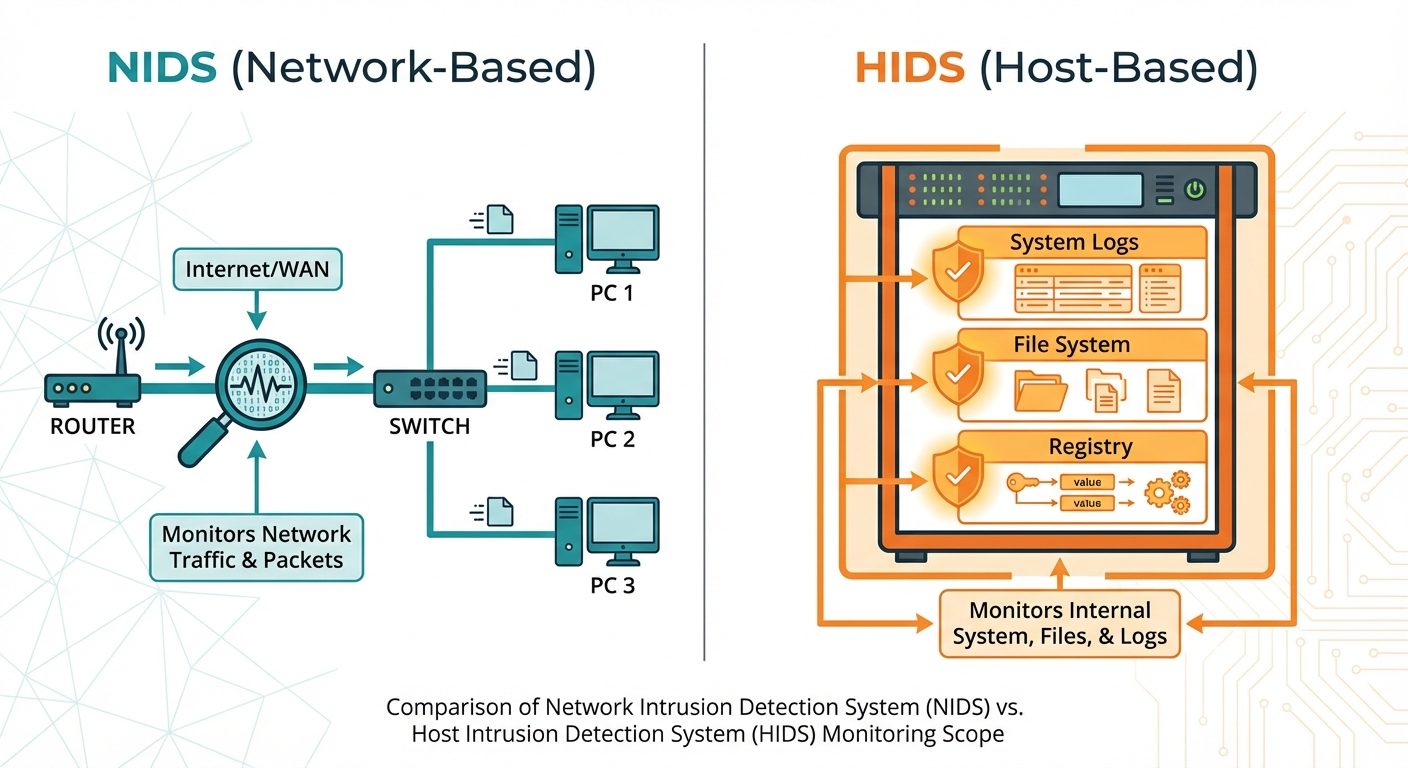
An IDS monitors network or system activities for malicious exploits or policy violations.
Types of IDS
- NIDS (Network Intrusion Detection System):
- Placed at strategic points within the network (e.g., behind the firewall).
- Analyzes traffic on the wire.
- Tool: Snort, Suricata.
- HIDS (Host Intrusion Detection System):
- Installed on individual servers.
- Monitors file integrity, log files, and rootkit detection.
- Tool: OSSEC, AIDE (Advanced Intrusion Detection Environment).
Detection Methods
- Signature-Based: Compares traffic against a database of known attack signatures (similar to antivirus). Fast, but fails against zero-day attacks.
- Anomaly-Based: Establishes a baseline of "normal" traffic/behavior. Alerts on deviations. Catches new attacks but has higher false positives.
4. Implement Logical Access Control Methods
Access control limits who can access what resources on the server.
DAC (Discretionary Access Control)
- The object owner determines who has access.
- Standard Linux permissions (rwx) are DAC.
- Weakness: If an attacker compromises a user account, they gain access to everything that user owns.
MAC (Mandatory Access Control)
- The operating system constrains the ability of a subject (user/process) to access an object (file/port).
- Users cannot override these policies.
- Implementations:
- SELinux (Security-Enhanced Linux): Uses labels/contexts.
- AppArmor: Uses path-based profiles.
RBAC (Role-Based Access Control)
- Access is assigned to "Roles" (e.g., Admin, Auditor, HR), not individual users.
- Users are assigned to roles.
- Simplifies management in large organizations.
5. Implement Data Security Models
Theoretical frameworks used to design secure systems.
The CIA Triad
- Confidentiality: Preventing unauthorized disclosure (Encryption, Permissions).
- Integrity: Preventing unauthorized modification (Hashing, Digital Signatures).
- Availability: Ensuring resources are accessible when needed (Redundancy, DDoS protection).
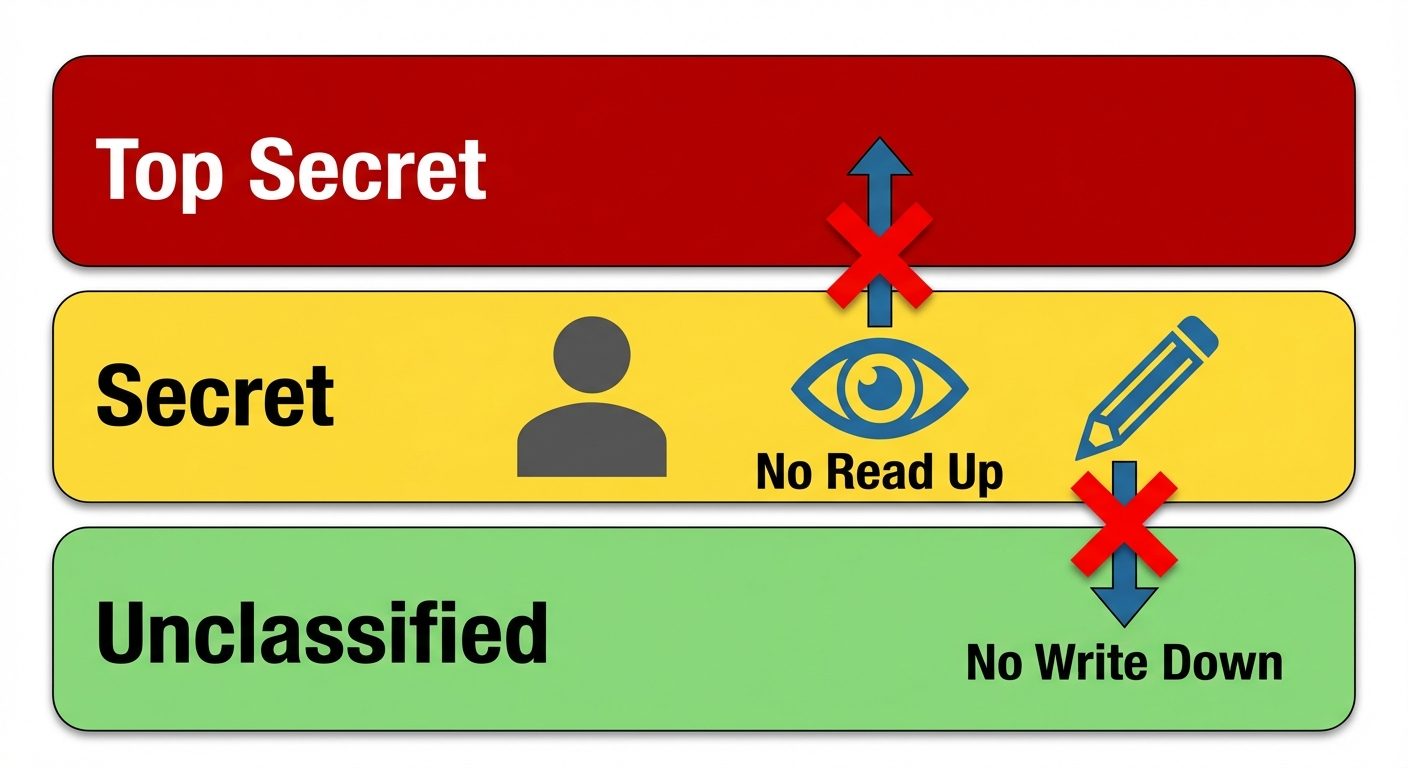
Bell-LaPadula Model (Confidentiality Focused)
- Used in military/government.
- Rule 1 (No Read Up): A subject at a lower security level cannot read data at a higher security level.
- Rule 2 (No Write Down): A subject at a higher security level cannot write data to a lower security level (prevents leakage).
Biba Model (Integrity Focused)
- Rule 1 (No Read Down): Cannot read data from a lower integrity level (prevents trusting unreliable sources).
- Rule 2 (No Write Up): Cannot write data to a higher integrity level (prevents corrupting high-value data).
6. Apply Server Hardening Techniques
Server hardening is the process of reducing the attack surface.
Key Techniques
- Patch Management: Keep OS and software updated to patch known CVEs.
- Remove Unnecessary Services: Uninstall FTP, Telnet, or web servers if the machine is a database server.
- Disable Unused Ports: Close ports not explicitly required by the application.
- Account Management:
- Lock inactive accounts.
- Enforce strong password policies (complexity, rotation).
- Use
sudoinstead of the root account.
- Logging and Auditing:
- Send logs to a remote log server (prevents attackers from deleting evidence).
- Monitor
/var/log/auth.log(Linux) or Event Viewer (Windows).
7. Implement Physical Security
Software security is useless if an attacker physically steals the server.
- Access Control: Biometric locks, keycards, and mantraps for data center entry.
- Boot Security:
- Set BIOS/UEFI Passwords to prevent changing boot order.
- Disable booting from USB/CD drives to prevent live-OS attacks.
- Environmental Controls: Fire suppression systems, UPS (Uninterruptible Power Supply), and climate control.
- Rack Security: Locking server cabinets.
8. Create Virtual Networks
Virtual networking isolates traffic and segments the server environment.
VLAN (Virtual Local Area Network)
- Logical segmentation of a Layer 2 network.
- Separates traffic (e.g., User traffic vs. Management traffic) on the same physical switch.
- Reduces the broadcast domain and limits lateral movement of attackers.
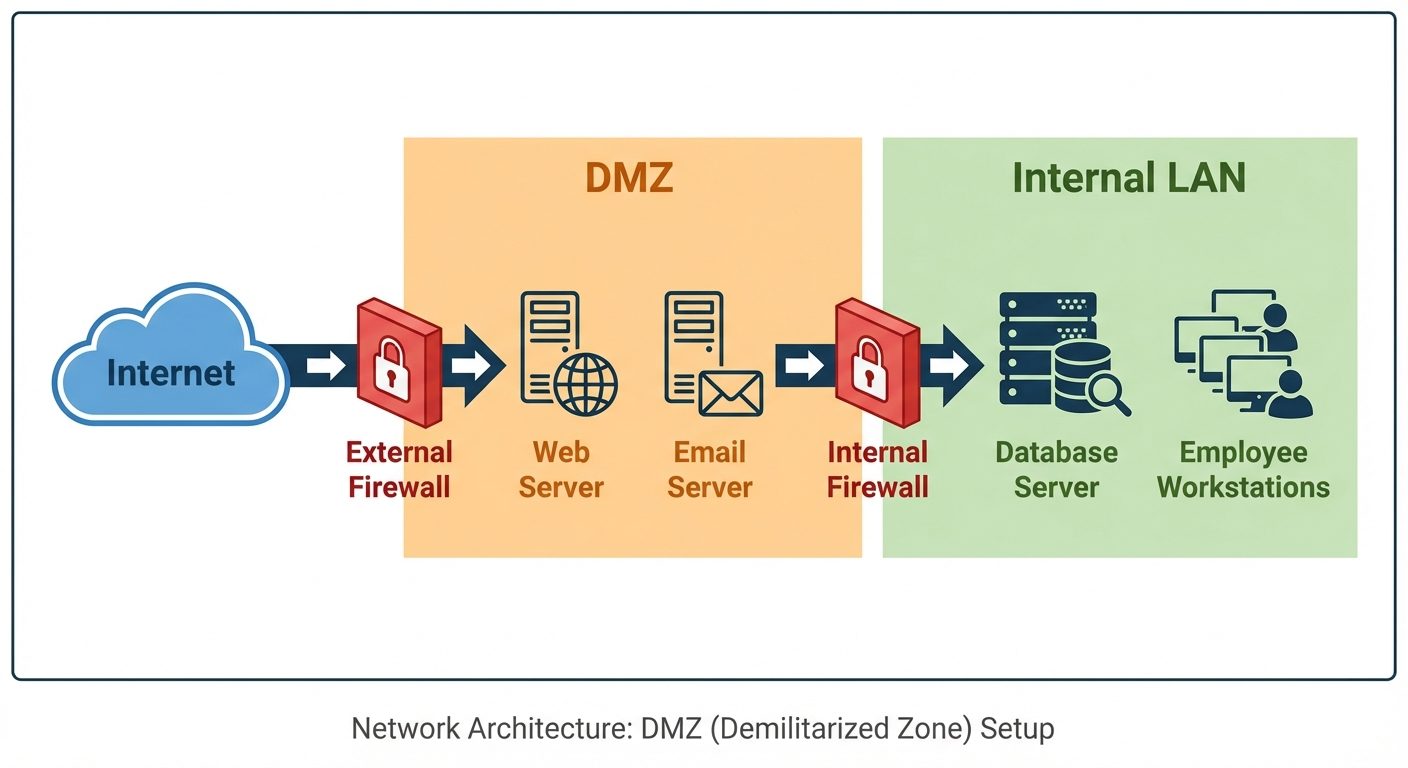
DMZ (Demilitarized Zone)
- A physical or logical subnetwork that contains the organization's external-facing services (Web, Mail, DNS).
- Architecture: The DMZ sits between the Internet and the Internal Network.
- Security Logic: If the web server in the DMZ is compromised, the attacker still faces another firewall before reaching the internal database.
VPN (Virtual Private Network)
- Creates an encrypted tunnel over a public network.
- Allows administrators to access the server securely from remote locations.
Did this save you a night before the exam?
LPU Notes is free, and it stays free. Ads cover part of the server bill. The rest comes out of a student's own pocket: the domain, the storage, and keeping the site up through the weeks everyone needs it at once.
The payment button didn't load. An ad blocker or a filtered network is the usual reason. to try again.
Nothing here is ever locked, and nothing unlocks. Chip in only if it was worth it. What it pays for →