Unit 4: Network, Endpoint, and Application Security Capabilities
1. Network Security Baselines
Network security baselines represent the minimum security controls and configuration standards required to secure a network infrastructure. These baselines serve as a reference point for auditing and monitoring network health.
1.1 Definition and Purpose
- Definition: A documented set of specifications for a system, or a configuration, that has been formally reviewed and agreed on at a given point in time.
- Purpose: To reduce the attack surface by eliminating known vulnerabilities associated with default configurations and ensuring consistency across the infrastructure.
1.2 Key Components of a Baseline
- Inventory Management: You cannot secure what you do not know. Maintain an up-to-date map of all hardware and software assets.
- OS Hardening: Applying patches, disabling unused user accounts, and configuring file system permissions.
- Device Hardening: Securing routers, switches, and firewalls.
1.3 Standard Hardening Procedures
- Change Default Credentials: Immediately change default usernames (e.g.,
admin) and passwords on all network devices. - Disable Unused Ports and Services: Close ports (e.g., TCP 23 for Telnet) and stop services not required for the device’s function.
- Implement Access Control Lists (ACLs): Define strict rules on routers/firewalls regarding what traffic is allowed in and out.
- Firmware Updates: Ensure network operating systems (e.g., Cisco IOS, Junos) are on the latest stable, secure release.
- Banner Grabbing Protection: Remove welcome banners that display OS versions or device models to prevent reconnaissance.
2. Network Security Capability Enhancement
Once baselines are established, organizations must implement advanced capabilities to detect, analyze, and block sophisticated threats.
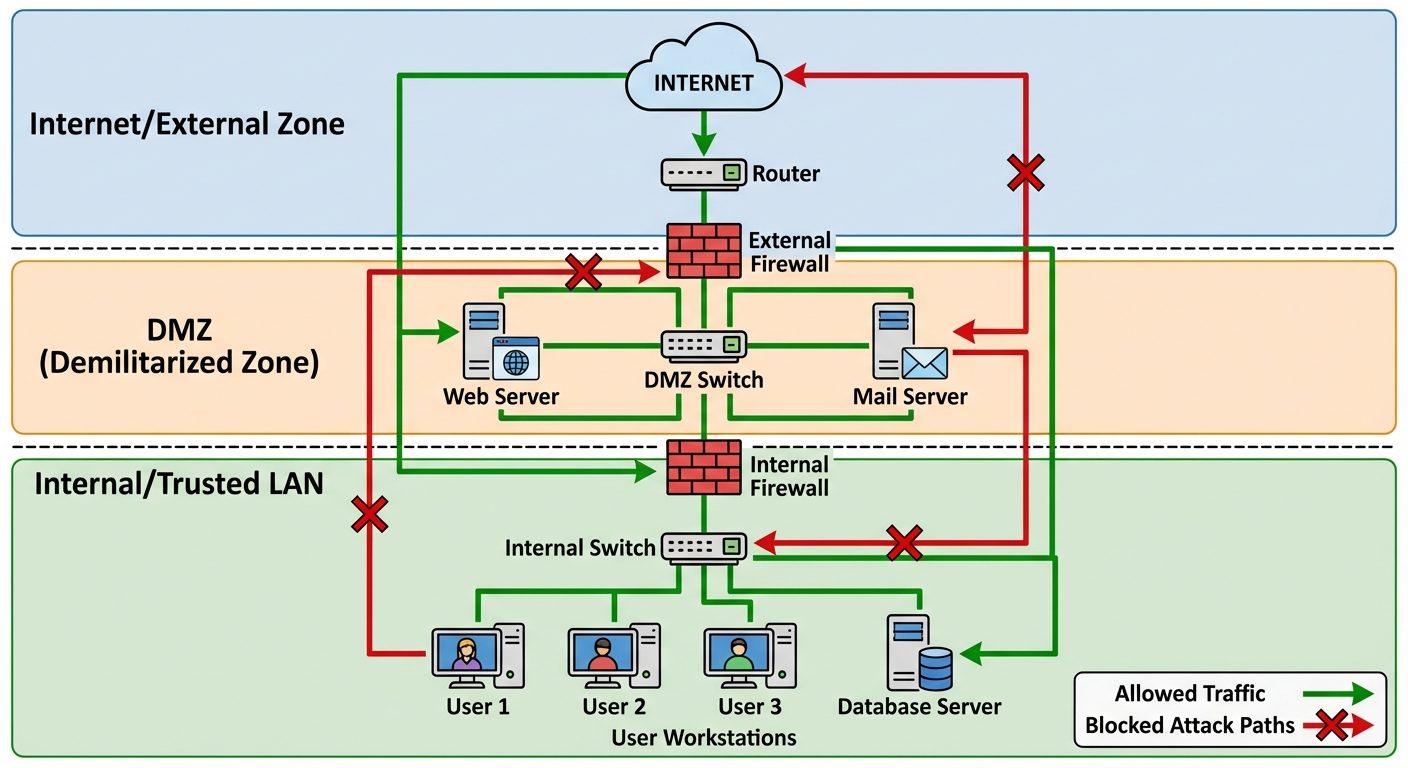
2.1 Defense in Depth
This strategy employs multiple layers of security controls (defense) throughout the IT system. If one layer fails, another steps up to prevent a breach.
- Physical Layer: Locks, guards, cameras.
- Perimeter: Firewalls, VPNs.
- Network: IPS, NIDS, Segmentation.
- Endpoint: Antivirus, EDR.
- Application: WAF, Code reviews.
2.2 Intrusion Detection and Prevention Systems (IDS/IPS)
- IDS (Intrusion Detection System): A passive monitoring system. It analyzes network traffic for suspicious patterns and alerts administrators but does not stop the traffic.
- Placement: Typically connected via a SPAN port or network tap.
- IPS (Intrusion Prevention System): An active inline device. It analyzes traffic and can automatically block packets that match known threat signatures.
- Placement: Placed directly in the traffic flow (inline) behind the firewall.
2.3 Network Segmentation and Zero Trust
- Segmentation: Splitting a network into sub-networks (VLANs) to limit lateral movement. If a hacker breaches the HR VLAN, they cannot access the Finance VLAN.
- Zero Trust Architecture: "Never Trust, Always Verify." Assumes the network is already compromised. Requires strict identity verification for every person and device trying to access resources, regardless of whether they are sitting within the network perimeter.
2.4 Security Information and Event Management (SIEM)
SIEM tools aggregate log data from multiple sources (firewalls, servers, routers) to identify deviations from the norm and take appropriate action.
- Key Functions: Log Aggregation, Correlation, Alerting, and Forensic Analysis.
3. Implement Endpoint Security
Endpoints (laptops, desktops, servers, IoT devices) are the most common entry points for attackers. Endpoint security focuses on securing these individual devices.
3.1 Traditional vs. Modern Endpoint Security
- Traditional Antivirus (AV): Relies on signatures (fingerprints of known malware). Effective against known threats but fails against zero-day attacks.
- Endpoint Detection and Response (EDR): Focuses on behavioral analysis. It records system activities and events to detect suspicious behavior (e.g., PowerShell launching a network connection to an unknown IP).
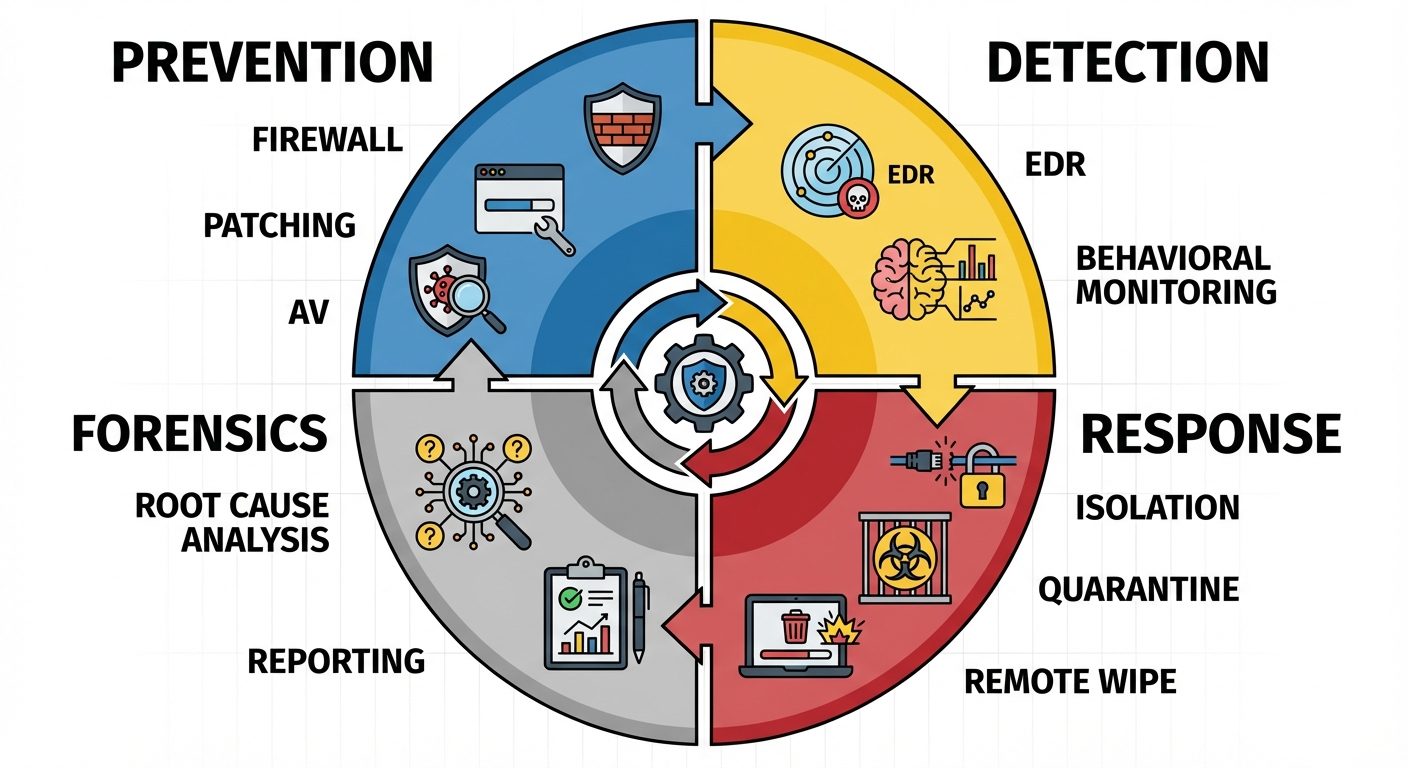
3.2 Core Endpoint Security Controls
- Host-Based Firewalls: Software firewalls running on the device to control incoming/outgoing network traffic.
- Patch Management: Automated systems to ensure OS and applications have the latest security updates.
- Application Whitelisting: Allowing only approved applications to run, blocking everything else by default.
- Full Disk Encryption (FDE): Encrypts the entire hard drive (e.g., BitLocker, FileVault) so data is unreadable if the device is stolen.
4. Mobile Device Hardening
Mobile devices introduce unique risks due to portability and the commingling of personal and corporate data (BYOD - Bring Your Own Device).
4.1 Mobile Device Management (MDM) / Unified Endpoint Management (UEM)
MDM is centralized software used to monitor, manage, and secure mobile devices.
- Capabilities:
- Remote Wipe: Erase data if the device is lost.
- Geofencing: Restrict access based on physical location.
- Containerization: Creating a secure, encrypted "container" on the phone for work apps (email, Slack) that is separate from personal apps (Facebook, Photos).
4.2 Hardening Techniques
- Screen Locks: Enforcing strong PINs, patterns, or biometrics (FaceID/Fingerprint).
- Encryption: Ensuring storage encryption is enabled (default on modern iOS/Android).
- Jailbreaking/Rooting Detection: Detecting if a user has bypassed OS security restrictions, which compromises the device's integrity.
- App Store Restrictions: Preventing the installation of apps from "Unknown Sources" (sideloading).
- Connectivity Management: Disabling Bluetooth/NFC/Wi-Fi when not in use to prevent "Bluebugging" or connection to rogue Access Points.
5. Application Protocol Security Baselines
Securing data in transit requires using protocols that support encryption and authentication, replacing legacy cleartext protocols.
5.1 Secure vs. Insecure Protocols
A fundamental baseline is replacing insecure protocols with their secure counterparts.
| Feature | Insecure Protocol (Cleartext) | Secure Protocol (Encrypted) | Port (Secure) |
|---|---|---|---|
| Web Browsing | HTTP | HTTPS (uses TLS) | 443 |
| Remote Shell | Telnet | SSH (Secure Shell) | 22 |
| File Transfer | FTP | SFTP or FTPS | 22 / 990 |
| Email Sending | SMTP | SMTP over TLS | 587 |
| Network Mgmt | SNMPv1 / SNMPv2 | SNMPv3 | 161 |
5.2 Transport Layer Security (TLS)
- SSL vs. TLS: SSL (Secure Sockets Layer) is deprecated. TLS (Transport Layer Security) is the modern standard.
- Baselines:
- Disable SSL v2.0 and v3.0.
- Disable TLS 1.0 and 1.1 (vulnerable to POODLE and BEAST attacks).
- Enforce TLS 1.2 or 1.3.
- Use strong cipher suites (AES-GCM) and disable weak ones (RC4, DES).
6. Cloud and Web Application Security Concepts
As infrastructure moves to the cloud, the security model shifts from a perimeter-based approach to an identity and data-centric approach.
6.1 The Shared Responsibility Model
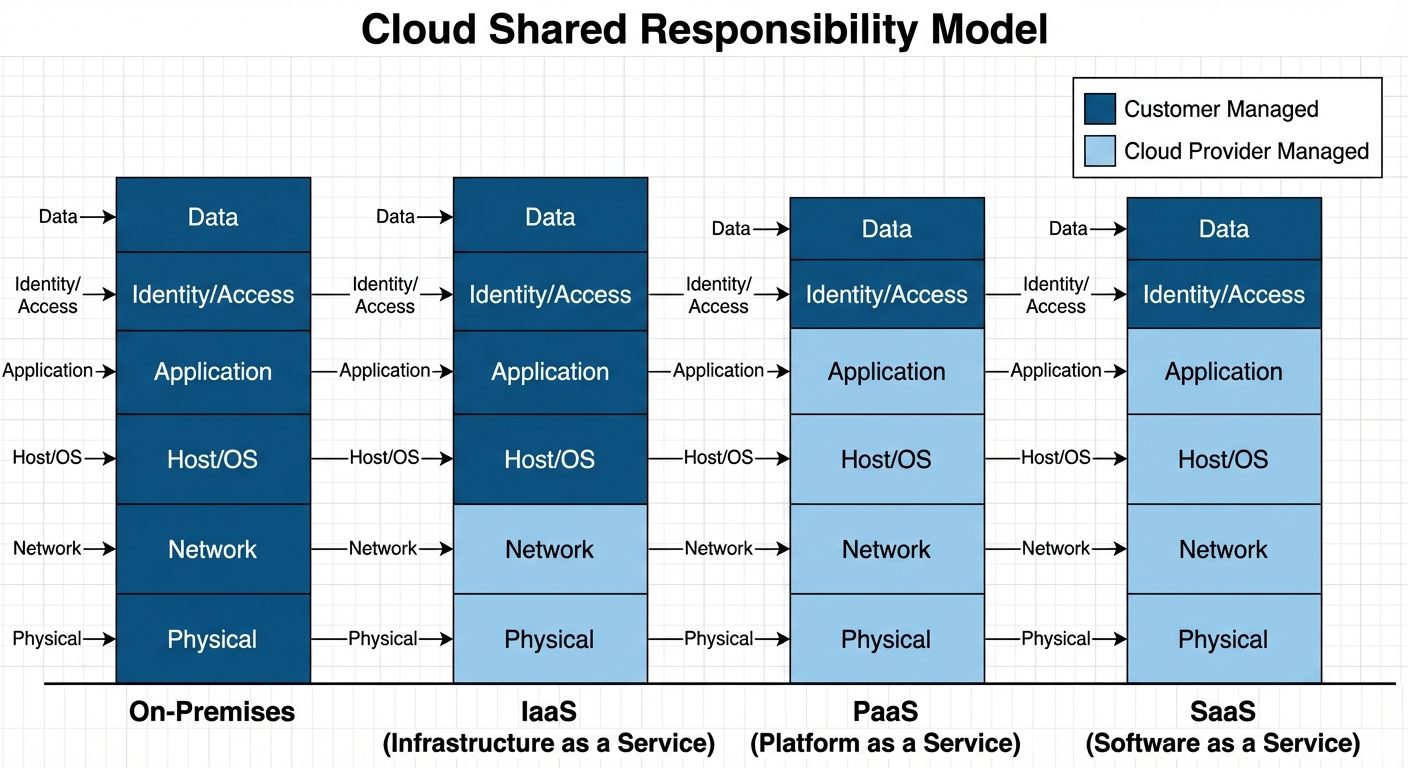
Security in the cloud is a shared obligation between the Cloud Service Provider (CSP - e.g., AWS, Azure) and the Customer.
- SaaS (Software as a Service): CSP manages almost everything (Physical, Network, OS, App). Customer manages Data and Access (Identity). Example: Gmail, Salesforce.
- PaaS (Platform as a Service): CSP manages Physical, Network, and OS. Customer manages Apps and Data. Example: Google App Engine, Heroku.
- IaaS (Infrastructure as a Service): CSP manages Physical hardware and Virtualization. Customer manages OS, Apps, Data, and Network configuration. Example: AWS EC2.
6.2 Web Application Security Risks (OWASP Top 10)
The Open Web Application Security Project (OWASP) maintains a standard awareness document for developers.
- Broken Access Control: Users acting outside of their intended permissions.
- Cryptographic Failures: Exposing sensitive data (passwords, credit cards) due to weak encryption.
- Injection: Sending untrusted data to an interpreter (e.g., SQL Injection where malicious SQL queries are executed by the database).
- Insecure Design: Flaws in the architecture itself (e.g., failing to implement rate limiting).
6.3 Web Application Firewall (WAF)
A WAF protects web applications by filtering and monitoring HTTP traffic between a web application and the Internet.
- Layer 7 Protection: unlike a standard network firewall (Layer 3/4), a WAF understands HTML, SQL, and HTTP.
- Functions: Prevents SQL injection, Cross-Site Scripting (XSS), and cookie poisoning.
Did this save you a night before the exam?
LPU Notes is free, and it stays free. Ads cover part of the server bill. The rest comes out of a student's own pocket: the domain, the storage, and keeping the site up through the weeks everyone needs it at once.
The payment button didn't load. An ad blocker or a filtered network is the usual reason. to try again.
Nothing here is ever locked, and nothing unlocks. Chip in only if it was worth it. What it pays for →