Unit 6: File Management
1. File System Interface
1.1 File Concepts
A file is a named collection of related information that is recorded on secondary storage. From a user's perspective, a file is the smallest allotment of logical secondary storage.
File Attributes:
- Name: The symbolic file name is the only information kept in human-readable form.
- Identifier: A unique tag, usually a number, identifies the file within the file system; it is the non-human-readable name for the file.
- Type: Needed for systems that support different types (e.g., .txt, .exe).
- Location: Pointer to a device and to the location of the file on that device.
- Size: Current size of the file (in bytes, words, or blocks).
- Protection: Access-control information determines who can do reading, writing, executing, and so on.
File Operations:
- Create
- Write
- Read
- Reposition within file (Seek)
- Delete
- Truncate
1.2 Access Methods
Files store information, and the system must provide mechanisms to access it.
- Sequential Access: Information is processed in order, one record after the other. (e.g., Compilers, magnetic tapes).
- Read next
- Write next
- Rewind
- Direct (Random) Access: A file is made up of fixed-length logical records that allow programs to read and write records rapidly in no particular order. (e.g., Databases).
- Read n
- Write n
- Position to n
- Index Access: Built on top of direct access. An index contains pointers to the various blocks. To find a record, the file system searches the index and then uses the pointer to access the file directly.
1.3 Directory Structure
The directory can be viewed as a symbol table that translates file names into their directory entries.
- Single-Level Directory: All files are contained in the same directory. (Problem: Naming collisions).
- Two-Level Directory: Each user has their own user file directory (UFD).
- Tree-Structured Directory: Most common. A root directory usually contains subdirectories. Allows for grouping.
- Acyclic-Graph Directory: Allows directories to share subdirectories and files (via links/aliases). No cycles allowed.
- General Graph Directory: Allows cycles but requires garbage collection to prevent orphaned loops.
1.4 File System Mounting and Sharing
- Mounting: Before a file system can be accessed, it must be mounted. The OS is given the name of the device and the mount point (the location within the file structure where the file system is to be attached).
- Sharing: Multi-user systems allow files to be shared. This is implemented via file permissions and locking mechanisms (e.g., NFS - Network File System).
1.5 Protection
Protection mechanisms provide controlled access by limiting the types of file access that can be made.
- Types of Access: Read, Write, Execute, Append, Delete, List.
- Access Control: The most common approach is an Access Control List (ACL) associating a user identity with specific rights (e.g., Unix
rwxpermissions for Owner, Group, Universe).
2. File System Implementation
2.1 Allocation Methods
How disk blocks are allocated to files directly affects performance and disk utilization.
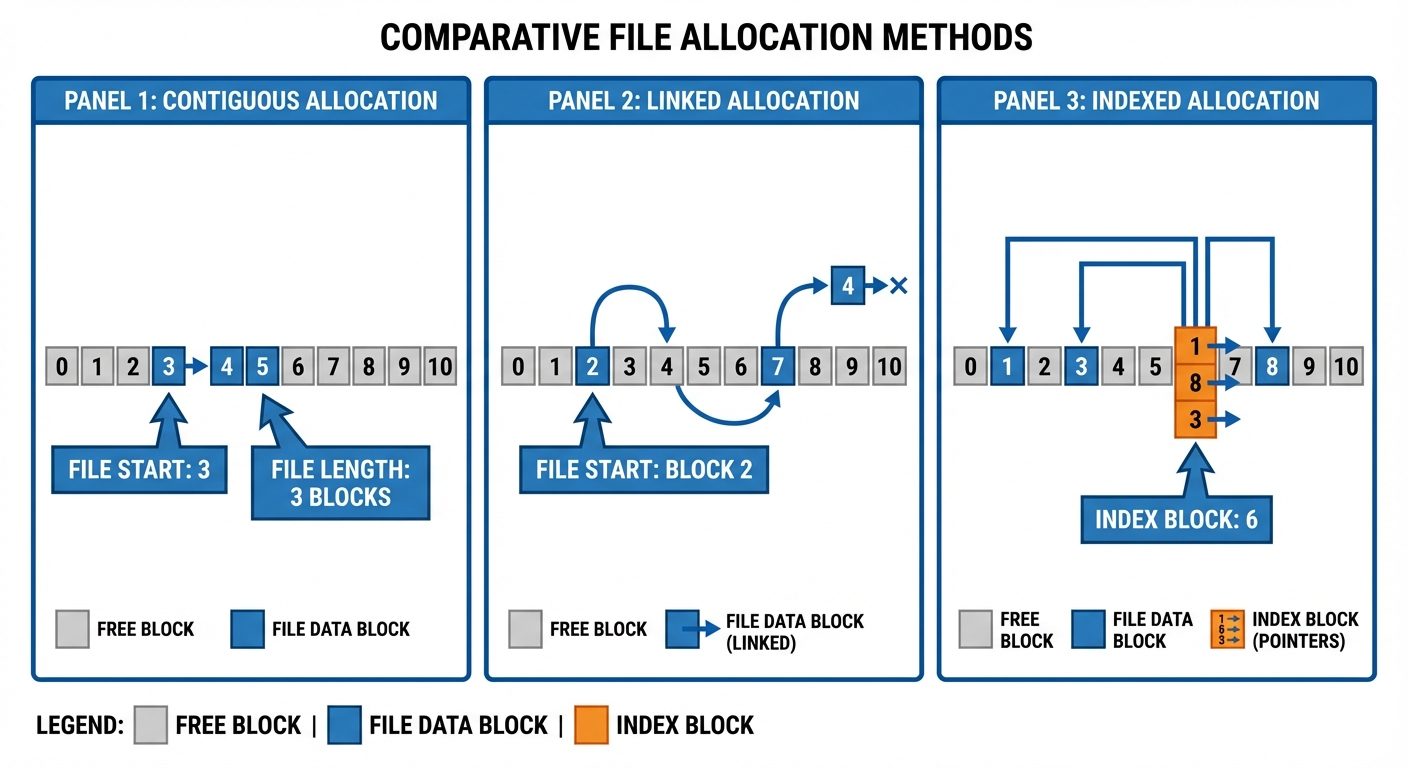
- Contiguous Allocation:
- Each file occupies a set of contiguous blocks on the disk.
- Pros: Best performance for sequential and direct access.
- Cons: External fragmentation; finding space for a new file is difficult (Best-fit, First-fit issues).
- Linked Allocation:
- Each file is a linked list of disk blocks; blocks may be scattered anywhere on the disk. Each block contains a pointer to the next block.
- Pros: No external fragmentation.
- Cons: Slow for direct access (must traverse list); overhead of pointers; reliability (if a pointer is lost, the file is corrupted).
- Indexed Allocation:
- Brings all pointers together into one location: the index block.
- Pros: Supports direct access without external fragmentation.
- Cons: Wasted space for index blocks (overhead) if files are very small.
2.2 Free-Space Management
To track free disk space, the system maintains a free-space list.
- Bit Vector (Bitmap): Each block is represented by 1 bit. If the block is free, the bit is 1; if allocated, the bit is 0.
- Linked List: Link together all free disk blocks.
- Grouping: Store the addresses of free blocks in the first free block.
- Counting: Keep the address of the first free block and the number () of free contiguous blocks that follow it.
2.3 Directory Implementation
- Linear List: A list of file names with pointers to the data blocks. Simple to program but time-consuming to execute (linear search).
- Hash Table: A linear list with a hash data structure. The hash table takes a value computed from the file name and returns a pointer to the file name in the linear list. Faster search, but creates collision issues.
3. Device Management & Mass Storage
3.1 Device Classifications
- Dedicated Devices: Assigned to only one job at a time (e.g., Tape drives, Plotters). Inefficient if the job pauses.
- Shared Devices: Can be assigned to several processes concurrently (e.g., Hard Disks). The OS interleaves requests.
- Virtual Devices: A combination of dedicated devices and software that makes them appear shared. Spooling (Simultaneous Peripheral Operations On-Line) is used here (e.g., a printer receives data from multiple processes into a buffer/disk file, then prints them one by one).
3.2 Access Types
- Serial Access Devices: Data must be accessed in a specific sequence (e.g., Magnetic Tapes). Access time depends on the current location.
- Direct Access Devices: Any block can be accessed directly (e.g., HDDs, SSDs, Optical Disks).
3.3 Disk Scheduling Methods
Since the disk is a shared device, the OS must schedule I/O requests to minimize seek time (time to move the disk arm to the cylinder).
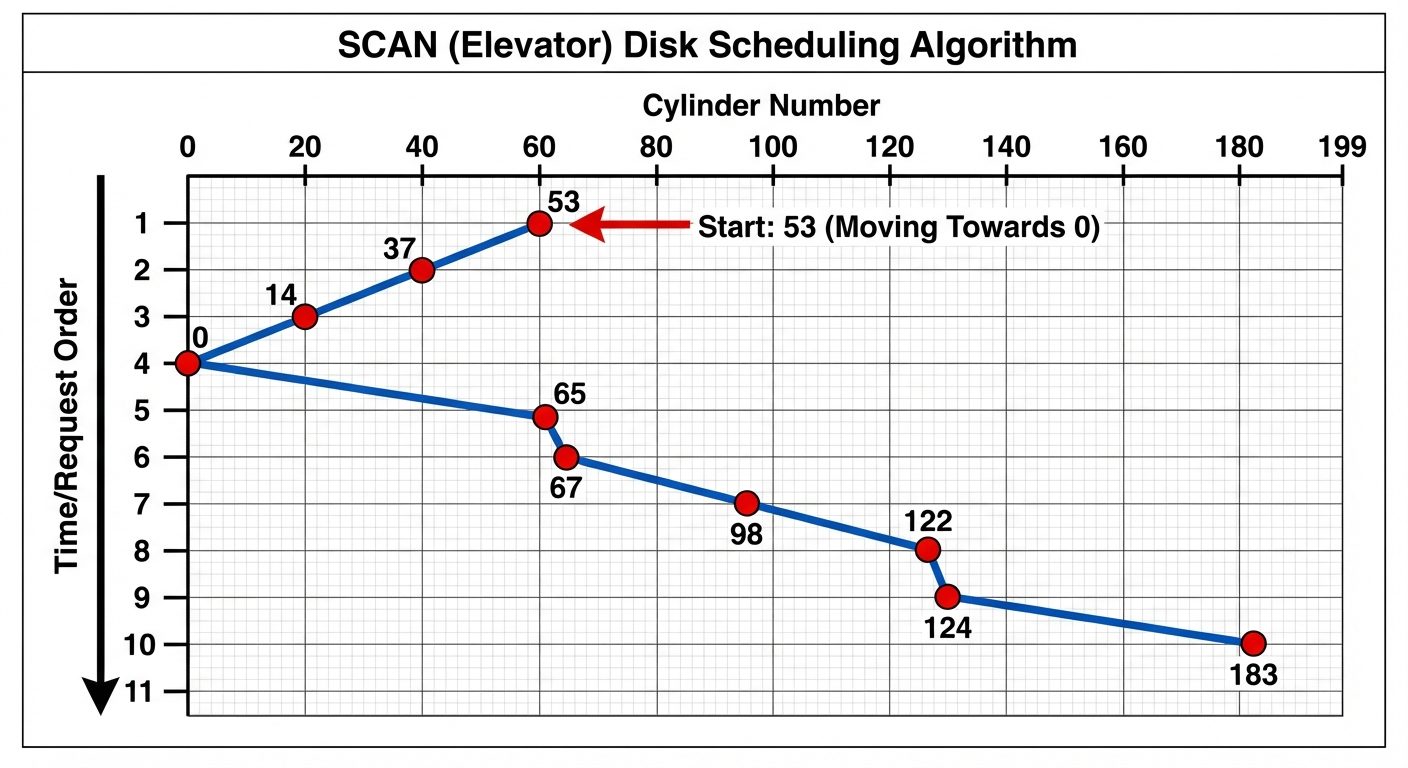
- FCFS (First-Come, First-Served): Simplest. Fair, but performs poorly (wild swings of the disk arm).
- SSTF (Shortest Seek Time First): Selects the request with the least seek time from the current head position. Risks starvation for distant requests.
- SCAN (Elevator Algorithm): The disk arm starts at one end and moves toward the other, servicing requests as it goes, then reverses.
- C-SCAN (Circular SCAN): Like SCAN, but when it reaches the end, it immediately returns to the beginning without servicing requests on the return trip. (Provides more uniform wait time).
- LOOK / C-LOOK: Similar to SCAN/C-SCAN, but the arm only goes as far as the last request in each direction, not to the physical end of the disk.
3.4 Direct Access Storage Devices (DASD)
DASD refers to storage devices that allow direct access to data blocks.
Structure:
- Host: The computer (CPU/Memory).
- Channels: Specialized processors (I/O processors) that handle I/O operations independently of the main CPU.
- Control Units: Hardware that interfaces the channel to specific devices (like a disk controller).
- Devices: The actual storage units.
4. Inter-Process Communication (IPC)
4.1 Introduction to IPC
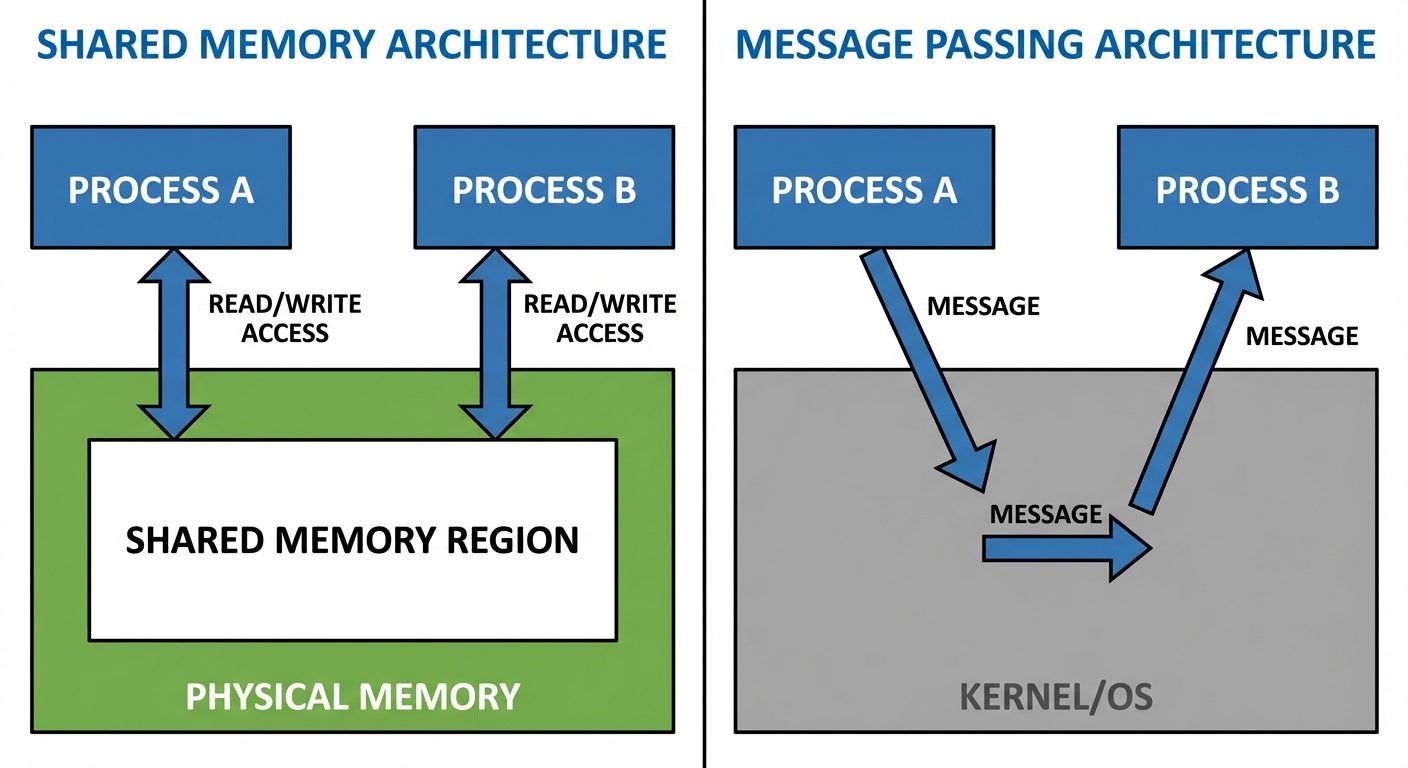
Processes executing concurrently may be either independent or cooperating. Cooperating processes need IPC to exchange data.
IPC Models:
- Shared Memory: A region of memory is established to be shared by cooperating processes. Fastest method.
- Message Passing: Communication takes place by means of exchanging messages between cooperating processes.
4.2 Pipes
Pipes provide a mechanism for processes to communicate by acting as a conduit. Data written to one end is read from the other.
Standard Pipes (Anonymous):
- Unidirectional (half-duplex).
- Only usable between blood-related processes (Parent/Child).
Functions: popen and pclose
The standard library provides high-level stream interface for pipes.
FILE *popen(const char *command, const char *type);- Creates a pipe, forks a child, invokes the shell, and runs the command.
- Type: "r" (read output of command) or "w" (write input to command).
int pclose(FILE *stream);- Closes the stream and waits for the command to terminate.
Example Code:
#include <stdio.h>

int main() {
    FILE *fp;
    char buffer[128];

    // Open pipe to read execution of 'ls'
    fp = popen("ls -l", "r");

    if (fp == NULL) return 1;

    while (fgets(buffer, sizeof(buffer), fp) != NULL) {
        printf("%s", buffer);
    }

    pclose(fp);
    return 0;
}
4.3 FIFOs (Named Pipes)
- Unlike standard pipes, FIFOs exist as device special files in the file system.
- Bidirectional: Can be used for two-way communication.
- Independence: Can be used by unrelated processes (no parent/child requirement).
- Processes access them via standard file operations (
open,read,write,close).
4.4 Shared Memory
- Concept: Allows two or more processes to share a specific segment of memory.
- Performance: Fastest form of IPC because no kernel intervention is required once the memory is mapped (data copying is avoided).
- Synchronization: Processes are responsible for ensuring they don't write to the same location simultaneously (usually handled via Semaphores).
- Key System Calls:
shmget(): Creates a shared memory segment.shmat(): Attaches the shared segment to the address space of the calling process.shmdt(): Detaches the segment.
4.5 Message Queues
- Concept: A linked list of messages stored within the kernel and identified by a message queue identifier.
- Features:
- Messages are discrete packets of data (type + content).
- Processes can read messages based on type (not strictly FIFO).
- Persistent: The queue exists until explicitly deleted, even if the creating process terminates.
- Advantages: Portable and allows asynchronous communication (sender doesn't have to wait for receiver).
Did this save you a night before the exam?
LPU Notes is free, and it stays free. Ads cover part of the server bill. The rest comes out of a student's own pocket: the domain, the storage, and keeping the site up through the weeks everyone needs it at once.
The payment button didn't load. An ad blocker or a filtered network is the usual reason. to try again.
Nothing here is ever locked, and nothing unlocks. Chip in only if it was worth it. What it pays for →