Unit 1: Introduction to Operating System
1. Operating System Overview
Meaning of Operating System
An Operating System (OS) is system software that acts as an intermediary between the computer user and the computer hardware. It is a collection of programs that manages hardware resources and provides common services for computer programs.
- As a Resource Manager: The OS manages and allocates resources (CPU time, memory space, file storage, I/O devices) to specific programs and users.
- As a Control Program: It controls the execution of user programs to prevent errors and improper use of the computer.
- Examples: Microsoft Windows, Linux, macOS, Android, iOS.
Functions of an Operating System
- Process Management: Creation, scheduling, termination of processes, and deadlock handling.
- Memory Management: Allocation and deallocation of memory space to programs.
- File Management: Creating, deleting, and organizing files and directories.
- I/O Management: Managing communication with hardware devices via drivers.
- Security & Protection: Preventing unauthorized access to data and resources.
- Command Interpretation: interpreting user commands (Shell/GUI).
2. Modes of Operation
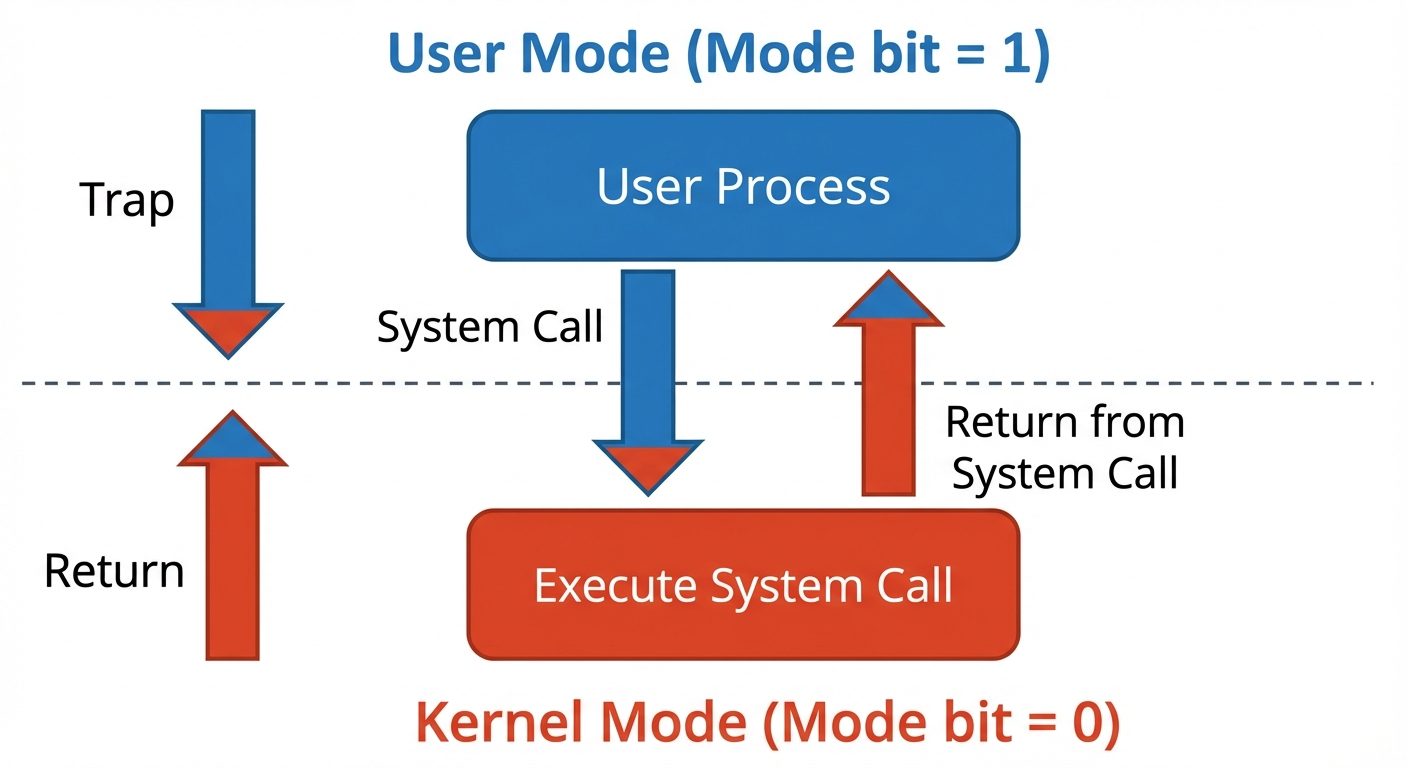
To ensure the proper execution of the operating system, we must distinguish between the execution of operating-system code and user-defined code. Modern hardware provides at least two modes of operation:
1. User Mode (Mode Bit = 1)
- When the computer system is running user applications (like a Word processor or Web browser), the system is in User Mode.
- Restricted access: User programs cannot access hardware directly or execute privileged instructions.
2. Supervisor / Kernel Mode (Mode Bit = 0)
- Also called System Mode or Privileged Mode.
- When a user application requests a service from the OS (via a system call) or an interrupt occurs, the system switches to Kernel Mode.
- Full access: The CPU can execute any instruction and access all hardware resources.
3. Evolution and Types of Operating Systems
Evolution of OS
The history of operating systems correlates with the generations of computer hardware:
- Serial Processing (No OS): Programmers interacted directly with hardware using toggle switches.
- Simple Batch Systems: Introduction of monitors to manage job queues.
- Multiprogramming: Maximizing CPU utilization.
- Time-Sharing: Interactive computing.
- Personal Computing: Focus on user interface (GUI).
Types of Operating Systems
A. Simple Batch Systems
- Concept: Similar jobs are grouped together into "batches" to reduce setup time.
- Mechanism: The operator puts a batch of jobs on an input device. A resident monitor program executes the jobs sequentially.
- Disadvantage: CPU remains idle during I/O operations (slow speed of mechanical I/O vs electronic CPU).
B. Multiprogramming Systems
- Concept: Increases CPU utilization by organizing jobs (code and data) so that the CPU always has one to execute.
- Mechanism: Several jobs are kept in memory simultaneously. When one job waits for I/O, the OS switches to another job.
- Key: Requires memory management and CPU scheduling.
C. Multitasking (Time-Sharing) Systems
- Concept: A logical extension of multiprogramming where the CPU switches jobs so frequently that users can interact with each program while it is running.
- Mechanism: Uses Round Robin Scheduling (time slices/quantums).
- Goal: To minimize response time.
D. Multiprocessing Systems
- Concept: Systems with two or more processors (CPUs) in close communication, sharing the computer bus, clock, memory, and peripherals.
- Types:
- Symmetric Multiprocessing (SMP): Each processor performs all tasks (peers).
- Asymmetric Multiprocessing: Master-slave relationship; master CPU schedules tasks for slave CPUs.
- Benefits: Increased throughput, economy of scale, increased reliability (graceful degradation).
E. Parallel Systems
- Tightly coupled systems where multiple processors share a global common memory and a single clock. They are used for high-speed scientific calculations.
F. Distributed Systems
- Concept: Loosely coupled systems. Processors have their own local memory and communicate via various communication lines (networks).
- Benefits: Resource sharing, computation speedup, load balancing, reliability.
G. Real-Time Operating Systems (RTOS)
- Concept: Systems used when there are rigid time requirements on the operation of a processor or the flow of data.
- Hard RTOS: Critical tasks must complete on time (e.g., medical imaging, pacemakers). Missing a deadline is catastrophic.
- Soft RTOS: A critical task gets priority over other tasks but deadlines are not strictly enforceable (e.g., multimedia streaming).
4. Operating System Structure
System Calls
The System Call provides the interface between a running program and the Operating System.
- It allows user-level processes to request services of the operating system (e.g., reading a file, sending a packet).
- API: accessed generally via Application Programming Interfaces (POSI, Win32 API, Java API).
- Types: Process Control, File Management, Device Management, Information Maintenance, Communications.
OS Architectural Structures
- Monolithic (Simple Structure): No clear modules; difficult to debug (e.g., MS-DOS).
- Layered Approach: The OS is broken into a number of layers (levels). The bottom layer (layer 0) is the hardware; the highest (layer N) is the user interface. Layers can only use functions of lower layers.
- Microkernel: Moves as much from the kernel into "user space" as possible. Communication is done via message passing (e.g., Mach, QNX).
- Modular: The kernel has a set of core components and links in additional services via modules, either at boot time or during run time (e.g., Solaris, Linux).
5. Process Management
Process Concept
- Definition: A process is a program in execution. It is an active entity (dynamic), whereas a program is a passive entity (static code stored on disk).
- A process includes:
- Text Section: Program code.
- Program Counter: Current activity.
- Stack: Temporary data (function parameters, return addresses).
- Data Section: Global variables.
- Heap: Dynamically allocated memory.
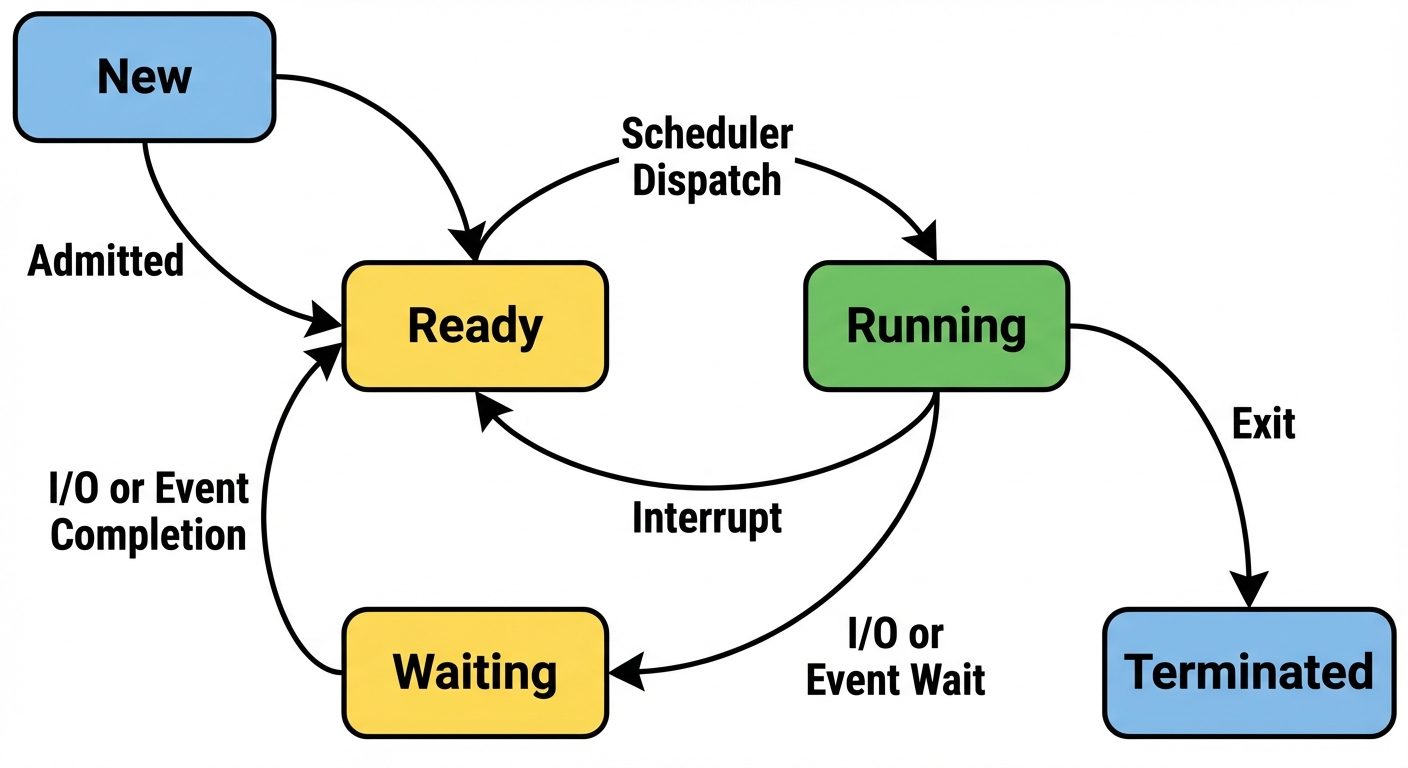
Process Life Cycle (Process States)
As a process executes, it changes state. The state is defined by the current activity of that process.
- New: The process is being created.
- Ready: The process is waiting to be assigned to a processor.
- Running: Instructions are being executed.
- Waiting (Blocked): The process is waiting for some event to occur (such as an I/O completion or reception of a signal).
- Terminated: The process has finished execution.
Process Control Block (PCB)
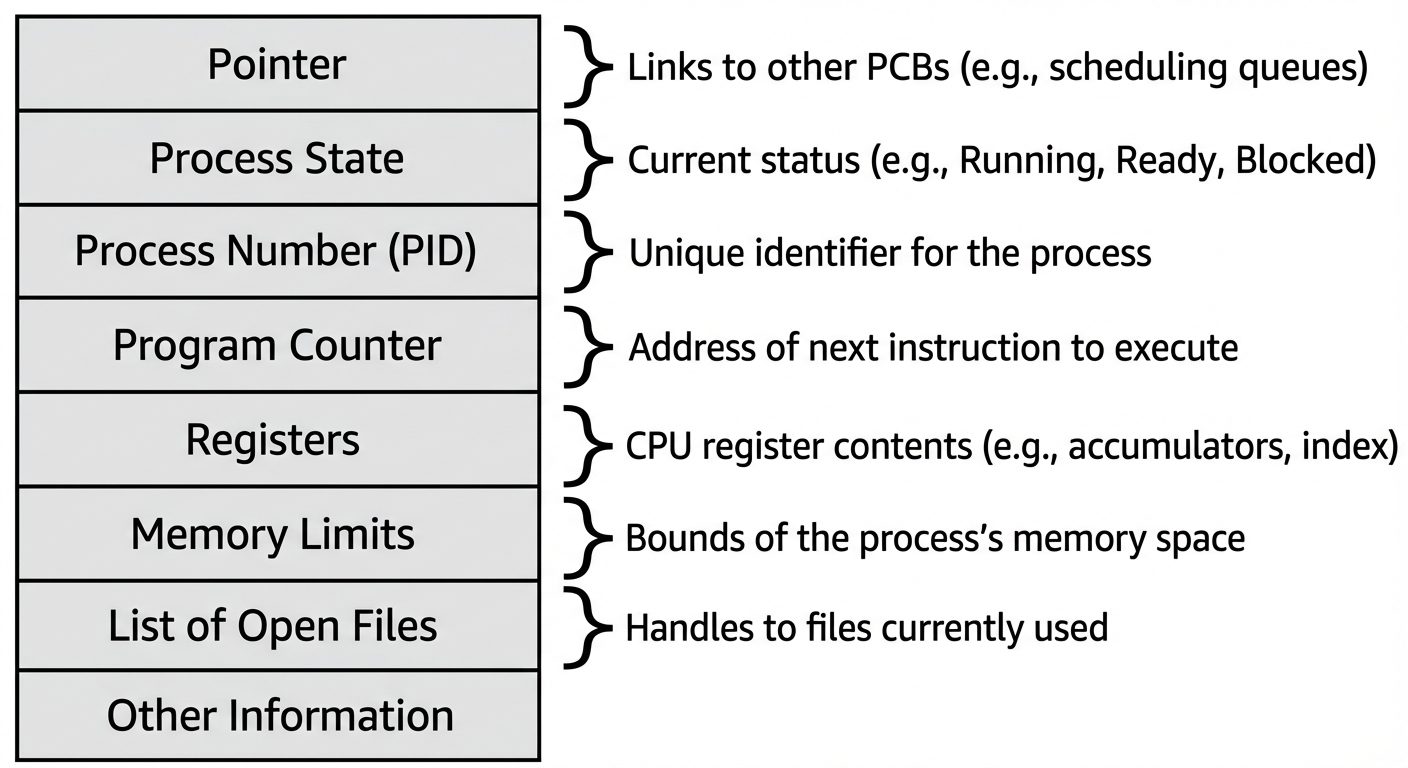
Each process is represented in the operating system by a Process Control Block (also called a Task Control Block). It is the data structure used by the OS to manage the process. It contains:
- Process State: (Running, waiting, etc.)
- Program Counter: Address of the next instruction to execute.
- CPU Registers: Accumulators, index registers, stack pointers.
- CPU Scheduling Information: Priority, pointers to scheduling queues.
- Memory Management Information: Base/limit registers, page tables.
- Accounting Information: CPU used, time limits.
- I/O Status Information: List of I/O devices allocated.
Operations on Processes
-
Process Creation:
- A parent process creates children processes, which, in turn, create other processes, forming a tree of processes.
- Resource sharing options: Parent and children share all resources, subset, or none.
- Execution options: Parent and children execute concurrently, or Parent waits until children terminate.
- UNIX example:
fork()system call creates a new process;exec()system call is used after a fork to replace the process' memory space with a new program.
-
Process Termination:
- Process executes the last statement and asks the operating system to delete it (exit).
- Output data is returned to the parent (via
wait). - Resources are deallocated by the OS.
- Cascading Termination: If a parent terminates, all its children must also be terminated (handled by the OS).
-
Context Switching:
- When switching the CPU to another process, the system must save the state of the old process (in its PCB) and load the saved state for the new process (from its PCB).
- Context-switch time is pure overhead; the system does no useful work while switching.
Cooperating vs. Independent Processes
- Independent Process: Cannot affect or be affected by the execution of another process. It does not share data with other processes.
- Cooperating Process: Can affect or be affected by other processes.
- Reasons for Cooperation: Information sharing, Computation speedup, Modularity, Convenience.
- IPC (Inter-Process Communication): Cooperating processes require an IPC mechanism (Shared Memory or Message Passing) to exchange data.
Did this save you a night before the exam?
LPU Notes is free, and it stays free. Ads cover part of the server bill. The rest comes out of a student's own pocket: the domain, the storage, and keeping the site up through the weeks everyone needs it at once.
The payment button didn't load. An ad blocker or a filtered network is the usual reason. to try again.
Nothing here is ever locked, and nothing unlocks. Chip in only if it was worth it. What it pays for →