Unit 5: I/O Fundamentals, Generics, and Multithreading
1. I/O Fundamentals
Java I/O (Input/Output) is based on the concept of Streams. A stream is a sequence of data. The java.io package contains nearly every class you might need to perform input and output (I/O) in Java.
Basics of Input and Output
- Input Stream: A source for reading data (e.g., keyboard, file, network).
- Output Stream: A destination for writing data (e.g., monitor, file, network).
Java defines two types of streams based on the data type they handle:
- Byte Streams: Handle I/O of raw binary data (8-bit bytes). Used for images, videos, and executable files.
- Root classes:
InputStreamandOutputStream.
- Root classes:
- Character Streams: Handle I/O of character data (16-bit Unicode). Used for text files.
- Root classes:
ReaderandWriter.
- Root classes:
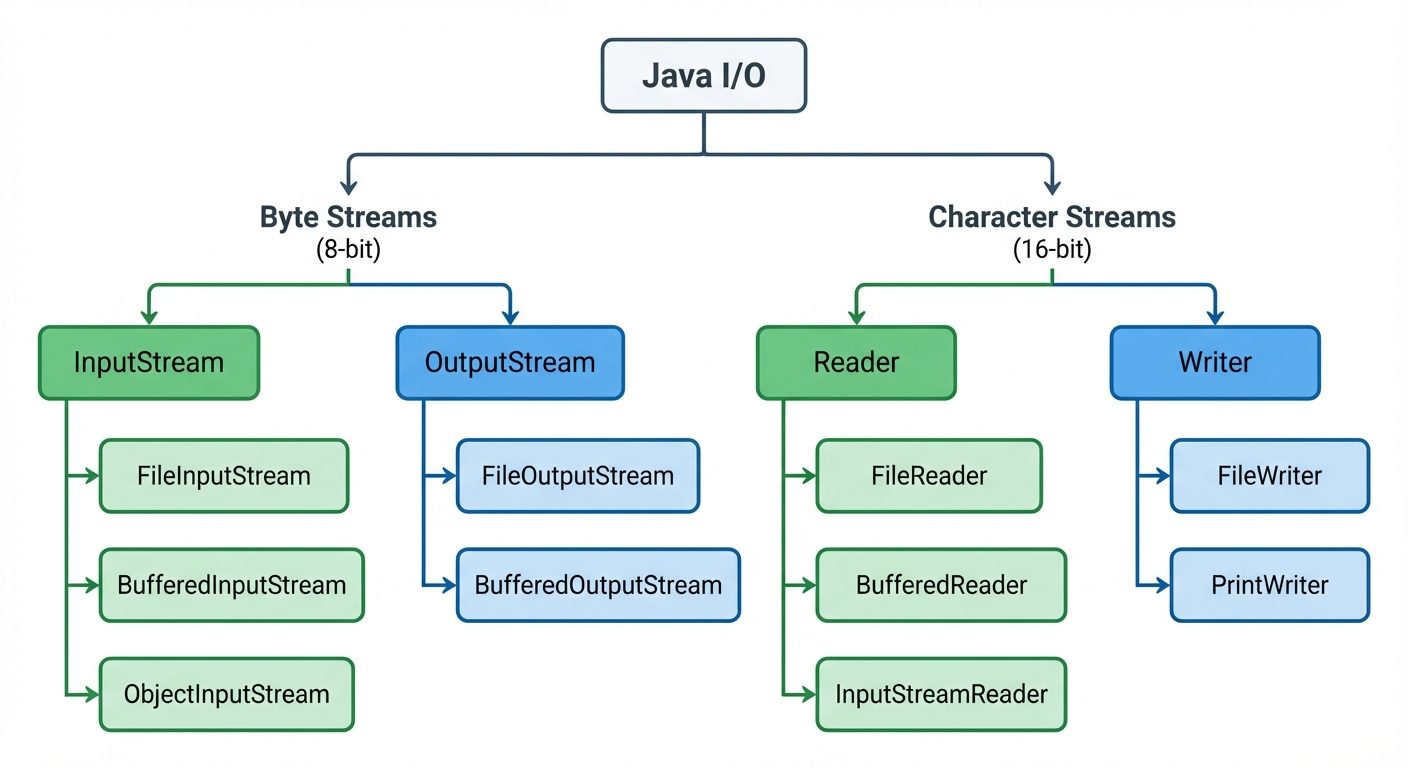
Reading and Writing Data from Various Sources
Byte Stream Classes (FileInputStream / FileOutputStream)
Used to read bytes from a file and write bytes to a file.
Example: Copying a binary file
import java.io.*;

public class ByteStreamExample {
    public static void main(String args[]) throws IOException {
        FileInputStream in = null;
        FileOutputStream out = null;

        try {
            in = new FileInputStream("input.jpg");
            out = new FileOutputStream("output.jpg");

            int c;
            // Reads a byte at a time until end of stream (-1)
            while ((c = in.read()) != -1) {
                out.write(c);
            }
        } finally {
            if (in != null) in.close();
            if (out != null) out.close();
        }
    }
}
Character Stream Classes (FileReader / FileWriter)
Used specifically for reading and writing text files.
Example: Reading text with BufferedReader (Efficient Reading)
import java.io.*;

public class CharStreamExample {
    public static void main(String args[]) {
        try (BufferedReader br = new BufferedReader(new FileReader("textfile.txt"))) {
            String line;
            // Reads a whole line at a time
            while ((line = br.readLine()) != null) {
                System.out.println(line);
            }
        } catch (IOException e) {
            e.printStackTrace();
        }
    }
}
Writing and Reading Objects using Serialization
Serialization is the process of converting an object's state into a byte stream. Deserialization is the reverse process.
- Interface: The class must implement the
java.io.Serializableinterface (a marker interface with no methods). - Classes Used:
ObjectOutputStream(write) andObjectInputStream(read). - Transient Keyword: Fields marked
transientare ignored during serialization.
Example: Serialization Implementation
import java.io.*;

class Student implements Serializable {
    int id;
    String name;
    transient int age; // This will not be saved

    public Student(int id, String name, int age) {
        this.id = id;
        this.name = name;
        this.age = age;
    }
}

public class SerializationDemo {
    public static void main(String[] args) {
        Student s1 = new Student(101, "Alice", 22);

        // Serialization
        try (ObjectOutputStream out = new ObjectOutputStream(new FileOutputStream("student.ser"))) {
            out.writeObject(s1);
            System.out.println("Object serialized");
        } catch (IOException e) { e.printStackTrace(); }

        // Deserialization
        try (ObjectInputStream in = new ObjectInputStream(new FileInputStream("student.ser"))) {
            Student s2 = (Student) in.readObject();
            System.out.println("ID: " + s2.id + " Name: " + s2.name + " Age: " + s2.age);
            // Output Age will be 0 (default int value) because it was transient
        } catch (Exception e) { e.printStackTrace(); }
    }
}
2. Generics
Generics allow types (classes and interfaces) to be parameters when defining classes, interfaces, and methods. They provide stronger type checks at compile time and eliminate the need for explicit casting.
Creating a Custom Generic Class
A generic class is defined with the following format: class ClassName<T1, T2, ...>. T stands for "Type".
// T is a type parameter that will be replaced by a real type
class Box<T> {
    private T t;

    public void set(T t) { this.t = t; }
    public T get() { return t; }
}

public class GenericDemo {
    public static void main(String[] args) {
        // Box for Integers
        Box<Integer> integerBox = new Box<Integer>();
        integerBox.set(10);
        // integerBox.set("Hello"); // Compile-time Error! Type Safety.

        // Box for Strings
        Box<String> stringBox = new Box<String>();
        stringBox.set("Hello World");

        System.out.printf("Integer Value :%d\n", integerBox.get());
        System.out.printf("String Value :%s\n", stringBox.get());
    }
}
Type Inference and the Diamond Operator (<>)
Introduced in Java 7, the Diamond Operator allows you to omit the type arguments in the constructor invocation if the compiler can infer them from the context.
// Pre-Java 7
Box<String> box1 = new Box<String>();

// Java 7 and later (Diamond Operator)
// The compiler infers <String> is needed inside new Box<>()
Box<String> box2 = new Box<>();
Bounded Types and Wildcards
Sometimes you want to restrict the types that can be used as type arguments.
-
Bounded Type Parameters: Restrict the generic to a specific subclass.
- Syntax:
<T extends SuperClass> - Example:
<T extends Number>acceptsInteger,Double,Float, etc., but notString.
- Syntax:
-
Wildcards (
?): Represents an unknown type.- Unbounded Wildcard:
List<?>(List of anything). - Upper Bounded Wildcard:
List<? extends Number>(List of Number or its subclasses). - Lower Bounded Wildcard:
List<? super Integer>(List of Integer or its superclasses).
- Unbounded Wildcard:
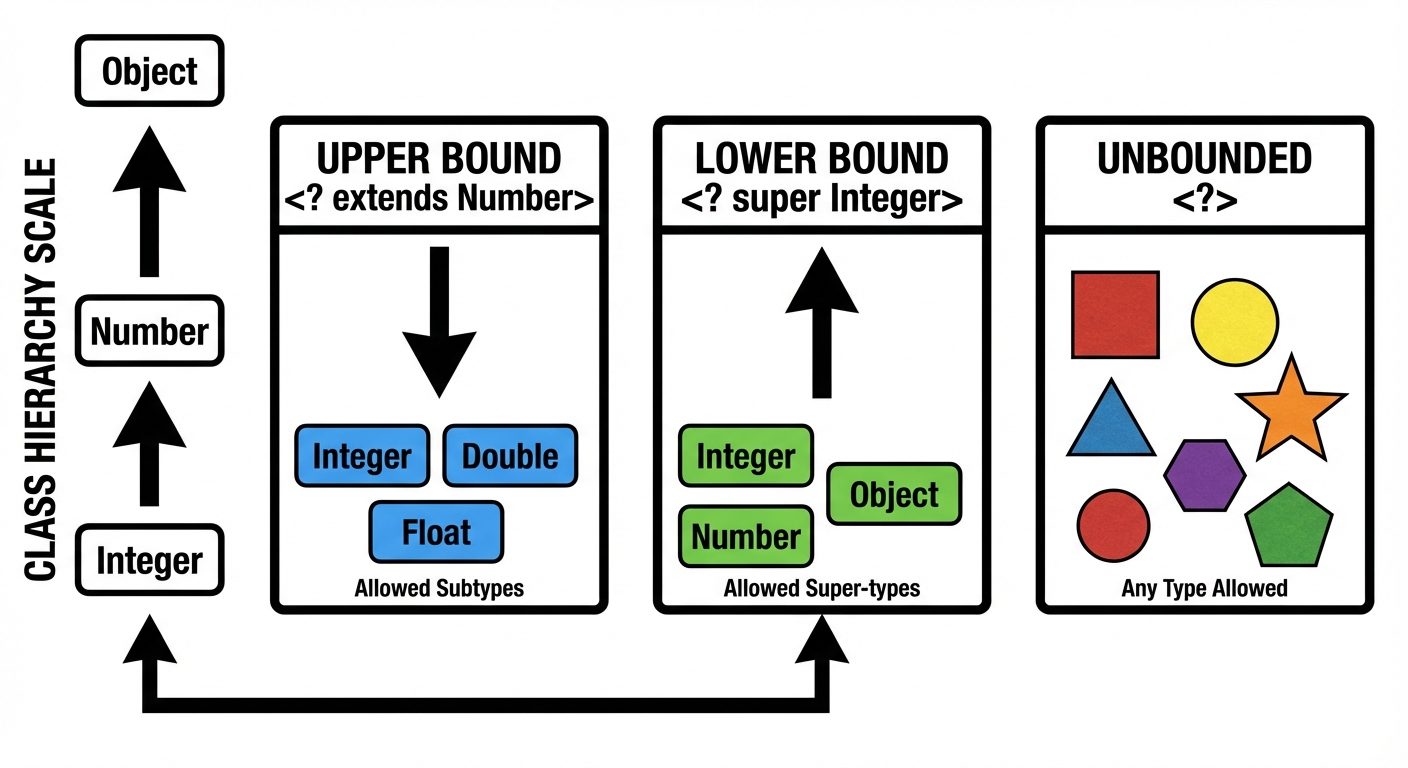
3. Multithreading
Multithreading is a Java feature that allows concurrent execution of two or more parts of a program for maximum utilization of the CPU. Each part of such a program is called a thread.
Thread Lifecycle
A thread goes through various stages in its life:
- New: The thread is created but not yet started.
- Runnable: The thread is ready to run and waiting for CPU time.
- Running: The CPU is executing the thread code.
- Blocked/Waiting: The thread is inactive, waiting for a resource or another thread to finish.
- Terminated (Dead): The thread has finished execution.
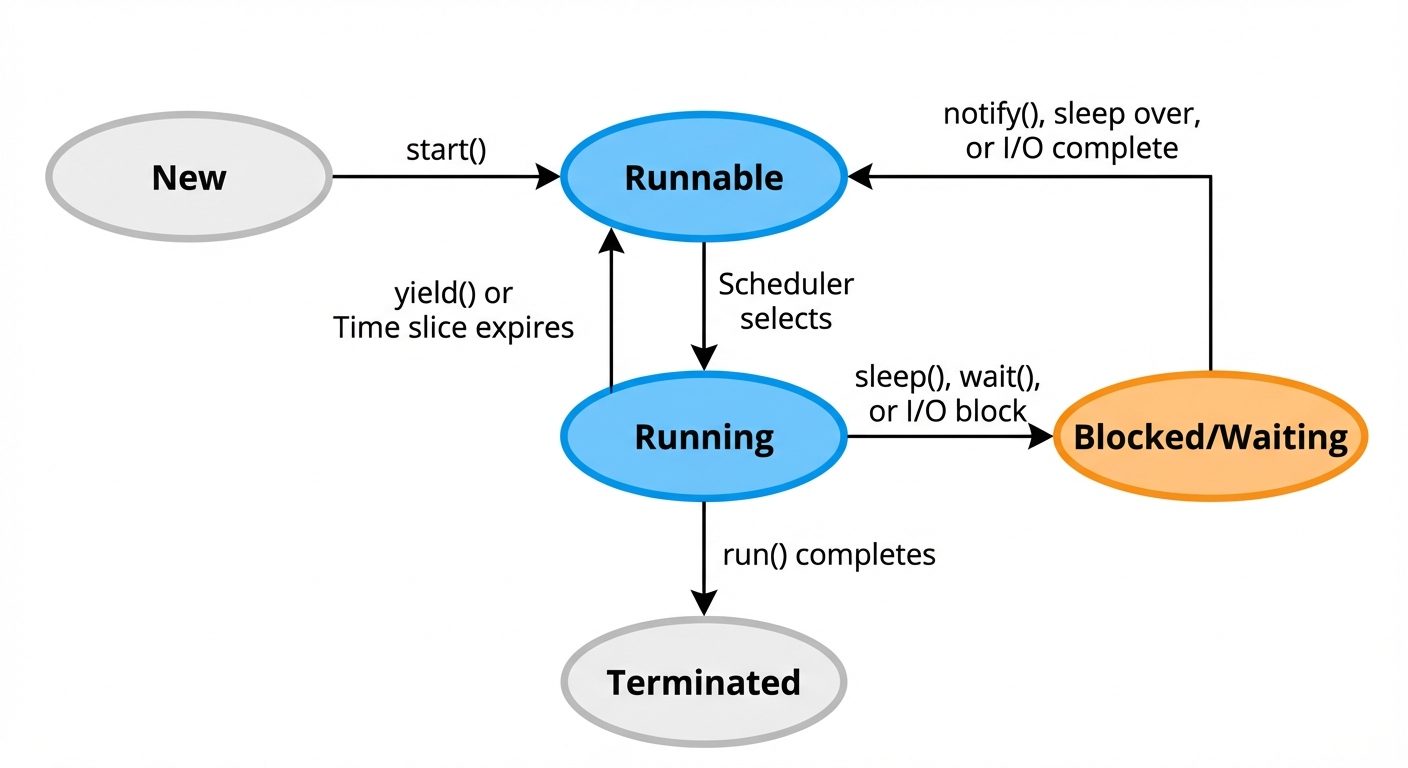
Creating Threads
There are two ways to create a thread in Java:
1. Extending the Thread Class
class MyThread extends Thread {
    public void run() {
        System.out.println("Thread is running...");
    }
}

// Usage
MyThread t1 = new MyThread();
t1.start(); // Moves thread from New to Runnable
2. Implementing the Runnable Interface (Preferred)
Better because Java supports implementing multiple interfaces but extending only one class.
class MyRunnable implements Runnable {
    public void run() {
        System.out.println("Runnable thread is running...");
    }
}

// Usage
Thread t2 = new Thread(new MyRunnable());
t2.start();
Thread Priorities
Every thread has a priority typically ranging from 1 to 10. The thread scheduler uses priorities to determine when each thread should be allowed to execute.
Thread.MIN_PRIORITY(1)Thread.NORM_PRIORITY(5) - DefaultThread.MAX_PRIORITY(10)
Thread t = new Thread();
t.setPriority(Thread.MAX_PRIORITY); // Set priority to 10
System.out.println(t.getPriority());
Synchronization
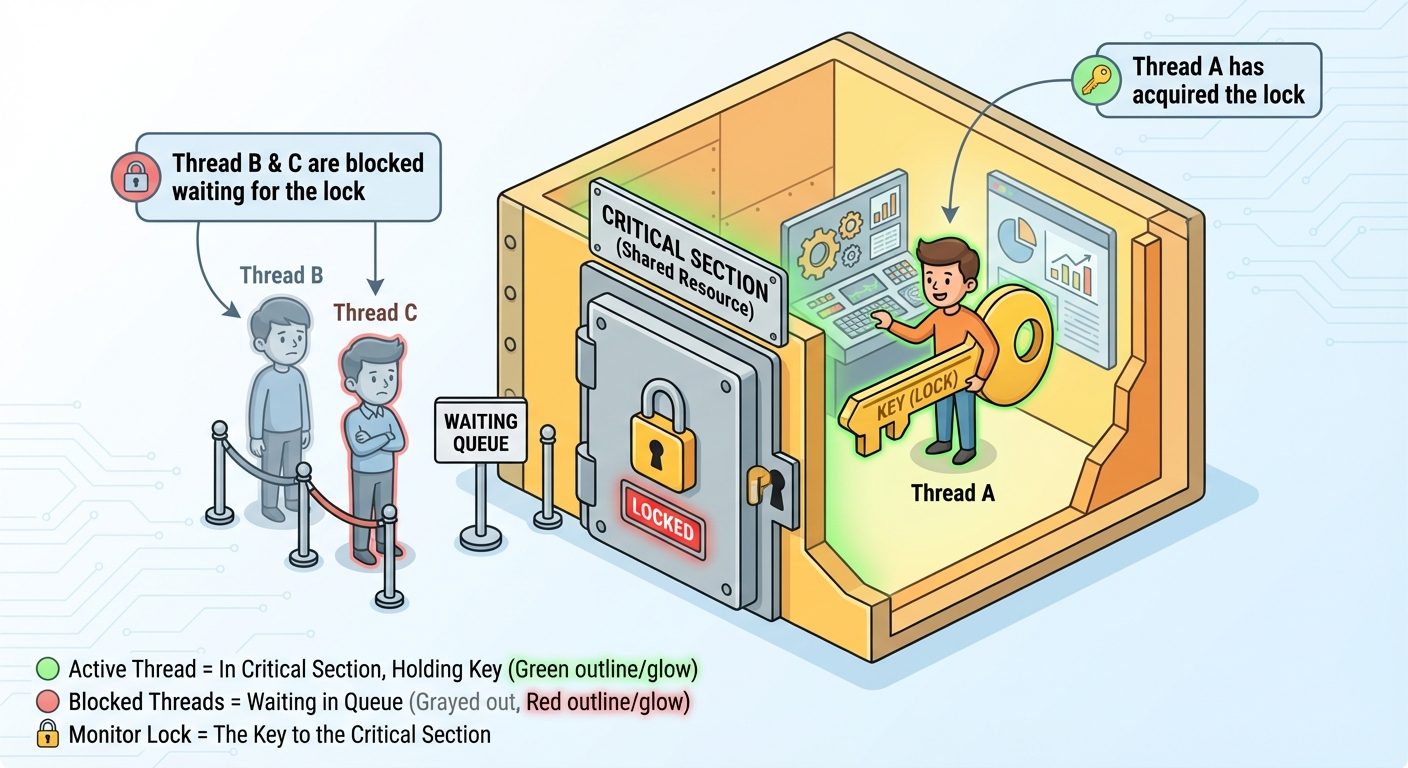
When multiple threads access a shared resource simultaneously, data inconsistency can occur (Race Condition). Synchronization ensures that only one thread accesses the resource at a time.
- Monitor Lock: Every object in Java has a lock (monitor). When a thread enters a synchronized block/method, it acquires the lock. Other threads must wait until the lock is released.
- Keyword:
synchronized
Example: Synchronized Method
class Counter {
    private int count = 0;

    // Only one thread can execute this at a time
    public synchronized void increment() {
        count++;
    }

    public int getCount() { return count; }
}
Inter-thread Communication
Threads can communicate using methods defined in the Object class. These methods must be called within a synchronized context.
wait(): Causes the current thread to release the lock and wait until another thread invokesnotify().notify(): Wakes up a single thread that is waiting on this object's monitor.notifyAll(): Wakes up all threads waiting on this object's monitor.
Example: Producer-Consumer Logic
class SharedData {
    boolean dataReady = false;

    synchronized void produce() {
        if (dataReady) {
            try { wait(); } catch (InterruptedException e) {}
        }
        // Produce logic here
        System.out.println("Produced Data");
        dataReady = true;
        notify(); // Notify consumer
    }

    synchronized void consume() {
        if (!dataReady) {
            try { wait(); } catch (InterruptedException e) {}
        }
        // Consume logic here
        System.out.println("Consumed Data");
        dataReady = false;
        notify(); // Notify producer
    }
}
Did this save you a night before the exam?
LPU Notes is free, and it stays free. Ads cover part of the server bill. The rest comes out of a student's own pocket: the domain, the storage, and keeping the site up through the weeks everyone needs it at once.
The payment button didn't load. An ad blocker or a filtered network is the usual reason. to try again.
Nothing here is ever locked, and nothing unlocks. Chip in only if it was worth it. What it pays for →