Unit 4: Nested Class, Lambda Expressions, and Exceptions
1. Nested Classes
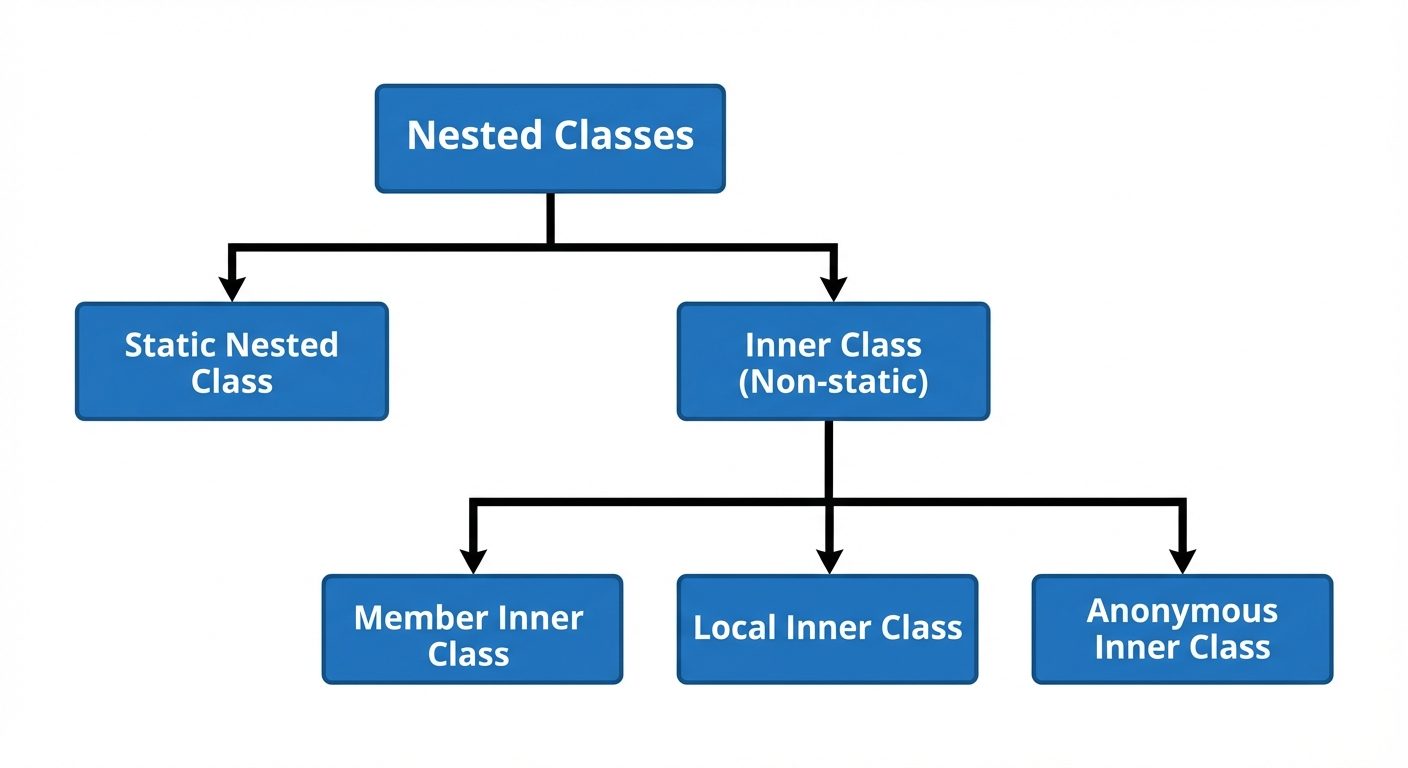
A nested class is a class defined within another class. Java allows classes to be defined within other classes to logically group classes that are only used in one place, increase encapsulation, and create more readable and maintainable code.
Categories of Nested Classes
Nested classes are divided into two main categories:
- Static Nested Classes: Declared
static. - Inner Classes: Non-static nested classes.
1.1 Static Nested Classes
- A static nested class is associated with its outer class.
- It cannot refer directly to instance variables or methods defined in its enclosing class (it can only use them through an object reference).
- It accesses static members of the enclosing class directly.
- Instantiation:
OuterClass.StaticNestedClass nestedObject = new OuterClass.StaticNestedClass();
1.2 Non-Static Nested Classes (Inner Classes)
An inner class is associated with an instance of its enclosing class and has direct access to that object's methods and fields (both static and non-static).
A. Member Inner Class
- Defined at the member level of a class (outside methods).
- Instantiation: Requires an instance of the outer class.
JAVAOuterClass outer = new OuterClass(); OuterClass.InnerClass inner = outer.new InnerClass();
B. Local Inner Class
- Defined inside a block, usually a method body.
- Scope is restricted to the method where it is declared.
- Can access
finalor "effectively final" local variables of the enclosing method.
C. Anonymous Inner Class
- An inner class without a name.
- Used to instantiate an object with certain "extras" (overriding methods) in a single expression.
- Commonly used for event handling or implementing functional interfaces before Lambda expressions were introduced.
// Example of Anonymous Inner Class
Runnable r = new Runnable() {
    @Override
    public void run() {
        System.out.println("Anonymous class running");
    }
};
2. Functional Interfaces and Lambda Expressions
2.1 Functional Interface
A Functional Interface is an interface that contains exactly one abstract method. They can contain any number of default or static methods.
- Annotation:
@FunctionalInterface(optional, but recommended for compiler checks). - Examples:
Runnable,Callable,Comparator,ActionListener.
2.2 Lambda Expressions
Lambda expressions (introduced in Java 8) provide a clear and concise way to represent one method interface using an expression. They are essentially anonymous functions.
Syntax:
(parameter_list) -> { body }- No Parameters:
() -> System.out.println("Hello"); - One Parameter:
x -> x * x;(Parentheses optional for single param) - Multiple Parameters:
(x, y) -> x + y; - Block Body:
(x, y) -> { int sum = x + y; return sum; };
Comparison: Anonymous Class vs. Lambda
// Anonymous Class approach
MathOperation addition = new MathOperation() {
    @Override
    public int operate(int a, int b) {
        return a + b;
    }
};

// Lambda approach
MathOperation addition = (a, b) -> a + b;
3. Working with Dates (Utility Classes)
Java 8 introduced the java.time package (JSR-310), which fixes the thread-safety and mutability issues of the legacy java.util.Date and java.util.Calendar.
Key Classes in java.time
- LocalDate: Represents a date (year, month, day) without time (e.g.,
2023-10-15). - LocalTime: Represents time without a date (e.g.,
14:30:00). - LocalDateTime: Combines date and time.
- ZonedDateTime: Represents date and time with time zone information.
- DateTimeFormatter: For formatting and parsing date objects.
Example Usage:
import java.time.*;
import java.time.format.DateTimeFormatter;

LocalDate today = LocalDate.now();
LocalDate specificDate = LocalDate.of(2023, Month.JANUARY, 1);

// Formatting
DateTimeFormatter formatter = DateTimeFormatter.ofPattern("dd-MM-yyyy");
String formattedDate = today.format(formatter);
4. Exception Handling Overview
An Exception is an event that occurs during the execution of a program that disrupts the normal flow of instructions. Exception handling allows the program to maintain execution flow or terminate gracefully.
4.1 Exception Class Hierarchy
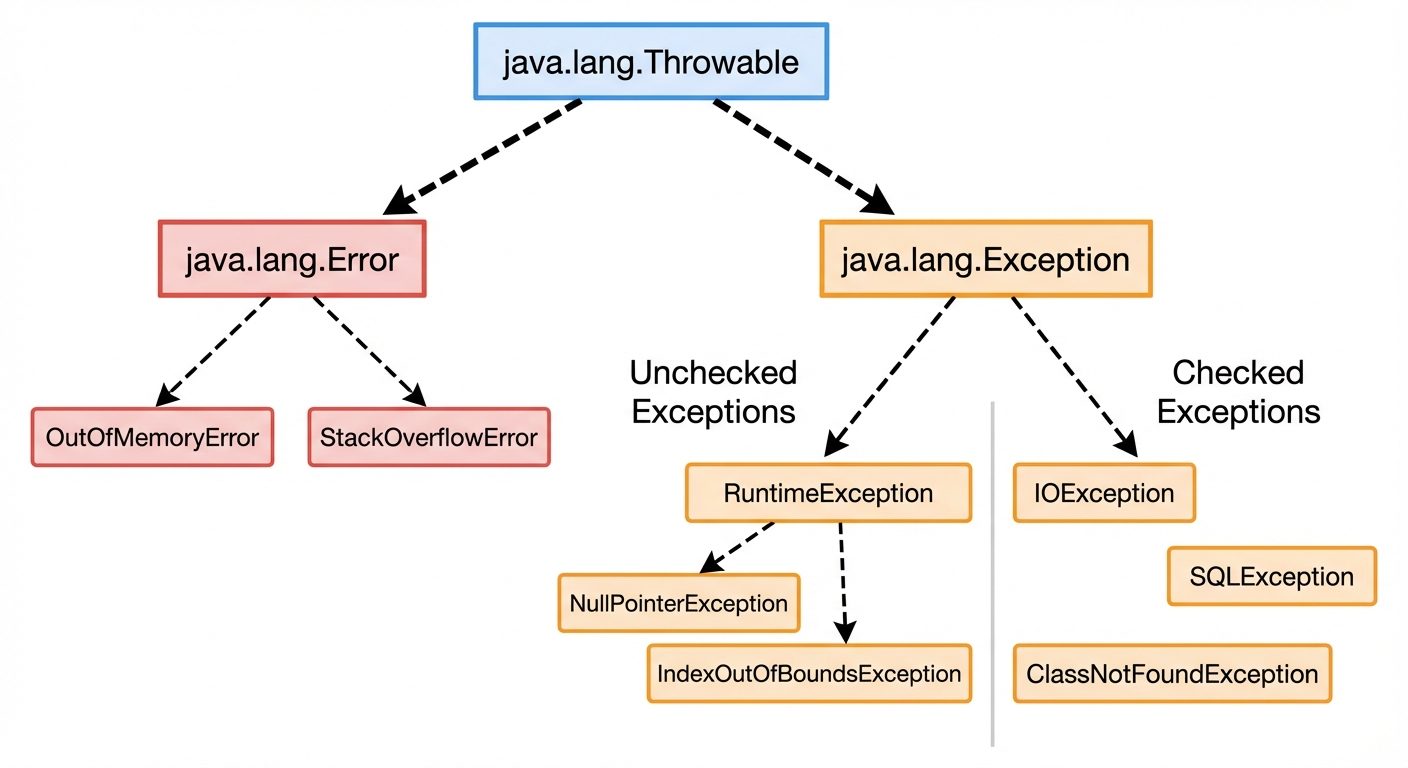
All exceptions and errors are subclasses of the Throwable class.
4.2 Exception Types
- Checked Exceptions:
- Checked at compile-time.
- Must be handled using
try-catchor declared usingthrows. - Examples:
IOException,SQLException,ClassNotFoundException.
- Unchecked Exceptions (Runtime Exceptions):
- Not checked at compile-time.
- Usually result from programming errors.
- Examples:
NullPointerException,ArrayIndexOutOfBoundsException,ArithmeticException.
- Errors:
- Serious problems that a reasonable application should not try to catch.
- Examples:
OutOfMemoryError,StackOverflowError.
4.3 Propagation of Exceptions
When an exception occurs in a method, if it is not caught, it is dropped down (propagated) to the method that called it. This continues until the exception is caught or it reaches the main() method, causing the JVM to terminate. This process involves "unwinding the stack."
5. Handling Exceptions
5.1 Try, Catch, and Finally
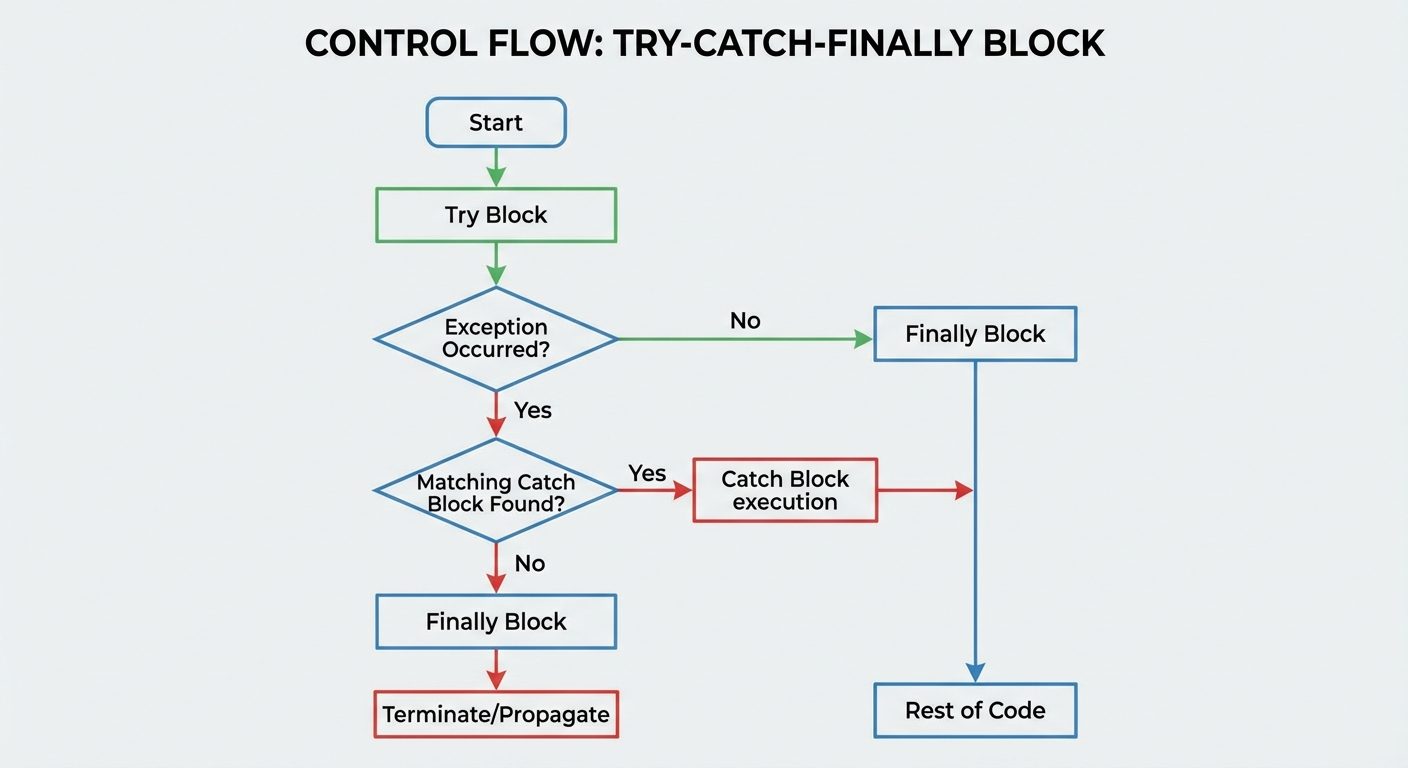
- try: Contains the code that might throw an exception.
- catch: Handles the specific exception thrown in the try block.
- finally: Contains code that is always executed, regardless of whether an exception occurred or not (e.g., closing files/connections).
try {
    int data = 50 / 0; // May throw ArithmeticException
} catch (ArithmeticException e) {
    System.out.println("Cannot divide by zero");
} finally {
    System.out.println("This block is always executed");
}
5.2 Throw vs. Throws
| Feature | throw |
throws |
|---|---|---|
| Usage | Used to explicitly throw an exception. | Used to declare that a method might throw an exception. |
| Location | Inside the method body. | With the method signature. |
| Syntax | throw new ExceptionType("msg"); |
void method() throws ExceptionType { ... } |
| Count | Followed by a single instance. | Followed by one or more class names. |
5.3 Handling Multiple Exceptions (Multi-Catch)
Since Java 7, a single catch block can handle more than one type of exception using the pipe | operator. This reduces code duplication.
try {
    // code
} catch (ArithmeticException | NullPointerException e) {
    System.out.println("Math or Null error occurred: " + e.getMessage());
}
5.4 Try-with-resources
Introduced in Java 7, this feature automatically closes resources (like files or sockets) when the try block exits. The resource must implement the java.lang.AutoCloseable or java.io.Closeable interface.
// FileReader and BufferedReader close automatically
try (FileReader fr = new FileReader("text.txt");
     BufferedReader br = new BufferedReader(fr)) {
    System.out.println(br.readLine());
} catch (IOException e) {
    e.printStackTrace();
}
5.5 Creating Custom Exceptions
Developers can create their own exceptions to handle application-specific errors by extending Exception (for checked) or RuntimeException (for unchecked).
class InvalidAgeException extends Exception {
    public InvalidAgeException(String str) {
        super(str);
    }
}
// Usage: throw new InvalidAgeException("Age is not valid");
6. Testing Invariants using Assertions
Assertions are a development tool used to test assumptions (invariants) about the program state. They are primarily used for debugging and testing, not for handling runtime errors in production.
Syntax
assert boolean_expression;assert boolean_expression : error_message_string;
If the boolean expression is false, the JVM throws an AssertionError.
Enabling Assertions
By default, assertions are disabled at runtime.
- Enable: Run with
-eaor-enableassertionsflag.java -ea MyProgram
- Disable: Run with
-daor-disableassertionsflag.
Example:
int age = 15;
assert age >= 18 : "Underage: Cannot process";
// If run with -ea, this throws AssertionError
Did this save you a night before the exam?
LPU Notes is free, and it stays free. Ads cover part of the server bill. The rest comes out of a student's own pocket: the domain, the storage, and keeping the site up through the weeks everyone needs it at once.
The payment button didn't load. An ad blocker or a filtered network is the usual reason. to try again.
Nothing here is ever locked, and nothing unlocks. Chip in only if it was worth it. What it pays for →