Unit 6: Collections and Java Database Programming
1. Creating a Collection by Using Generics
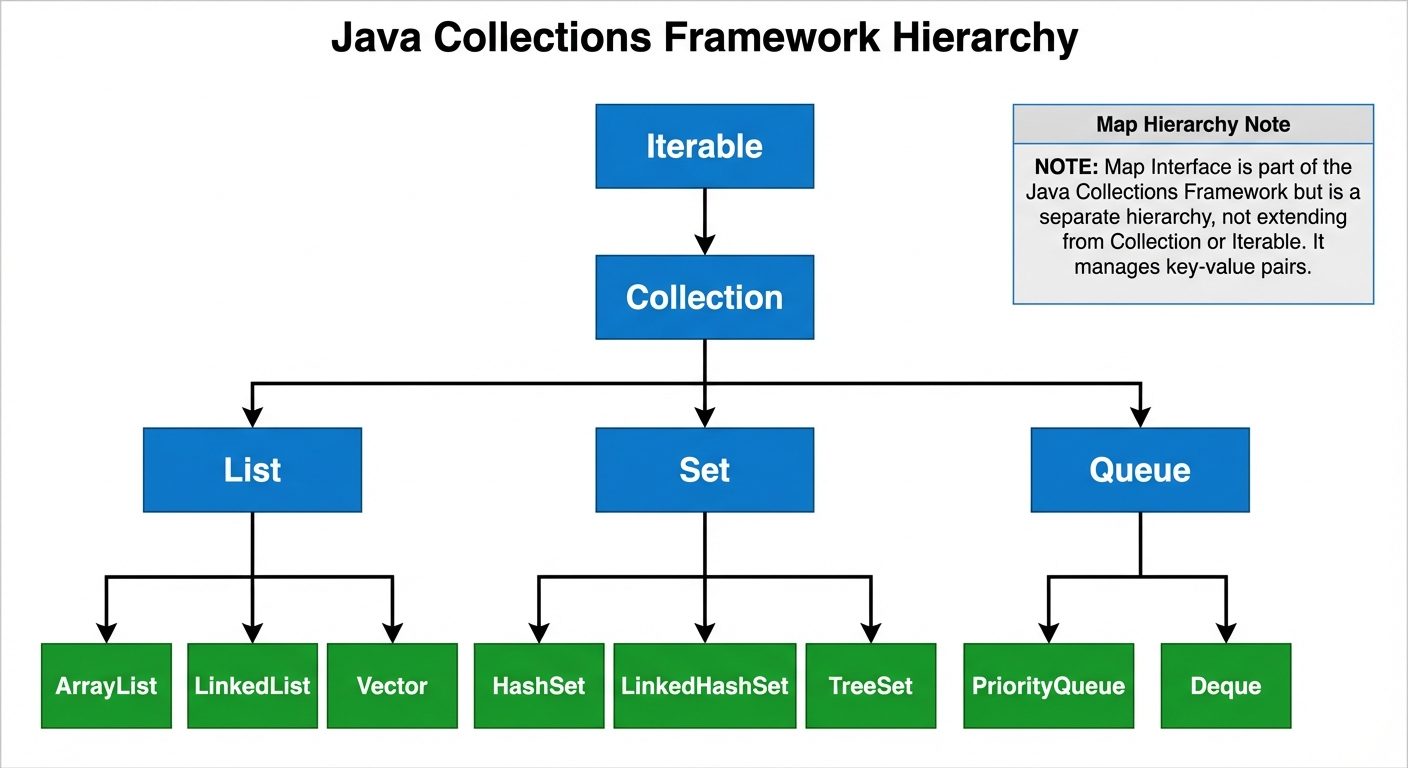
The Java Collections Framework provides a set of classes and interfaces that implement commonly reusable collection data structures. Prior to Java 5, collections held Object references, requiring manual casting. Generics allow specific types to be defined at compile-time, ensuring type safety.
Concept of Generics
Generics enable types (classes and interfaces) to be parameters when defining classes, interfaces, and methods.
Syntax: ClassOrInterface<Type>
Benefits:
- Type Safety: The compiler ensures that only objects of the correct type are inserted into the collection.
- Elimination of Casting: Explicit casting is not required when retrieving elements.
Example:
import java.util.ArrayList;
import java.util.List;

public class GenericExample {
    public static void main(String[] args) {
        // Without Generics (Old style - Unsafe)
        List listOld = new ArrayList();
        listOld.add("Hello");
        String s1 = (String) listOld.get(0); // Casting needed

        // With Generics (Type Safe)
        List<String> listNew = new ArrayList<>(); // <> is the diamond operator
        listNew.add("World");
        // listNew.add(100); // Compile-time error! Types must match.
        String s2 = listNew.get(0); // No casting needed
    }
}
2. Implementing an ArrayList
ArrayList is a resizable-array implementation of the List interface. It permits all elements, including null.
Key Characteristics
- Dynamic Sizing: Unlike standard arrays,
ArrayListgrows automatically when it reaches capacity (usually by 50%). - Index-Based Access: Provides fast random access () to elements using an index.
- Performance: Slow for manipulation (insertion/deletion) in the middle of the list because elements must be shifted.
Implementation Example
import java.util.ArrayList;
import java.util.Iterator;

public class ArrayListDemo {
    public static void main(String[] args) {
        // Create
        ArrayList<String> fruits = new ArrayList<>();

        // Add
        fruits.add("Apple");
        fruits.add("Banana");
        fruits.add("Orange");

        // Access
        System.out.println("Element at 1: " + fruits.get(1)); // Banana

        // Remove
        fruits.remove("Apple");

        // Iterate
        for(String fruit : fruits) {
            System.out.println(fruit);
        }
    }
}
3. Implementing TreeSet using Comparable and Comparator
TreeSet implements the Set interface and keeps elements sorted. To maintain order, objects stored in a TreeSet must define how they compare to one another.
3.1 Comparable Interface (Natural Ordering)
Implemented by the class of the objects being stored. The class must override the compareTo method.
import java.util.TreeSet;

// Student implements Comparable to define default sorting logic
class Student implements Comparable<Student> {
    int id;
    String name;

    public Student(int id, String name) {
        this.id = id;
        this.name = name;
    }

    // Sort by ID ascending
    @Override
    public int compareTo(Student other) {
        return this.id - other.id;
    }

    @Override
    public String toString() { return id + ": " + name; }
}

public class ComparableExample {
    public static void main(String[] args) {
        TreeSet<Student> students = new TreeSet<>();
        students.add(new Student(102, "Alice"));
        students.add(new Student(101, "Bob"));

        System.out.println(students); // Output: [101: Bob, 102: Alice]
    }
}
3.2 Comparator Interface (Custom Ordering)
Used when you want to define a sorting logic external to the class, or you cannot modify the class source code.
import java.util.Comparator;
import java.util.TreeSet;

// A separate class for logic, or an anonymous class/lambda
class NameComparator implements Comparator<Student> {
    @Override
    public int compare(Student s1, Student s2) {
        return s1.name.compareTo(s2.name); // Sort by Name alphabetically
    }
}

public class ComparatorExample {
    public static void main(String[] args) {
        // Pass the Comparator to the TreeSet constructor
        TreeSet<Student> students = new TreeSet<>(new NameComparator());
        students.add(new Student(102, "Alice"));
        students.add(new Student(101, "Bob"));

        System.out.println(students); // Output: [102: Alice, 101: Bob]
    }
}
4. Implementing a HashMap
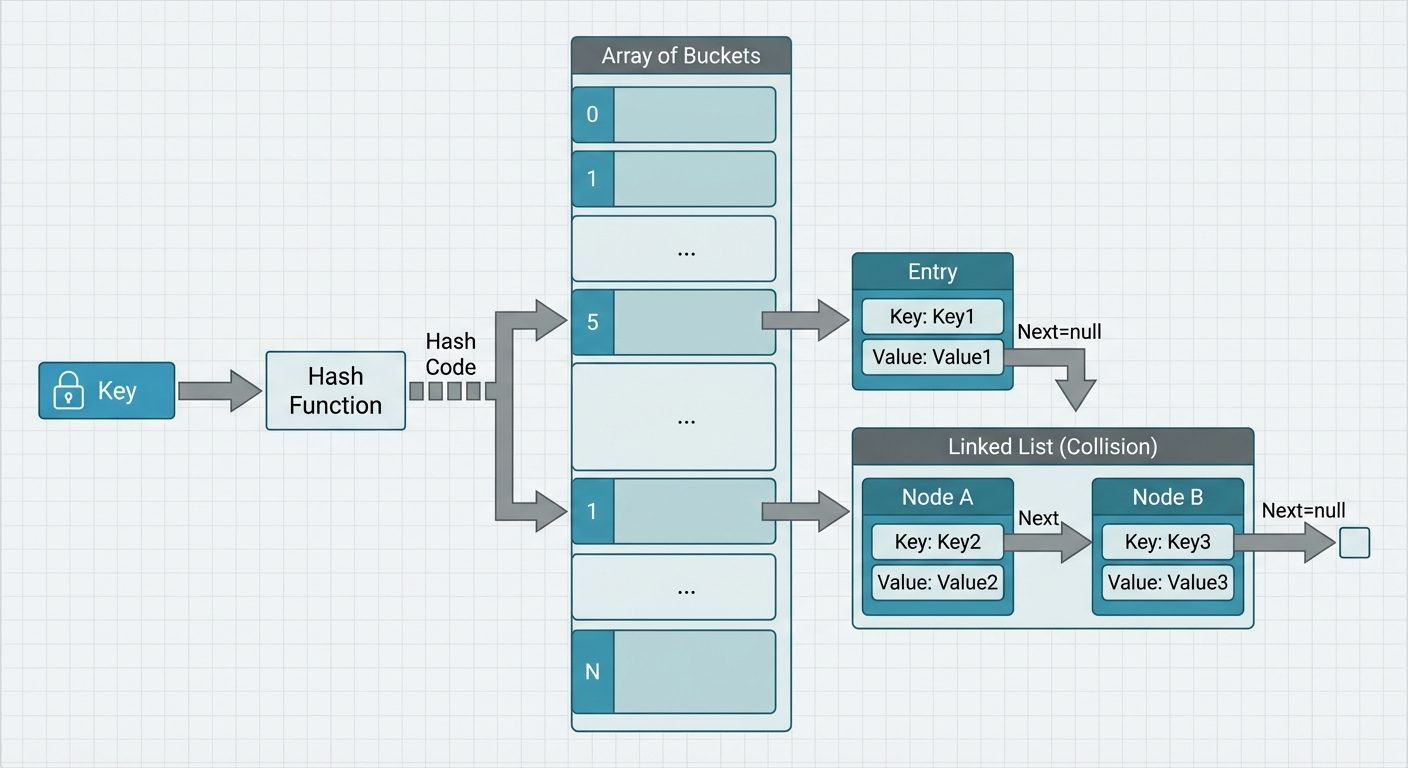
HashMap stores data in Key-Value pairs. It uses a technique called Hashing to calculate an index for storing values.
Internal Working
- Key Hashing: Java computes
key.hashCode(). - Index Calculation: The hash is converted to an index (Bucket).
- Collision Handling: If two keys land in the same bucket, Java uses a Linked List (or a Balanced Tree in Java 8+ if the bucket is large) to store multiple entries.
Implementation Example
import java.util.HashMap;
import java.util.Map;

public class HashMapDemo {
    public static void main(String[] args) {
        // Key: Integer (ID), Value: String (Name)
        HashMap<Integer, String> map = new HashMap<>();

        // Put (Create/Update)
        map.put(1, "Java");
        map.put(2, "Python");
        map.put(3, "C++");

        // Get (Read)
        System.out.println(map.get(2)); // Output: Python

        // Contains
        if(map.containsKey(1)) {
            System.out.println("ID 1 exists");
        }

        // Iterating
        for(Map.Entry<Integer, String> entry : map.entrySet()) {
            System.out.println(entry.getKey() + " -> " + entry.getValue());
        }
    }
}
5. Implementing a Deque
Deque stands for Double Ended Queue. It is a linear collection that supports element insertion and removal at both ends. It can function as both a Stack (LIFO) and a Queue (FIFO).
Implementing Class: ArrayDeque (faster than Stack or LinkedList for this purpose).
import java.util.ArrayDeque;
import java.util.Deque;

public class DequeDemo {
    public static void main(String[] args) {
        Deque<String> deck = new ArrayDeque<>();

        // Add to both ends
        deck.addFirst("Start");
        deck.addLast("End");
        deck.addFirst("Before Start");

        // Current: [Before Start, Start, End]

        // Remove from both ends
        System.out.println(deck.pollFirst()); // Before Start
        System.out.println(deck.pollLast());  // End
    }
}
6. Introduction to JDBC and Drivers
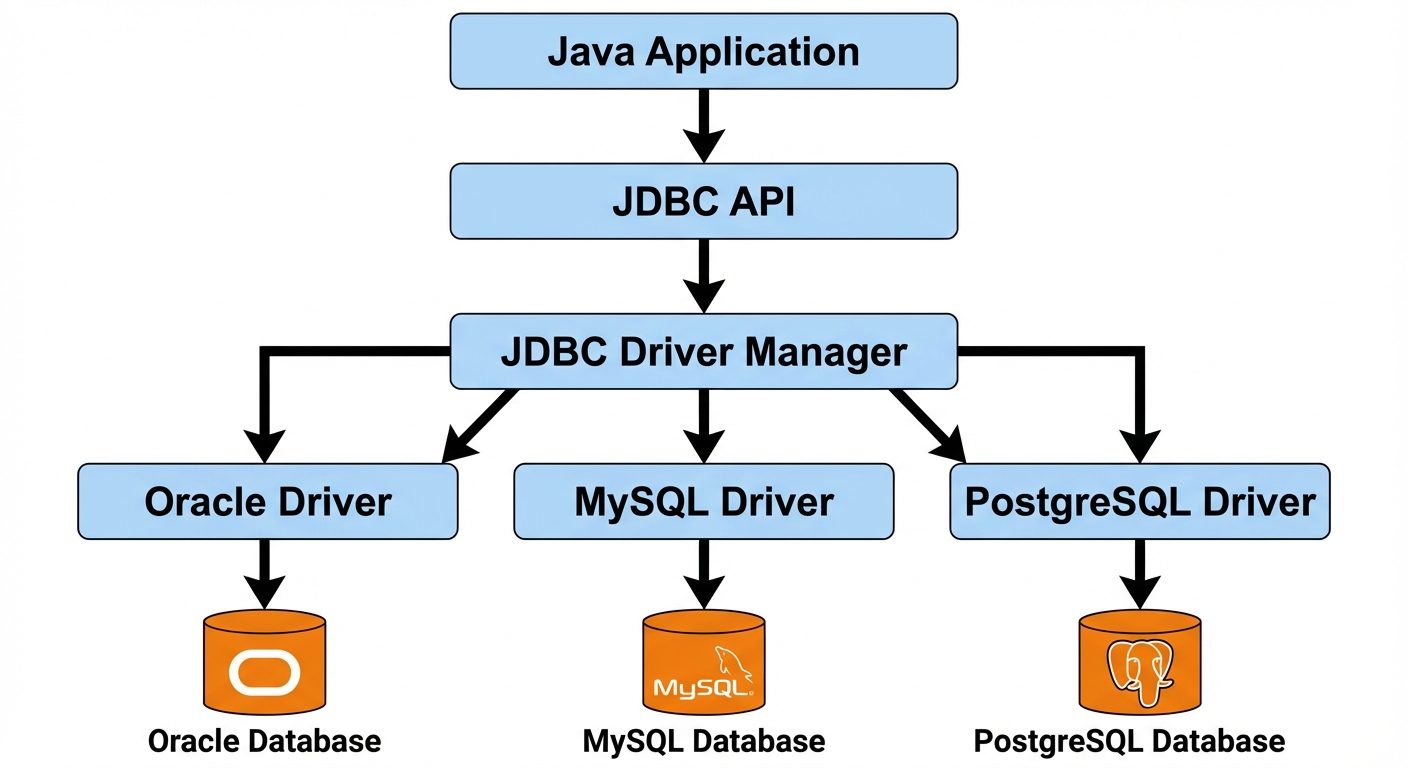
JDBC (Java Database Connectivity) is a standard Java API for database-independent connectivity between the Java programming language and a wide range of databases.
JDBC Architecture Components
- Java Application: Calls JDBC API.
- JDBC API: Provides classes/interfaces (
Connection,Statement,ResultSet). - DriverManager: Manages a list of database drivers.
- JDBC Driver: Communicates with the specific database server.
Types of JDBC Drivers
- Type 1 (JDBC-ODBC Bridge): Translates JDBC calls to ODBC calls. (Obsolete, removed in Java 8).
- Type 2 (Native-API Driver): Converts JDBC calls into client-side API of the database (requires native library installation on client).
- Type 3 (Network Protocol Driver): Converts JDBC calls into a middleware protocol, which is then translated to the DBMS protocol.
- Type 4 (Thin Driver): Converts JDBC calls directly into the vendor-specific database protocol. Written entirely in Java. This is the most commonly used driver type.
7. CRUD Operations Using JDBC
CRUD stands for Create, Read, Update, and Delete.
Standard Steps for JDBC:
- Load the Driver.
- Establish Connection.
- Create Statement.
- Execute Query.
- Close Connection.
Example Code (MySQL Context)
import java.sql.*;

public class JdbcCrud {
    static final String DB_URL = "jdbc:mysql://localhost:3306/schooldb";
    static final String USER = "root";
    static final String PASS = "password";

    public static void main(String[] args) {
        try (Connection conn = DriverManager.getConnection(DB_URL, USER, PASS);
             Statement stmt = conn.createStatement()) {

            // 1. CREATE (Insert)
            String sqlInsert = "INSERT INTO students (id, name, age) VALUES (101, 'John', 20)";
            int rowsAffected = stmt.executeUpdate(sqlInsert);
            System.out.println("Rows Inserted: " + rowsAffected);

            // 2. UPDATE
            String sqlUpdate = "UPDATE students SET age = 21 WHERE id = 101";
            stmt.executeUpdate(sqlUpdate);

            // 3. READ (Select)
            String sqlSelect = "SELECT id, name, age FROM students";
            ResultSet rs = stmt.executeQuery(sqlSelect);
            while(rs.next()) {
                // Retrieve by column name
                int id  = rs.getInt("id");
                String name = rs.getString("name");
                int age = rs.getInt("age");
                System.out.println("ID: " + id + ", Name: " + name + ", Age: " + age);
            }

            // 4. DELETE
            String sqlDelete = "DELETE FROM students WHERE id = 101";
            stmt.executeUpdate(sqlDelete);

        } catch (SQLException e) {
            e.printStackTrace();
        }
    }
}
8. Connecting to Non-Conventional Databases
Traditional JDBC is designed for Relational (SQL) databases. However, Java connects to "Non-Conventional" or NoSQL databases (like MongoDB, Cassandra, Redis) using specific drivers provided by the database vendors, as they may not strictly follow the JDBC standard (due to lack of SQL support).
Example: Connecting to MongoDB
MongoDB does not use SQL. Instead of Connection and Statement, it uses MongoClient and MongoCollection.
Prerequisite: Add MongoDB Java Driver dependency.
import com.mongodb.client.MongoClients;
import com.mongodb.client.MongoClient;
import com.mongodb.client.MongoDatabase;
import com.mongodb.client.MongoCollection;
import org.bson.Document;

public class MongoConnect {
    public static void main(String[] args) {
        // Connect to MongoDB server
        try (MongoClient mongoClient = MongoClients.create("mongodb://localhost:27017")) {

            // Access database
            MongoDatabase database = mongoClient.getDatabase("testdb");

            // Access collection (equivalent to Table)
            MongoCollection<Document> collection = database.getCollection("users");

            // Create a document (JSON-like)
            Document doc = new Document("name", "Alice")
                            .append("age", 25)
                            .append("city", "New York");

            // Insert
            collection.insertOne(doc);
            System.out.println("Document inserted successfully");
        }
    }
}
Key Differences vs JDBC:
- Data Model: Uses Documents/Graphs instead of Tables/Rows.
- Query Language: Uses API methods (
find(),insertOne()) instead of String-based SQL queries. - Schema: Dynamic (flexible) schema vs. Rigid schema in SQL.
Did this save you a night before the exam?
LPU Notes is free, and it stays free. Ads cover part of the server bill. The rest comes out of a student's own pocket: the domain, the storage, and keeping the site up through the weeks everyone needs it at once.
The payment button didn't load. An ad blocker or a filtered network is the usual reason. to try again.
Nothing here is ever locked, and nothing unlocks. Chip in only if it was worth it. What it pays for →