Unit 2: Loops, Arrays, and OOP Concepts
1. Control Flow Statements: Loops
Loops allow a program to execute a block of code repeatedly based on a condition. Java supports four types of loops.
A. The for Loop
Used when the number of iterations is known beforehand.
- Syntax:
for (initialization; condition; update) { // body } - Process:
- Initialization executes once.
- Condition is checked. If
true, body executes. Iffalse, loop terminates. - Update expression runs (increment/decrement).
- Repeat from step 2.
// Example: Print numbers 1 to 5
for (int i = 1; i <= 5; i++) {
    System.out.print(i + " ");
}
B. The while Loop
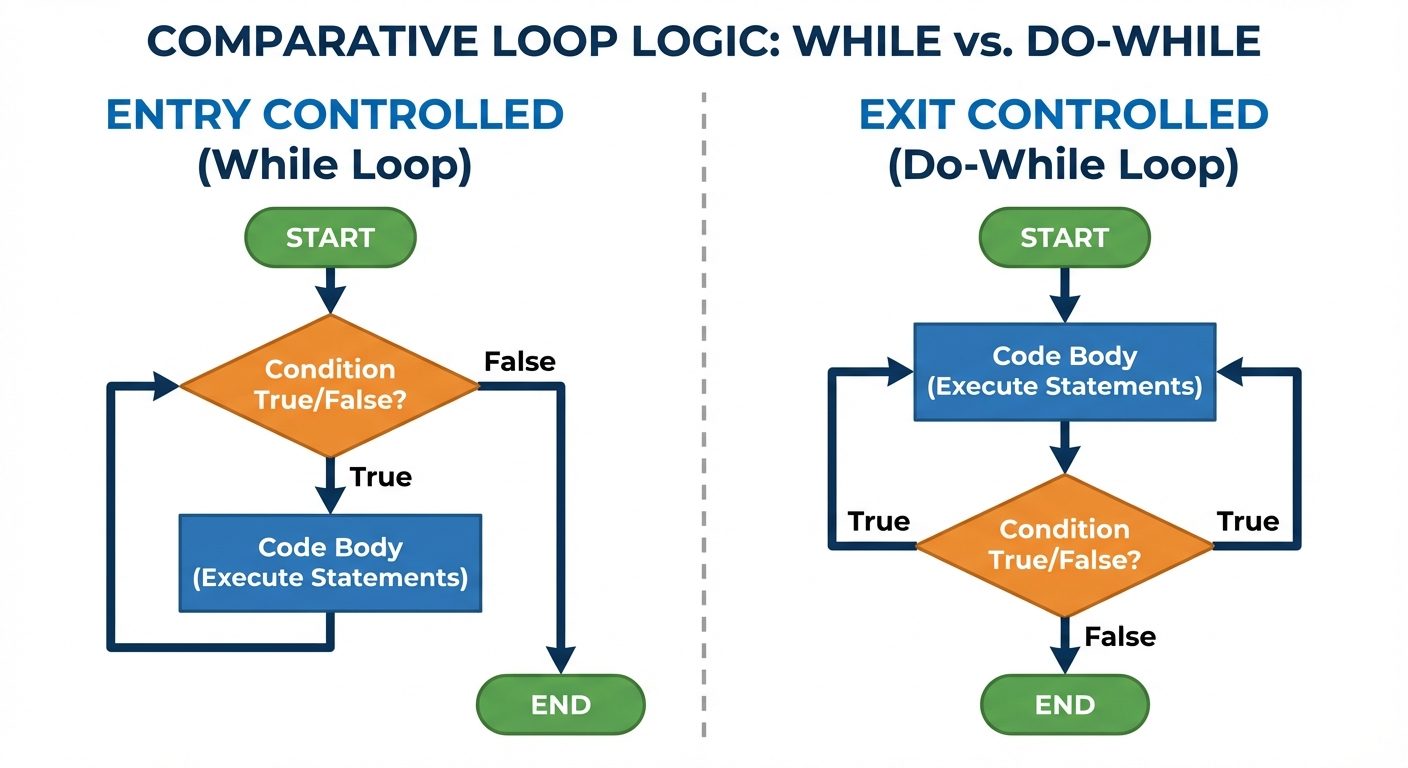
Used when the number of iterations is unknown and depends on a condition being met. It is an entry-controlled loop.
- Syntax:
while (condition) { // body } - Process: Condition is checked before the body executes. If the condition is initially false, the body never runs.
int i = 1;
while (i <= 5) {
    System.out.print(i + " ");
    i++;
}
C. The do-while Loop
Used when the loop body must execute at least once. It is an exit-controlled loop.
- Syntax:
do { // body } while (condition); - Process: Body executes first, then the condition is checked.
D. The Enhanced for-each Loop
Introduced in Java 5, specifically designed to iterate over Arrays and Collections (like ArrayList). It eliminates the need for a counter variable.
- Syntax:
for (DataType item : arrayName) { // use item } - Limitation: It is forward-only and cannot modify the structure (e.g., cannot remove items) or access the index directly.
String[] names = {"Java", "C++", "Python"};
for (String n : names) {
    System.out.println(n);
}
2. Arrays
An array is a container object that holds a fixed number of values of a single type.
A. Fundamentals
- Fixed Size: Once created, the size cannot change.
- Homogeneous: All elements must be of the same data type.
- Heap Memory: Arrays in Java are objects, stored in the heap.
Declaration, Instantiation, and Initialization:
int[] numbers;             // Declaration
numbers = new int[5];      // Instantiation (Allocates memory, default value 0)
int[] primes = {2, 3, 5};  // Declaration + Initialization (Array Literal)
B. Array Access and Iterations
- Indexing: Zero-based index (0 to
length - 1). - Access:
arrayName[index] - Exceptions: Accessing an invalid index throws
ArrayIndexOutOfBoundsException.
C. Multi-dimensional Arrays
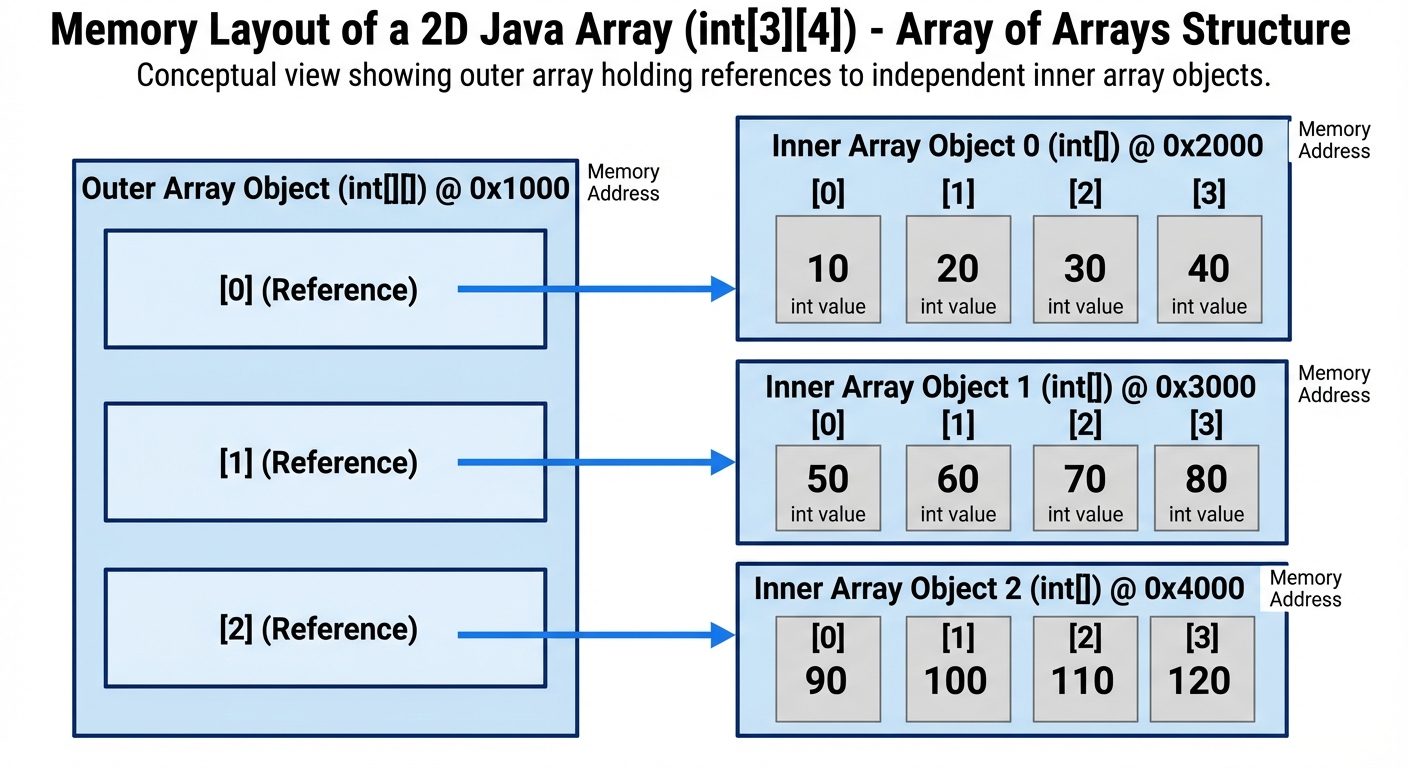
In Java, multi-dimensional arrays are essentially "arrays of arrays."
- 2D Array Syntax:
int[][] matrix = new int[3][3]; - Jagged Arrays: Since arrays are objects, rows can have different lengths.
JAVAint[][] jagged = new int[2][]; jagged[0] = new int[3]; // Row 0 has 3 columns jagged[1] = new int[5]; // Row 1 has 5 columns
![A detailed diagram showing the memory layout of a 2D Java array (int[] arr = new int[3][2]). On the left (Stack Memory), show a reference variable 'arr' pointing to a memory block in the Heap. On the right (Heap Memory), show the 'Main Array Object' containing three slots (indices 0, 1, 2). Each of these three slots should have an arrow pointing to three separate 'Sub-Array Objects'. Each 'Sub-Array Object' contains two integer cells. Label the references clearly with memory addresses (e.g., 0x100, 0x200). Use different colors for Stack (light grey) and Heap (light yellow) areas to distinguish memory segments.]
3. Advanced Array Concepts
A. Variable Arguments (Varargs)
Varargs allow a method to accept zero or multiple arguments of the same type. Internally, it is treated as an array.
- Syntax:
Type... variableName(Three dots). - Rule: There can be only one varargs parameter, and it must be the last parameter in the list.
void printNumbers(String prefix, int... nums) {
    System.out.print(prefix + ": ");
    for(int n : nums) System.out.print(n + " ");
}
// Call: printNumbers("Test", 1, 2, 3, 4);
B. Enumerations (Enum)
An Enum is a special class that represents a group of constants (unchangeable variables, like final variables).
- Usage: defining days of the week, states, colors.
- Enums can have attributes, methods, and constructors.
enum Level {
    LOW, MEDIUM, HIGH
}

Level myVar = Level.MEDIUM;
4. Object-Oriented Programming (OOP) Basics
A. Class and Objects
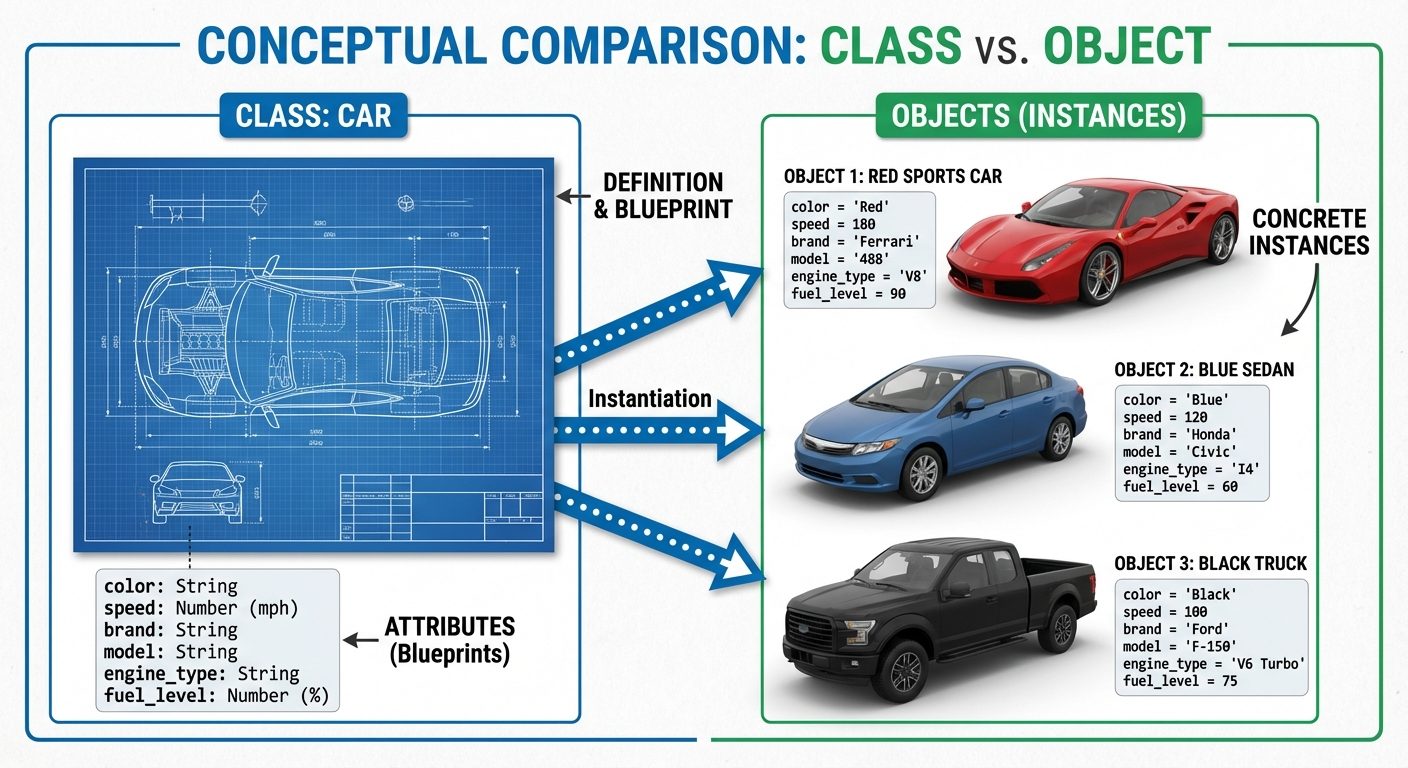
- Class: A blueprint or template. It defines the state (fields) and behavior (methods) common to all objects of that type.
- Object: An instance of a class. It occupies memory in the heap.
- Instantiation: Creating an object using the
newkeyword.
B. Writing Methods
A method is a block of code that runs only when it is called.
- Structure:
Modifier ReturnType Name(Parameters) { Body } - Return Type: Data type of the value returned (
voidif nothing is returned).
5. Constructors and Initialization
A. Constructors
A special method used to initialize objects.
- Rules:
- Must have the same name as the class.
- Must not have a return type (not even
void).
- Default Constructor: Provided by the compiler if no constructor is defined (sets fields to default values like 0, null).
B. Method and Constructor Overloading
Polymorphism feature where multiple methods/constructors have the same name but different parameter lists (different type, number, or order of parameters).
class Calculator {
    // Method Overloading
    int add(int a, int b) { return a + b; }
    double add(double a, double b) { return a + b; }

    // Constructor Overloading
    Calculator() { }
    Calculator(int initialValue) { }
}
C. The this Keyword
this is a reference variable that refers to the current object.
- Uses:
- Resolve Ambiguity: When parameter names match instance variable names (
this.name = name). - Constructor Chaining: Calling one constructor from another (
this(arguments)). It must be the first statement. - Return Current Object:
return this;(used for builder patterns).
- Resolve Ambiguity: When parameter names match instance variable names (
D. Initializer Blocks
- Instance Initializer Block (
{ ... }): Runs every time an object is created, before the constructor. - Static Initializer Block (
static { ... }): Runs only once when the class is loaded into memory by the ClassLoader.
6. String Handling
Strings are objects in Java that represent a sequence of characters.
A. String Class (Immutable)
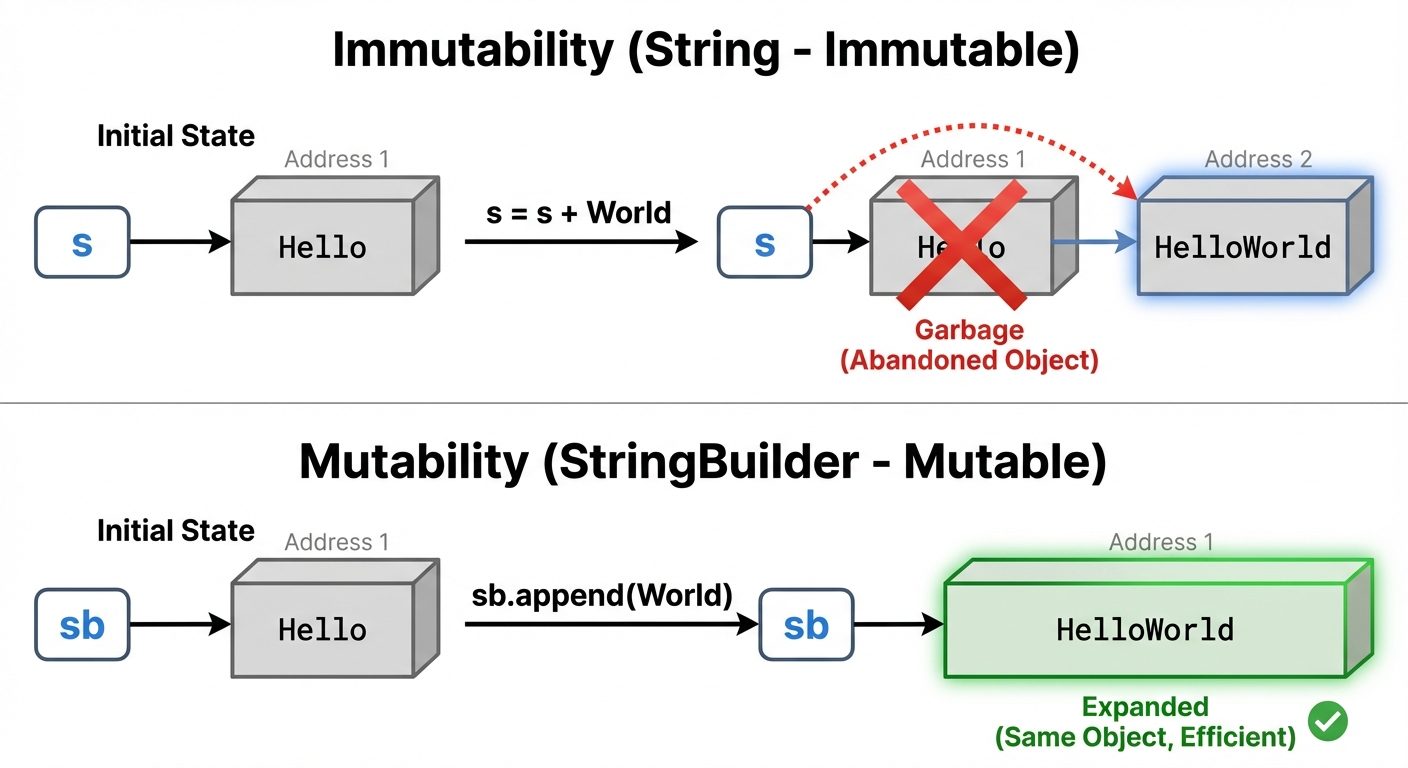
Once a String object is created, its data cannot be changed. If you modify it, a new object is created.
- String Pool: A special memory region where String literals are stored to save memory.
- Common Methods:
length(): Returns character count.charAt(int index): Returns char at index.substring(int begin, int end): Extracts part of string.equals(String s): Compares content (not reference).trim(): Removes leading/trailing whitespace.
B. StringBuilder Class (Mutable)
Used when a string needs to be modified frequently (e.g., inside loops). It is more memory efficient than String for concatenation.
- Common Methods:
append(String s): Adds text to the end.insert(int offset, String s): Adds text at a specific position.delete(int start, int end): Removes characters.reverse(): Reverses the sequence.
Did this save you a night before the exam?
LPU Notes is free, and it stays free. Ads cover part of the server bill. The rest comes out of a student's own pocket: the domain, the storage, and keeping the site up through the weeks everyone needs it at once.
The payment button didn't load. An ad blocker or a filtered network is the usual reason. to try again.
Nothing here is ever locked, and nothing unlocks. Chip in only if it was worth it. What it pays for →