Unit 1: Introduction to Java
1. History and Features of Java
History
- Origin: Java was developed by James Gosling and his team (known as the "Green Team") at Sun Microsystems (now owned by Oracle) in 1991.
- Original Name: Initially called "Greentalk," then renamed to "Oak" (after an oak tree outside Gosling's office).
- Final Name: Renamed to Java in 1995 (inspired by Java coffee).
- Purpose: Originally designed for consumer electronics (embedded systems like set-top boxes), but it found its true calling in the nascent World Wide Web due to its portability.
- The Motto: "Write Once, Run Anywhere" (WORA).
Key Features (Buzzwords)
- Simple: Syntax is based on C++ but removes complex features like pointers, operator overloading, and multiple inheritance.
- Object-Oriented: Everything in Java is an object (except primitive data types). It follows OOP principles: Inheritance, Polymorphism, Abstraction, and Encapsulation.
- Platform Independent: Java code is compiled into bytecode, which is not specific to any machine. This bytecode runs on the Java Virtual Machine (JVM).
- Robust: Strong memory management (automatic Garbage Collection) and exception handling mechanisms to prevent crashes.
- Secure: Java runs inside a virtual machine sandbox. It has no explicit pointers, preventing unauthorized memory access.
- Multi-threaded: Allows execution of multiple parts of a program simultaneously (concurrency).
- Dynamic: Designed to adapt to an evolving environment; classes are loaded on demand.
2. Understanding JDK, JRE, and JVM
The architecture of Java relies on three core components that are often confused.
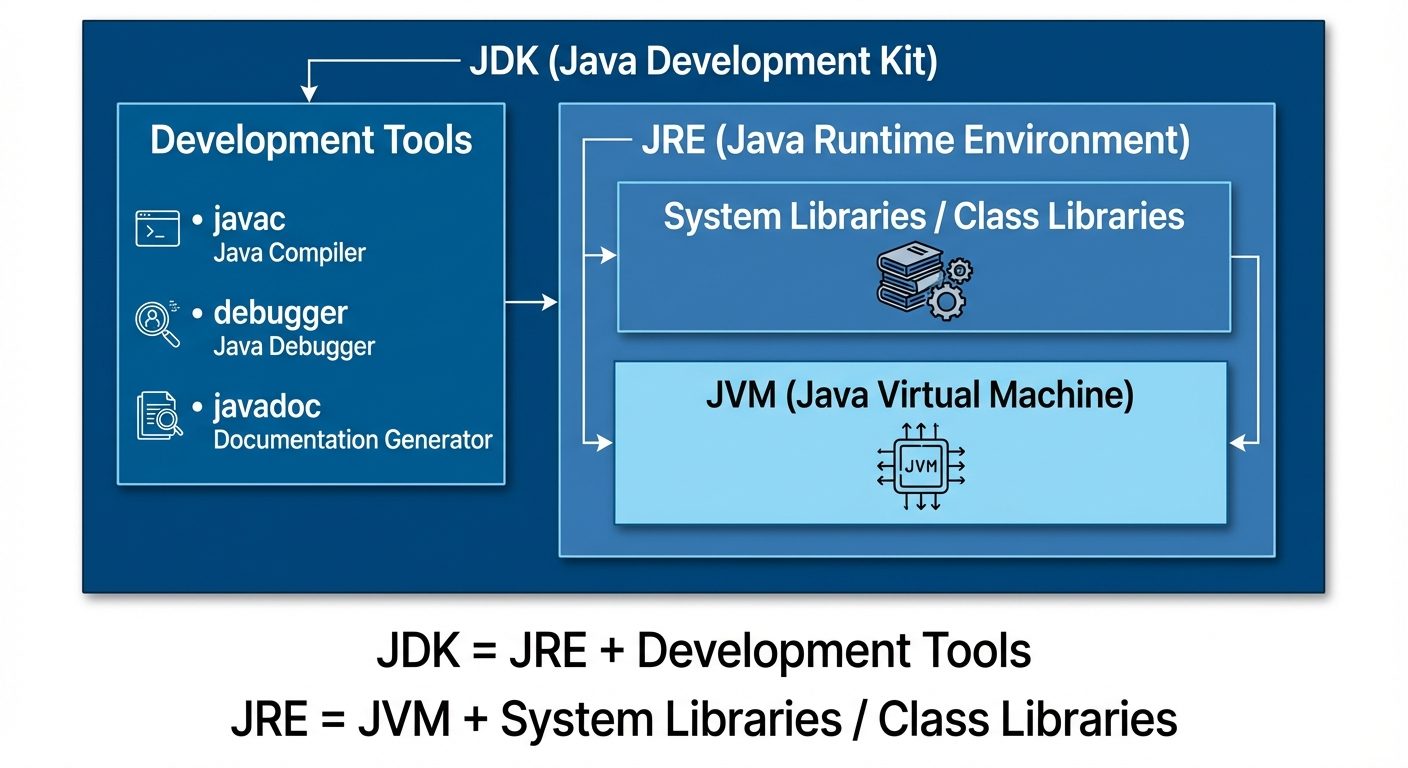
JVM (Java Virtual Machine)
- Definition: An abstract machine that enables a computer to run a Java program.
- Function: It converts Java Bytecode (.class file) into machine-specific machine code.
- Nature: The JVM itself is platform-dependent (there is a different JVM for Windows, Linux, and Mac).
JRE (Java Runtime Environment)
- Definition: A software package that provides the class libraries and other resources that a specific Java program needs to run.
- Formula: JRE = JVM + Class Libraries (rt.jar).
- Usage: Required by end-users to run Java applications.
JDK (Java Development Kit)
- Definition: A full-featured software development kit for developers.
- Formula: JDK = JRE + Development Tools (Compiler
javac, Archiverjar, Documentation generatorjavadoc, etc.). - Usage: Required by developers to write and compile Java applications.
3. Java Program Structure
A Java program consists of classes and methods. The filename must match the public class name.
Writing a Simple Java Class
// File: HelloWorld.java
public class HelloWorld {
    // Main method execution starts here
    public static void main(String[] args) {
        System.out.println("Hello, Java!");
    }
}
Analysis of public static void main(String[] args)
public: Access modifier. The JVM calls this method from outside the class, so it must be public.static: Allows the JVM to invoke the method without creating an instance (object) of the class.void: The return type. The main method does not return any value to the JVM.main: The keyword/identifier the JVM looks for as the starting point.String[] args: Command-line arguments. It accepts an array of strings passed during execution.
Command-Line Arguments
Inputs passed to the program at the time of running it.
- Example Code:
JAVApublic class CmdArgs { public static void main(String[] args) { System.out.println("Argument 1: " + args[0]); } } - Execution:
java CmdArgs JavaIsFun - Output:
Argument 1: JavaIsFun
4. Data Types and Variables
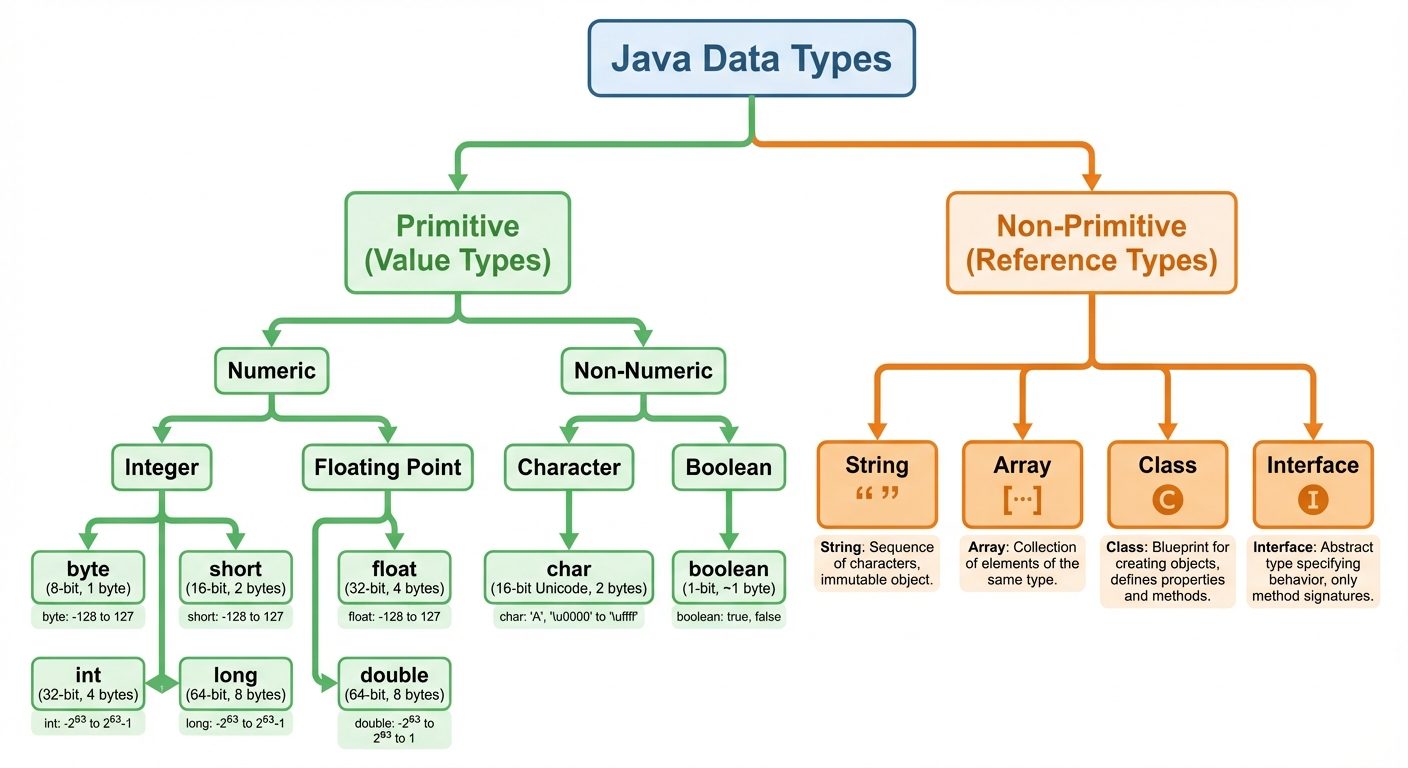
Primitive Data Types
Java has 8 primitive data types:
| Type | Size | Default Value | Description |
|---|---|---|---|
byte |
8-bit | 0 | Very small integers (-128 to 127) |
short |
16-bit | 0 | Small integers |
int |
32-bit | 0 | Standard integer |
long |
64-bit | 0L | Large integers (suffix 'L') |
float |
32-bit | 0.0f | Floating point (suffix 'f') |
double |
64-bit | 0.0d | Large floating point (default for decimals) |
char |
16-bit | '\u0000' | Unicode character |
boolean |
1-bit* | false | True or False |
Variables, Identifiers, and Keywords
- Keywords: Reserved words with predefined meanings (e.g.,
class,if,void,new). They cannot be used as variable names. - Identifiers: Names given to classes, methods, and variables.
- Rules: Must start with a letter,
$, or_. Case sensitive. No whitespace.
- Rules: Must start with a letter,
- Variable Declaration:
JAVAint age = 25; // Declaration and Initialization float salary; // Declaration only salary = 5000.50f; // Assignment
Type Conversion (Casting)
- Widening (Implicit): Converting a smaller type to a larger type size. Done automatically.
byteshortintlongfloatdouble- Example:
int i = 100; long l = i;
- Narrowing (Explicit): Converting a larger type to a smaller size. Requires manual casting.
- Example:
double d = 100.04; int i = (int)d;(Result: 100, precision lost).
- Example:
5. Modifiers and Wrapper Classes
Access Modifiers
Controls the visibility of classes, methods, and variables.
private: Accessible only within the same class.- Default (no keyword): Accessible within the same package.
protected: Accessible within the same package and subclasses (even in different packages).public: Accessible from everywhere.
The static Keyword
- Static Variable: Shared among all instances of a class. Memory is allocated only once.
- Static Method: Can be called without creating an object. Cannot access instance (non-static) data.
- Static Block: Used to initialize static data members; executed before
main.
Wrapper Classes
Java is an OOP language, but primitives are not objects. Wrapper classes provide a mechanism to use primitive data types as objects (essential for Collections like ArrayList).
| Primitive | Wrapper Class |
|---|---|
| int | Integer |
| char | Character |
| double | Double |
| boolean | Boolean |
- Autoboxing: Automatic conversion of primitive to wrapper. (
Integer a = 5;) - Unboxing: Automatic conversion of wrapper to primitive. (
int b = a;)
6. Operators
Java provides a rich set of operators to manipulate variables.
Categories
- Arithmetic:
+,-,*,/,%(Modulo/Remainder). - Unary:
++(Increment),--(Decrement).- Prefix (
++i): Change then use. Postfix (i++): Use then change.
- Relational (Comparison): Returns boolean (
true/false).==,!=,>,<,>=,<=.
- Logical: Used to combine boolean conditions.
&&(AND): True if both are true.||(OR): True if at least one is true.!(NOT): Reverses boolean value.
- Bitwise: Operates on bits.
&(Bitwise AND),|(Bitwise OR),^(XOR),~(Complement).<<(Left Shift),>>(Right Shift).
- Assignment:
=,+=,-=,*=,/=. - Ternary Operator: Short for if-else.
- Syntax:
variable = (condition) ? expressionTrue : expressionFalse; - Example:
int max = (a > b) ? a : b;
- Syntax:
Operator Precedence
The order in which operators are evaluated.
- High:
(),++,-- - Medium:
*,/,%then+,- - Low:
=,+=
7. Control Flow Statements
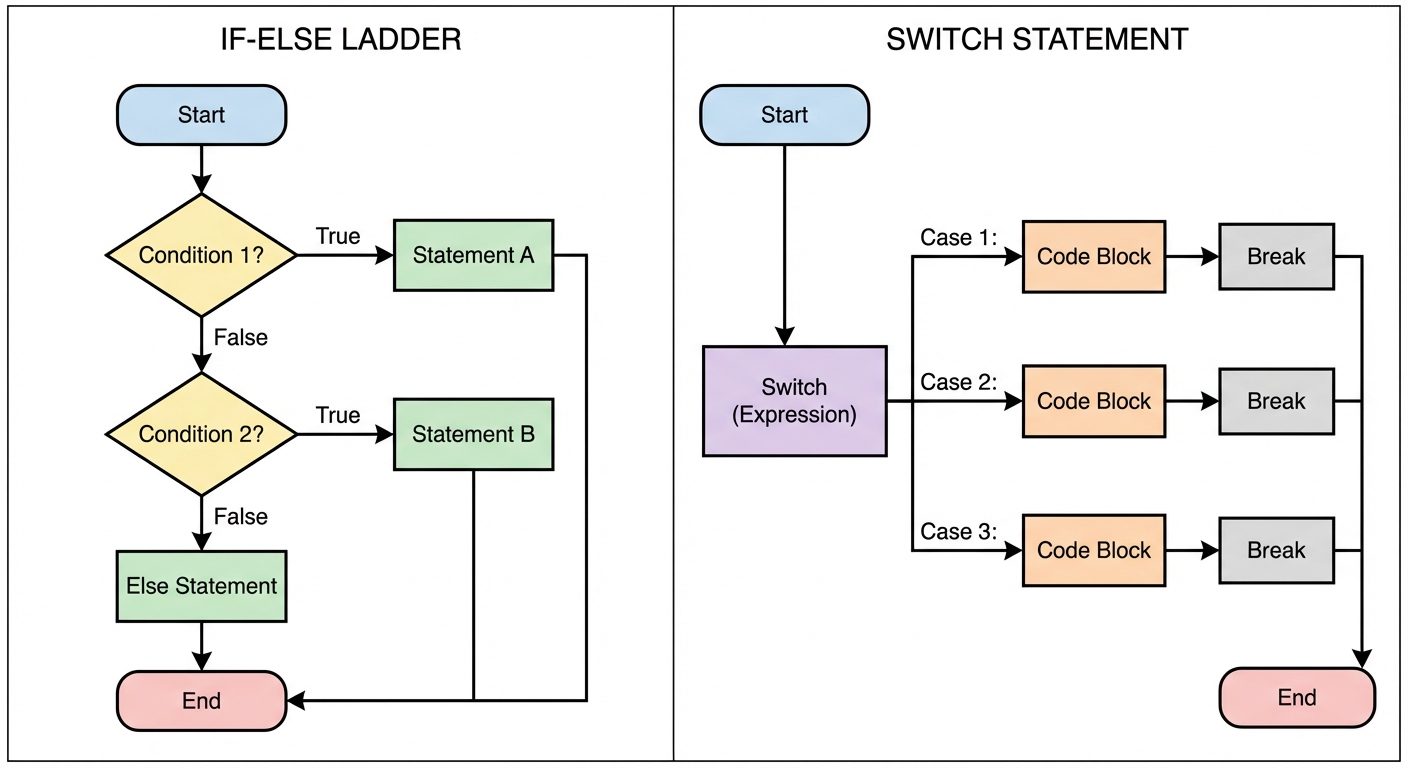
If/Else Constructs
Used for decision making based on boolean conditions.
- Simple If:
JAVAif(age > 18) { System.out.println("Adult"); } - If-Else:
JAVAif(num % 2 == 0) { System.out.println("Even"); } else { System.out.println("Odd"); } - Else-If Ladder: Used to check multiple conditions.
JAVAif(marks > 90) System.out.println("A Grade"); else if(marks > 75) System.out.println("B Grade"); else System.out.println("C Grade");
Switch-Case Statements
Used when a single variable is compared against multiple possible values (cases). It works with byte, short, char, int, String, and Enums.
int day = 3;
switch(day) {
    case 1:
        System.out.println("Monday");
        break; // Important: Prevents fall-through to next case
    case 2:
        System.out.println("Tuesday");
        break;
    case 3:
        System.out.println("Wednesday");
        break;
    default:
        // Executed if no cases match
        System.out.println("Invalid day");
}
Key Difference:
- If-Else checks boolean conditions and ranges (e.g.,
x > 5). - Switch checks for equality against specific constants (e.g.,
x == 5).
Did this save you a night before the exam?
LPU Notes is free, and it stays free. Ads cover part of the server bill. The rest comes out of a student's own pocket: the domain, the storage, and keeping the site up through the weeks everyone needs it at once.
The payment button didn't load. An ad blocker or a filtered network is the usual reason. to try again.
Nothing here is ever locked, and nothing unlocks. Chip in only if it was worth it. What it pays for →