Unit 6: Using Infrastructure as Code
1. Understand Infrastructure as Code (IaC)
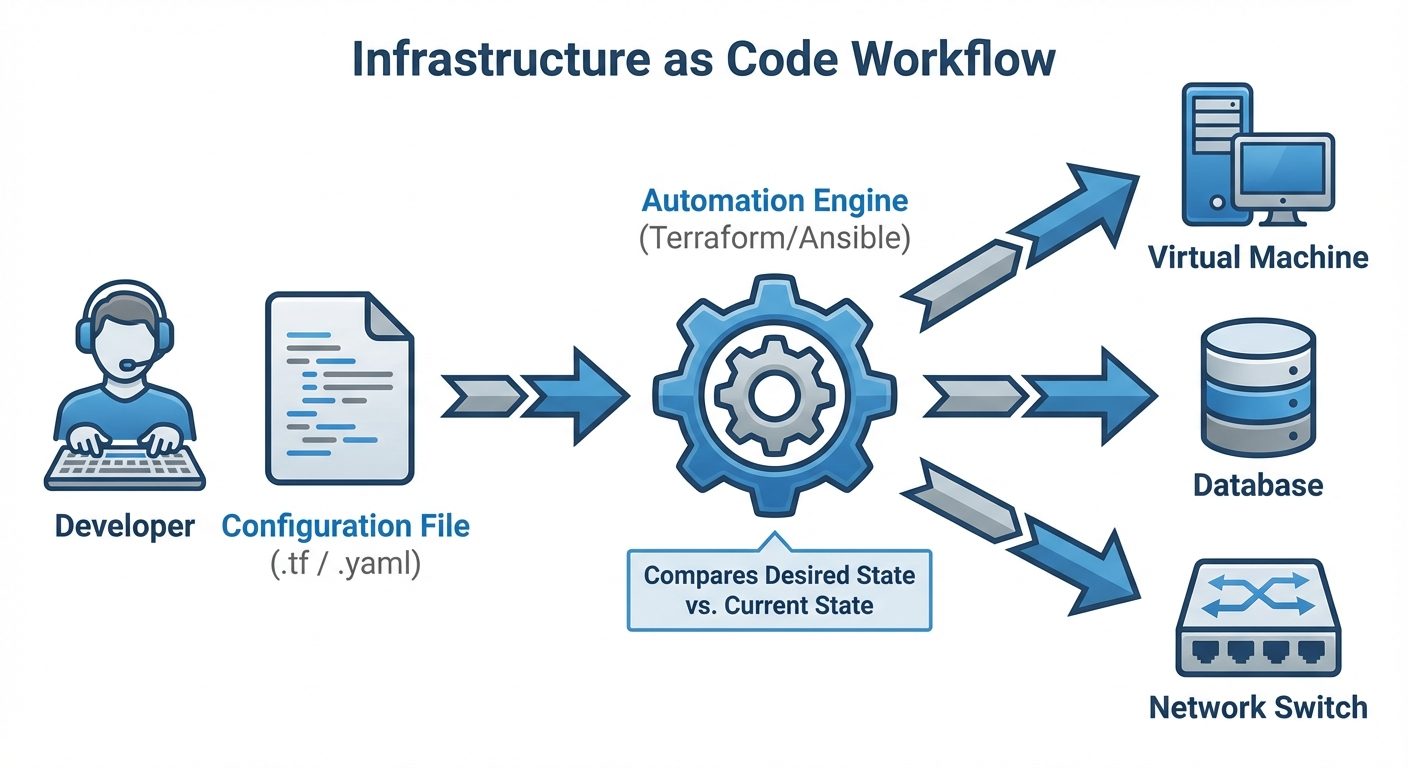
Infrastructure as Code (IaC) is the practice of managing and provisioning computer data centers through machine-readable definition files, rather than physical hardware configuration or interactive configuration tools.
Core Concepts
- Definition: Replacing manual processes (clicking in a web console, SSH-ing into servers) with code that describes the desired state of the infrastructure.
- Declarative vs. Imperative:
- Declarative (What): You define what the final state should look like (e.g., "I need 3 servers"). The tool figures out how to achieve it. (Examples: Terraform, Kubernetes, CloudFormation).
- Imperative (How): You define the specific steps to reach the state (e.g., "Run command A, then command B"). (Examples: Bash scripts, early Chef/Puppet configurations).
- Idempotency: A critical property where applying the same code multiple times results in the same outcome. If a server already exists, an idempotent script will not create a duplicate; it will do nothing or update the existing one to match the configuration.
Benefits of IaC
- Speed and Efficiency: Automated provisioning is significantly faster than manual configuration.
- Consistency (Eliminating Configuration Drift): Manual configurations lead to "snowflakes"—servers that are slightly different from one another. IaC ensures every environment (Dev, Test, Prod) is identical.
- Version Control: Infrastructure definitions are stored in Git, allowing for history tracking, rollbacks, and code reviews.
- Documentation: The code is the documentation. Reading the Terraform file tells you exactly how the network is set up.
Popular IaC Tools
| Tool | Type | Primary Use Case |
|---|---|---|
| Terraform | Declarative | Infrastructure Provisioning (Creating VMs, VPCs, Storage) |
| Ansible | Hybrid (Procedural) | Configuration Management (Installing software, patching OS) |
| Puppet/Chef | Declarative | Configuration Management (Enforcing state on servers) |
| CloudFormation | Declarative | AWS-specific infrastructure provisioning |
2. Manage Version Control with Git
Git is the backbone of IaC. It allows System Administrators to track changes to infrastructure code over time, collaborate with teams, and revert mistakes instantly.
Key Terminology
- Repository (Repo): A data structure that stores the metadata for a set of files and directories.
- Commit: A snapshot of the project's state at a specific point in time.
- Branch: A parallel version of the repository. It allows you to work on changes without affecting the main code.
- Merge: The process of taking the changes from one branch and integrating them into another.
- Remote: A version of the repository hosted on a server (e.g., GitHub, GitLab).
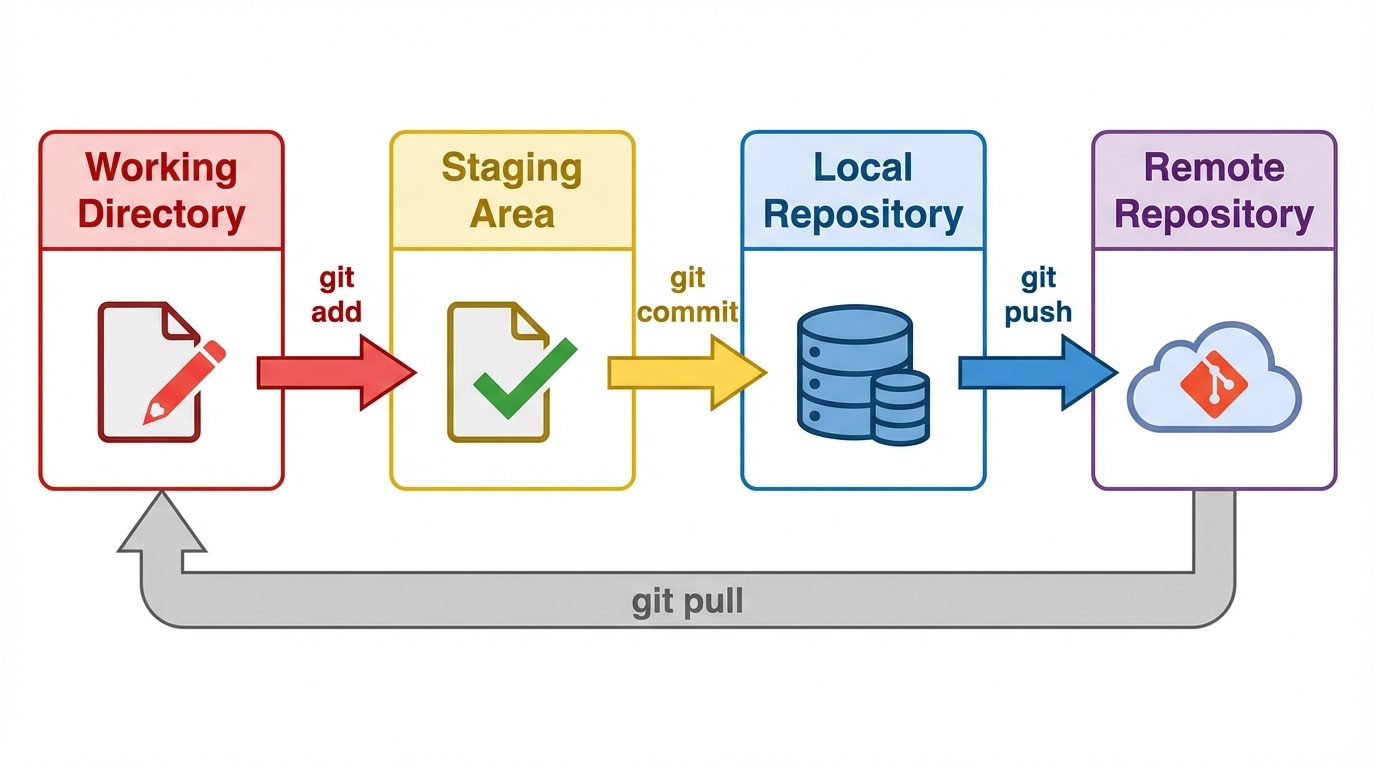
The Three-Stage Architecture
- Working Directory: Where you modify files.
- Staging Area (Index): Where you organize changes before committing.
- Repository (HEAD): Where committed changes are stored permanently.
Essential Git Commands for SysAdmins
# Initialize a new repository
git init

# Check the status of files (modified, staged, untracked)
git status

# Add files to the staging area
git add server_config.yaml

# Commit changes with a descriptive message
git commit -m "Added firewall rules for port 80"

# Create and switch to a new branch for testing
git checkout -b feature/new-load-balancer

# Push changes to the remote server
git push origin feature/new-load-balancer

# Merge changes back to the main branch
git checkout main
git merge feature/new-load-balancer
3. Understand Virtualization Concepts
Before containers, virtualization was the primary method for isolating applications and maximizing hardware utilization.
What is Virtualization?
Virtualization creates a software-based (virtual) representation of applications, servers, storage, and networks. It allows multiple operating systems to run on a single physical machine simultaneously.
The Hypervisor
The software that creates and runs virtual machines (VMs).
- Type 1 (Bare Metal): Installs directly on the physical hardware. Highly efficient. used in enterprise data centers.
- Examples: VMware ESXi, Microsoft Hyper-V, KVM (Kernel-based Virtual Machine).
- Type 2 (Hosted): Runs as an application on top of an existing OS. Less efficient, used for local testing.
- Examples: Oracle VirtualBox, VMware Workstation.
Virtual Machines (VMs)
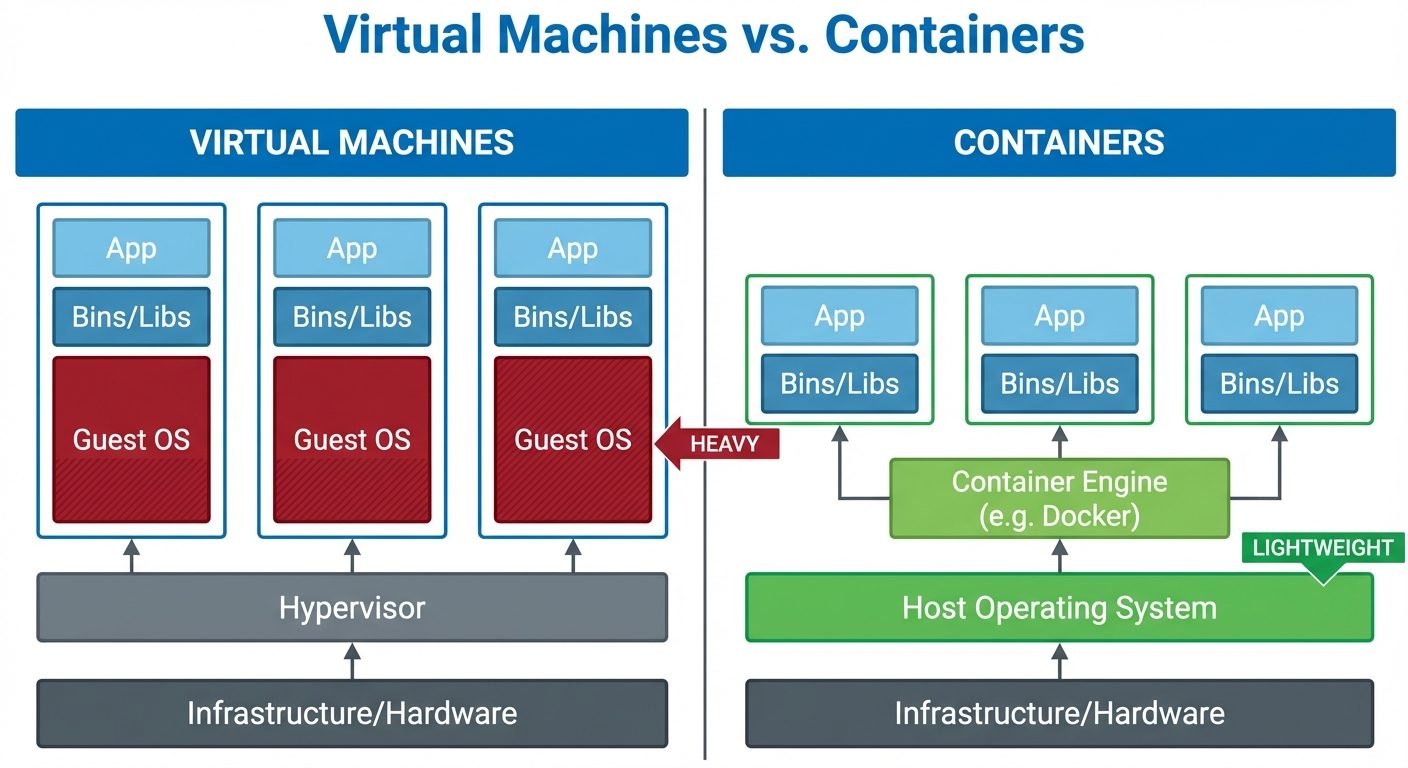
A VM is a tightly isolated software container with an operating system and application inside. Each VM is completely independent.
- Pros: Complete isolation, high security, ability to run different OS kernels (Linux on Windows).
- Cons: Heavy resource usage (each VM needs a full OS license, CPU, and RAM allocation), slow boot times.
4. Understand Containers
Containers are a form of operating system virtualization. A single container might be used to run anything from a small microservice or software process to a larger application.
Container Architecture vs. Virtual Machines
While VMs virtualize the hardware, containers virtualize the Operating System.
- Shared Kernel: Containers share the host machine's OS kernel. They do not need a full OS for every instance.
- Isolation: Isolation is achieved via Linux kernel features like cgroups (resource limiting) and namespaces (visibility isolation).
Benefits of Containers
- Lightweight: Sizes are measured in MBs rather than GBs.
- Portability: "Write once, run anywhere." If it works on your laptop, it will work in production because the dependencies are packaged with the code.
- Speed: Containers start in milliseconds because they don't need to boot an OS.
- Microservices: Ideal for breaking monolithic applications into small, manageable services.
5. Deploy Containers
Deploying containers usually involves a Container Engine (like Docker) and potentially an Orchestrator (like Kubernetes) for scale.
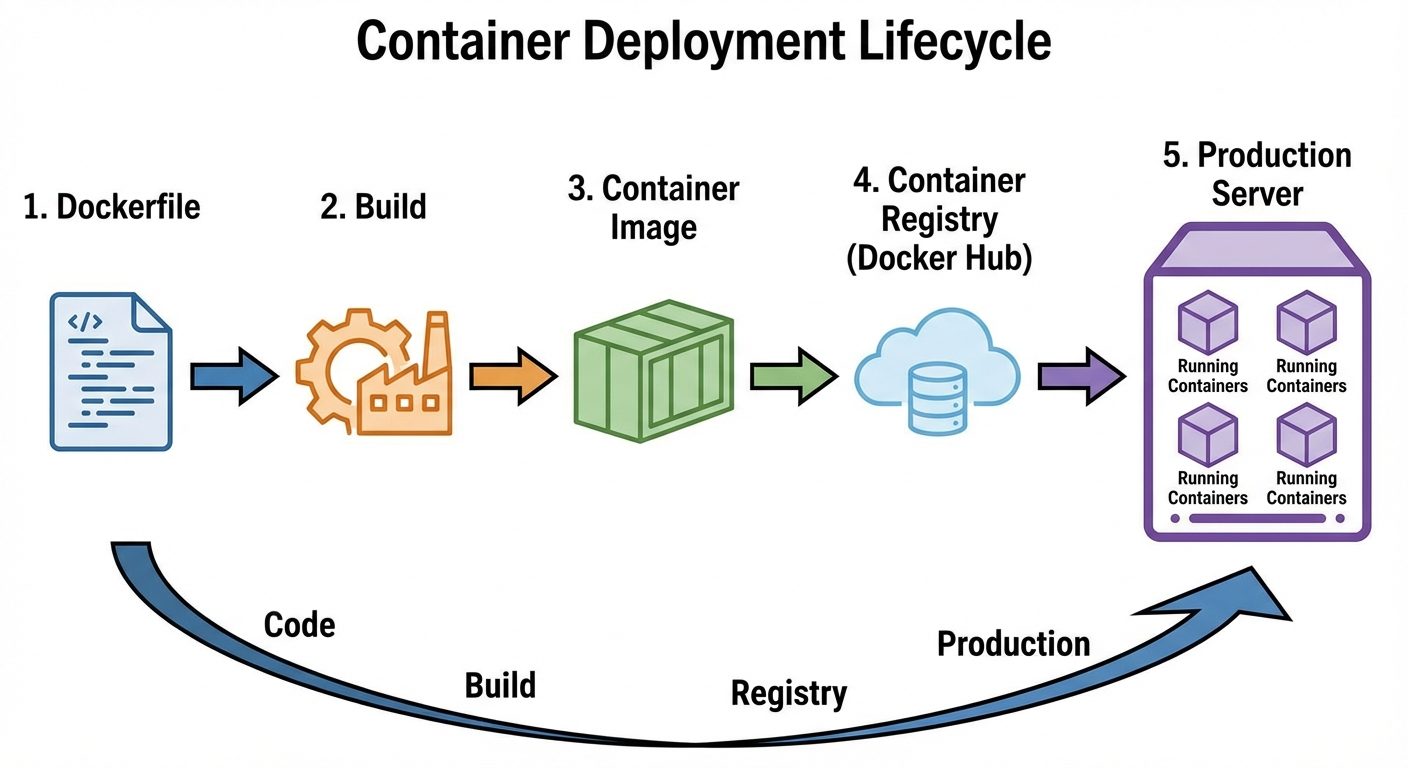
The Docker Workflow
- Dockerfile: A text file containing instructions to build the image (e.g.,
FROM ubuntu,RUN apt-get update). - Image: The immutable, read-only template built from the Dockerfile.
- Container: The running instance of an image.
Basic Docker Commands
1. Building an Image:
# Build an image from a Dockerfile in the current directory
# Tag it as 'my-web-server:v1'
docker build -t my-web-server:v1 .
2. Running a Container:
# Run the container in detached mode (-d)
# Map host port 8080 to container port 80 (-p)
docker run -d -p 8080:80 --name web-app my-web-server:v1
3. Managing Containers:
# List running containers
docker ps

# Stop a container
docker stop web-app

# Remove a container
docker rm web-app
Container Registries
Once an image is built, it is stored in a Registry so other servers can pull and run it.
- Public: Docker Hub.
- Private: Amazon ECR, Azure ACR, Google GCR.
Container Orchestration (Introduction)
When managing hundreds of containers across multiple servers, manual docker run commands are insufficient. Tools like Kubernetes (K8s) are used to:
- Auto-scaling: Automatically create new container instances if traffic spikes.
- Self-healing: Restart containers that crash.
- Load Balancing: Distribute traffic across containers.
Did this save you a night before the exam?
LPU Notes is free, and it stays free. Ads cover part of the server bill. The rest comes out of a student's own pocket: the domain, the storage, and keeping the site up through the weeks everyone needs it at once.
The payment button didn't load. An ad blocker or a filtered network is the usual reason. to try again.
Nothing here is ever locked, and nothing unlocks. Chip in only if it was worth it. What it pays for →