Unit 4: Managing Devices, Processes, Memory, and the Kernel
1. Gather Hardware Information
System administrators often need to audit the hardware available on a server to determine capacity, compatibility, and troubleshooting steps. Linux relies on the /proc virtual file system and specific utilities to expose this data.
The Virtual File Systems (/proc and /sys)
The Linux kernel exports hardware information to the /proc and /sys directories. These are not real files on a disk but interfaces to the kernel's memory.
- /proc/cpuinfo: Details about the processor (model, cores, cache).
- /proc/meminfo: Real-time memory usage statistics.
- /proc/interrupts: Hardware interrupt request (IRQ) assignments.
Hardware Inspection Utilities
| Command | Description |
|---|---|
lscpu |
Displays CPU architecture information in a human-readable format. |
lsblk |
Lists information about all available block devices (hard drives, partitions, flash drives). |
lspci |
Lists all PCI bus devices (graphics cards, network adapters, RAID controllers). |
lsusb |
Lists USB devices connected to the system. |
dmidecode |
Dumps the system's DMI (Desktop Management Interface) table content. Useful for finding serial numbers and BIOS versions. |
Example Usage:
# View block devices with a tree structure showing mount points
lsblk -f

# Filter PCI devices for Ethernet controllers
lspci | grep -i ethernet
2. Manage Processes
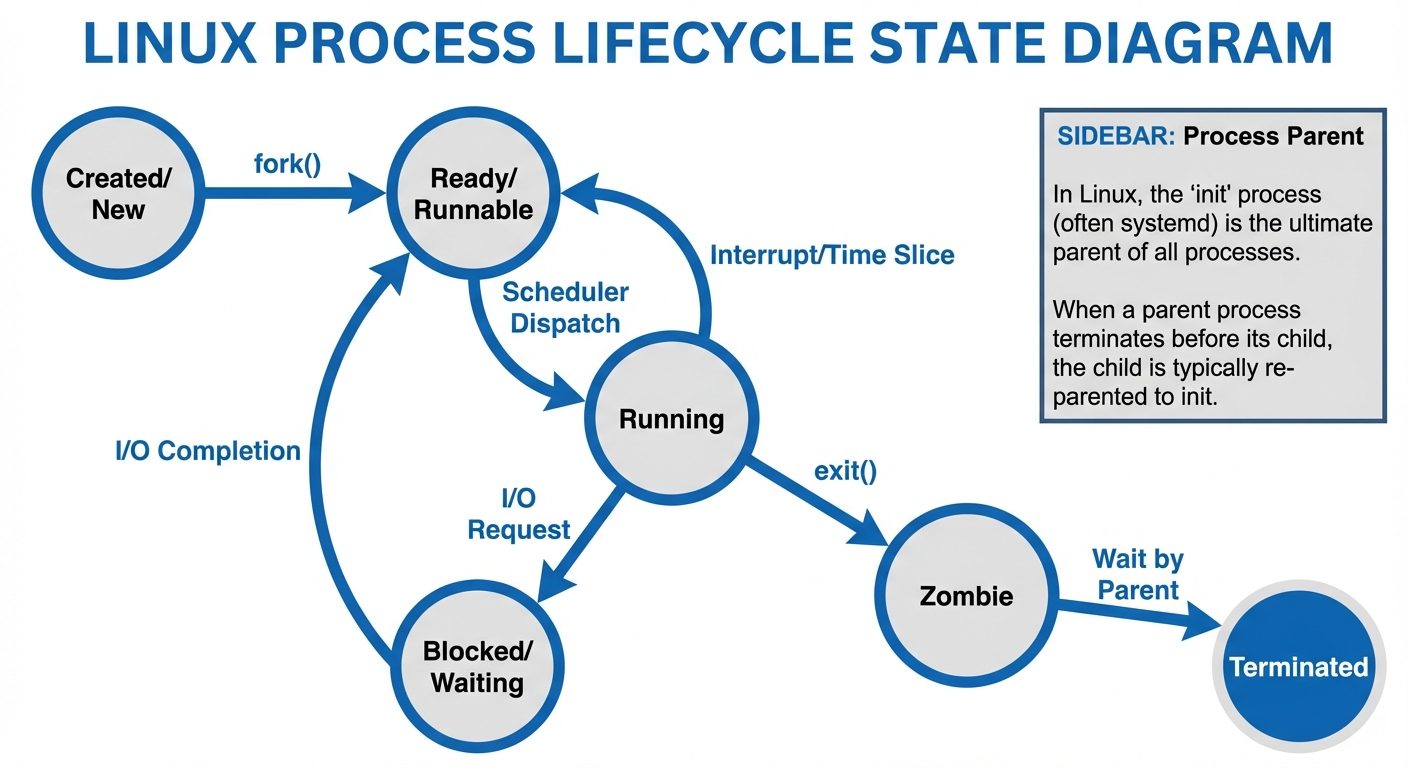
A process is a running instance of a program. The kernel manages these processes by assigning each a unique Process ID (PID).
Viewing Processes
ps: Snapshot of current processes.ps aux: Displays all processes for all users with detailed info.ps -ef: Standard syntax showing Parent PIDs (PPID).
top: Real-time dynamic view of running processes.htop: An interactive, colorful alternative totop(requires installation).
Process States
In output like ps aux, the STAT column indicates the process state:
- R (Running): Currently running or ready to run.
- S (Sleeping): Waiting for an event (interruptible).
- D (Uninterruptible Sleep): Waiting for I/O (cannot be killed easily).
- Z (Zombie): Terminated but the parent hasn't collected the exit status.
- T (Stopped): Paused by a job control signal.
Controlling Processes
- Foreground vs. Background:
- Append
&to a command to run it in the background. jobs: List background jobs.fg %1: Bring job 1 to the foreground.bg %1: Resume a stopped job in the background.
- Append
- Killing Processes:
kill <PID>: Sends specific signals to a process.kill -9 <PID>: SIGKILL (Force kill, immediate termination).kill -15 <PID>: SIGTERM (Clean termination, allows cleanup).pkill <name>: Kill processes by name.
- Process Priority (Niceness):
- Range: -20 (highest priority) to 19 (lowest priority). Default is 0.
nice -n -5 command: Start a command with higher priority.renice +10 <PID>: Change priority of a running process.
3. Manage Memory
Linux memory management involves Physical RAM and Virtual Memory (Swap). Efficient management prevents system slowdowns and "Out of Memory" (OOM) crashes.
Monitoring Memory
free -h: Displays free and used memory in human-readable format (MB/GB).- Buffers/Cache: Linux automatically uses unused RAM to cache disk data. This is "good" usage and is freed if applications need RAM.
vmstat: Reports information about processes, memory, paging, block IO, traps, and cpu activity.
Swap Management
Swap is space on the disk used when physical RAM is full.
- Create a partition or file:
fdiskordd. - Format as swap:
mkswap /dev/sdb1. - Activate swap:
swapon /dev/sdb1. - Persist: Add to
/etc/fstab.
4. Manage the Linux Kernel
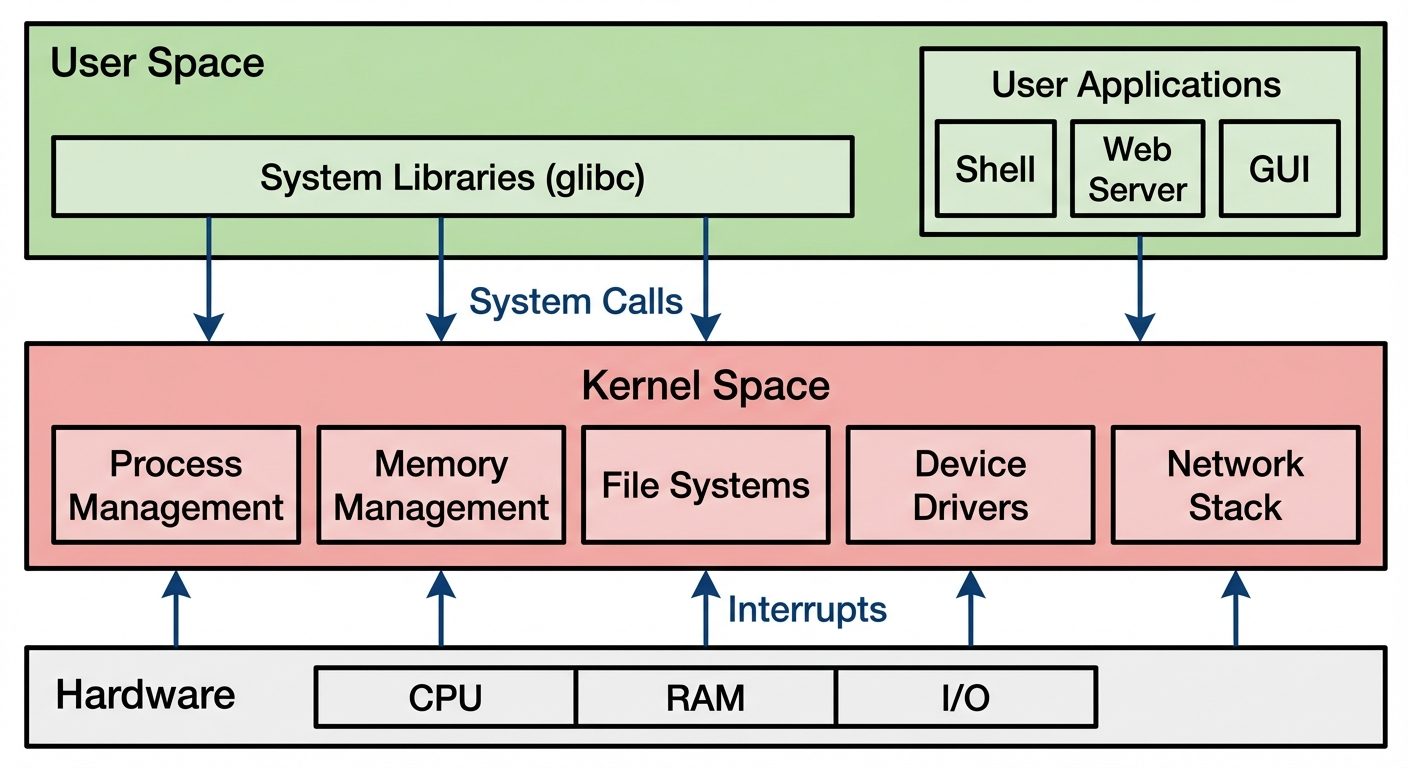
The kernel is the core interface between hardware and software. Linux uses a monolithic modular kernel, meaning it is one large binary but can load functionality dynamically via modules.
Kernel Modules
Modules allow the kernel to support new hardware or filesystems without rebooting.
uname -r: View current kernel version.lsmod: List currently loaded modules.modinfo <module_name>: Display details about a module.modprobe <module_name>: Load a module and its dependencies.modprobe -r <module_name>: Remove a module.
Runtime Kernel Tuning (sysctl)
Kernel parameters can be modified on the fly via the /proc/sys/ directory or the sysctl command.
- View parameter:
sysctl net.ipv4.ip_forward - Modify temporarily:
sysctl -w net.ipv4.ip_forward=1 - Modify permanently: Edit
/etc/sysctl.confand runsysctl -p.
5. Manage System Services (Systemd)
Modern Linux distributions (RHEL, CentOS, Ubuntu, Debian) use systemd as the initialization system (PID 1). It manages services, mount points, and system states.
Service Management (systemctl)
- Start a service:
systemctl start httpd - Stop a service:
systemctl stop httpd - Restart:
systemctl restart httpd - Check status:
systemctl status httpd(Shows logs and active state). - Enable at boot:
systemctl enable httpd(Creates a symlink). - Disable at boot:
systemctl disable httpd.
Systemd Targets
Targets are groups of units that define a system state (similar to runlevels in SysV init).
- multi-user.target: Text-mode, multi-user, networking enabled (Server default).
- graphical.target: Multi-user with GUI.
- rescue.target: Single-user mode for maintenance.
- Set default target:
systemctl set-default multi-user.target.
6. Configure Common System Services & Localization
Time Synchronization (NTP)
Accurate time is critical for logs and authentication (Kerberos).
- Services:
chronydorntp. - Command:
timedatectltimedatectl status: Check time and time zone.timedatectl set-timezone America/New_York.
Logging (rsyslog and journald)
- rsyslog: Writes logs to
/var/log/(e.g.,/var/log/messagesor/var/log/syslog). Controlled by/etc/rsyslog.conf. - systemd-journald: Collects binary logs.
journalctl: Read the entire log.journalctl -u sshd: Read logs for a specific unit.journalctl -f: Follow logs in real-time (like tail).
Localization
- Command:
localectllocalectl status: View current locale and keymap.localectl set-locale LANG=en_US.UTF-8.
- Config file:
/etc/locale.conf.
7. Understand Network Fundamentals
The TCP/IP Model
Linux networking is based on the TCP/IP stack.
- Link Layer: Drivers and physical hardware (Ethernet/Wi-Fi).
- Internet Layer: IP addressing (IPv4/IPv6), Routing (ICMP).
- Transport Layer: TCP (Reliable, connection-oriented) and UDP (Fast, connectionless).
- Application Layer: HTTP, SSH, FTP, DNS.
Key Concepts
- IP Address: Unique identifier (e.g., 192.168.1.10).
- Subnet Mask: Defines the network portion vs. host portion of the IP (CIDR notation: /24).
- Gateway: The router that connects the local network to outside networks (Internet).
- DNS (Domain Name System): Resolves hostnames (google.com) to IP addresses.
8. Manage Network Settings
In modern Linux, the ip command (from iproute2 package) has replaced the deprecated ifconfig.
The ip Command
- View interfaces/IPs:
ip addr show - View routing table:
ip route show - Add an IP (temporary):
sudo ip addr add 192.168.1.50/24 dev eth0 - Bring interface up/down:
sudo ip link set eth0 up
Persistent Configuration
Methods vary by distribution:
- Red Hat/CentOS/Fedora: Historically
/etc/sysconfig/network-scripts/, now often NetworkManager (nmcli).nmcli dev status: View devices.nmcli con add ...: Add connections.
- Ubuntu/Debian: Netplan (YAML files in
/etc/netplan/).
YAMLnetwork: version: 2 ethernets: eth0: dhcp4: no addresses: [192.168.1.10/24] gateway4: 192.168.1.1
DNS Configuration
- Client configuration:
/etc/resolv.conf. - Format:
nameserver 8.8.8.8.
9. Configure Remote Administrative Access (SSH)
SSH (Secure Shell) provides encrypted remote access. The daemon is sshd.
Configuration
Main config file: /etc/ssh/sshd_config
- Port: Change default 22 to reduce scanner noise (
Port 2222). - Root Login: Disable for security (
PermitRootLogin no). - Password Auth: Disable if using keys (
PasswordAuthentication no). - Restart service after changes:
systemctl restart sshd.
Key-Based Authentication
More secure than passwords.
- Generate Key Pair (Client):
ssh-keygen -t rsa -b 4096 - Copy Public Key to Server:
ssh-copy-id user@server_ip - Login:
ssh user@server_ip(No password required).
10. Troubleshoot the Network
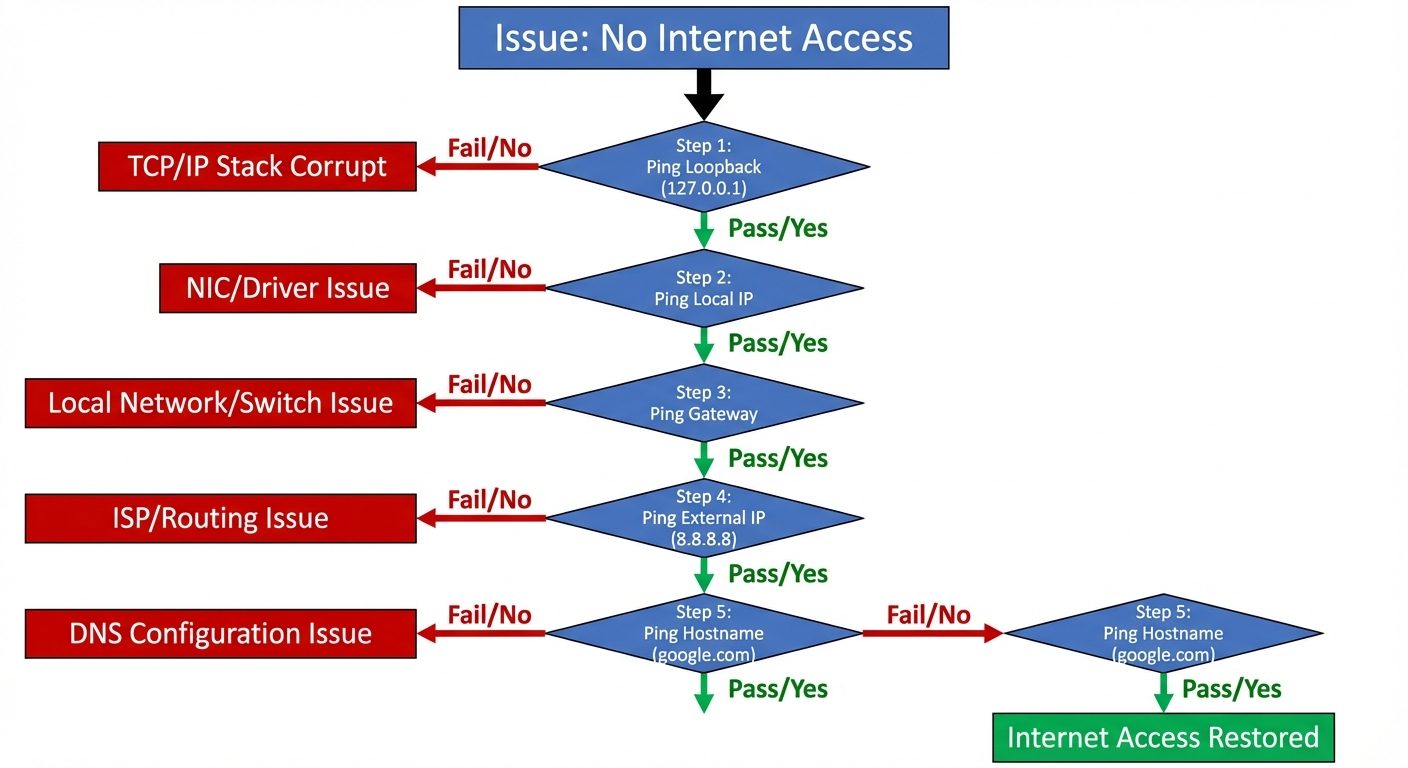
When connectivity fails, use a systematic approach and specific tools.
Troubleshooting Tools
| Tool | Purpose | Usage Example |
|---|---|---|
| ping | Test reachability using ICMP echo. | ping -c 4 8.8.8.8 |
| traceroute / tracepath | Show the path packets take to a destination. | traceroute google.com |
| ss / netstat | Display socket statistics and listening ports. | ss -tulpn (Show TCP/UDP, listening, processes, numeric). |
| dig / nslookup | Query DNS servers. | dig google.com |
| nc (Netcat) | Test specific port connectivity. | nc -zv 192.168.1.10 80 (Test port 80). |
| tcpdump | Capture packet data for deep analysis. | tcpdump -i eth0 port 80 |
Did this save you a night before the exam?
LPU Notes is free, and it stays free. Ads cover part of the server bill. The rest comes out of a student's own pocket: the domain, the storage, and keeping the site up through the weeks everyone needs it at once.
The payment button didn't load. An ad blocker or a filtered network is the usual reason. to try again.
Nothing here is ever locked, and nothing unlocks. Chip in only if it was worth it. What it pays for →