Unit 1: Software Engineering Foundations & SDLC
1. Evolution and Impact of Software Engineering
1.1 What is Software Engineering?
Software Engineering is the systematic application of engineering approaches to the development of software. It is defined by the IEEE as: "The application of a systematic, disciplined, quantifiable approach to the development, operation, and maintenance of software."
1.2 The Software Crisis & Evolution
Software engineering evolved as a solution to the "Software Crisis" of the 1960s and 70s, characterized by:
- Projects running over budget.
- Projects running over time.
- Software being inefficient and of low quality.
- Software failing to meet requirements.
Evolutionary Eras:
- Early Era (1950s-1960s): "Code and Fix" approach. Software was an afterthought to hardware. Limited documentation.
- Structured Era (1970s-1980s): Introduction of the Waterfall model, structured programming (C, Pascal), and CASE tools. Focus on process.
- Object-Oriented Era (1990s): Rise of OOP (C++, Java), component-based reuse, and the Unified Modeling Language (UML).
- Agile & Modern Era (2000s-Present): Focus on flexibility, rapid iteration, DevOps, Cloud computing, and AI-driven development.
1.3 Impact of Software Engineering
- Economic: Software drives global economies (e-commerce, fintech).
- Societal: Ubiquitous connectivity via social media and mobile apps.
- Safety-Critical: Essential for medical devices, aviation, and automotive systems where failure is not an option.
2. Software Development Life Cycle (SDLC)
The SDLC is a framework defining tasks performed at each step in the software development process. It ensures software is built correctly, systematically, and to a high standard.
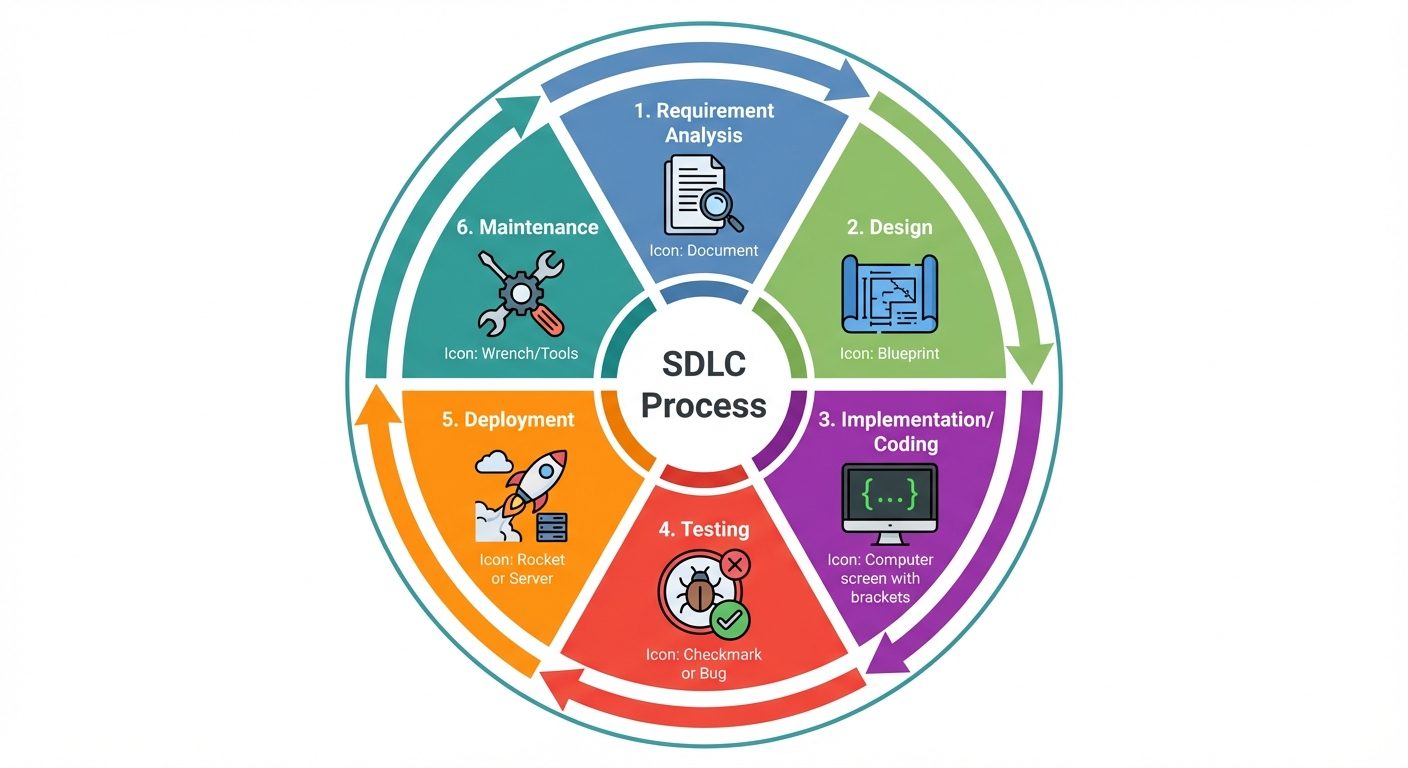
Phases of SDLC
- Requirement Gathering & Analysis: Understanding what the customer wants. Feasibility studies are conducted here.
- Design: Creating the architecture.
- High-Level Design (HLD): Architecture, database design.
- Low-Level Design (LLD): Algorithm logic, class diagrams.
- Implementation (Coding): Translating design into source code using programming languages.
- Testing: Verifying that the code meets requirements and is bug-free (Unit, Integration, System testing).
- Deployment: Releasing the software to the production environment for user access.
- Maintenance: Fixing bugs, updating features, and ensuring system uptime after release.
3. Life Cycle Models
Different projects require different approaches. These models dictate how the SDLC phases are executed.
3.1 Waterfall Model (The Classical Model)
- Concept: A linear, sequential approach where each phase must complete before the next begins.
- Pros: Simple, easy to manage, clear milestones.
- Cons: Inflexible to changes; working software is produced late; high risk if requirements are misunderstood.
- Best Use: Small projects with fixed, clear requirements.
3.2 Prototyping Model
- Concept: A throwaway prototype is built to understand requirements before actual development.
- Pros: Users see the system early, reduces requirement errors.
- Cons: Can increase cost; users may confuse the prototype with the final product.
- Best Use: Systems with unclear user interfaces or complex requirements.
3.3 Spiral Model
- Concept: Combines iterative nature of prototyping with controlled aspects of Waterfall. Focuses heavily on Risk Analysis.
- Quadrants: 1. Determine Objectives, 2. Identify/Resolve Risks, 3. Development & Test, 4. Plan Next Iteration.
- Pros: Good for high-risk projects.
- Cons: Complex management, expensive.
3.4 V-Model (Verification and Validation)
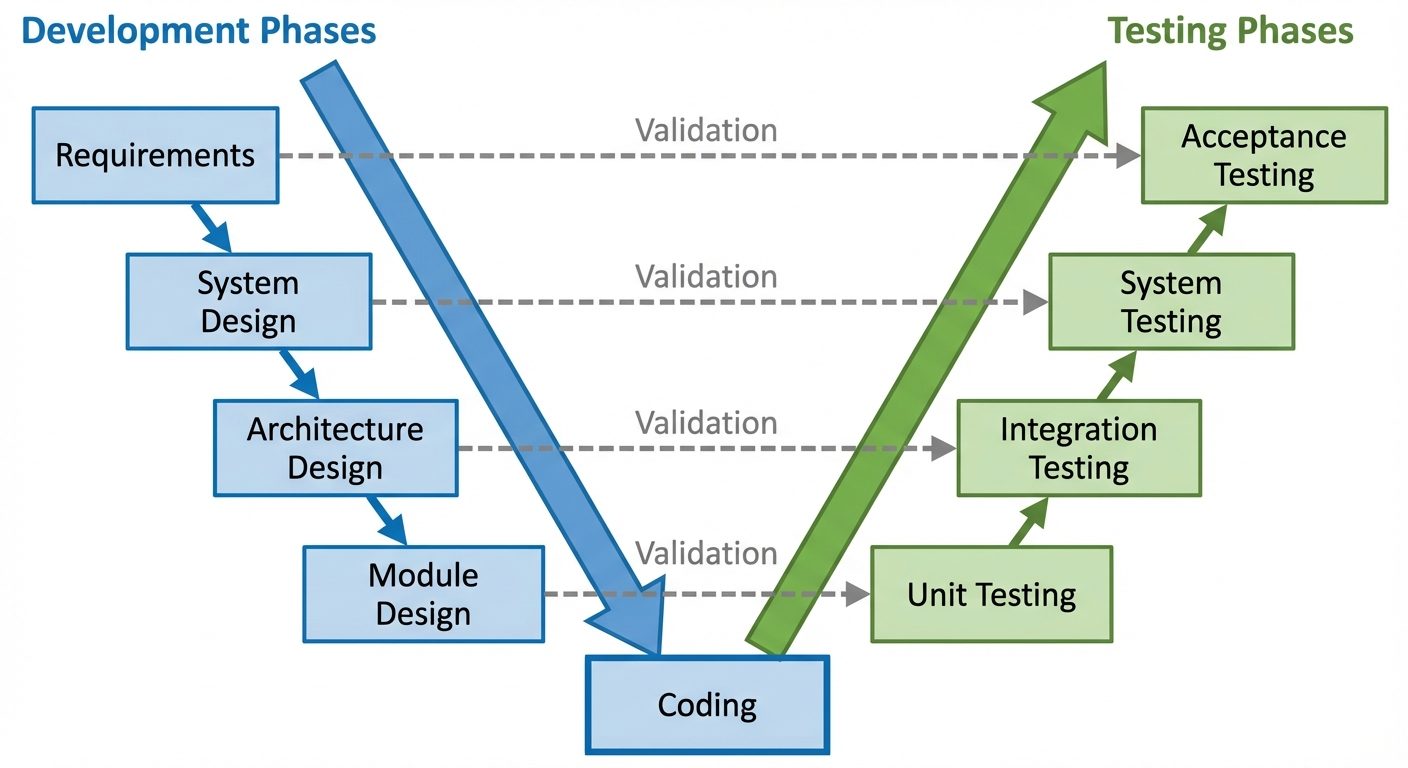
- Concept: An extension of Waterfall where testing phases correspond directly to development phases. Execution happens in a V-shape.
- Verification (Left side): Are we building the product right? (Reviews, Static analysis).
- Validation (Right side): Are we building the right product? (Dynamic testing).
3.5 Agile & Scrum
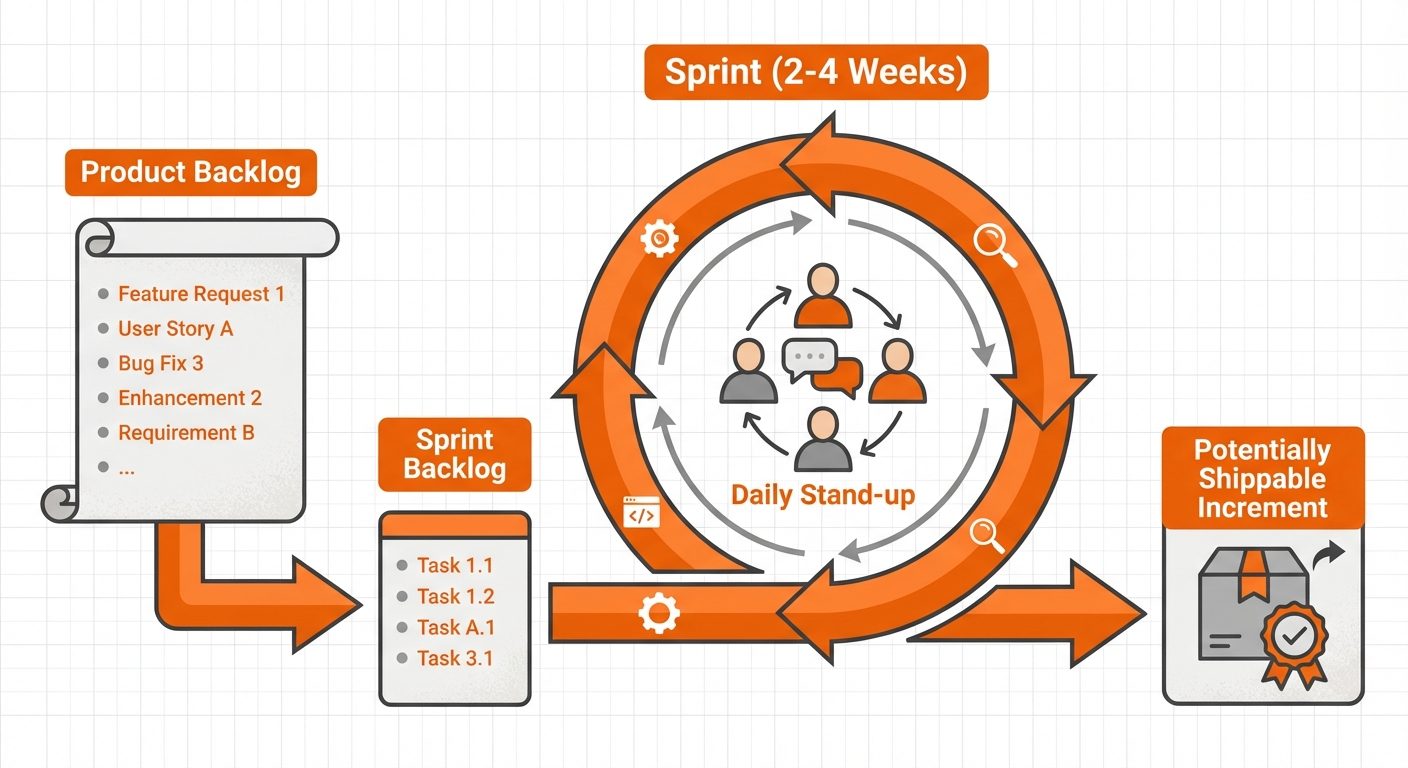
- Agile: A philosophy favoring individuals and interactions over processes and tools, and responding to change over following a plan.
- Scrum Framework:
- Sprints: Fixed time-boxed iterations (usually 2-4 weeks).
- Roles: Product Owner (defines features), Scrum Master (facilitator), Development Team.
- Artifacts: Product Backlog (wishlist), Sprint Backlog (current tasks), Burndown Chart.
- Pros: Rapid delivery, flexible, high customer satisfaction.
3.6 DevOps Lifecycle
- Concept: Unifies Software Development (Dev) and IT Operations (Ops).
- Goal: Shorten systems development life cycle while delivering features, fixes, and updates frequently.
- CI/CD: Continuous Integration (code merged frequently) and Continuous Deployment (automated release).
- Phases: Plan, Code, Build, Test, Release, Deploy, Operate, Monitor (Continuous Loop).
4. Software Requirements
4.1 Functional Requirements (FR)
Describes what the system should do. These are the core features.
- Input/Output: What goes in and what comes out.
- Processing: How inputs are transformed.
- Example: "The system shall send a confirmation email after a successful transaction."
4.2 Non-Functional Requirements (NFR)
Describes how the system performs. These are quality attributes (constraints).
- Performance: Response time, throughput.
- Scalability: Ability to handle increased load.
- Security: Authentication, encryption.
- Reliability: Uptime, failure recovery.
- Maintainability: Ease of code modification.
5. Requirement Gathering & Analysis
5.1 Requirement Engineering Process
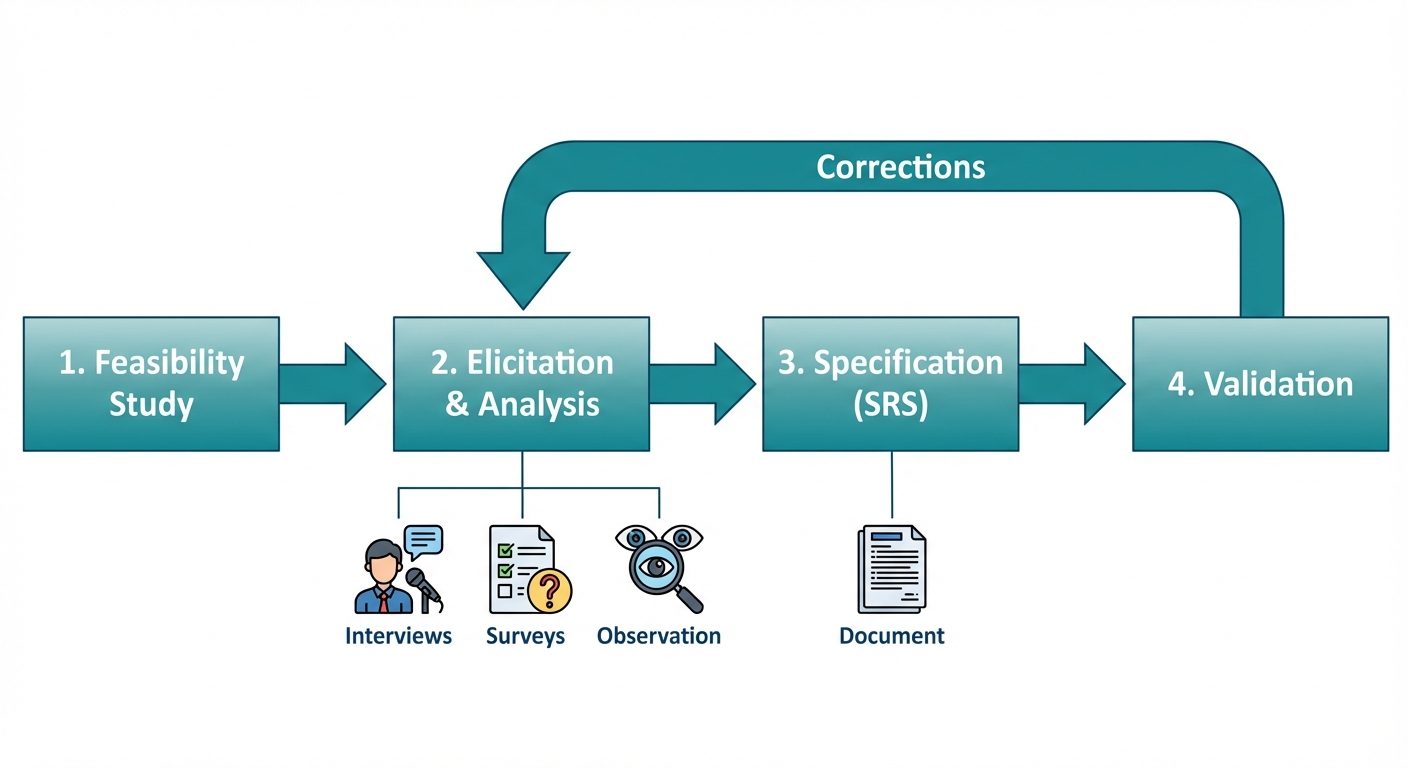
The process of defining, documenting, and maintaining requirements.
- Feasibility Study: Is the project financially and technically possible?
- Requirement Elicitation: Gathering information.
- Requirement Analysis: Modeling and checking for consistency.
- Requirement Specification: Writing the SRS.
- Requirement Validation: Ensuring the SRS is correct.
5.2 Elicitation Techniques
- Interviews: One-on-one discussions with stakeholders.
- Brainstorming: Group sessions to generate ideas.
- Surveys/Questionnaires: Reaching a large audience.
- Observation: Watching users perform their current tasks.
- Prototyping: showing a mock-up to elicit feedback.
- JAD (Joint Application Development): Intensive workshops with users and developers.
6. Software Requirements Specification (SRS)
6.1 What is an SRS?
An SRS is a formal document that acts as a contract between the client and the developer. It fully describes the expected behavior of the software system.
6.2 Characteristics of a Good SRS (IEEE 830)
- Correct: Accurately reflects the user's needs.
- Unambiguous: Every requirement has only one interpretation.
- Complete: Contains all significant requirements and responses to all inputs.
- Consistent: No conflicts between requirements (e.g., specific vs. general).
- Ranked for Importance: Must-have vs. Nice-to-have.
- Verifiable: Can be tested (avoid vague words like "user-friendly" or "fast").
- Modifiable: Easy to change structure.
- Traceable: Origin of the requirement is clear.
6.3 Structure of SRS (Based on IEEE Std 830)
- Introduction
- Purpose
- Scope
- Definitions & Acronyms
- Overall Description
- Product Perspective (Interfaces)
- Product Functions
- User Characteristics
- Constraints
- Specific Requirements
- Functional Requirements
- External Interface Requirements
- Performance Requirements
- Design Constraints
6.4 Requirement Validation Techniques
Once the SRS is written, it must be validated before coding begins:
- Reviews: Formal meeting where the author presents the document to a team for comment.
- Walkthroughs: Informal peer review.
- Prototyping: checking if the documented requirements match the user's mental model.
- Traceability Matrix: Ensuring requirements map to test cases.
Did this save you a night before the exam?
LPU Notes is free, and it stays free. Ads cover part of the server bill. The rest comes out of a student's own pocket: the domain, the storage, and keeping the site up through the weeks everyone needs it at once.
The payment button didn't load. An ad blocker or a filtered network is the usual reason. to try again.
Nothing here is ever locked, and nothing unlocks. Chip in only if it was worth it. What it pays for →