Unit 5: Pointers, Dynamic memory allocation and Strings
1. Pointers: Fundamentals
Definition
A pointer is a special variable in C that stores the memory address of another variable. Unlike normal variables that hold data values (like integers or characters), pointers hold the location of where that data is stored in memory.
Pointer Declaration and Initialization
To declare a pointer, we use the asterisk * symbol before the pointer name.
Syntax:
data_type *pointer_name;Operators:
&(Address-of Operator): Returns the memory address of a variable.*(Dereference/Indirection Operator): Accesses the value stored at the address held by the pointer.
Example:
int a = 10;      // Normal integer variable
int *ptr;        // Declaration of integer pointer
ptr = &a;        // Initialization: ptr now holds the address of 'a'

printf("%d", *ptr); // Prints 10 (Value at address)
printf("%p", ptr);  // Prints address of a (e.g., 0x7ffee...)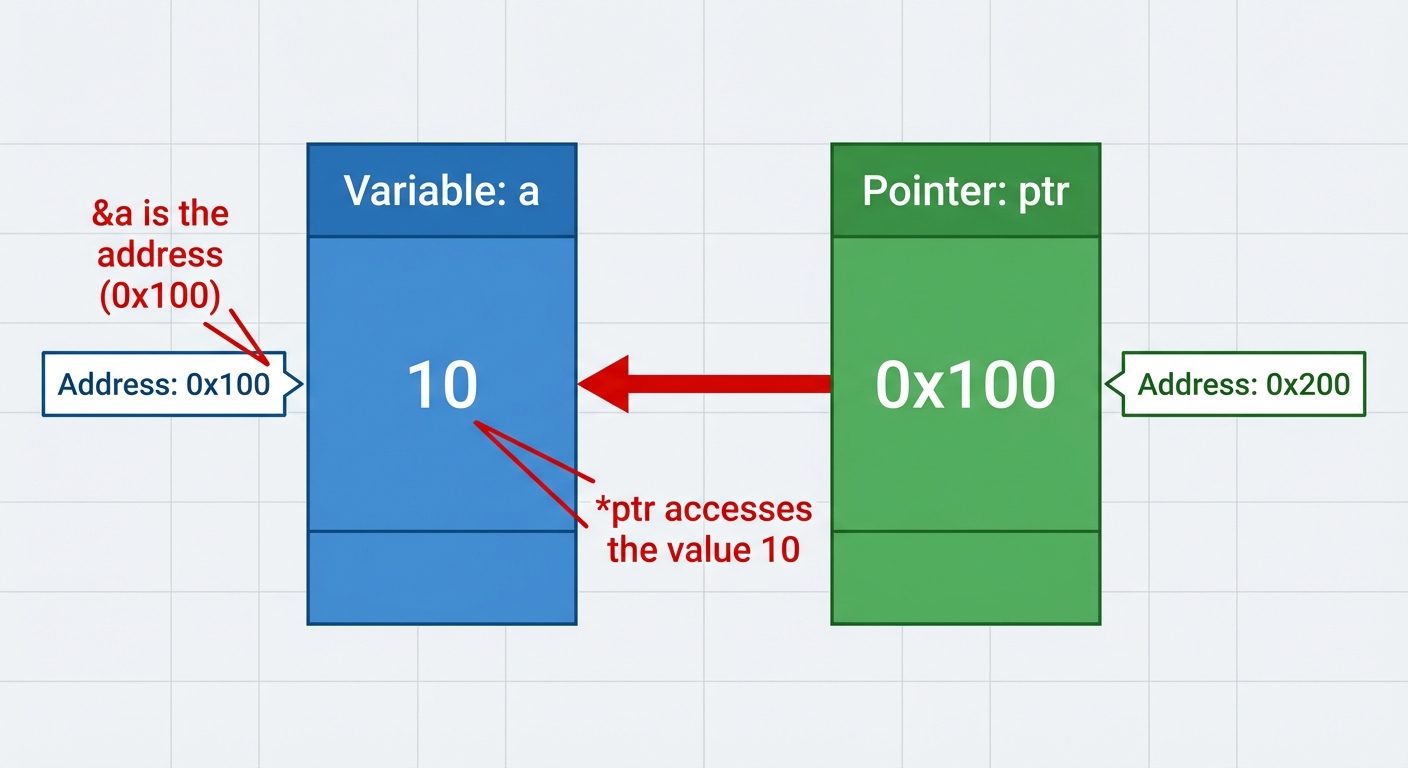
2. Types of Pointers
1. Null Pointer
A pointer that points to nothing. It is a good practice to assign NULL to a pointer if you don't have an exact address to be assigned.
int *ptr = NULL; // Value is 02. Generic (Void) Pointer
A pointer of type void that can point to a variable of any data type. However, it cannot be dereferenced directly; it must be type-casted first.
int n = 10;
void *ptr = &n;
printf("%d", *(int*)ptr); // Type-casting required
3. Wild Pointer
A pointer that has been declared but not initialized. It points to an arbitrary (random) memory location. Using these is dangerous and can crash the program.
int *ptr; // Wild pointer (contains garbage address)
*ptr = 5; // Dangerous!
4. Dangling Pointer
A pointer that points to a memory location that has been deleted (freed) or is no longer valid (out of scope).
int *ptr = (int *)malloc(sizeof(int));
free(ptr);
// ptr is now a dangling pointer because the memory it points to is released.
ptr = NULL; // Fix: Assign NULL to avoid issues.
3. Pointer Expressions and Arithmetic
Pointers do not follow standard arithmetic rules. Arithmetic operations on pointers depend on the data type size they point to.
Valid Operations
- Increment/Decrement (
ptr++,ptr--):- Increments the address by
sizeof(data_type). - Example: If an integer is 4 bytes and
ptris1000,ptr++becomes1004.
- Increments the address by
- Addition/Subtraction of Constant (
ptr + 3):- Moves the pointer forward by
3 * sizeof(data_type).
- Moves the pointer forward by
- Subtraction of two pointers (
ptr2 - ptr1):- Returns the number of elements between the two pointers (provided they point to the same array).
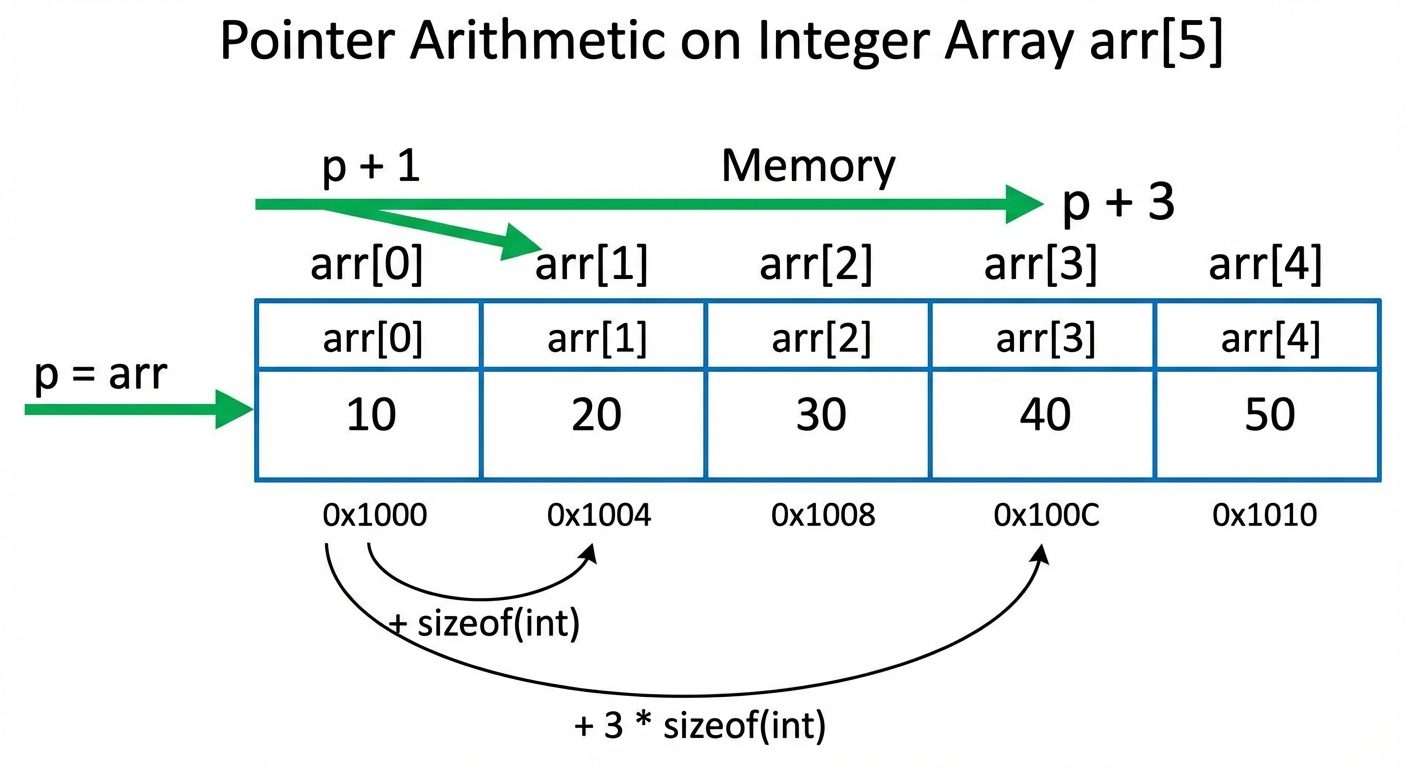 AI-generated image — may contain inaccuracies". The blocks contain values [10, 20, 30, 40, 50]. Below the boxes, list memory addresses: 1000, 1004, 1008, 1012, 1016. Show a pointer "ptr" pointing to 1000. Show an arrow labeled "ptr++" moving the pointer from 1000 to 1004. Add a text note "Increment adds sizeof(int) = 4 bytes". Use clear, high-contrast colors with a white background.]
4. Pointers with Arrays and Functions
Pointers and One-Dimensional Arrays
The name of an array acts as a constant pointer to the first element of the array.
arris equivalent to&arr[0].- Accessing elements:
arr[i]is equivalent to*(arr + i).
int arr[] = {10, 20, 30};
int *p = arr;

// Accessing the second element
printf("%d", *(p + 1)); // Output: 20
Passing Pointers to Functions (Call by Reference)
This allows a function to modify the actual values of variables declared in the calling function.
void swap(int *x, int *y) {
    int temp = *x;
    *x = *y;
    *y = temp;
}

int main() {
    int a = 5, b = 10;
    swap(&a, &b); // Passes addresses
    // a is now 10, b is now 5
}
5. Dynamic Memory Management (DMA)
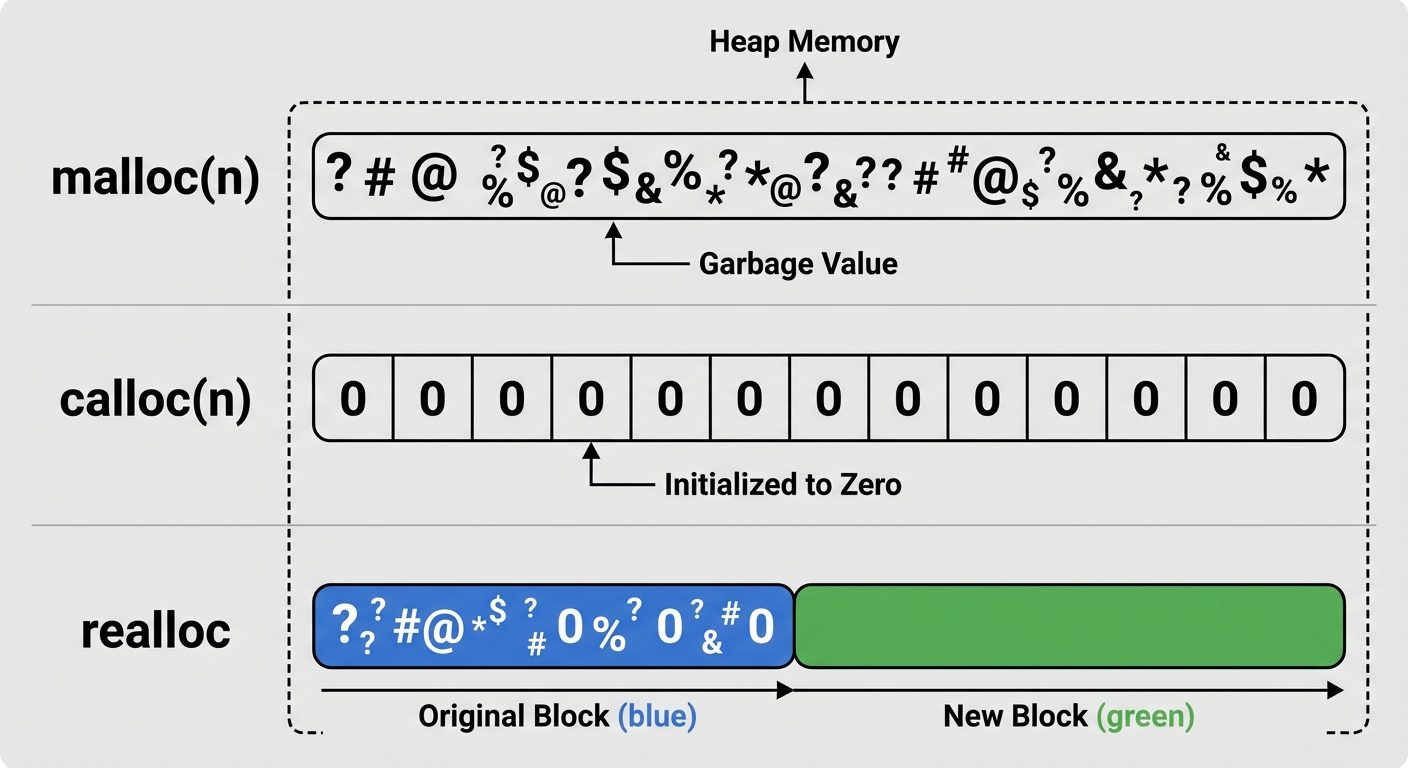
Dynamic memory allocation allows the program to obtain memory at runtime from the Heap segment, rather than compile-time (Stack). These functions are defined in <stdlib.h>.
1. malloc() (Memory Allocation)
Allocates a single large block of contiguous memory.
- Initialization: Contains garbage values.
- Return:
void*(needs casting). - Syntax:
ptr = (cast_type*) malloc(byte_size);
int *ptr = (int*) malloc(5 * sizeof(int)); // Allocates array for 5 ints2. calloc() (Contiguous Allocation)
Allocates multiple blocks of memory.
- Initialization: Initializes all bytes to zero.
- Syntax:
ptr = (cast_type*) calloc(n, element_size);
int *ptr = (int*) calloc(5, sizeof(int)); // Allocates 5 blocks, all set to 03. realloc() (Re-Allocation)
Changes the size of previously allocated memory (expands or shrinks).
- Syntax:
ptr = realloc(ptr, new_size);
4. free()
Releases the dynamically allocated memory back to the heap to prevent memory leaks.
- Syntax:
free(ptr);
6. Strings
Defining and Initializing Strings
A string in C is a one-dimensional array of characters terminated by a Null Character (\0).
// Method 1: Array (Editable)
char str1[] = "Hello";
// Memory: ['H', 'e', 'l', 'l', 'o', '\0']

// Method 2: Character Pointer (Read-only usually stored in text segment)
char *str2 = "Hello";

// Method 3: Element by element
char str3[6] = {'H', 'e', 'l', 'l', 'o', '\0'};
Reading and Writing Strings
-
Reading:
scanf("%s", str);: Reads until whitespace (cannot read "Hello World").gets(str);: Reads undefined spaces but dangerous (buffer overflow). Deprecated.fgets(str, size, stdin);: Safe method. Reads spaces and limits size.
-
Writing:
printf("%s", str);puts(str);: Prints string and adds a newline automatically.
Character Arithmetic
Characters in C are stored as ASCII integers. We can perform arithmetic on them.
'a' + 1results in'b'.'0'is not integer0(ASCII 48).- Converting Char Digit to Int:
int val = char_var - '0';
String Manipulation Functions (<string.h>)
| Function | Description | Example Syntax |
|---|---|---|
strlen(s) |
Returns the length of the string (excluding \0). |
int len = strlen(str); |
strcpy(dest, src) |
Copies content of src to dest. |
strcpy(s1, s2); |
strcat(dest, src) |
Concatenates (joins) src to the end of dest. |
strcat(s1, s2); |
strcmp(s1, s2) |
Compares two strings character by character. Returns 0 if equal. | if(strcmp(s1,s2)==0) |
strrev(s) |
Reverses the string (Non-standard, often implemented manually). | strrev(s1); |
Example of Processing Logic (Manual strlen):
int length = 0;
char str[] = "Study";
// Loop until null terminator is found
while(str[length] != '\0') {
    length++;
}
// length is 5
Did this save you a night before the exam?
LPU Notes is free, and it stays free. Ads cover part of the server bill. The rest comes out of a student's own pocket: the domain, the storage, and keeping the site up through the weeks everyone needs it at once.
The payment button didn't load. An ad blocker or a filtered network is the usual reason. to try again.
Nothing here is ever locked, and nothing unlocks. Chip in only if it was worth it. What it pays for →