Unit 3: User defined functions and Storage classes
1. Introduction to User Defined Functions
A function is a self-contained block of statements that performs a specific task. C programming is based on the concept of modular programming, where a large program is divided into smaller, manageable sub-programs (functions).
Benefits of using functions:
- Reusability: Write code once and use it multiple times.
- Modularity: Complex problems are broken down into smaller pieces.
- Debuggability: Easier to isolate and fix errors.
- Abstraction: The user only needs to know what the function does, not how it does it.
2. Anatomy of a Function
To implement a user-defined function in C, three distinct elements are required:
2.1 Function Prototype (Declaration)
A prototype tells the compiler about the function's name, return type, and parameters before the function is actually defined. It ensures type checking.
Syntax:
return_type function_name(type parameter1, type parameter2, ...);
Example:
int add(int a, int b); // Declaration2.2 Function Definition
The definition contains the actual logic (body) of the function. It consists of the function header and the function block.
Syntax:
return_type function_name(type parameter1, type parameter2) {
    // Body of the function
    // Statements...
    return value; // Optional, based on return_type
}
2.3 Function Call
This is the command that executes the function. The control jumps from the calling function (e.g., main) to the called function.
Syntax:
variable = function_name(argument1, argument2);3. Parameter Passing Mechanisms
When a function is called, data is passed from the calling function to the called function. There are two primary ways to do this in C.
3.1 Call by Value
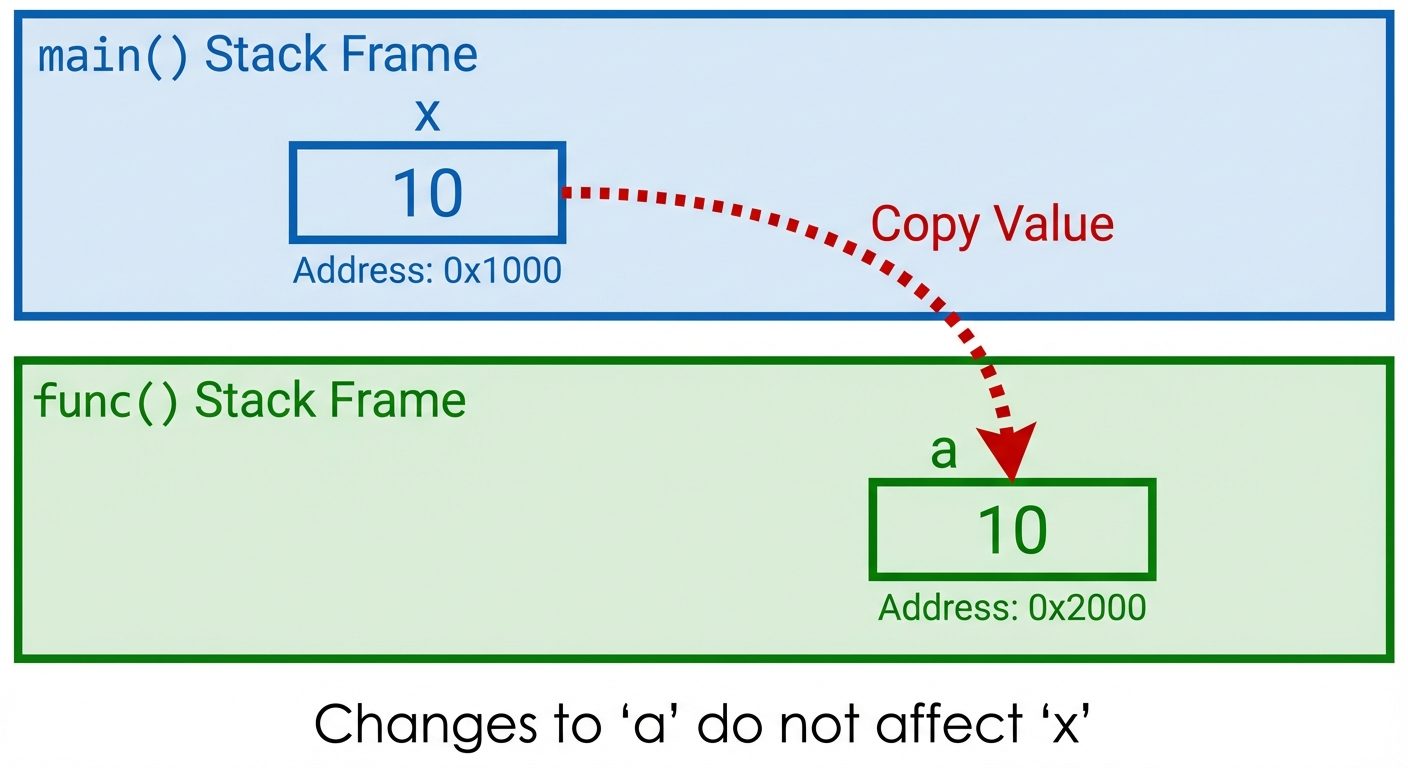
In this method, the value of the actual parameters is copied into the formal parameters.
- Safety: Changes made to the formal parameters inside the function do not affect the actual parameters in the calling function.
- Memory: Separate memory is allocated for formal parameters.
Example:
void swap(int x, int y) {
    int temp = x;
    x = y;
    y = temp;
    // x and y are swapped here, but not in main()
}
3.2 Call by Reference
In this method, the address (memory location) of the actual parameters is passed to the function. This is achieved using pointers.
- Effect: Changes made to the formal parameters (which are pointers) directly affect the actual parameters.
- Mechanism: Uses the dereference operator (
*) to access the value at the passed address.
Example:
void swap(int *x, int *y) {
    int temp = *x;
    *x = *y;
    *y = temp;
    // The actual variables in main() are swapped
}

// Call inside main:
swap(&a, &b);
4. Math Library Functions
C provides a standard library <math.h> containing built-in functions for mathematical operations. To use these, you must include #include <math.h> at the top of your program.
Common Functions:
| Function | Description | Example | Result |
|---|---|---|---|
sqrt(x) |
Square root of x | sqrt(16.0) |
4.0 |
pow(x, y) |
x raised to power y | pow(2.0, 3.0) |
8.0 |
abs(x) |
Absolute value (integer) | abs(-5) |
5 |
ceil(x) |
Rounds up to nearest int | ceil(3.2) |
4.0 |
floor(x) |
Rounds down to nearest int | floor(3.9) |
3.0 |
sin(x) |
Sine of x (radians) | sin(0.0) |
0.0 |
Note: Most math functions accept and return double type.
5. Recursive Functions
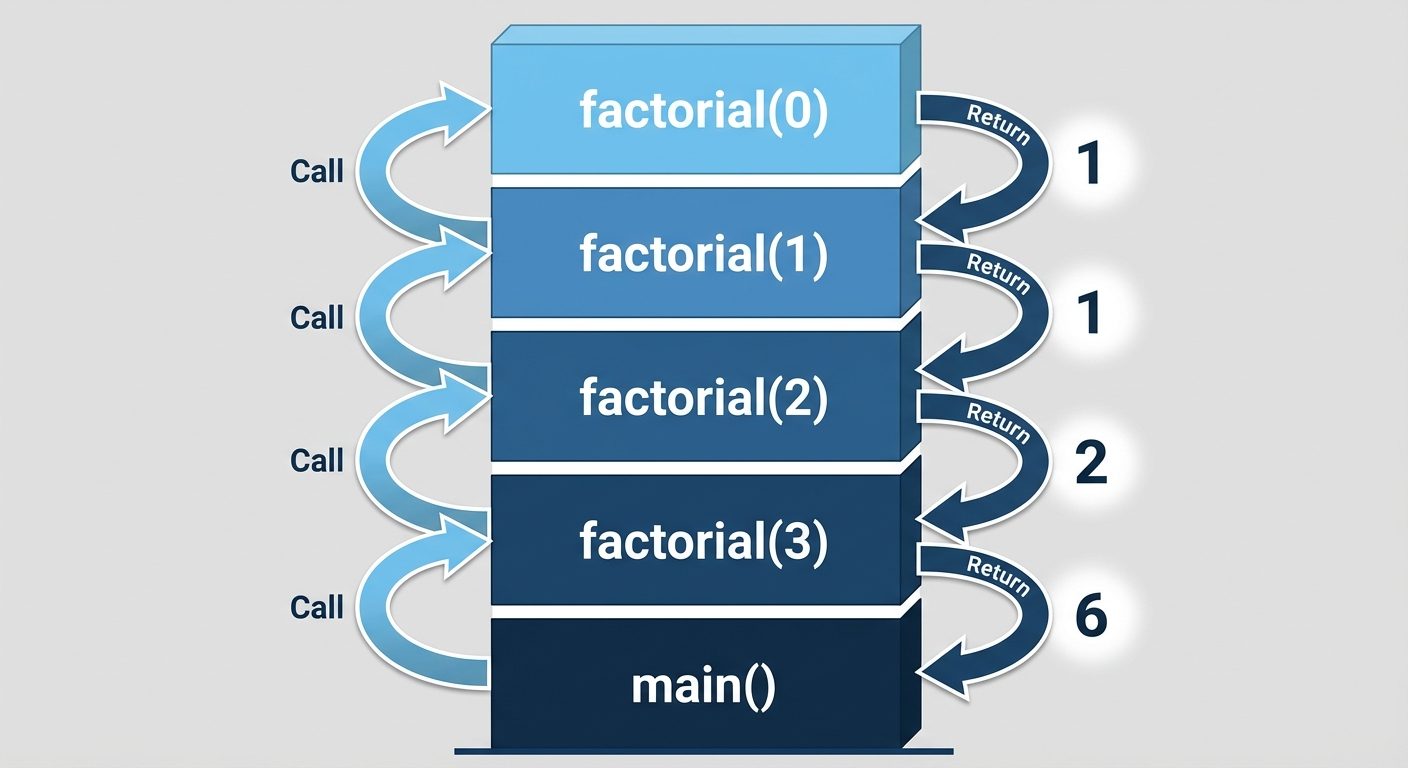
Recursion is a process where a function calls itself directly or indirectly.
Key Components:
- Base Case: The condition that stops the recursion. Without this, infinite recursion (Stack Overflow) occurs.
- Recursive Step: The part where the function calls itself with a modified parameter, moving toward the base case.
Example: Factorial of N
int factorial(int n) {
    if (n == 0) // Base Case
        return 1;
    else        // Recursive Step
        return n * factorial(n - 1);
}
6. Scope Rules
Scope refers to the region of the program where a variable is visible and accessible.
6.1 Local Scope
- Variables declared inside a function or block
{ }. - Accessible only within that block.
- Created when control enters the block, destroyed when it exits.
6.2 Global Scope
- Variables declared outside all functions (usually at the top of the file).
- Accessible by any function in the program.
- They persist for the entire lifetime of the program execution.
7. Storage Classes in C
Storage classes describe the features of a variable or function. They determine four things:
- Storage: Where the variable is stored (Stack, CPU Register, Data Segment).
- Default Initial Value: What the variable contains if not initialized (Garbage or Zero).
- Scope: Where the variable can be accessed.
- Lifetime: How long the variable stays in memory.
There are four storage classes in C:
7.1 Auto (Automatic)
- Keyword:
auto - Storage: Stack memory.
- Default Value: Garbage value.
- Scope: Local to the block in which defined.
- Lifetime: Ends when the block is exited.
- Note: All local variables are
autoby default.
Cvoid func() { auto int a = 10; // same as int a = 10; }
7.2 Extern (External)
- Keyword:
extern - Storage: Data segment (RAM).
- Default Value: Zero.
- Scope: Global (visible to all files in the program).
- Lifetime: Throughout the program execution.
- Usage: Used to access a global variable defined in another file.
7.3 Register
- Keyword:
register - Storage: CPU Registers (instead of RAM).
- Default Value: Garbage value.
- Scope: Local to the block.
- Lifetime: Ends when the block is exited.
- Purpose: Faster access. Used for loop counters.
- Limitation: You cannot use the
&operator (address of) on a register variable because it doesn't have a memory address.
Cregister int i;
7.4 Static
- Keyword:
static - Storage: Data segment (RAM).
- Default Value: Zero.
- Scope: Local to the block (visibility is restricted).
- Lifetime: Persists between function calls. The value is preserved.
Comparison Example (Auto vs Static):
void counter() {
    auto int a = 0;
    static int s = 0;
    a++;
    s++;
    printf("Auto: %d, Static: %d\n", a, s);
}
// Calling counter() 3 times:
// 1st call: Auto: 1, Static: 1
// 2nd call: Auto: 1, Static: 2 (s remembered previous value)
// 3rd call: Auto: 1, Static: 3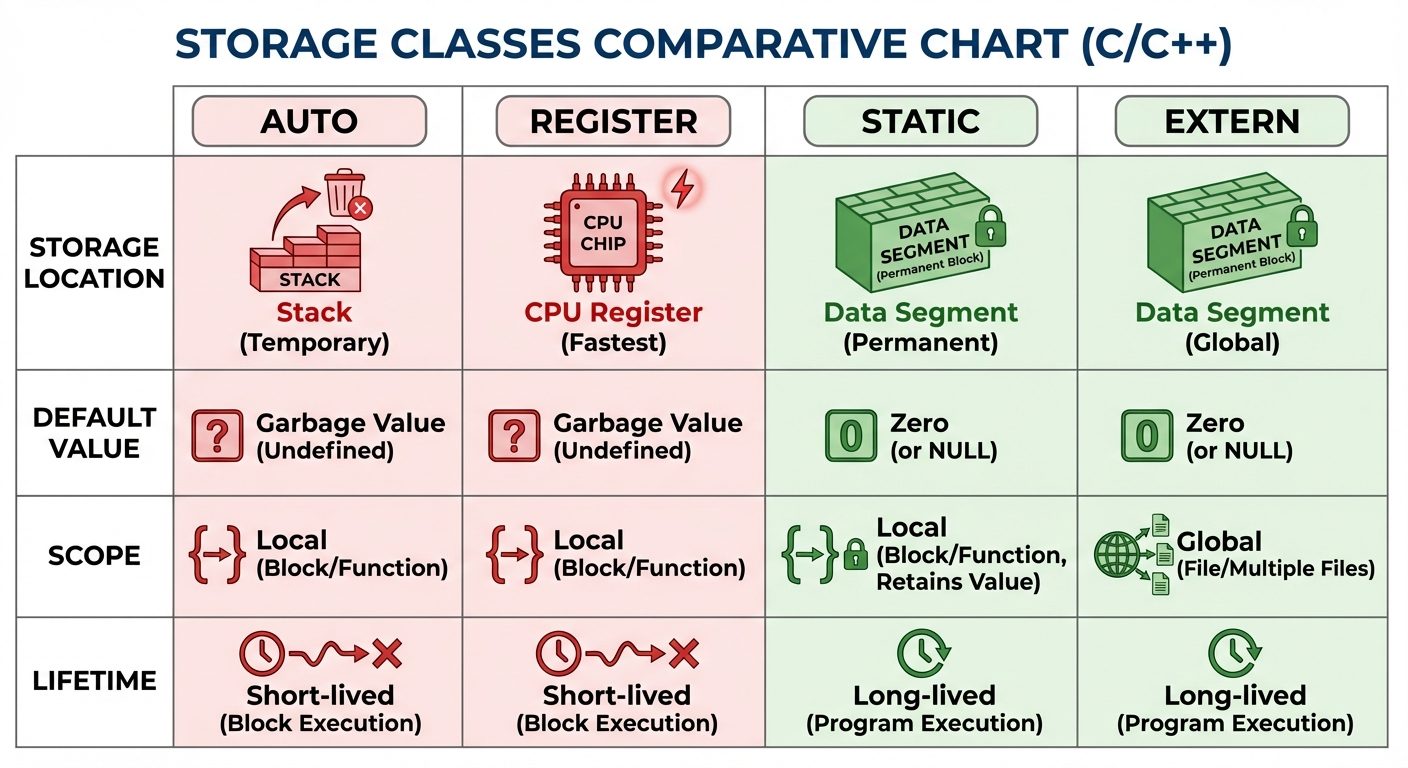
Did this save you a night before the exam?
LPU Notes is free, and it stays free. Ads cover part of the server bill. The rest comes out of a student's own pocket: the domain, the storage, and keeping the site up through the weeks everyone needs it at once.
The payment button didn't load. An ad blocker or a filtered network is the usual reason. to try again.
Nothing here is ever locked, and nothing unlocks. Chip in only if it was worth it. What it pays for →