Unit 2: Control structures and Input/Output functions
This unit focuses on the logic flow within C programs (Control Structures) and the mechanisms used to interact with the user (Input/Output functions). Mastering these concepts is essential for writing dynamic and interactive software.
1. Control Structures: Decision Making (Branching)
Decision-making structures require the programmer to specify one or more conditions to be evaluated by the program, along with statements to be executed if the condition is determined to be true, and optionally, other statements if the condition is false.
1.1 The if Statement
The simplest form of decision control. It executes a block of code only if a specified condition is true.
Syntax:
if (condition) {
    // Statement(s) to execute if condition is true
}
1.2 The if...else Statement
This structure allows for a two-way branch. If the condition is true, the if block is executed; otherwise, the else block is executed.
Syntax:
if (condition) {
    // Executes if condition is true
} else {
    // Executes if condition is false
}
1.3 The Nested if...else and Else-if Ladder
Used when checking multiple conditions sequentially.
Syntax:
if (condition1) {
    // Code
} else if (condition2) {
    // Code
} else {
    // Code if all previous conditions are false
}
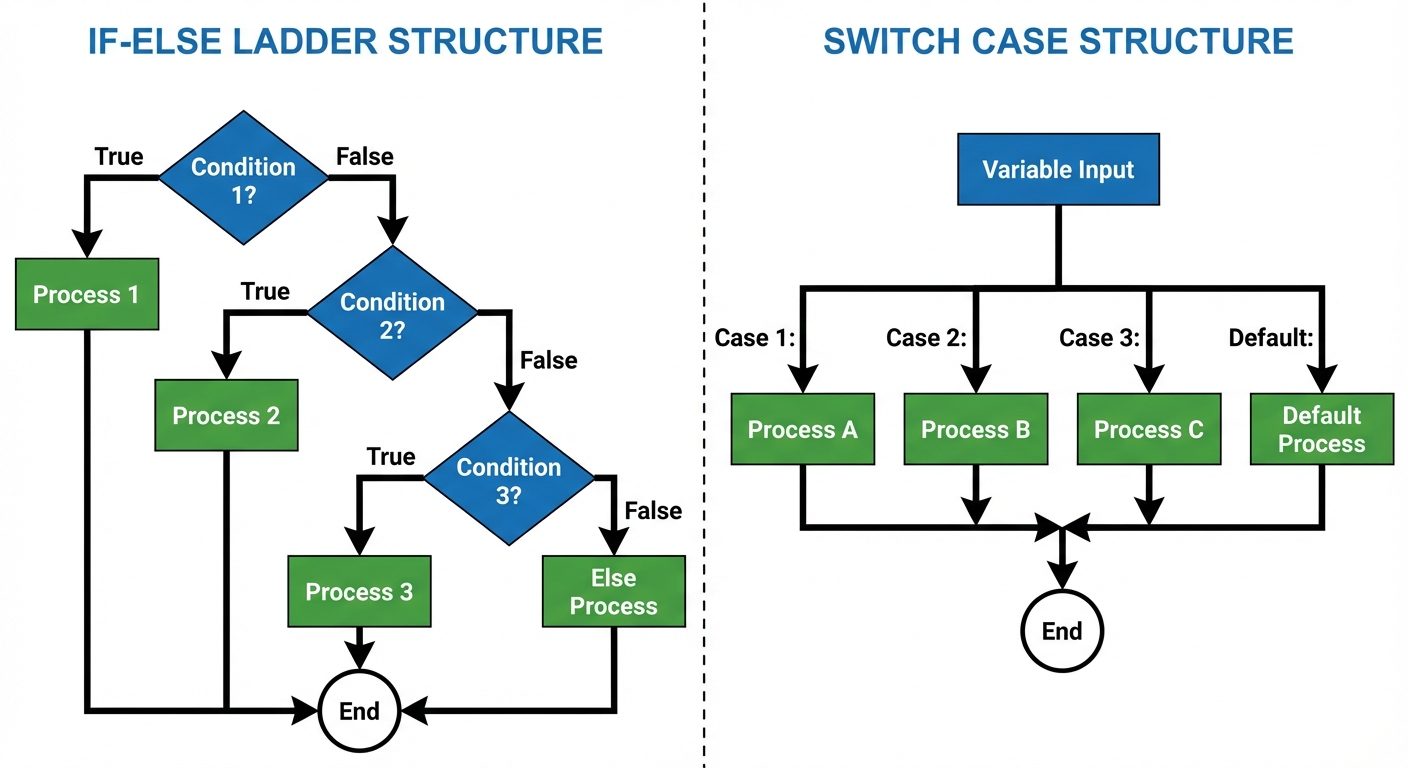
1.4 The switch Statement
The switch statement is a multi-way branch statement. It provides an easy way to dispatch execution to different parts of code based on the value of the expression. It is often cleaner than a long else-if ladder.
- Key Rules:
- The expression must evaluate to an integer or character.
caselabels must be constants.breakis used to exit the switch block; without it, "fall-through" occurs (executing subsequent cases).defaultexecutes if no cases match.
Syntax:
switch (expression) {
    case constant1:
        // statement sequence
        break;
    case constant2:
        // statement sequence
        break;
    default:
        // default statement sequence
}
2. Control Structures: Loops (Iteration)
Loops are used to execute a block of code repeatedly until a specified condition is met.
2.1 The while Loop (Entry Controlled)
The condition is evaluated before the execution of the loop body. If the condition is false initially, the loop body never executes.
Syntax:
while (condition) {
    // Code to be executed
    // Increment/Decrement
}
2.2 The for Loop (Entry Controlled)
The for loop is a concise way of writing the loop structure. It combines initialization, condition checking, and increment/decrement in one line.
Syntax:
for (initialization; condition; update) {
    // Body of the loop
}
Example:
for (int i = 0; i < 5; i++) {
    printf("%d ", i);
}
2.3 The do...while Loop (Exit Controlled)
The condition is evaluated after the execution of the loop body. This guarantees that the loop body is executed at least once, regardless of the condition.
Syntax:
do {
    // Body of the loop
} while (condition); // Note the semicolon here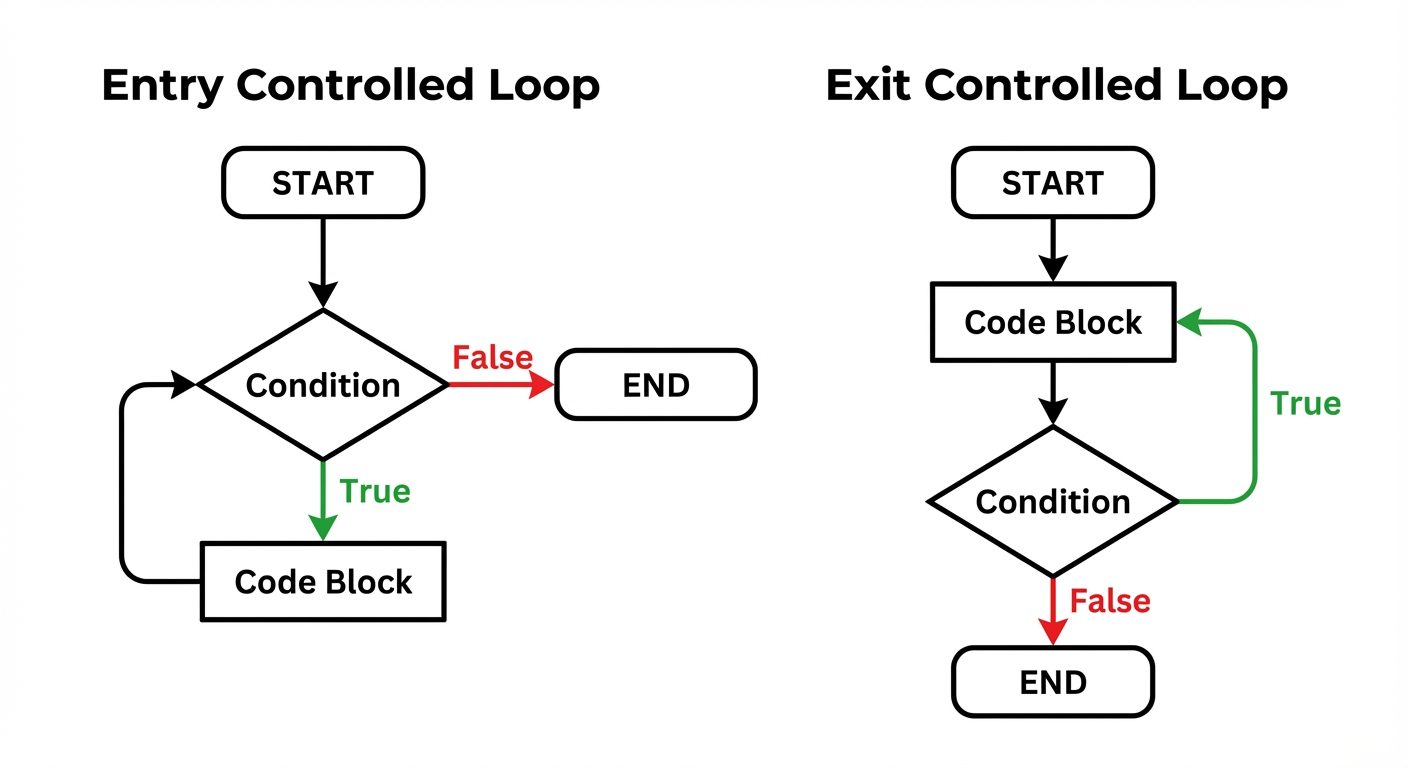
3. Jump Statements
Jump statements unconditionally transfer control within a function.
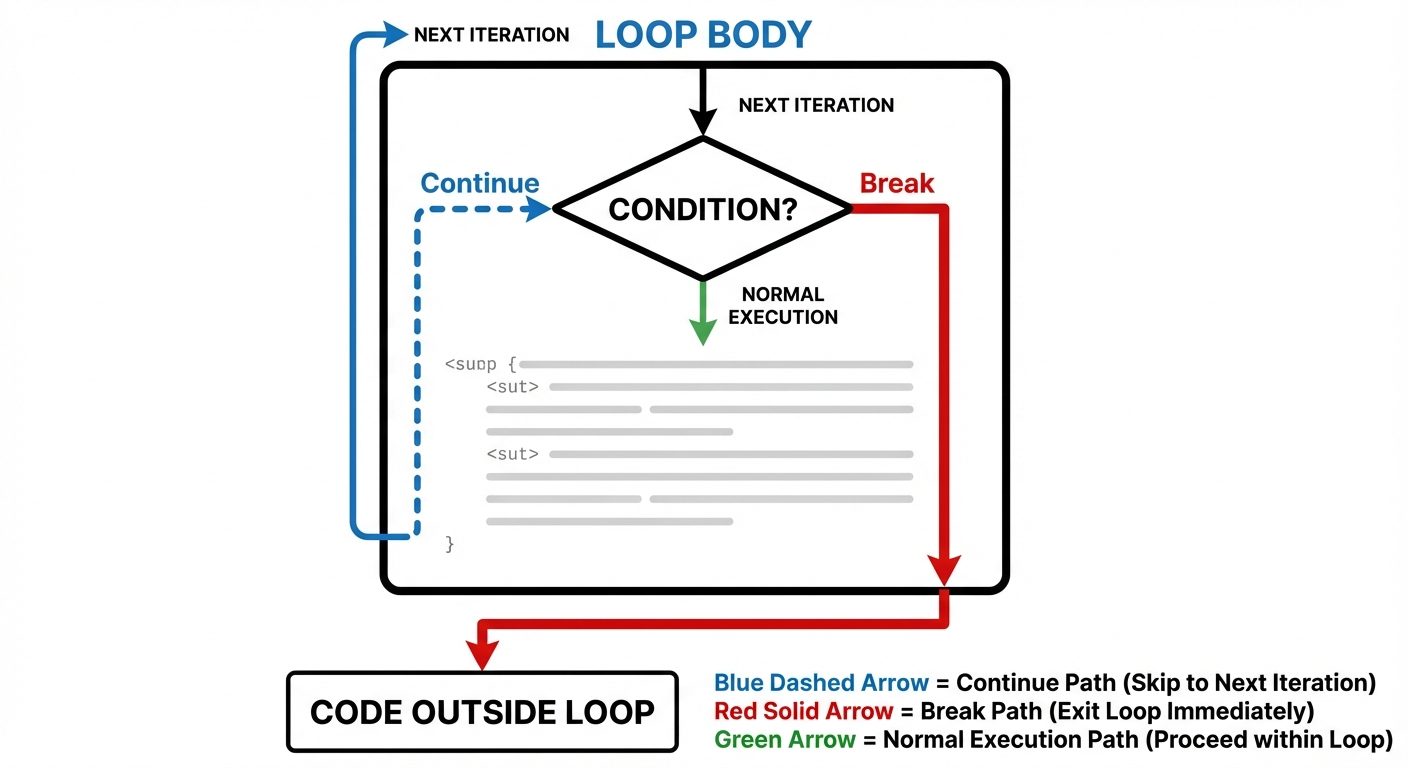
3.1 break Statement
- Used inside loops and switch statements.
- Immediately terminates the loop or switch.
- Control resumes at the next statement following the loop/switch.
3.2 continue Statement
- Used only inside loops.
- Skips the remaining code in the current iteration of the loop body.
- Control jumps to the update expression (in
forloop) or condition check (inwhileloop).
3.3 goto Statement
- Transfers control to a labeled statement anywhere in the function.
- Note: Generally discouraged in structured programming as it creates "spaghetti code" that is hard to debug.
Syntax:
goto label_name;
// ... code ...
label_name: statement;
3.4 return Statement
- Terminates the execution of a function and returns control to the calling function.
- Can optionally return a value.
4. Type Conversion and Modifiers
4.1 Type Modifiers
Modifiers alter the meaning of base data types to fit various situations more precisely. They are prefixed to basic types (int, char, double).
- Signed: Allows storage of positive and negative numbers (default for
int). - Unsigned: Allows storage of only positive numbers (doubles the positive range).
- Short: Reduces memory usage (usually 2 bytes for
int). - Long: Increases memory usage for larger ranges (usually 4 or 8 bytes).
Example: unsigned long int population;
4.2 Type Conversion (Casting)
The process of converting one data type to another.
- Implicit Conversion (Type Coercion): Done automatically by the compiler. Smaller types are promoted to larger types to prevent data loss (e.g.,
inttofloat). - Explicit Conversion (Type Casting): Done manually by the programmer using the cast operator.
- Syntax:
(type_name) expression; - Example:
float avg = (float) sum / count;
- Syntax:
5. Input/Output (I/O) Functions
C does not have built-in I/O keywords; it uses functions from the standard library <stdio.h>.
5.1 Formatted I/O Functions
These functions allow data input/output in specific formats defined by the user.
printf() (Print Formatted)
Used to output data to the standard output (console).
- Syntax:
printf("control string", arg1, arg2...); - Format Specifiers:
%dor%i: Integer%f: Float%c: Character%s: String%lf: Double
scanf() (Scan Formatted)
Used to read data from standard input (keyboard).
- Syntax:
scanf("control string", &variable); - Important: The ampersand
&is the "address-of" operator. It tellsscanfwhere in memory to store the input. (Note:&is not used for string arrays).
5.2 Unformatted I/O Functions
These functions work specifically with characters or strings and do not require format specifiers.
Character I/O
getchar(): Reads a single character from input.- Example:
char c = getchar();
- Example:
putchar(): Writes a single character to output.- Example:
putchar(c);
- Example:
String I/O
gets(): Reads a string including spaces until a newline is found.- Warning:
gets()is unsafe (potential buffer overflow) and has been removed in modern C standards (C11). Usefgets()instead.
- Warning:
puts(): Writes a string to output and appends a newline character automatically.- Example:
puts("Hello World");
- Example:
6. Designing Structured Programs in C
Structured programming is a paradigm aimed at improving the clarity, quality, and development time of a computer program by making extensive use of the control structures (selection and repetition) described above.
Core Principles:
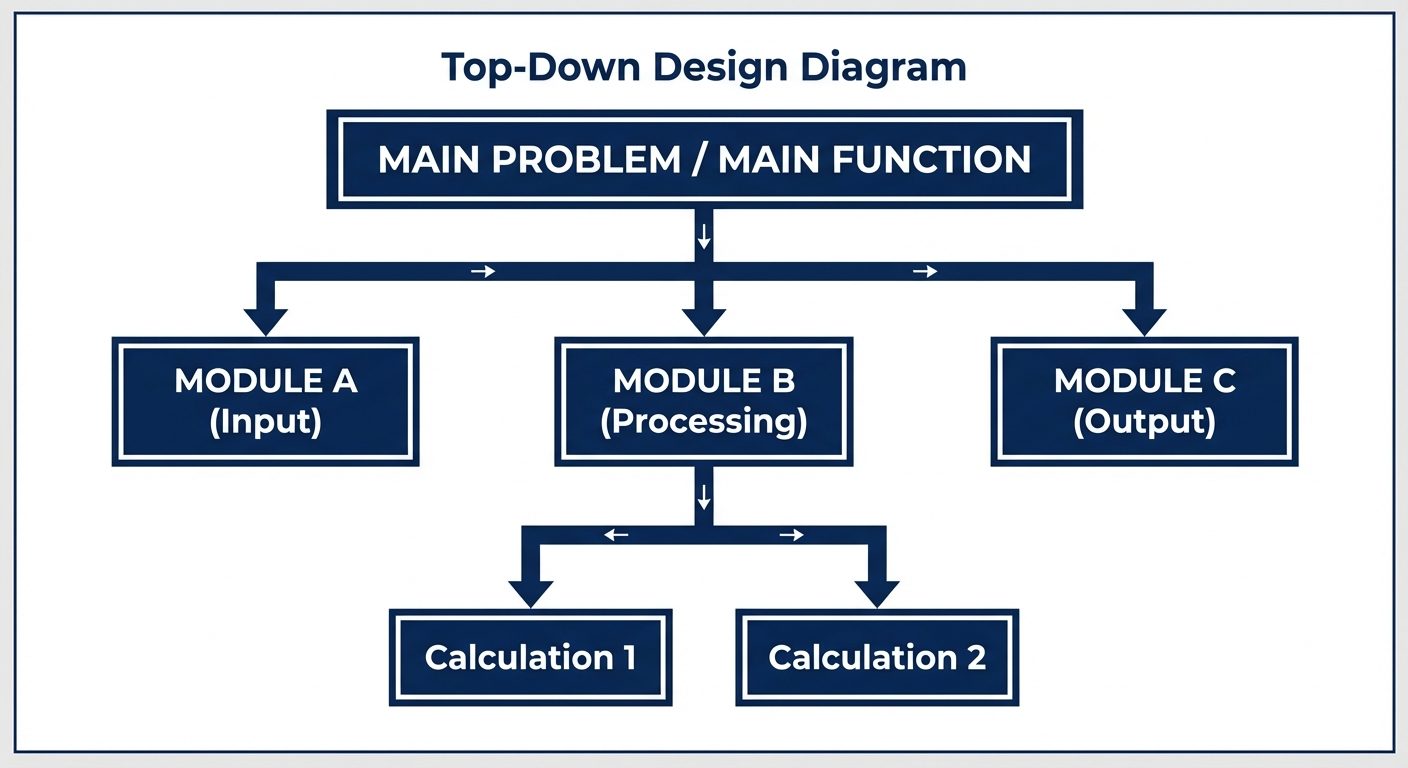
- Top-Down Design: Breaking a complex problem into smaller, manageable sub-problems (modules/functions).
- Modularity: Writing code in distinct, independent blocks (functions) that perform specific tasks.
- Readability: Using meaningful variable names, indentation, and comments.
- Single Entry/Exit: Control structures (loops/functions) should ideally have one entry point and one exit point.
Structure of a C Program:
- Documentation Section: Comments describing the program.
- Link Section: Includes (
#include <stdio.h>). - Definition Section: Macros and symbolic constants.
- Global Declaration Section: Global variables.
main()Function: The entry point.- Sub-program Section: User-defined functions.
Did this save you a night before the exam?
LPU Notes is free, and it stays free. Ads cover part of the server bill. The rest comes out of a student's own pocket: the domain, the storage, and keeping the site up through the weeks everyone needs it at once.
The payment button didn't load. An ad blocker or a filtered network is the usual reason. to try again.
Nothing here is ever locked, and nothing unlocks. Chip in only if it was worth it. What it pays for →