Unit 1: Basics and introduction to C
1. The C Character Set
The C character set consists of the alphabet, digits, and special characters used to represent information. These characters are combined to form strings, variables, and constants.
- Alphabets: Uppercase (
AtoZ) and Lowercase (atoz). C is case-sensitive, meaningAandaare different. - Digits: Decimal digits
0through9. - Special Characters: Symbols with specific meanings, such as:
,,.,;,:,?,',"|,/,\,~,_$,#,%,&,^,*-,+,<,>,=,(,),{,},[,]
- White Space Characters: Used to separate words but are generally ignored by the compiler during execution. Includes blank space, newline (
\n), horizontal tab (\t), vertical tab (\v), and carriage return (\r).
2. Identifiers and Keywords
Keywords
Keywords are reserved words in C that have a predefined meaning to the compiler. They cannot be changed or used as variable names. There are 32 standard keywords in ANSI C:
| Type | Keywords |
|---|---|
| Data Types | int, char, float, double, void, short, long, signed, unsigned |
| Control Flow | if, else, switch, case, default, for, while, do, break, continue, goto, return |
| Storage Classes | auto, extern, register, static |
| Structure/Union | struct, union, typedef, enum |
| Others | const, volatile, sizeof |
Identifiers
Identifiers are user-defined names given to program elements like variables, functions, and arrays.
Rules for Naming Identifiers:
- Must begin with a letter (A-Z or a-z) or an underscore (
_). - Followed by any combination of letters, underscores, or digits (0-9).
- No special characters (like @, #, %) allowed other than underscore.
- No white spaces allowed.
- Keywords cannot be used as identifiers.
- Case-sensitive (
Totalandtotalare different).
3. Data Types
Data types specify the type of data a variable can hold, the storage space required, and the range of values it can represent.
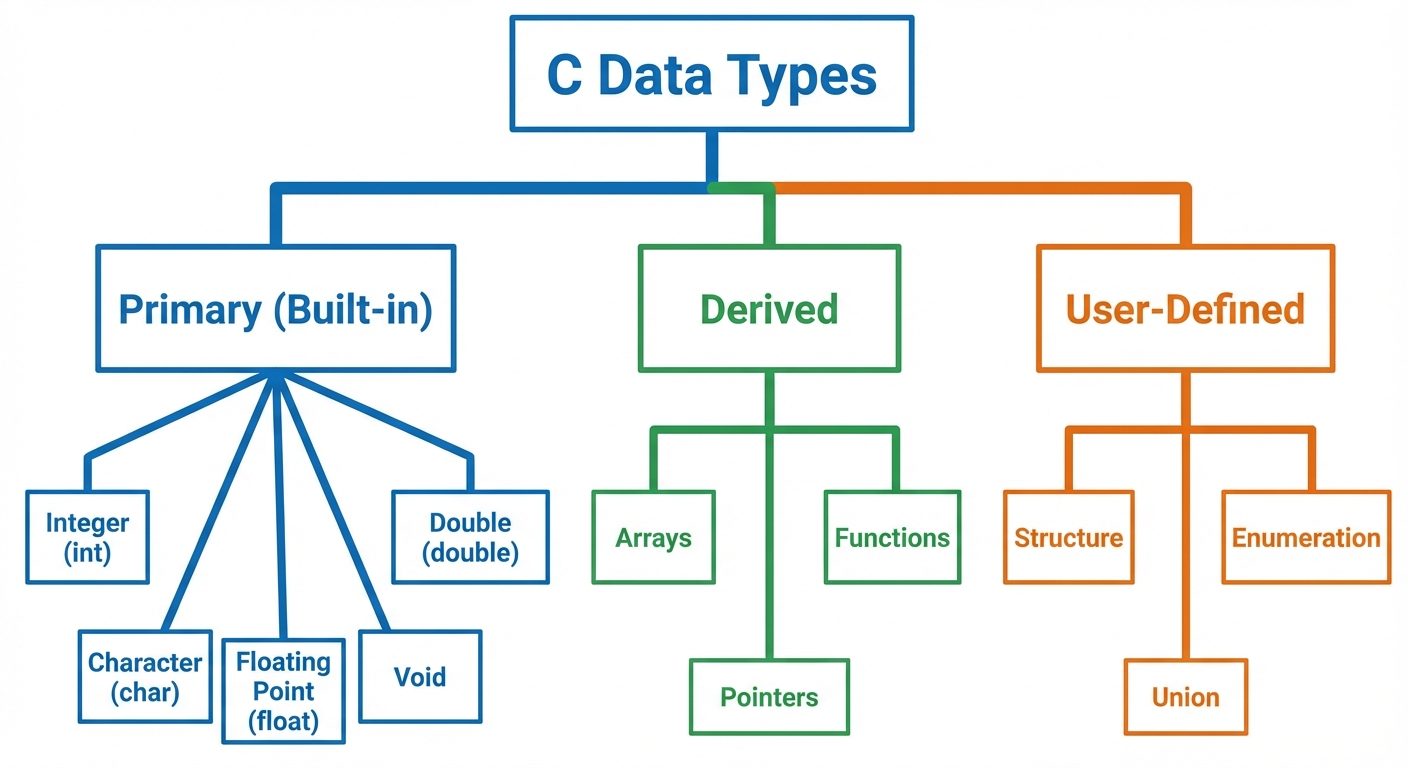
Primary Data Types
char(Character):- Size: 1 byte.
- Range: -128 to 127 (signed) or 0 to 255 (unsigned).
- Format specifier:
%c.
int(Integer):- Size: Usually 2 or 4 bytes (machine-dependent).
- Stores whole numbers.
- Format specifier:
%d.
float(Floating Point):- Size: 4 bytes.
- Stores decimal numbers (6 decimal places precision).
- Format specifier:
%f.
double(Double Precision):- Size: 8 bytes.
- Stores decimal numbers with higher precision (15 decimal places).
- Format specifier:
%lf.
void:- Represents the absence of value. Used in functions that do not return a value.
4. Constants and Variables
Variables
A variable is a named storage location in memory used to hold a value that can change during program execution.
Declaration vs. Initialization:
int age;          // Declaration (reserves space)
age = 25;         // Assignment
int score = 100;  // Initialization (Declaration + Assignment)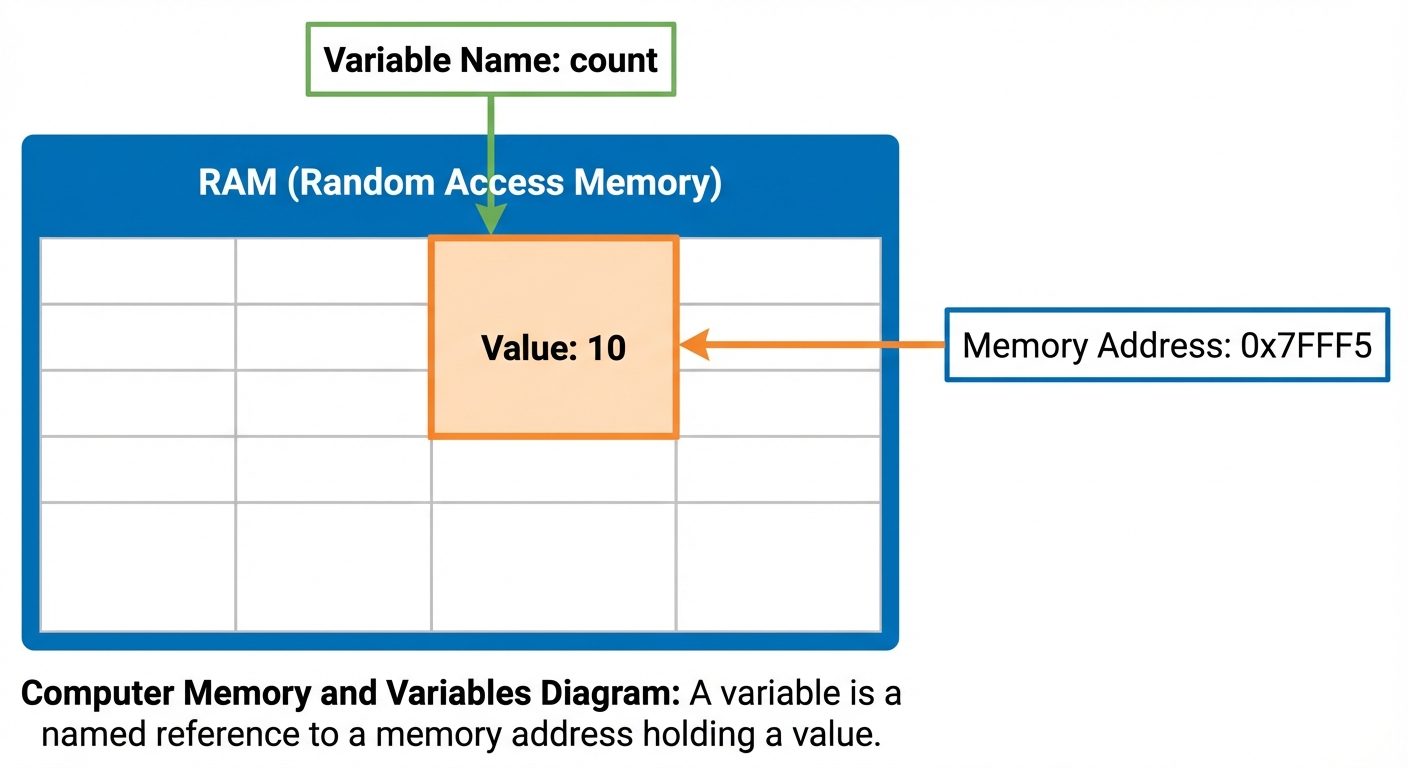
Constants
Constants are fixed values that do not change during the execution.
- Integer Constants: Whole numbers (e.g.,
10,-5,07(Octal),0xF(Hex)). - Real (Floating-point) Constants: Numbers with fractions (e.g.,
3.14,-0.005). - Character Constants: Single character in single quotes (e.g.,
'a','5'). - String Constants: Sequence of characters in double quotes (e.g.,
"Hello"). - Symbolic Constants: Defined using
#defineorconst.#define PI 3.14(Preprocessor directive)const int MAX = 100;(Keyword)
5. Expressions
An expression is a combination of variables, constants, and operators that evaluates to a single value.
- Example:
result = (a + b) * c;
Operator Precedence and Associativity:
Determines the order in which operations are performed. For example, multiplication * has higher precedence than addition +.
6. Operators in C
Operators are symbols used to perform operations on operands (variables/values).
A. Arithmetic Operators
Used for mathematical calculations.
| Operator | Name | Description | Example (a=10, b=3) |
|---|---|---|---|
+ |
Addition | Adds two operands | a + b = 13 |
- |
Subtraction | Subtracts second from first | a - b = 7 |
* |
Multiplication | Multiplies operands | a * b = 30 |
/ |
Division | Divides numerator by denominator | a / b = 3 (Integer division truncates decimal) |
% |
Modulo | Returns remainder of division | a % b = 1 |
B. Unary Operators
Operate on a single operand.
- Increment (
++): Increases value by 1.- Pre-increment (
++a): Increment first, then use value. - Post-increment (
a++): Use value first, then increment.
- Pre-increment (
- Decrement (
--): Decreases value by 1. - Unary Minus (
-): Negates the value. - Sizeof (
sizeof): Returns the size of a variable/type in bytes.
C. Relational Operators
Used to compare two values. Returns 1 (true) or 0 (false).
| Operator | Meaning | Example (a=5, b=10) |
Result |
|---|---|---|---|
== |
Equal to | a == b |
0 |
!= |
Not equal to | a != b |
1 |
> |
Greater than | a > b |
0 |
< |
Less than | a < b |
1 |
>= |
Greater than or equal | a >= 5 |
1 |
<= |
Less than or equal | b <= 10 |
1 |
D. Logical Operators
Used to combine conditional statements.
| Operator | Name | Description |
|---|---|---|
&& |
Logical AND | True only if both operands are true. |
\|\| |
Logical OR | True if at least one operand is true. |
! |
Logical NOT | Reverses the logical state (True becomes False). |
Note: C uses Short-circuit evaluation. In (A && B), if A is false, B is not evaluated.
E. Assignment and Conditional Operators
Assignment Operators:
- Simple:
=(Assigns right side to left side). - Compound (Shorthand):
+=,-=,*=,/=,%=.a += bis equivalent toa = a + b.
Conditional (Ternary) Operator (? :):
It is a shorthand for if-else.
- Syntax:
Condition ? Expression1 : Expression2; - Logic: If Condition is true, execute Expression1; otherwise, execute Expression2.
- Example:
max = (a > b) ? a : b;
F. Bitwise Operators
These operators perform operations at the bit level (binary representation).
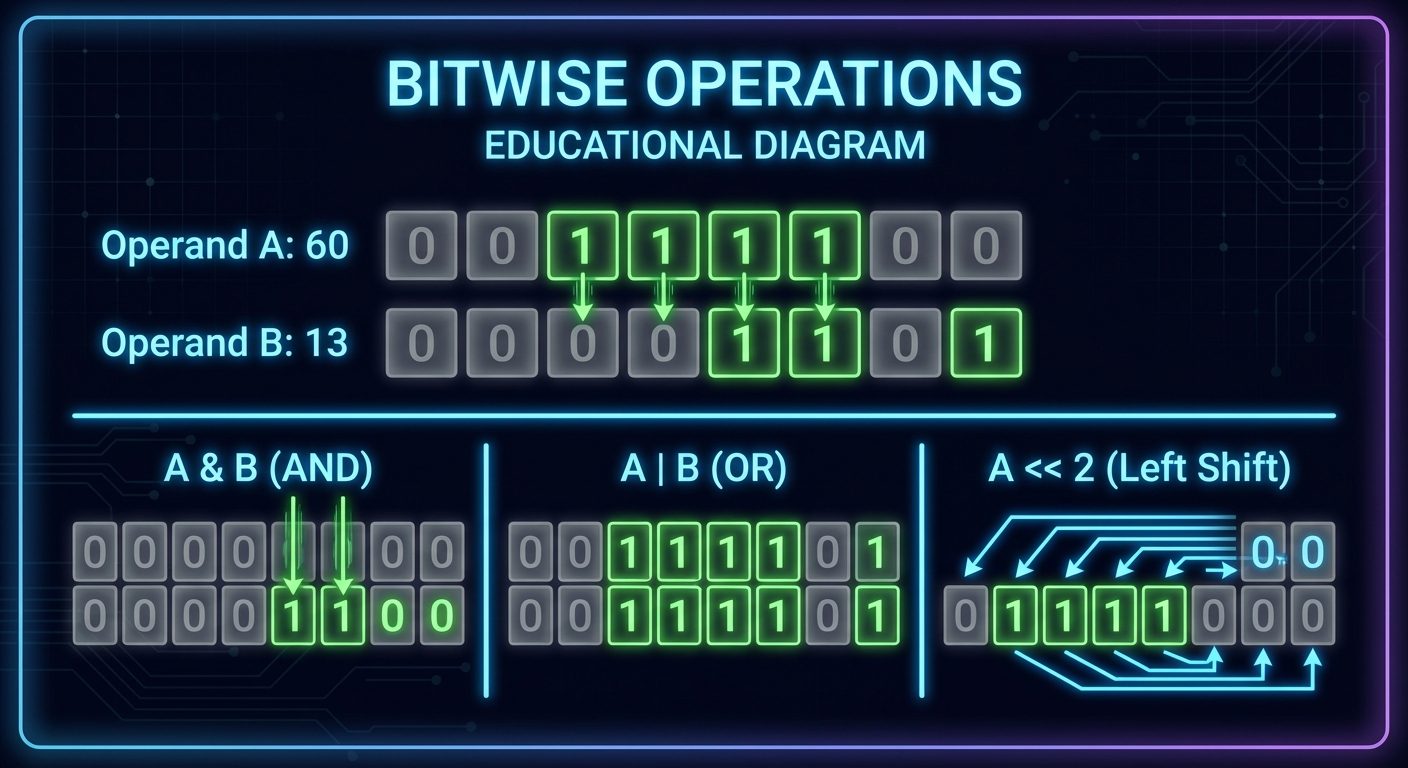
| Operator | Name | Description | Example (A=60 0011 1100, B=13 0000 1101) |
|---|---|---|---|
& |
Bitwise AND | 1 if both bits are 1 | A & B = 12 (0000 1100) |
\| |
Bitwise OR | 1 if either bit is 1 | A \| B = 61 (0011 1101) |
^ |
Bitwise XOR | 1 if bits are different | A ^ B = 49 (0011 0001) |
~ |
Bitwise NOT | Flips bits (1s to 0s) | ~A = -61 (1100 0011 in 2's comp) |
<< |
Left Shift | Shifts bits left (multiplies by 2) | A << 2 = 240 (1111 0000) |
>> |
Right Shift | Shifts bits right (divides by 2) | A >> 2 = 15 (0000 1111) |
Did this save you a night before the exam?
LPU Notes is free, and it stays free. Ads cover part of the server bill. The rest comes out of a student's own pocket: the domain, the storage, and keeping the site up through the weeks everyone needs it at once.
The payment button didn't load. An ad blocker or a filtered network is the usual reason. to try again.
Nothing here is ever locked, and nothing unlocks. Chip in only if it was worth it. What it pays for →