Unit 6: Data Analysis & Visualization / AI Model Environments & Lifecycle Basics
1. Data Analysis and Visualization Using AI Tools
Modern data analysis has shifted from manual spreadsheet manipulation to AI-assisted exploration and automated visualization. This section explores how Large Language Models (LLMs) and specialized BI tools leverage AI.
ChatGPT Advanced Data Analysis (formerly Code Interpreter)
This feature allows the AI to write and execute Python code in a sandboxed environment to perform data analysis.
- Capabilities:
- Data Cleaning: Automatically identifies missing values, duplicates, and inconsistent formatting.
- Descriptive Statistics: Generates mean, median, mode, standard deviation, and correlation matrices instantly.
- Visualization: Uses Python libraries (Matplotlib, Seaborn) to create heatmaps, scatter plots, bar charts, and histograms based on natural language prompts.
- File Conversion: Can convert file formats (e.g., CSV to Excel, PDF to Image).
- Workflow: User uploads a dataset User prompts (e.g., "Show me sales trends over time") AI generates and runs Python code AI displays the chart and interprets the results.
Tableau (AI-Driven Analytics)
Tableau integrates AI features (often called "Tableau AI" or "Einstein Discovery") to enhance business intelligence.
- Ask Data: Uses Natural Language Processing (NLP) allowing users to type questions like "What was the profit ratio by region in 2023?" to generate visualizations instantly.
- Explain Data: Uses statistical models to analyze a specific data point and provide explanations for outliers or trends (e.g., "Profit is low here because shipping costs increased by 40%").
- Predictive Modeling: Built-in forecasting tools that project future trends based on historical data without requiring complex coding.
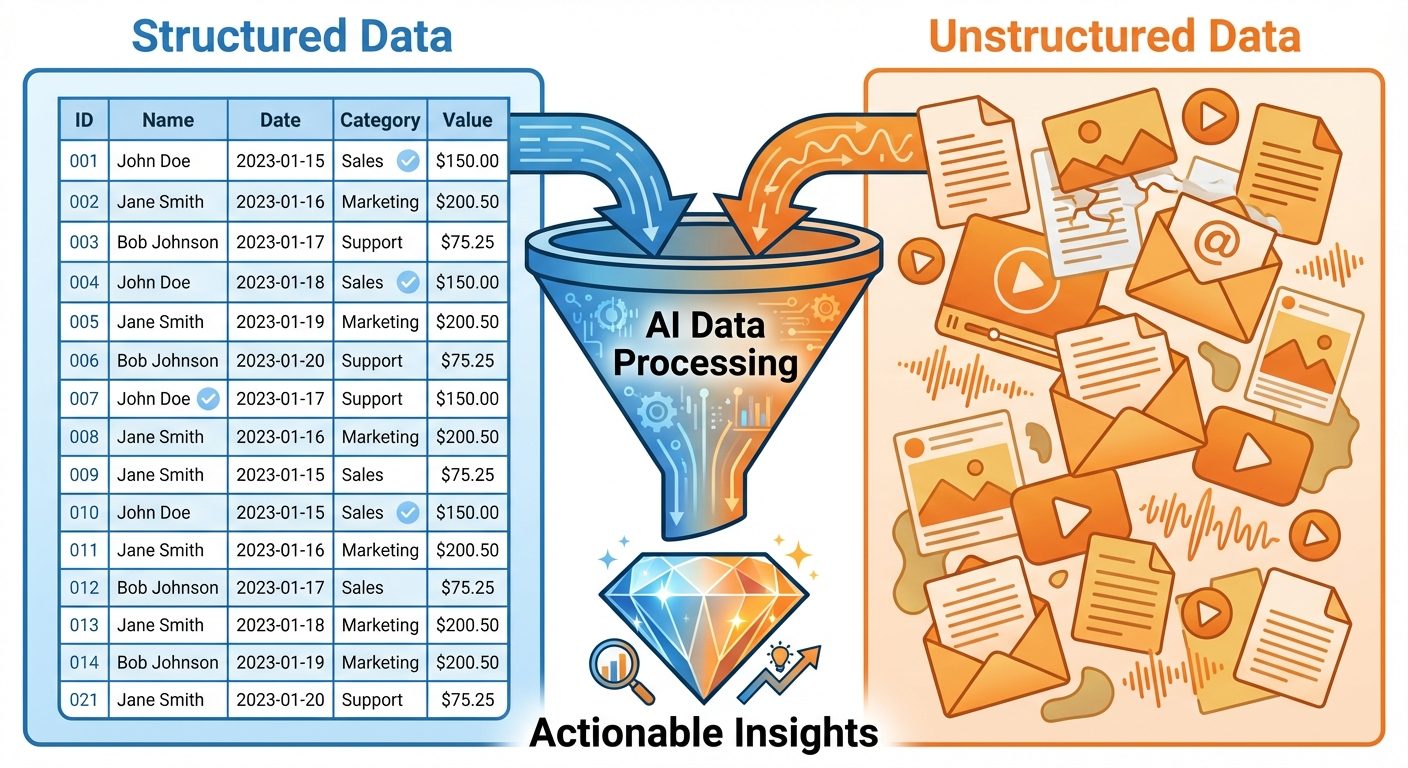
2. Working with Structured and Unstructured Data
AI systems must handle various data formats. Understanding the distinction is crucial for selecting the right model and pipeline.
Structured Data
Data that adheres to a pre-defined data model and is therefore straightforward to analyze.
- Format: Rows and columns (Relational Databases, CSV, Excel).
- Examples: Customer records, financial transactions, sensor logs, inventory lists.
- AI Processing: Processed using Machine Learning algorithms (Regression, Decision Trees, Random Forests) and queried via SQL.
Unstructured Data
Information that either does not have a pre-defined data model or is not organized in a pre-defined manner. It accounts for ~80% of enterprise data.
- Format: Text, images, audio, video.
- Examples: Emails, social media posts, satellite imagery, call center recordings.
- AI Processing: Requires Deep Learning:
- NLP: For text (Sentiment analysis, summarization).
- Computer Vision: For images/video (Object detection).
- Speech-to-Text: For audio processing.
Data Pipelines and Automation
A data pipeline is a set of actions that ingest raw data from disparate sources and move the data to a destination for storage and analysis.
- ETL (Extract, Transform, Load):
- Extract: Pull data from APIs, databases, or file systems.
- Transform: Clean, normalize, and format the data (often where AI automation applies).
- Load: Store in a Data Warehouse (e.g., Snowflake, Redshift).
- Pipeline Automation: Using tools like Apache Airflow or Prefect to schedule these tasks. AI can monitor pipelines to predict failures or optimize resource allocation based on data volume.
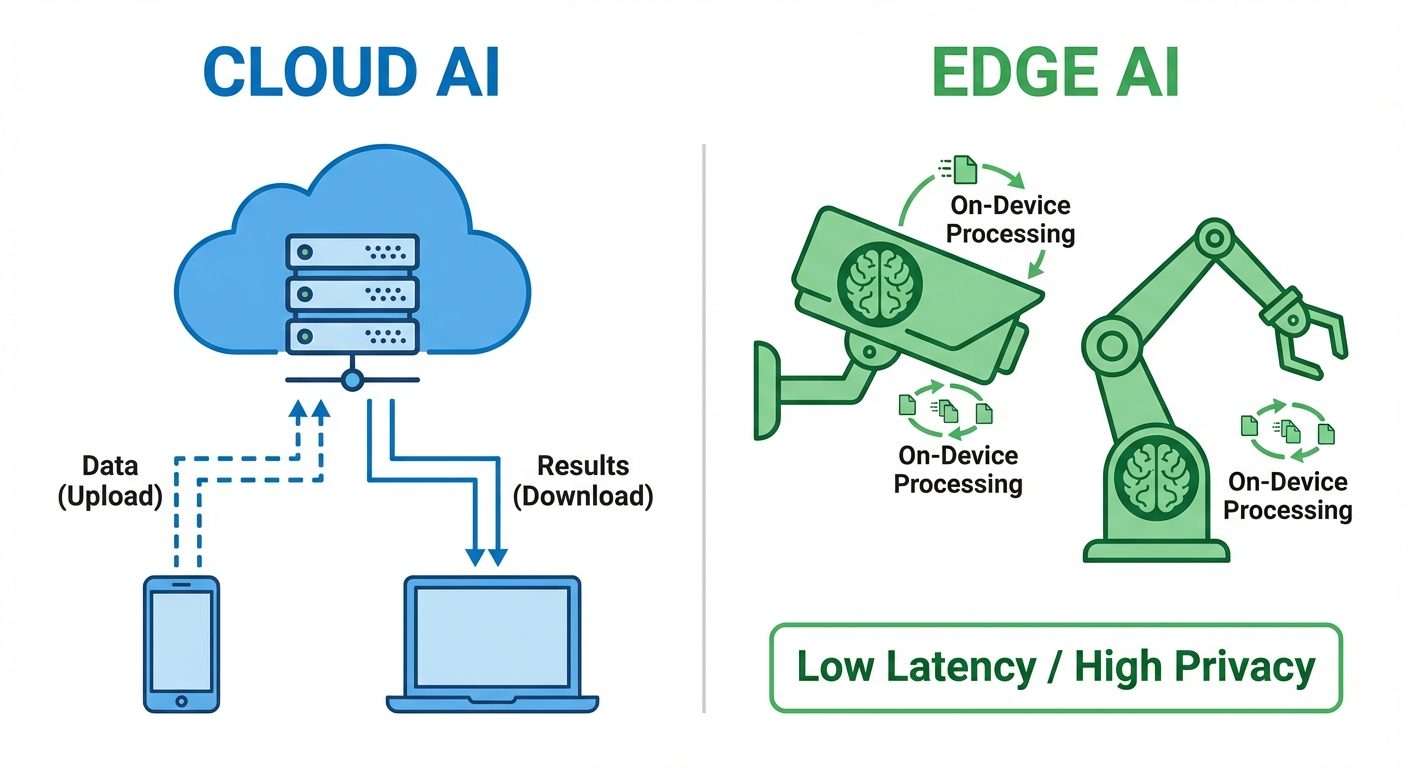
3. AI Model Environments: Cloud Services vs. Edge Deployment
Where an AI model "lives" and executes its logic is a critical architectural decision involving trade-offs between speed, cost, and privacy.
Cloud Services (Centralized AI)
The model runs on remote servers owned by providers like AWS, Google Cloud Platform (GCP), or Microsoft Azure.
- Pros:
- Infinite Scalability: Can handle massive workloads by adding more servers.
- Power: Access to high-end GPUs (e.g., NVIDIA H100s) for complex model training and inference.
- Ease of Management: Centralized updates and maintenance.
- Cons:
- Latency: Data must travel to the server and back (lag).
- Internet Dependency: Requires constant connectivity.
- Privacy: Sensitive data leaves the user's device.
Edge Deployment (Decentralized AI)
The model runs locally on the user's device (IoT sensors, smartphones, autonomous vehicles, cameras).
- Pros:
- Low Latency: Real-time processing (crucial for self-driving cars).
- Privacy: Data stays on the device.
- Bandwidth Efficiency: No need to upload massive video/audio streams to the cloud.
- Cons:
- Resource Constraints: Limited battery, memory, and processing power.
- Model Compression: Requires techniques like Quantization (reducing precision) or Pruning (removing unnecessary connections) to fit models on small chips.
4. Error Identification and Troubleshooting
AI systems fail differently than traditional software. Errors are often probabilistic rather than deterministic.
Types of Errors
- Data Errors (The "Garbage In, Garbage Out" problem):
- Bias: The training data does not represent the real world (e.g., facial recognition training only on light skin tones).
- Outliers: Anomalous data points skewing predictions.
- Missing Labels: Unsupervised data mixed into supervised tasks.
- Model Errors:
- Overfitting: The model memorizes the training data (including noise) and performs poorly on new data. Symptom: High accuracy on training set, low accuracy on test set.
- Underfitting: The model is too simple to capture the underlying pattern. Symptom: Low accuracy on both training and test sets.
- Infrastructure Errors:
- API timeouts, version conflicts (e.g., PyTorch version mismatch), or CUDA (GPU) out-of-memory errors.
Troubleshooting Strategies
- Confusion Matrix: A table used to define the performance of a classification algorithm (True Positives, False Positives, True Negatives, False Negatives).
- Ablation Studies: Removing parts of the model or features to see which contributes most to performance.
- Human-in-the-loop (HITL): Sending low-confidence predictions to a human for manual review to retrain the model.
5. AI Process Automation and MLOps
AI Process Automation (Intelligent Automation)
Combining RPA (Robotic Process Automation) with AI.
- Traditional RPA: "Click here, copy this, paste there." (Rule-based).
- AI + RPA: "Read this invoice, understand the context, extract the total, and decide which department approves it." (Cognitive).
- Benefits: Reduces manual labor, minimizes human error in repetitive tasks, operates 24/7.
Introduction to MLOps (Machine Learning Operations)
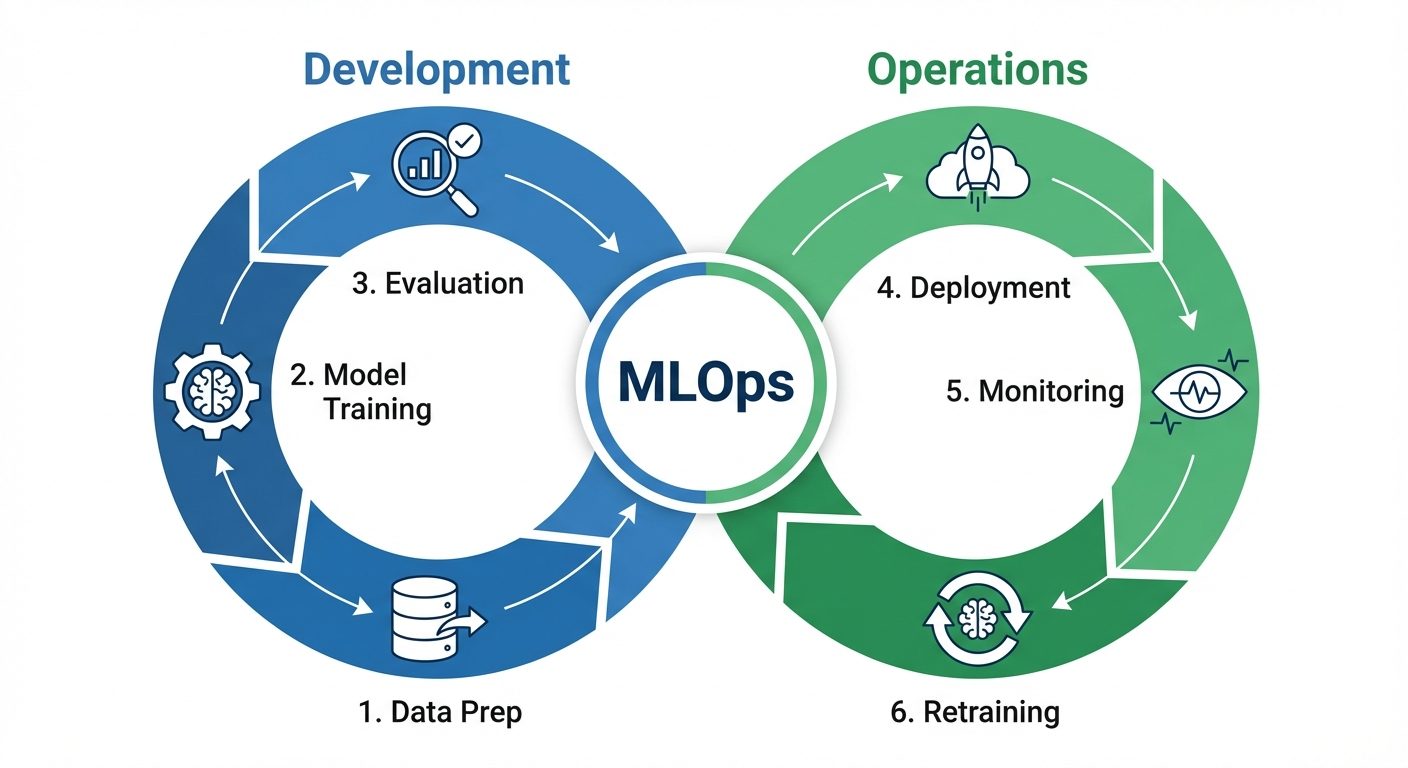
MLOps is the application of DevOps principles to Machine Learning systems. It aims to unify ML system development (Dev) and ML system deployment (Ops).
The MLOps Lifecycle
- Scoping: Defining the business problem.
- Data Engineering: Collection, cleaning, labeling.
- Modeling: Training, validation, hyperparameter tuning.
- Deployment: Packaging the model (using Docker/Kubernetes) and serving it via API.
- Monitoring: The most critical ongoing phase.
Lifecycle Management & Monitoring
Unlike standard software code, ML models degrade over time without changing a single line of code. This is due to Drift.
- Data Drift: The input data distribution changes (e.g., user demographics shift).
- Concept Drift: The relationship between input and output changes (e.g., a "spam" email definition changes over time as scammers get smarter).
MLOps ensures:
- Reproducibility: Ability to recreate a specific model version using versioned data and code.
- CI/CD for ML: Continuous Integration / Continuous Deployment pipelines specifically for retraining models automatically.
Did this save you a night before the exam?
LPU Notes is free, and it stays free. Ads cover part of the server bill. The rest comes out of a student's own pocket: the domain, the storage, and keeping the site up through the weeks everyone needs it at once.
The payment button didn't load. An ad blocker or a filtered network is the usual reason. to try again.
Nothing here is ever locked, and nothing unlocks. Chip in only if it was worth it. What it pays for →