Unit 6: Inter-Process Communication (IPC)
Inter-Process Communication (IPC) refers to the mechanisms provided by an operating system to allow processes to manage shared data. Since processes typically operate in isolated memory spaces for security and stability, IPC is essential for coordination, data exchange, and synchronization.
In the Linux/Unix environment, the three major forms of IPC covered in this unit are:
- Pipes (Anonymous Pipes)
- Named FIFOs (Named Pipes)
- Shared Memory
1. Pipes (Anonymous Pipes)
A pipe is the oldest and most fundamental form of IPC in Unix systems. It provides a unidirectional (one-way) communication channel between related processes.
Key Characteristics
- Unidirectional: Data flows in one direction only. If two-way communication is needed, two pipes must be established.
- Lineage Requirement: Pipes can only be used between processes that have a common ancestor (e.g., a parent and a child created via
fork()). - Volatile: The pipe exists only as long as the processes are running.
- Byte Stream: There are no message boundaries; data is treated as a continuous stream of bytes.
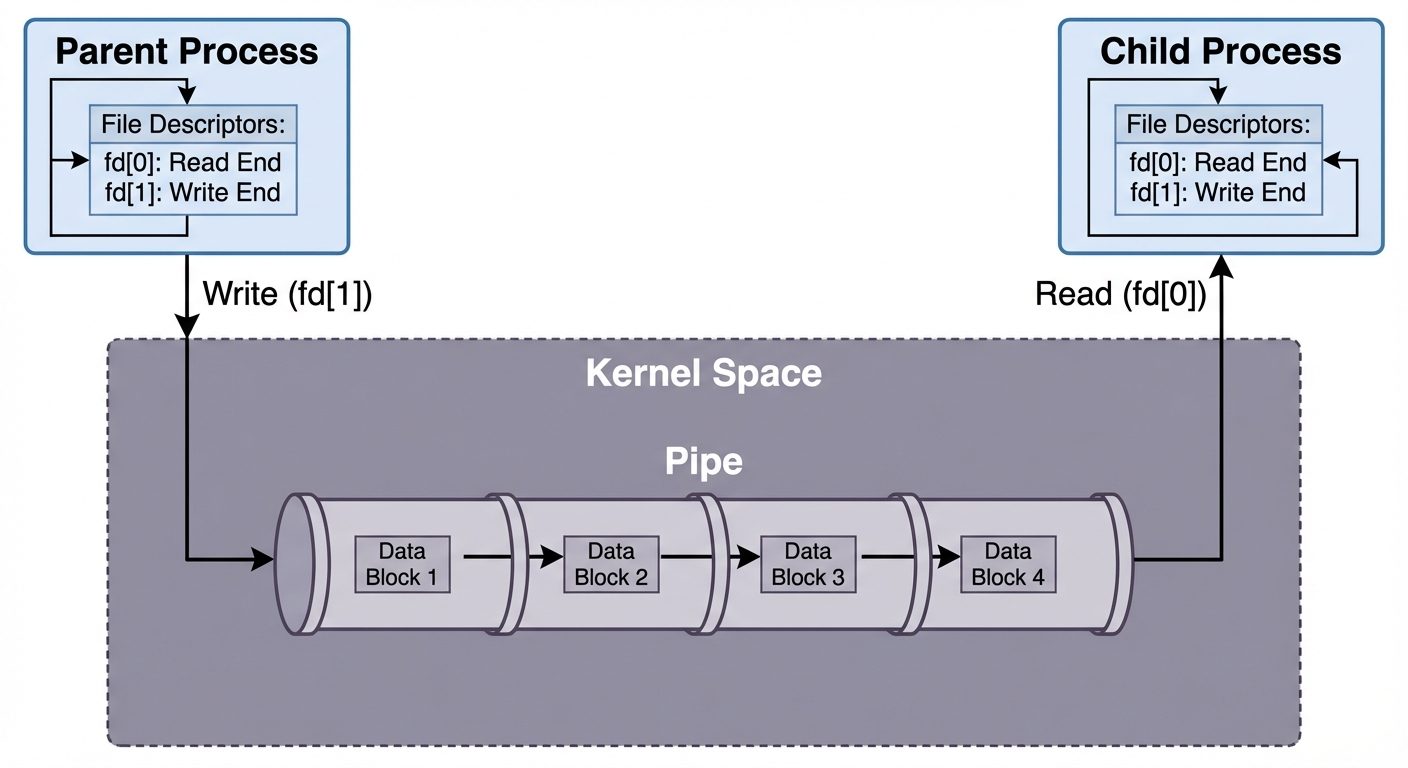 AI-generated image — may contain inaccuracies)" entering the pipe, and an arrow from the pipe to the Child Process labeled "Read (fd[0])". Use blue for the user space processes and light grey for the kernel space. clearly label the file descriptors fd[0] as read-end and fd[1] as write-end. Clean, 2D vector style.]
System Calls and Implementation
The pipe() system call creates a pipe.
#include <unistd.h>

int pipe(int fd[2]);- Arguments: An integer array of size 2.
fd[0]: The read end of the pipe.fd[1]: The write end of the pipe.
- Return Value:
0on success,-1on failure.
Laboratory Implementation Example
Objective: Parent process writes a string to the pipe, and the child process reads it.
#include <stdio.h>
#include <unistd.h>
#include <sys/types.h>
#include <string.h>

int main() {
    int fd[2];
    pid_t p;
    char buffer[100];

    // Create the pipe
    if (pipe(fd) == -1) {
        perror("Pipe failed");
        return 1;
    }

    // Create child process
    p = fork();

    if (p < 0) {
        perror("Fork failed");
        return 1;
    }

    else if (p > 0) {
        // PARENT PROCESS
        char message[] = "Hello from Parent via Pipe!";

        close(fd[0]); // Close unused read end

        // Write to pipe
        write(fd[1], message, strlen(message) + 1);
        printf("Parent: Wrote message to pipe.\n");

        close(fd[1]); // Close write end after finishing
    }

    else {
        // CHILD PROCESS
        close(fd[1]); // Close unused write end

        // Read from pipe
        read(fd[0], buffer, 100);
        printf("Child: Read from pipe -> %s\n", buffer);

        close(fd[0]); // Close read end after finishing
    }

    return 0;
}
2. Named FIFOs (Named Pipes)
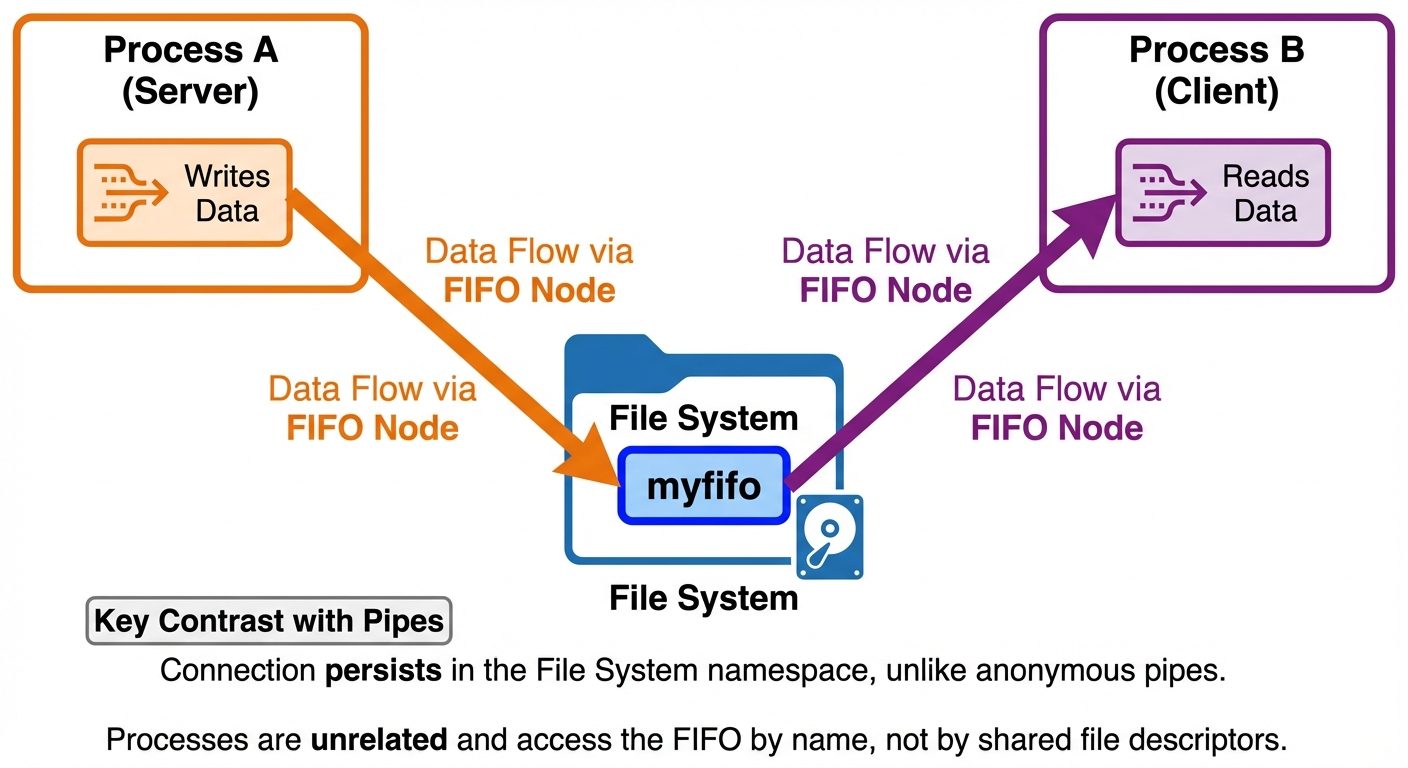
While anonymous pipes require processes to be related (parent-child), Named FIFOs (First In, First Out) allow unrelated processes to communicate.
Key Characteristics
- File System Presence: A FIFO exists as a special file in the file system. It has a name and permissions like a regular file.
- Persistence: The name exists in the file system until explicitly deleted (using
unlinkorrm), though the data in the buffer is transient. - Blocking Behavior: Opening a FIFO for reading blocks until another process opens it for writing, and vice versa (unless the
O_NONBLOCKflag is used). - Half-duplex: Generally used for one-way communication, though the file node is visible to all.
System Calls
To create a FIFO programmatically:
#include <sys/types.h>
#include <sys/stat.h>

int mkfifo(const char *pathname, mode_t mode);- pathname: The name of the FIFO file.
- mode: File permissions (e.g.,
0666).
Laboratory Implementation Example
This requires two separate programs running simultaneously.
Program 1: The Writer
#include <stdio.h>
#include <string.h>
#include <fcntl.h>
#include <sys/stat.h>
#include <sys/types.h>
#include <unistd.h>

int main() {
    int fd;
    char * myfifo = "/tmp/myfifo";

    // Create the FIFO (named pipe)
    mkfifo(myfifo, 0666);

    printf("Writer: Opening FIFO...\n");
    // Open for writing only
    fd = open(myfifo, O_WRONLY);

    char arr1[80];
    while (1) {
        printf("Enter message: ");
        fgets(arr1, 80, stdin);

        // Write input to FIFO
        write(fd, arr1, strlen(arr1)+1);
        close(fd);
        break; // Example sends one message then exits
    }
    return 0;
}
Program 2: The Reader
#include <stdio.h>
#include <string.h>
#include <fcntl.h>
#include <sys/stat.h>
#include <sys/types.h>
#include <unistd.h>

int main() {
    int fd;
    char * myfifo = "/tmp/myfifo";
    char str1[80];

    printf("Reader: Waiting for writer...\n");
    // Open for reading only
    fd = open(myfifo, O_RDONLY);

    // Read from FIFO
    read(fd, str1, 80);

    printf("User Input: %s\n", str1);
    close(fd);
    return 0;
}
3. Shared Memory
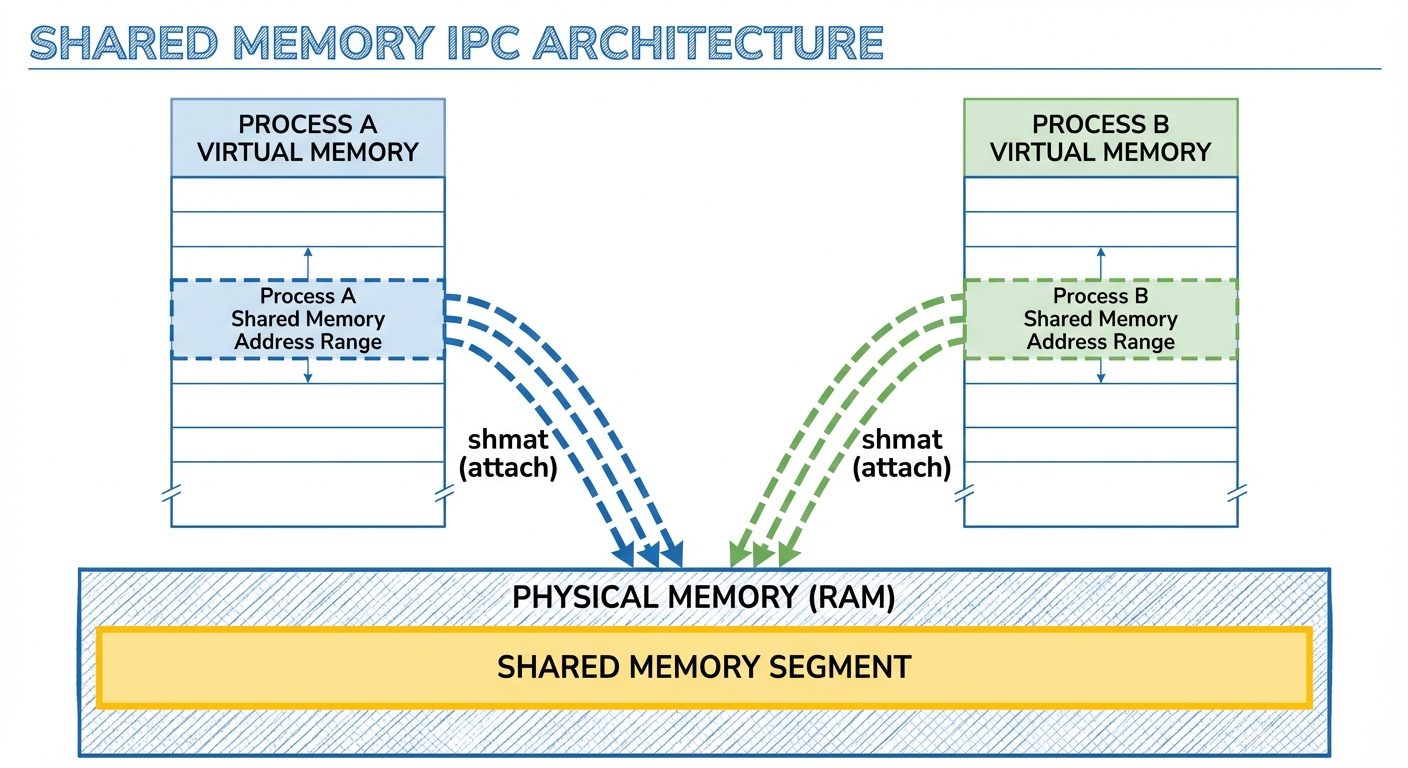
Shared memory is the fastest form of IPC. Instead of copying data between the client and server (as pipes do), shared memory allows multiple processes to map the same segment of physical memory into their own virtual address spaces.
Key Characteristics
- Efficiency: No data copying involves the kernel after setup; access is as fast as a standard memory access.
- Synchronization Needed: Because processes access memory simultaneously, race conditions can occur. Shared memory is almost always used in conjunction with Semaphores to coordinate access (locking).
- Random Access: Unlike pipes (which are streams), processes can read/write to any part of the shared memory segment randomly.
System V Shared Memory API
shmget(): Creates a shared memory segment.
Cint shmget(key_t key, size_t size, int shmflg);shmat(): Attaches the shared memory segment to the address space of the calling process.
Cvoid *shmat(int shmid, const void *shmaddr, int shmflg);shmdt(): Detaches the shared memory segment from the process.
Cint shmdt(const void *shmaddr);shmctl(): Control operations (e.g., removing the segment).
Cint shmctl(int shmid, int cmd, struct shmid_ds *buf);
Laboratory Implementation Example (Writer and Reader)
Program 1: Shared Memory Writer
#include <sys/ipc.h>
#include <sys/shm.h>
#include <stdio.h>

int main() {
    // ftok to generate unique key
    key_t key = ftok("shmfile", 65);

    // shmget returns an identifier in shmid
    // 1024 is size, 0666 is permission, IPC_CREAT creates if not exists
    int shmid = shmget(key, 1024, 0666|IPC_CREAT);

    // shmat to attach to shared memory
    char *str = (char*) shmat(shmid, (void*)0, 0);

    printf("Write Data : ");
    gets(str); // Warning: gets is unsafe, use fgets in production

    printf("Data written in memory: %s\n", str);

    // detach from shared memory
    shmdt(str);

    return 0;
}
Program 2: Shared Memory Reader
#include <sys/ipc.h>
#include <sys/shm.h>
#include <stdio.h>

int main() {
    // ftok to generate unique key
    key_t key = ftok("shmfile", 65);

    // shmget returns an identifier in shmid
    int shmid = shmget(key, 1024, 0666|IPC_CREAT);

    // shmat to attach to shared memory
    char *str = (char*) shmat(shmid, (void*)0, 0);

    printf("Data read from memory: %s\n", str);

    // detach from shared memory
    shmdt(str);

    // destroy the shared memory
    shmctl(shmid, IPC_RMID, NULL);

    return 0;
}
Summary Comparison Table
| Feature | Pipe | Named FIFO | Shared Memory |
|---|---|---|---|
| Data Flow | Unidirectional | Unidirectional (typically) | Bidirectional |
| Scope | Related processes only | Unrelated processes | Unrelated processes |
| Speed | Moderate (data copying) | Moderate (data copying) | Fastest (no copying) |
| Mechanism | Kernel Buffer | File System Node | Memory Mapping |
| Synchronization | Implicit (read blocks if empty) | Implicit (open blocks) | Explicit (Requires Semaphores) |
Did this save you a night before the exam?
LPU Notes is free, and it stays free. Ads cover part of the server bill. The rest comes out of a student's own pocket: the domain, the storage, and keeping the site up through the weeks everyone needs it at once.
The payment button didn't load. An ad blocker or a filtered network is the usual reason. to try again.
Nothing here is ever locked, and nothing unlocks. Chip in only if it was worth it. What it pays for →